https://github.com/jjling2011/systraylauncher
系统托盘程序启动器。System tray application launcher.
https://github.com/jjling2011/systraylauncher
app windows
Last synced: 2 months ago
JSON representation
系统托盘程序启动器。System tray application launcher.
- Host: GitHub
- URL: https://github.com/jjling2011/systraylauncher
- Owner: jjling2011
- License: gpl-3.0
- Created: 2022-07-12T02:18:47.000Z (almost 4 years ago)
- Default Branch: main
- Last Pushed: 2026-02-20T09:56:41.000Z (5 months ago)
- Last Synced: 2026-02-20T13:46:05.610Z (5 months ago)
- Topics: app, windows
- Language: C#
- Homepage:
- Size: 154 KB
- Stars: 4
- Watchers: 1
- Forks: 0
- Open Issues: 0
-
Metadata Files:
- Readme: README.md
- License: LICENSE
Awesome Lists containing this project
README
# SystrayLauncher
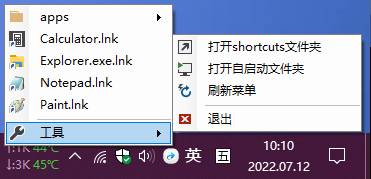
任务栏程序启动器。Systray app launcher.
## 下载
[https://github.com/jjling2011/SystrayLauncher/releases/latest](https://github.com/jjling2011/SystrayLauncher/releases/latest)
## 用法
把要常用程序的快捷方式放入shortcuts目录中,然后运行本软件。
程序较多时可以创建文件夹,分类存放。
## 特殊用法
需要管理员权限时,比如修改“hosts”,先把快捷方式的“目标”修改为:
```
%windir%\system32\notepad.exe %SystemRoot%\System32\drivers\etc\hosts
```
然后点“高级”,勾上“用管理员身份运行”。
## 开机启动
点击"工具"-"打开自启动文件夹",拖个快捷方式进去即可。