https://github.com/jjohannes/javarcade
Example used in presentations about Modularization and Dependency Management in Java projects
https://github.com/jjohannes/javarcade
gradle java jpms maven
Last synced: about 1 month ago
JSON representation
Example used in presentations about Modularization and Dependency Management in Java projects
- Host: GitHub
- URL: https://github.com/jjohannes/javarcade
- Owner: jjohannes
- Created: 2025-05-13T10:59:18.000Z (about 1 year ago)
- Default Branch: main
- Last Pushed: 2025-07-04T07:05:16.000Z (11 months ago)
- Last Synced: 2025-07-04T07:32:53.109Z (11 months ago)
- Topics: gradle, java, jpms, maven
- Language: Java
- Homepage: https://javarca.de
- Size: 98.6 KB
- Stars: 0
- Watchers: 1
- Forks: 0
- Open Issues: 5
-
Metadata Files:
- Readme: README.md
Awesome Lists containing this project
README
# Welcome to the JavaRCAde!
_This repository is..._
🧩 an example for using the [javaRCA.de](https://javarca.de) recipe with different Java development tools.
👾 a concise game engine to develop arcade games in Java while learning about Java dependencies and modules.
## The Recipe
[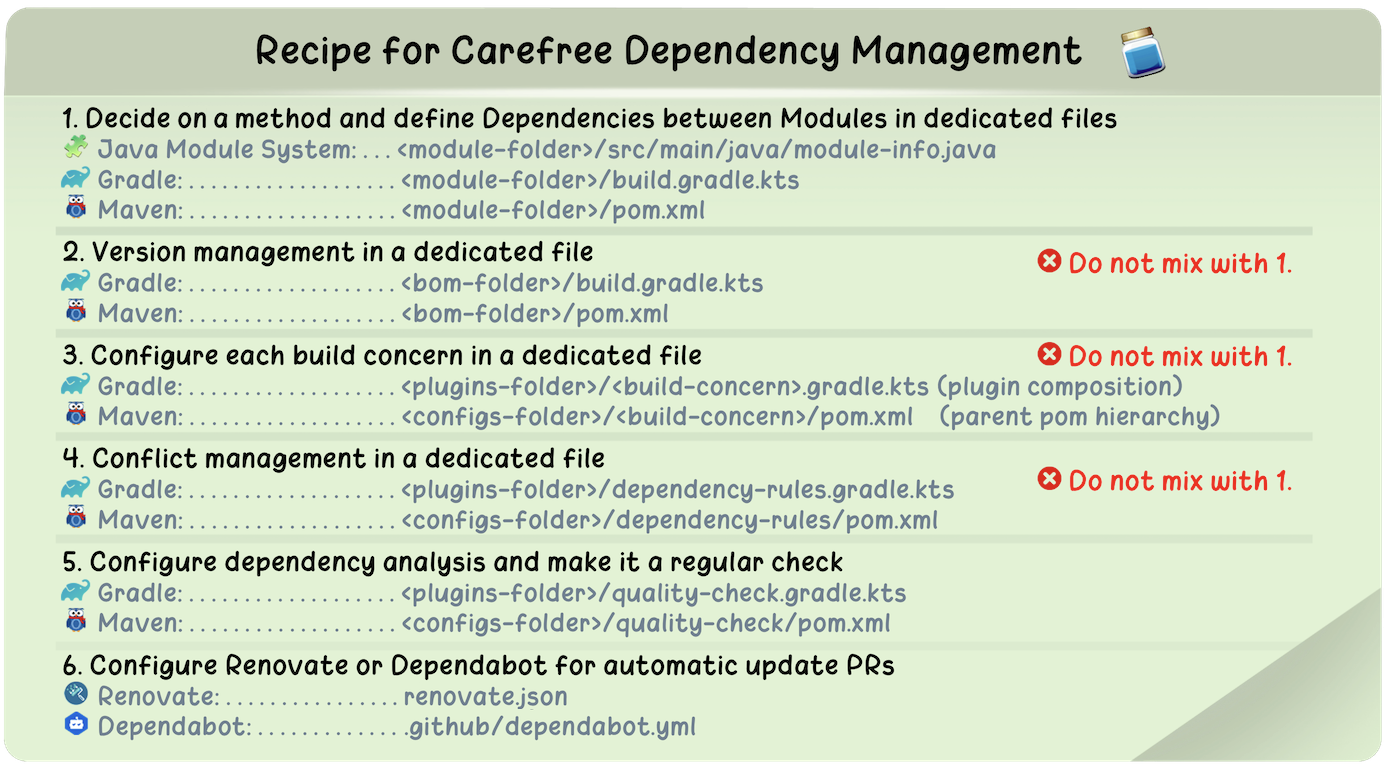 ](https://javarca.de/#recipe)
## Variations of the Example
There are multiple branches in this repository that may interest you.
The modules and Java code are the same on all of them.
Only the build tool setups differ [depending on the choice of dependency notation](https://javarca.de/#notation).
There are:
- 🧩 [`main`](https://github.com/jjohannes/javarcade)
This is **my favorite choice**: use the `module-info.java` for dependency declaration and **Gradle** as build tool.
(Gradle being the most performant and feature-rich build tool currently available for Java projects.)
- 🥯 [`everything`](https://github.com/jjohannes/javarcade/tree/everything) This is same as `main` but with the setup for **Maven**
added. The Gradle setup is kept on the branch as the two definitions do not collide. You can use that branch with
both build tools and compare.
- 👵🏼 [`no-module-info`](https://github.com/jjohannes/javarcade/tree/no-module-info)
This is **old school Java**: no `module-info.java` files and **dependencies are declared directly in the build tools**.
Both **Gradle** and **Maven** setups can be inspected next to each other.
For more details on the structure of this Java project, and Java projects in general, please visit the
[gradle-project-setup-howto](https://github.com/jjohannes/gradle-project-setup-howto/) repository.
## Building and Running the Game Engine and the Example Game
**Compile and run with one command**
```shell
./gradlew run
```
**Build with Gradle and run with Java**
```shell
# Compile code, run checks, run tests, assemble artifacts
./gradlew build
# find the install folder
cd apps/app-jamcatch/build/install/app-jamcatch
# Run as Module
java --module-path 'lib' --module de.javarca.engine
# Run on Classpath (old school)
java --class-path 'lib/*' de.javarca.engine.Engine
```
**Build with Maven and run with Java**
```shell
# Compile code, run checks, run tests, assemble artifacts
./mvnw clean verify
# find the install folder
cd apps/app-jamcatch/target/install/app-jamcatch
# Run as Module
java --module-path 'lib' --module de.javarca.engine
# Run on Classpath (old school)
java --class-path 'lib/*' de.javarca.engine.Engine
```
## Other Build Setup Topics
If you follow the recipe based on this repository, you may have questions about certain other build configuration topics
that are currently out of scope here. Please have a look at the [issues](https://github.com/jjohannes/javarcade/issues) and the
[gradle-project-setup-howto](https://github.com/jjohannes/gradle-project-setup-howto) project for further guidance.
## Modifying the Example Game or Developing Your Own
> [!NOTE]
>️ The game engine is in an early state as it primarily acts as an example here.
> However, it is fully functional to the point it is and may evolve further.
The [javarca-engine](engine/javarca-engine) offers
[a number of service endpoints](engine/javarca-engine/src/main/java/module-info.java) based on the
[javarca-model](engine/javarca-model).
The example Game – **Jamcatch 🫙** – uses this to plug the game implementation into the engine.
It is split into three modules:
- [jamcatch-stage](game/jamcatch-stage) - the stage setup in which the game takes place
- [jamcatch-actors](game/jamcatch-actors) - the game logic
- [jamcatch-assets](game/jamcatch-assets) - graphic assets for the game
For convenience, there is an additional project [app-jamcatch](apps/app-jamcatch) for composing the game. In the
[build.gradle.kts](apps/app-jamcatch/build.gradle.kts) or
[pom.xml](https://github.com/jjohannes/javarcade/blob/everything/apps/app-jamcatch/pom.xml) file of that
project you finde the list of modules that make up the game that is used by Gradle or Maven to fill
the `install` folder when building.
Some things you can try:
- Remove entries from [app-jamcatch/build.gradle.kts](apps/app-jamcatch/build.gradle.kts) or
[app-jamcatch/pom.xml](apps/app-jamcatch/pom.xml) to dynamically change the composition of the game.
For example, you can remove the assets and the game still works without graphics.
- Modify code or assets in one of the three `jamcatch-` modules to modify the game.
- You can add additional modules to the `game` folder with your own implementations and assets and
replace modules in [app-jamcatch](apps/app-jamcatch). Or add another `app-` project to the `apps` folder.
(Note: for Maven you need to register each additional module in the root [pom.xml](https://github.com/jjohannes/javarcade/blob/everything/pom.xml))
## Inspiration
Certain aspects of [PICO-8](https://www.lexaloffle.com/pico-8.php) were an inspiration for the game engine.