https://github.com/jlblancoc/git2docs
Generating docs for each Git tag & branch, made easy
https://github.com/jlblancoc/git2docs
continuous-integration documentation-tool documentation-website doxygen sphinx
Last synced: about 1 year ago
JSON representation
Generating docs for each Git tag & branch, made easy
- Host: GitHub
- URL: https://github.com/jlblancoc/git2docs
- Owner: jlblancoc
- License: gpl-3.0
- Created: 2017-07-16T03:05:43.000Z (almost 9 years ago)
- Default Branch: master
- Last Pushed: 2021-12-13T23:58:25.000Z (over 4 years ago)
- Last Synced: 2025-02-12T23:49:34.086Z (over 1 year ago)
- Topics: continuous-integration, documentation-tool, documentation-website, doxygen, sphinx
- Language: Shell
- Size: 3.68 MB
- Stars: 4
- Watchers: 3
- Forks: 0
- Open Issues: 0
-
Metadata Files:
- Readme: README.md
- License: LICENSE
Awesome Lists containing this project
README
# git2docs
Generating docs for each Git tag & branch, made easy
## Features
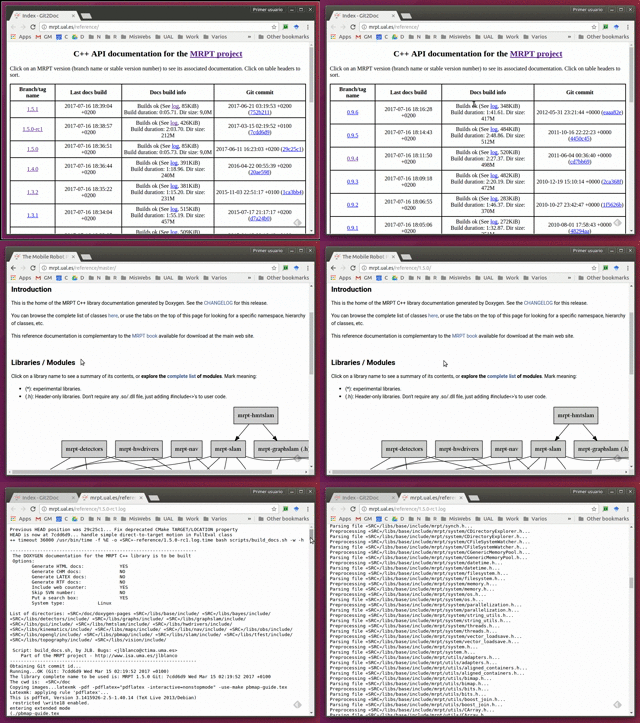
* Checks for updates in Git branches or new tags and generates their documentation.
* Git SHA values are cached for each branch so documentation is only (re)built if necessary.
* Compatible with Doxygen, Sphinx and any other documentation tool.
* Generates a summary table for each branch with build time, success/error status, etc.
* Exposes a list of logs for each attempt to build documentation. Local path names are
replaced to avoid exposing information on machine local paths.
* Written in pure Bash. No dependencies. Install it anywhere.
Check out this [example output](http://mrpt.ual.es/reference/).
## Instalation
* Clone this repository.
* Make a copy of the configuration template:
```bash
cp config.sh.template config.sh
```
* Edit `config.sh` to put the URI of your Git repository, etc. See all required parameters [here](https://github.com/jlblancoc/git2docs/blob/master/config.sh.template)
* Add a call to `bash [PATH_TO]/git2docs.sh` to your crontab if you want it to be executed periodically (e.g. on a hourly basis).
* You can also manually invoke `git2docs.sh`. To check that everything is working as expected, run it in versbose mode:
```bash
VERBOSE=1 ./git2docs.sh
```