https://github.com/jlcodes99/cockpit-tools
🚀 通用 AI IDE 账号管理工具:支持 Antigravity / Codex / GitHub Copilot / Windsurf / Kiro / Cursor / Gemini-cli / CodeBuddy,多账号切换、配额监控、自动唤醒与多开实例管理。 🚀 Universal AI IDE account manager for Antigravity / Codex / GitHub Copilot / Windsurf / Kiro / Cursor / Gemini-cli / CodeBuddy, with multi-account switching, quota monitoring, wake-up automation, and multi-insta
https://github.com/jlcodes99/cockpit-tools
account-manager ai antigravity codebuddy codex cursor github-copilot kiro windsurf
Last synced: 3 months ago
JSON representation
🚀 通用 AI IDE 账号管理工具:支持 Antigravity / Codex / GitHub Copilot / Windsurf / Kiro / Cursor / Gemini-cli / CodeBuddy,多账号切换、配额监控、自动唤醒与多开实例管理。 🚀 Universal AI IDE account manager for Antigravity / Codex / GitHub Copilot / Windsurf / Kiro / Cursor / Gemini-cli / CodeBuddy, with multi-account switching, quota monitoring, wake-up automation, and multi-insta
- Host: GitHub
- URL: https://github.com/jlcodes99/cockpit-tools
- Owner: jlcodes99
- Created: 2026-01-16T07:09:32.000Z (7 months ago)
- Default Branch: main
- Last Pushed: 2026-05-21T07:34:37.000Z (3 months ago)
- Last Synced: 2026-05-21T10:21:58.860Z (3 months ago)
- Topics: account-manager, ai, antigravity, codebuddy, codex, cursor, github-copilot, kiro, windsurf
- Language: Rust
- Homepage: https://github.com/jlcodes99/cockpit-tools#readme
- Size: 399 MB
- Stars: 8,566
- Watchers: 18
- Forks: 784
- Open Issues: 108
-
Metadata Files:
- Readme: README.en.md
- Changelog: CHANGELOG.md
- Contributing: CONTRIBUTING.md
- Security: SECURITY.md
Awesome Lists containing this project
- StarryDivineSky - jlcodes99/cockpit-tools - tools 是一款专为开发者设计的通用 AI IDE 账号管理工具,它通过集中化管理多款主流编程辅助工具(如 GitHub Copilot、Cursor、Gemini-cli 等)的账号体系,解决了开发者在频繁切换不同 AI 编码工具时面临的账号登录繁琐、配额监控困难、多实例协同效率低下等核心痛点。**核心特色** 1. **一站式多账号管理**:支持 Antigravity、Codex 等 8 种主流 AI 编程工具的账号切换,避免了重复登录或浏览器多标签页的混乱,尤其适合团队协作或需要同时测试多平台效能的场景。2. **智能资源调度**:通过实时配额监控与自动唤醒功能,工具能在账号使用量接近上限时智能切换备用账号,类比于“机场塔台动态分配跑道”,最大化利用订阅资源的剩余额度。3. **轻量级多开控制**:允许用户为不同项目单独启动 IDE 实例并绑定对应账号,类似“虚拟工作区”的概念,既隔离了环境又避免了多工具间的进程冲突,显著提升复杂任务下的操作流畅度。**硬核原理(通俗化)** 其技术架构类似于一个“交通指挥中心”:底层通过封装各 AI 工具的 API 及认证协议(如 OAuth 2.0),构建统一的账号鉴权中继层;中间层则采用动态代理机制,将开发者的操作请求路由到当前活跃账号对应的服务端,同时通过心跳检测维持会话活性;前端则提供 CLI 或 GUI 交互界面,将账号状态、配额数据等抽象为可视化的仪表盘。这种设计好比在用户与多个云服务商之间架设了一座“智能立交桥”,既隐藏了底层复杂性,又能根据流量(请求负载)自动选择最优路径。cockpit-tools 凭借其模块化设计和对开发者工作流的深度理解,在 AI 编程工具生态中扮演了“粘合剂”角色。相比手动管理或单一工具插件,它通过自动化与聚合能力,将分散的账号操作转化为可编程的标准化流程,是追求效率的工程团队或个人开发者的实用增效利器。 (A01_文本生成_文本对话 / 大语言对话模型及数据)
README
# Cockpit Tools
English · [Portuguese (BR)](README.pt-br.md) · [简体中文](README.md)
[](https://github.com/jlcodes99/cockpit-tools)
[](https://github.com/jlcodes99/cockpit-tools/releases)
[](https://github.com/jlcodes99/cockpit-tools/releases)
[](https://github.com/jlcodes99/cockpit-tools/issues)
A **universal AI IDE account management tool**, currently supporting **Antigravity IDE**, **Codex**, **GitHub Copilot**, **Windsurf**, **Kiro**, **Cursor**, **Gemini Cli**, **CodeBuddy**, **CodeBuddy CN**, **Qoder**, **Trae**, and **Zed**, with multi-instance parallel workflows.
> Designed to help users efficiently manage multiple AI IDE accounts, this tool supports one-click switching, quota monitoring, wake-up tasks, and multi-instance parallel runs, helping you fully utilize resources from different accounts.
**Features**: One-click Switch · Multi-account Management · Multi-instance · Quota Monitoring · Wake-up Tasks · Device Fingerprints · Plugin Integration · GitHub Copilot Management · Windsurf Management · Kiro Management · Cursor Management · Gemini Cli Management · CodeBuddy Management · CodeBuddy CN Management · Qoder Management · Trae Management · Zed Management
**Languages**: Supports 18 languages
🇺🇸 English · 🇨🇳 简体中文 · 繁體中文 · 🇯🇵 日本語 · 🇩🇪 Deutsch · 🇪🇸 Español · 🇫🇷 Français · 🇮🇹 Italiano · 🇰🇷 한국어 · 🇧🇷 Português · 🇷🇺 Русский · 🇹🇷 Türkçe · 🇵🇱 Polski · 🇨🇿 Čeština · 🇸🇦 العربية · 🇻🇳 Tiếng Việt · 🇮🇩 Bahasa Indonesia
**Officially supported platforms**: macOS, Windows, and Linux.
---
## Feature Overview
### 1. Dashboard
A brand new visual dashboard providing a one-stop status overview:
- **Twelve-Platform Support**: Simultaneously displays Antigravity IDE, Codex, GitHub Copilot, Windsurf, Kiro, Cursor, Gemini Cli, CodeBuddy, CodeBuddy CN, Qoder, Trae, and Zed account status
- **Quota Monitoring**: Real-time view of remaining quotas and reset times for each model
- **Quick Actions**: One-click refresh, one-click wake-up
- **Visual Progress**: Intuitive progress bars showing quota consumption
> 
### 2. Antigravity IDE Account Management
- **One-Click Switch**: Switch the currently active account instantly without manual login/logout
- **Multiple Import Methods**: OAuth, Refresh Token, Plugin Sync
- **Wake-up Tasks**: Schedule AI model wake-ups to trigger quota reset cycles in advance
- **Device Fingerprints**: Generate, manage, and bind device fingerprints to reduce risk
> 
>
> *(Wakeup Tasks & Device Fingerprints)*
> 
> 
#### 2.1 Antigravity IDE Multi-Instance
Run multiple Antigravity IDE instances in parallel with different accounts. For example, open two Antigravity IDE instances, bind different accounts, and handle different projects independently.
- **Isolated Accounts**: Each instance binds a different account and runs independently
- **Parallel Projects**: Run multiple tasks/projects at the same time
- **Argument Isolation**: Custom instance directory and launch arguments
> 
### 3. Codex Account Management
- **Dedicated Support**: Optimized account management experience for Codex
- **Quota Display**: Clear display of Hourly and Weekly quota status
- **Plan Recognition**: Automatically identifies account Plan types (Basic, Plus, Team, etc.)
- **API Service**: The local Codex API service is powered by the bundled CLIProxyAPI sidecar. Cockpit Tools handles account sync, config projection, status, and usage statistics while keeping the same Base URL, API keys, and user workflow.
> 
#### 3.1 Codex Multi-Instance
Codex also supports parallel multi-instance usage. For example, open two Codex instances, bind different accounts, and handle different projects independently.
- **Isolated Accounts**: Each instance binds a different account and runs independently
- **Parallel Projects**: Run multiple tasks/projects at the same time
- **Argument Isolation**: Custom instance directory and launch arguments
> 
### 4. GitHub Copilot Account Management
- **Account Import**: OAuth, Token/JSON import
- **Quota View**: Inline Suggestions / Chat messages usage and reset time
- **Plan Recognition**: Auto-detects Free / Individual / Pro / Business / Enterprise tiers
- **Batch Operations**: Tags and bulk actions
#### 4.1 GitHub Copilot Multi-Instance
Manage VS Code Copilot instances with isolated profiles and lifecycle controls.
- **Isolated Profiles**: Each instance uses its own user data directory
- **Quick Lifecycle**: Start/stop/force stop instances
- **Window Control**: Open instance windows and close all instances
### 5. Windsurf Account Management
- **Account Import**: OAuth, Token/JSON import, and local import
- **Quota View**: Shows Plan, User Prompt credits, Add-on prompt credits, and cycle information
- **Batch Operations**: Tags and bulk actions
- **Switch Injection**: Supports injecting and launching Windsurf after account switch
#### 5.1 Windsurf Multi-Instance
Manage Windsurf instances with isolated profiles and lifecycle controls.
- **Isolated Profiles**: Each instance uses its own user data directory
- **Quick Lifecycle**: Start/stop/force stop instances
- **Window Control**: Open instance windows and close all instances
### 6. Kiro Account Management
- **Account Import**: OAuth, Token/JSON import, and local import
- **Quota View**: Shows Plan, User Prompt credits, Add-on prompt credits, and cycle information
- **Batch Operations**: Tags and bulk actions
- **Switch Injection**: Supports injecting and launching Kiro after account switch
#### 6.1 Kiro Multi-Instance
Manage Kiro instances with isolated profiles and lifecycle controls.
- **Isolated Profiles**: Each instance uses its own user data directory
- **Quick Lifecycle**: Start/stop/force stop instances
- **Window Control**: Open instance windows and close all instances
### 7. Cursor Account Management
- **Account Import**: OAuth, Token/JSON import, and local import
- **Quota View**: Shows Total Usage, Auto + Composer, API Usage, On-Demand, and cycle information
- **Batch Operations**: Tags and bulk actions
- **Switch Injection**: Supports injecting and launching Cursor after account switch
#### 7.1 Cursor Multi-Instance
Manage Cursor instances with isolated profiles and lifecycle controls.
- **Isolated Profiles**: Each instance uses its own user data directory
- **Quick Lifecycle**: Start/stop/force stop instances
- **Window Control**: Open instance windows and close all instances
### 8. Gemini Cli Account Management
- **Account Import**: OAuth, Token/JSON import, and local import
- **Quota View**: Shows Total Usage, Auto + Composer, API Usage, On-Demand, and cycle information
- **Batch Operations**: Tags and bulk actions
- **Switch Injection**: Supports injecting Gemini Cli local credentials after account switch (`~/.gemini`)
- **Platform Limitation**: Gemini Cli multi-instance management is not supported yet
### 9. CodeBuddy Account Management
- **Account Import**: OAuth and Token/JSON import
- **Quota View**: quota query, cycle details, and extra-credit display
- **Batch Operations**: tags and bulk actions
- **Switch Injection**: supports injecting and launching CodeBuddy after account switch
#### 9.1 CodeBuddy Multi-Instance
Manage CodeBuddy instances with isolated profiles and lifecycle controls.
- **Isolated Profiles**: Each instance uses its own user data directory
- **Quick Lifecycle**: Start/stop/force stop instances
- **Window Control**: Open instance windows and close all instances
### 10. CodeBuddy CN Account Management
- **Account Import**: supports OAuth, Token/JSON import, and local-client import
- **Quota View**: shows plan and usage status, with a shortcut to open detailed quota information on the official web page
- **Batch Operations**: supports tags and bulk actions
- **Switch Injection**: supports writing local auth state back and launching CodeBuddy CN after account switch
#### 10.1 CodeBuddy CN Multi-Instance
Manage CodeBuddy CN instances with isolated profiles and lifecycle controls.
- **Isolated Profiles**: each instance uses its own user data directory
- **Quick Lifecycle**: start/stop/force stop instances
- **Window Control**: open instance windows and close all instances
### 11. Qoder Account Management
- **Account Import**: supports local import and JSON import
- **Quota View**: shows Credits usage, remaining credits, and raw plan values
- **Batch Operations**: supports tags, filters, export, and batch delete/refresh
- **Switch Injection**: supports injecting and launching Qoder after account switch
#### 11.1 Qoder Multi-Instance
Manage Qoder instances with isolated profiles and lifecycle controls.
- **Isolated Profiles**: each instance uses its own user data directory
- **Quick Lifecycle**: start/stop/force stop instances
- **Window Control**: open instance windows and close all instances
### 12. Trae Account Management
- **Account Import**: supports local import and JSON import
- **Quota View**: shows raw plan values, USD spent/total budget, and reset time
- **Batch Operations**: supports tags, filters, export, and batch delete/refresh
- **Switch Injection**: supports writing back local auth state and launching Trae after account switch
#### 12.1 Trae Multi-Instance
Manage Trae instances with isolated profiles and lifecycle controls.
- **Isolated Profiles**: each instance uses its own user data directory
- **Quick Lifecycle**: start/stop/force stop instances
- **Window Control**: open instance windows and close all instances
### 13. Zed Account Management
- **Account Import**: Supports official OAuth sign-in, JSON import, and importing the current local sign-in state
- **Usage View**: Shows subscription status, Edit Predictions, Token Spend, Spend Limit, and billing period end
- **Batch Operations**: Supports tags, filters, export, and batch delete/refresh
- **Switch Injection**: Applies the selected account back to the official Zed client using the client's real local persistence rules and restarts the client when needed
### 14. General Settings
- **Personalized Settings**: Theme switching, language settings, auto-refresh interval
- **Platform Controls**: Centralized CodeBuddy CN/Qoder/Trae/Zed launch-path and quota-alert settings
> 
---
## Security & Privacy (Plain-English)
These are the most common security questions answered directly:
- **This is a local desktop tool**: it does not require a separate cloud account for this project, and it does not rely on a project-hosted cloud account storage.
- **Data is mainly stored on your machine**:
- `~/.antigravity_cockpit`: Antigravity IDE accounts, configs, WebSocket status, etc.
- `~/.codex`: official Codex current login `auth.json`
- `~/.gemini`: Gemini Cli local session files (for example `oauth_creds.json`, `google_accounts.json`, `settings.json`)
- local app data folder under `com.antigravity.cockpit-tools`: Codex / GitHub Copilot / Windsurf / Kiro / Cursor / Gemini Cli / CodeBuddy / CodeBuddy CN / Qoder / Trae / Zed multi-account index data, etc.
- **WebSocket is local-only by default**: binds to `127.0.0.1`, default port `19528`; you can disable it or change the port in Settings.
- **When network access happens**: OAuth login, token refresh, quota fetching, update checks, and other official API requests.
- **macOS privacy permission prompts**: after you start Codex/agent from Cockpit Tools, if an agent-run shell command accesses protected folders such as Desktop, Documents, Downloads, or Photos, macOS may show the request as "Cockpit Tools would like to access...". This happens because those commands are child processes launched by Cockpit Tools, so macOS attributes the request to the host app; it does not by itself mean the Cockpit Tools main process is actively scanning those folders. Grant access only when you trust the current agent task and the commands it is going to run. If unsure, deny the prompt or run the project from a normal working directory first.
- **Practical safety tips**:
1. If you do not need plugin integration, disable WebSocket.
2. Do not share your full user directory directly; redact token files before backup/share.
3. On shared/public computers, remove accounts and quit the app after use.
## Settings Guide (Beginner Friendly)
If you want a stable setup with minimal tuning, follow the "Recommended" values.
### General Settings
| Setting | What it does (simple) | Recommended | When to change |
| --- | --- | --- | --- |
| Display Language | Changes UI language | Your native/comfortable language | Only if current language is hard to read |
| Theme | Light/dark appearance | System | Use dark mode for long night sessions |
| Window Close Behavior | What happens when clicking close | Ask every time | Choose "Minimize to tray" if you want background running |
| Antigravity IDE Auto Refresh | Periodically updates Antigravity IDE quota | 5-10 minutes | Use 2 minutes if you need near real-time updates |
| Codex Auto Refresh | Periodically updates Codex quota | 5-10 minutes | Same as above |
| GitHub Copilot Auto Refresh | Periodically updates GitHub Copilot quota | 5-10 minutes | Same as above |
| Windsurf Auto Refresh | Periodically updates Windsurf quota | 5-10 minutes | Same as above |
| Kiro Auto Refresh | Periodically updates Kiro quota | 5-10 minutes | Same as above |
| Cursor Auto Refresh | Periodically updates Cursor quota | 5-10 minutes | Same as above |
| Gemini Cli Auto Refresh | Periodically updates Gemini Cli quota | 5-10 minutes | Same as above |
| CodeBuddy Auto Refresh | Periodically updates CodeBuddy quota | 5-10 minutes | Same as above |
| CodeBuddy CN Auto Refresh | Periodically updates CodeBuddy CN quota | 5-10 minutes | Same as above |
| Qoder Auto Refresh | Periodically updates Qoder quota | 5-10 minutes | Same as above |
| Trae Auto Refresh | Periodically updates Trae quota | 5-10 minutes | Same as above |
| Zed Auto Refresh | Periodically updates Zed quota | 5-10 minutes | Same as above |
| Data Directory | Where account/config files are stored | Keep default | Only for troubleshooting or backups |
| Antigravity IDE/Codex/VS Code/Windsurf/Kiro/Cursor/Gemini Cli/CodeBuddy/CodeBuddy CN/Qoder/Trae/Zed/OpenCode App Path | Manually set executable path | Leave empty (auto-detect) | Change only if auto-detect fails or you use custom install paths |
| Auto-restart OpenCode on Codex switch | Sync OpenCode auth after Codex switch | ON if you use OpenCode; otherwise OFF | Enable for frequent Codex switching with OpenCode |
Notes:
- Smaller refresh intervals mean more frequent requests.
- If quota-reset wake-up tasks are enabled, some minimum refresh limits may apply (UI will show hints).
### Network Settings
| Setting | What it does (simple) | Recommended | Risk / Notes |
| --- | --- | --- | --- |
| WebSocket Service | Real-time local integration for plugins/clients | OFF if not needed | Still local-only (`127.0.0.1`) when enabled |
| Preferred Port | Listening port for WebSocket | Default `19528` | Change only on conflict; restart required after save |
| Current Running Port | The actual active port | Read-only info | May differ if preferred port is occupied |
### 3 Ready-to-Use Presets
1. **Stable default**: 10-min refresh, WebSocket OFF (if no plugin), keep default paths.
2. **Frequent switching**: 2-5 min refresh, WebSocket ON if needed, OpenCode sync ON.
3. **Security-first**: WebSocket OFF, do not share user directory, remove unused accounts regularly.
---
---
## Installation Guide
### Option A: Manual Download (Recommended)
Go to [GitHub Releases](https://github.com/jlcodes99/cockpit-tools/releases) to download the package for your system:
* **macOS**: `.dmg` (Apple Silicon & Intel)
* **Windows**: `.msi` (Recommended) or `.exe`
* **Linux**: `.deb` (Debian/Ubuntu), `.rpm`, or `.AppImage` (Universal)
### Option B: Install with Homebrew (macOS)
> Homebrew is required.
```bash
brew tap jlcodes99/cockpit-tools https://github.com/jlcodes99/cockpit-tools
brew install --cask cockpit-tools
```
If you hit the macOS "App is damaged" warning, you can also install with `--no-quarantine`:
```bash
brew install --cask --no-quarantine cockpit-tools
```
If Homebrew says the app already exists (e.g. `already an App at '/Applications/Cockpit Tools.app'`), remove the old app and install again:
```bash
rm -rf "/Applications/Cockpit Tools.app"
brew install --cask cockpit-tools
```
Or force overwrite the existing app:
```bash
brew install --cask --force cockpit-tools
```
### 🛠️ Troubleshooting
#### macOS says "App is damaged and can't be opened"?
Due to macOS security mechanisms, apps not downloaded from the App Store may trigger this warning. The current open-source release flow does not yet use Apple Developer ID signing or notarization, so some macOS versions may show stricter Gatekeeper prompts. You can quickly fix this by following these steps:
1. **Command Line Fix** (Recommended):
Open Terminal and run the following command:
```bash
sudo xattr -rd com.apple.quarantine "/Applications/Cockpit Tools.app"
```
> **Note**: If you changed the app name, please adjust the path in the command accordingly.
2. **Or**: Go to "System Settings" -> "Privacy & Security" and click "Open Anyway".
---
## Development & Build
### Prerequisites
- Node.js v18+
- npm v9+
- Rust (Tauri runtime)
### Install Dependencies
```bash
npm install
```
### Development Mode
```bash
npm run tauri dev
```
### Build
```bash
npm run tauri build
```
---
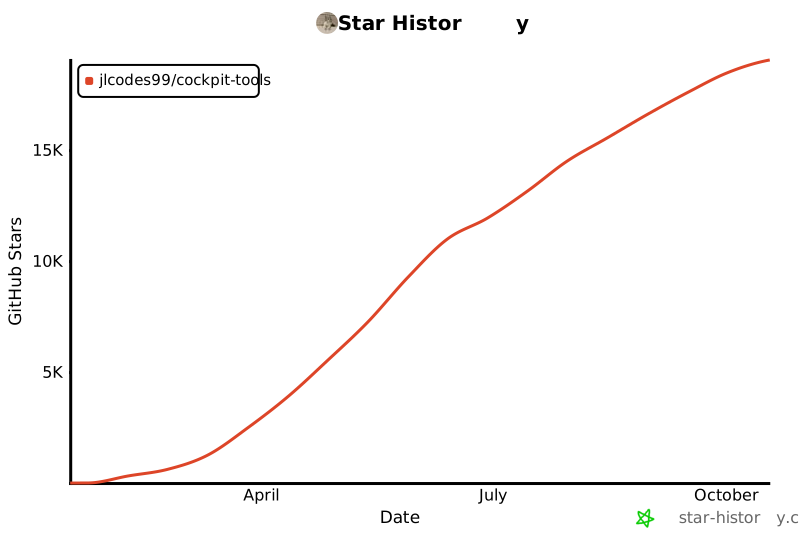
## Star History
[](https://star-history.com/#jlcodes99/cockpit-tools&Date)
---
## Community
Newly created Telegram chat group: [Join the group](https://t.me/+Y8gMv4SlZUU2MWY1)
---
## Sponsor
If you find this project useful, consider supporting it here: [☕ Donate](docs/DONATE.en.md)
Every bit of support helps sustain open-source development. Thank you!
---
## Acknowledgments
- Antigravity IDE account switching logic based on: [Antigravity-Manager](https://github.com/lbjlaq/Antigravity-Manager)
- Codex API service sidecar integration: [router-for-me/CLIProxyAPI](https://github.com/router-for-me/CLIProxyAPI)
Thanks to the project author for their open-source contributions! If these projects have helped you, please give them a ⭐ Star to show your support!
---
## License
This project is licensed under [CC BY-NC-SA 4.0](https://creativecommons.org/licenses/by-nc-sa/4.0/).
- Allowed: personal learning, research, and non-commercial use/modification (with attribution and share-alike obligations).
- Not allowed: any commercial use without authorization (including internal commercial operations, external paid services, paid product integration, or resale/redistribution for profit).
- Commercial license: contact the author for a separate written commercial license and pricing.
---
## Disclaimer
This project is for personal learning and research purposes only. By using this project, you agree to:
- Not use this project for any commercial purposes without prior written authorization from the author
- Bear all risks and responsibilities of using this project
- Comply with relevant terms of service and laws and regulations
The project author is not responsible for any direct or indirect losses arising from the use of this project.