https://github.com/jlcodes99/vscode-antigravity-cockpit
VS Code extension for monitoring Google Antigravity AI quotas. Features Webview dashboard, QuickPick mode, and quota grouping.
https://github.com/jlcodes99/vscode-antigravity-cockpit
Last synced: 4 months ago
JSON representation
VS Code extension for monitoring Google Antigravity AI quotas. Features Webview dashboard, QuickPick mode, and quota grouping.
- Host: GitHub
- URL: https://github.com/jlcodes99/vscode-antigravity-cockpit
- Owner: jlcodes99
- License: mit
- Created: 2025-12-08T02:24:15.000Z (8 months ago)
- Default Branch: main
- Last Pushed: 2026-04-01T05:27:12.000Z (4 months ago)
- Last Synced: 2026-04-02T07:37:45.475Z (4 months ago)
- Language: TypeScript
- Homepage:
- Size: 8.62 MB
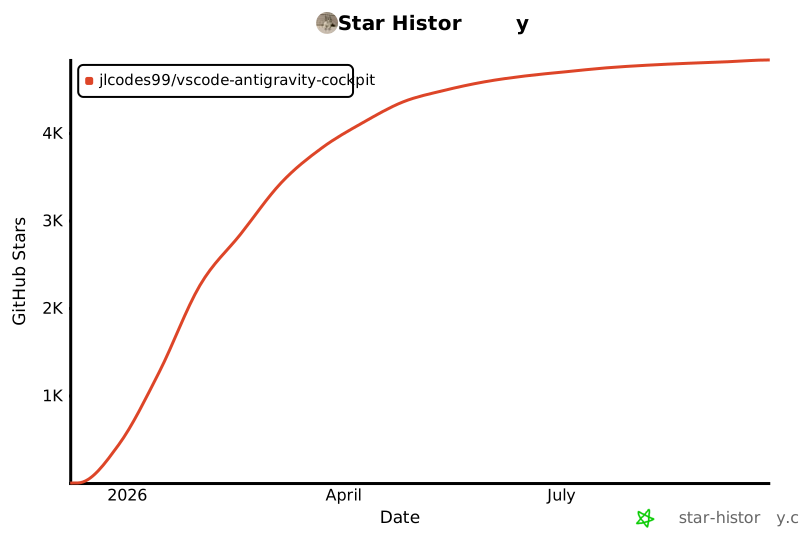
- Stars: 4,177
- Watchers: 4
- Forks: 120
- Open Issues: 1
-
Metadata Files:
- Readme: README.en.md
- Changelog: CHANGELOG.md
- License: LICENSE
Awesome Lists containing this project
README
# Antigravity Cockpit
English · [简体中文](README.md)
[](https://open-vsx.org/extension/jlcodes/antigravity-cockpit)
[](https://open-vsx.org/extension/jlcodes/antigravity-cockpit)
[](https://github.com/jlcodes99/vscode-antigravity-cockpit)
[](https://github.com/jlcodes99/vscode-antigravity-cockpit/issues)
[](https://github.com/jlcodes99/vscode-antigravity-cockpit)
VS Code extension for monitoring Google Antigravity AI model quotas.
**Features**: Webview Dashboard · QuickPick Mode · Quota Grouping · Auto-Grouping · Rename · Card View · Drag-and-Drop Sorting · Status Bar Monitor · Threshold Notifications · Privacy Mode
**Languages**: Follows VS Code language setting, supports 16 languages
🇺🇸 English · 🇨🇳 简体中文 · 繁體中文 · 🇯🇵 日本語 · 🇩🇪 Deutsch · 🇪🇸 Español · 🇫🇷 Français · 🇮🇹 Italiano · 🇰🇷 한국어 · 🇧🇷 Português · 🇷🇺 Русский · 🇹🇷 Türkçe · 🇵🇱 Polski · 🇨🇿 Čeština · 🇸🇦 العربية · 🇻🇳 Tiếng Việt
---
## Features
### Display Modes
Two display modes available, configurable via `agCockpit.displayMode`:
#### Webview Dashboard

- **Card View**: Card layout for quota overview
- **Grouping Mode**: Aggregates models by quota pool
- **Non-Grouping Mode**: Shows individual model quotas
- **Drag-and-Drop Sorting**: Reorder cards by dragging
- **Auto-Grouping**: Automatically categorizes models by quota pool
#### QuickPick Mode

Uses VS Code native QuickPick API, suitable for:
- Environments where Webview cannot load
- Users who prefer keyboard navigation
- Quick quota checks
Features:
- Supports grouping / non-grouping mode
- Title bar buttons: Refresh, Toggle Grouping, Logs, Settings, Switch to Webview
- Pin models to status bar
- Rename models and groups
---
### Status Bar
Displays quota status of monitored models. 6 formats available:
| Format | Example |
|--------|---------|
| Icon only | `🚀` |
| Dot only | `🟢` / `🟡` / `🔴` |
| Percent only | `95%` |
| Dot + Percent | `🟢 95%` |
| Name + Percent | `Sonnet: 95%` |
| Full display | `🟢 Sonnet: 95%` |
- **Multi-Model Pinning**: Monitor multiple models simultaneously
- **Auto-Monitor**: Shows the model with lowest remaining quota when no model is pinned
---
### Quota Display
Each model / group shows:
- **Remaining quota percentage**
- **Countdown**: e.g., `4h 40m`
- **Reset time**: e.g., `15:16`
- **Progress bar**: Visual representation of remaining quota
---
### Quota Source (Local / Authorized)
Two quota sources are available, and you can switch from the top-right of the panel at any time:
- **Local Monitoring**: Reads from the local Antigravity client process; more stable but requires the client to stay running
- **Authorized Monitoring**: Fetches quota via authorized remote APIs, independent of the local process; ideal for API relays or headless usage
- **Multi-account Authorization**: Authorized monitoring supports multiple accounts with account switching and status badges
- **Switching Tips**: Shows loading/timeout hints during switches; you can switch back to local if the network is unstable
---
### Model Capabilities Tooltip

Hover over model name to view:
- Supported input types (text, image, video, etc.)
- Context window size
- Other capability tags
---
### Grouping Feature
- **Group by Quota Pool**: Models sharing quota pools are grouped automatically or manually
- **Custom Group Names**: Click edit icon to rename
- **Group Sorting**: Drag to reorder groups
- **Group Pinning**: Pin groups to status bar
---
### Settings Panel

Open via gear icon in dashboard header. Configure:
- Status bar display format
- Warning threshold (yellow)
- Critical threshold (red)
- View mode (card / list)
- Notification toggle
---
### Profile Panel
Displays:
- Subscription tier
- User ID
- Collapsible, sensitive data can be masked
---
### Notifications
Sends notifications when model quota falls below warning threshold or is exhausted. Can be disabled in settings.
---
## Usage
1. **Open**:
- Click status bar icon
- Or `Ctrl/Cmd+Shift+Q`
- Or run `Antigravity Cockpit: Open Dashboard` from command palette
2. **Refresh**: Click refresh button or `Ctrl/Cmd+Shift+R` (when dashboard is active)
3. **Troubleshooting**:
- Click **Retry Connection** when showing "Systems Offline"
- Click **Open Logs** to view debug logs (authorized requests show full URLs to identify domains)
---
---
### Auto Wake-up
**NEW** 🔥 Schedule automated requests to wake up AI models and trigger quota reset cycles.
- **Flexible Scheduling**: Supports daily, weekly, interval, and advanced Crontab modes
- **Multi-Model Support**: Wake up multiple models simultaneously
- **Multi-Account Authorization**: Authorize multiple accounts, switch active account, and view account status
- **Account Management**: Manage accounts with reauthorize/remove actions
- **Secure**: Credentials encrypted in VS Code Secret Storage, running locally
- **History**: View detailed trigger logs and AI responses
- **Use Case**: Wake up before work to run through the reset cooldown during idle time
---
## Configuration
| Setting | Default | Description |
|---------|---------|-------------|
| `agCockpit.displayMode` | `webview` | Display mode: `webview` / `quickpick` |
| `agCockpit.refreshInterval` | `120` | Refresh interval (seconds, 10-3600) |
| `agCockpit.statusBarFormat` | `standard` | Status bar format |
| `agCockpit.groupingEnabled` | `true` | Enable grouping mode |
| `agCockpit.warningThreshold` | `30` | Warning threshold (%) |
| `agCockpit.criticalThreshold` | `10` | Critical threshold (%) |
| `agCockpit.notificationEnabled` | `true` | Enable notifications |
| `agCockpit.pinnedModels` | `[]` | Models pinned to status bar |
| `agCockpit.pinnedGroups` | `[]` | Groups pinned to status bar |
---
## Installation
### Open VSX Marketplace
1. `Cmd/Ctrl+Shift+X` to open Extensions panel
2. Search `Antigravity Cockpit`
3. Click Install
### VSIX File
```bash
code --install-extension antigravity-cockpit-x.y.z.vsix
```
---
## Build from Source
```bash
# Clone repository
git clone https://github.com/jlcodes99/vscode-antigravity-cockpit.git
cd vscode-antigravity-cockpit
# Install dependencies
npm install
# Compile
npm run compile
# Package
npm run package
```
Requirements: Node.js v18+, npm v9+
---
## Changelog
- [CHANGELOG.md](CHANGELOG.md) (English)
- [CHANGELOG.zh-CN.md](CHANGELOG.zh-CN.md) (Chinese)
---
## Acknowledgements
- The initial process detection logic of this project was referenced from [Antigravity Quota](https://github.com/Henrik-3/AntigravityQuota).
- [Antigravity Quota](https://github.com/Henrik-3/AntigravityQuota)'s process detection logic originated from [AntigravityQuotaWatcher](https://github.com/wusimpl/AntigravityQuotaWatcher).
Thanks to all the above project authors for their open-source contributions! If these projects are helpful to you, please give them a ⭐ Star too!
---
## Support
- ⭐ [GitHub Star](https://github.com/jlcodes99/vscode-antigravity-cockpit)
- 💬 [Report Issues](https://github.com/jlcodes99/vscode-antigravity-cockpit/issues)
---
## ☕ Buy Me a Coffee
If you find this extension helpful, consider buying me a coffee! Your support keeps me motivated to continue improving ❤️
[](docs/DONATE.en.md)
---
## Star History
[](https://star-history.com/#jlcodes99/vscode-antigravity-cockpit&Date)
---
## License
[MIT](LICENSE)
---
## Disclaimer
This project is intended for personal learning and research purposes only. By using this project, you agree to:
- Not use this project for any commercial purposes
- Assume all risks and responsibilities associated with using this project
- Comply with relevant service terms and applicable laws
The author is not responsible for any direct or indirect damages arising from the use of this project.