https://github.com/jmwierzbicki/linguo
A modern i18n toolkit for Angular 18+, built on SignalStore — reactive translations, ICU MessageFormat 2, HTML-free placeholders for translators, and a gettext .po extraction CLI.
https://github.com/jmwierzbicki/linguo
angular gettext i18n icu internationalization localization messageformat ngrx-signals signals translation typescript
Last synced: about 2 months ago
JSON representation
A modern i18n toolkit for Angular 18+, built on SignalStore — reactive translations, ICU MessageFormat 2, HTML-free placeholders for translators, and a gettext .po extraction CLI.
- Host: GitHub
- URL: https://github.com/jmwierzbicki/linguo
- Owner: jmwierzbicki
- License: mit
- Created: 2026-05-22T21:08:40.000Z (2 months ago)
- Default Branch: main
- Last Pushed: 2026-05-22T23:16:18.000Z (2 months ago)
- Last Synced: 2026-05-22T23:36:56.997Z (2 months ago)
- Topics: angular, gettext, i18n, icu, internationalization, localization, messageformat, ngrx-signals, signals, translation, typescript
- Language: TypeScript
- Size: 464 KB
- Stars: 0
- Watchers: 0
- Forks: 0
- Open Issues: 0
-
Metadata Files:
- Readme: README.md
- License: LICENSE
Awesome Lists containing this project
- fucking-awesome-angular - ng-linguo - Modern Angular 18+ i18n toolkit built on SignalStore — a reactive, from‑scratch alternative to `@ngx‑translate/core` and Transloco with zero RxJS in components. (Development Utilities / Internationalization)
- awesome-angular - ng-linguo - Modern Angular 18+ i18n toolkit built on SignalStore — a reactive, from‑scratch alternative to `@ngx‑translate/core` and Transloco with zero RxJS in components. (Development Utilities / Internationalization)
README

# ng-linguo
**Signal-native internationalization for Angular.** A modern, complete i18n
toolkit for Angular 18+, built on SignalStore — an independent, from-scratch
alternative to `@ngx-translate/core` and Transloco, reactive by default with
zero RxJS plumbing in your components.
```html
```
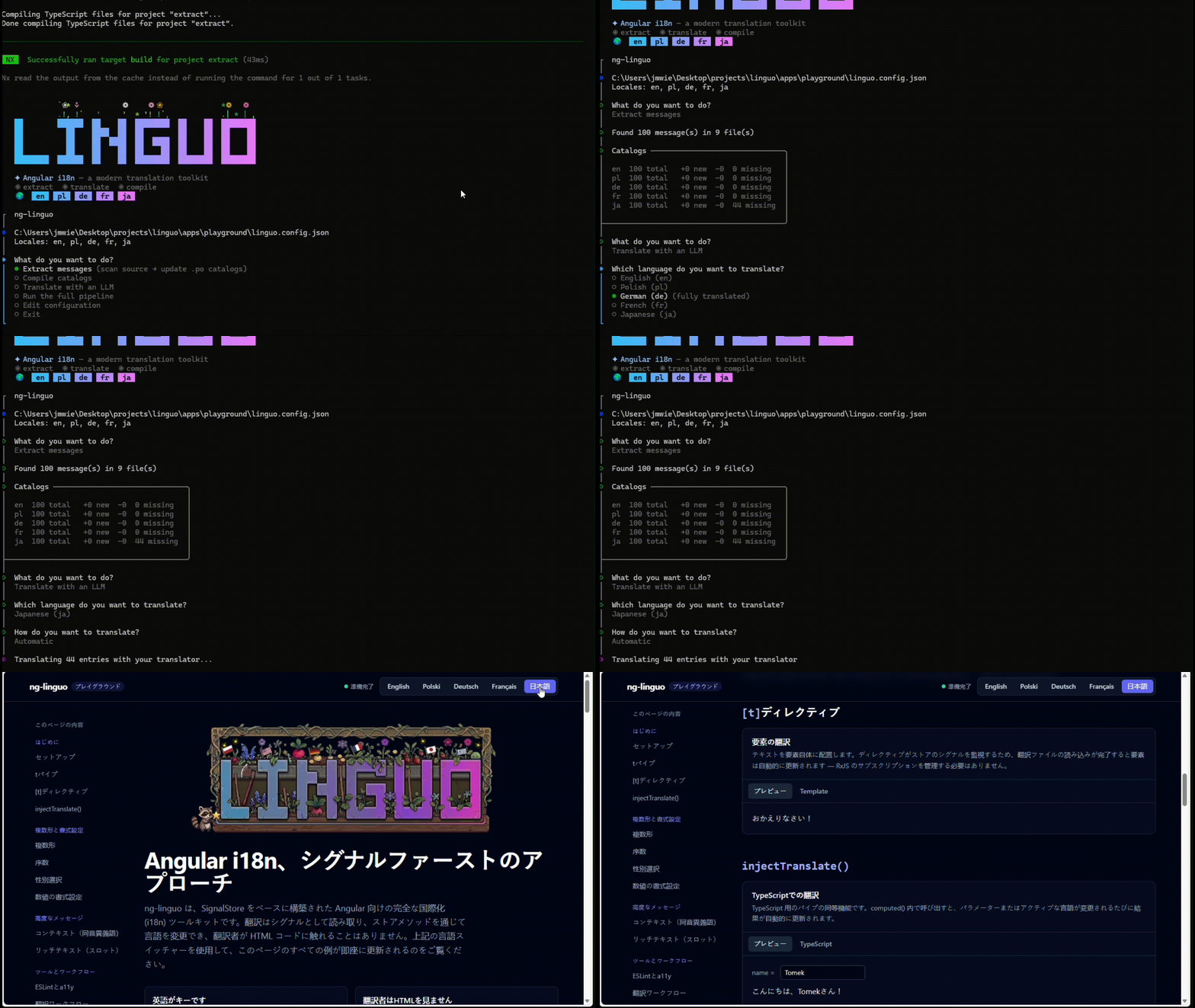
Switch the language and every binding re-renders — no reload, no subscriptions.
▶ Try the live demo
> **Status:** pre-release (`0.9.x`) — published to npm and usable today. The
> runtime, the extraction CLI, and the full test suite are in place and green.
> APIs may still shift before `1.0`.
## Why ng-linguo
**Writing code**
- **Signals, not subscriptions.** Translations are reactive through
[`@ngrx/signals`](https://ngrx.io/guide/signals) — switch language and the UI
updates on its own, with no `async` pipe and no manual `subscribe`/`unsubscribe`.
- **Three ways to translate, one for each job.** A `t` pipe for templates, a
`[t]` directive for elements and rich text, and `injectTranslate()` for
TypeScript — see [which to use](#which-api-should-i-use).
- **Zoneless-ready, SSR-friendly, tree-shakeable.** No `zone.js` dependency,
safe to render on the server, and the optional ICU and HTTP pieces live in
separate entry points so you only ship what you import.
**Writing translations**
- **English _is_ the key — no key files to maintain.** You write real English
in your components, and that text _is_ the translation key. There are no
`home.header.title` paths to invent, keep unique, and keep in sync, and
nothing opaque for a translator (or an LLM) to guess at — they always see a
full, meaningful sentence. For the rare clash, a `context` disambiguates
(`Play` in a game vs. a music player).
- **Translators never see HTML.** Named slots `[name]…[/name]` (a BBCode-like
syntax) bind to _your_ ``, so links, buttons, and bindings render
as real Angular while the translation file stays plain text. Translated text
is never inserted as HTML, so cross-site scripting (XSS) is impossible by design.
- **Correct grammar in every language (ICU MessageFormat 2, and MF1).** Real
plurals, `select`, and gendered text per locale — Polish gets four plural
forms, English gets two, all from one message.
**Shipping translations**
- **A real, additive extraction pipeline.** Extract your source strings to
standard gettext `.po` files (works with Crowdin / Lokalise / Phrase) and
compile them to runtime JSON. Re-running extraction is _additive_: new and
changed strings merge in while every existing translation is kept.
- **Add a language in seconds.** Add its code to the config and extract — with
an AI translator wired up, filling it in is a single command (or a couple of
clicks in the interactive CLI).
- **Translate with AI — your model, your key.** Copy a ready-made prompt into
any chat model, or point ng-linguo at a translator module that calls your own
provider. ng-linguo writes the prompt (it teaches the model your context,
slot tags, and plural rules) and merges the reply; your SDK and API key never
leave your machine.
- **Automatable in CI.** Every command runs non-interactively and is
deterministic, so extraction and compilation drop straight into a pipeline.
**Fast by default**
- The `t` pipe memoizes its result, `injectTranslate()` + `computed()` does zero
work per change-detection pass, and ICU messages are compiled once and cached.
See [Performance](#performance).
## Install
ng-linguo is two packages that do two different jobs at two different times — so
you install both, once.
**The runtime** — what your app imports and ships to the browser:
```bash
npm i @ng-linguo/linguo @ngrx/signals
```
Requires **Angular 18+**. `@ngrx/signals` is a peer dependency — bring your own.
**The CLI** (`@ng-linguo/extract`) — the build-time tool that scans your source
and produces the translation files the runtime loads. It's pure Node with zero
Angular dependencies, so it installs as a dev dependency and never reaches the
browser:
```bash
npm i -D @ng-linguo/extract
```
Its bin is `linguo-extract`; you run it with `npx linguo-extract …` (or from an
npm script). Neither package depends on the other, so each stays minimal — the
runtime renders translations in your app, the CLI generates them in your build.
## Getting started
The fastest path from an empty Angular app to a translated one. Steps 1–3 get
the runtime working; step 4 uses the CLI to generate the real translation files.
### 1. Configure the runtime
Add the providers to your `app.config.ts` (or `bootstrapApplication`). Pick a
loader — loading is explicit, so nothing is fetched during DI setup.
Most apps load their translation JSON over HTTP:
```ts
import { provideTranslate } from '@ng-linguo/linguo';
import { createHttpLoader } from '@ng-linguo/linguo/http';
import { provideIcu } from '@ng-linguo/linguo/icu';
import { provideHttpClient } from '@angular/common/http';
export const appConfig = {
providers: [
provideHttpClient(),
provideTranslate({
defaultLang: 'en', // required: reported before load, and the fallback
// optional: only matches a saved/browser language to one you ship.
// This is a runtime concern — separate from the CLI's linguo.config.json.
supportedLangs: ['en', 'pl', 'de'],
// factory form: the loader is built in DI, so it can use HttpClient.
// GETs /assets/i18n/.json by default.
loader: () => createHttpLoader(),
}),
provideIcu(), // optional — enables ICU MessageFormat (defaults to MF2)
],
};
```
Prefer to **bundle** translations (no network)? A loader is just an object with
a `load(lang)` method, so a static import works too:
```ts
import en from './i18n/en.json';
import pl from './i18n/pl.json';
const dictionaries: Record = { en, pl };
provideTranslate({
defaultLang: 'en',
loader: { load: (lang) => Promise.resolve(dictionaries[lang] ?? {}) },
});
```
### 2. Load a language at startup
The store never loads on its own. Call `restoreLang()` once, usually in your
root component. It picks the startup language for you —
**persisted choice → browser preference → `defaultLang`** — and loads it. Gate
your UI on the `isReady` signal to avoid a flash of untranslated content:
```ts
import { Component, inject } from '@angular/core';
import { TranslateStore } from '@ng-linguo/linguo';
@Component({
selector: 'app-root',
template: `@if (store.isReady()) {
} @else {
}`,
})
export class App {
protected readonly store = inject(TranslateStore);
constructor() {
void this.store.restoreLang(); // resolve + load the startup language
}
}
```
The active language is saved to `localStorage` (key `ng-linguo.lang`), and the
browser's preferred language is used on the first visit — both **on by default**
and **SSR-safe** (no-ops on the server). Set `supportedLangs` so a stored or
browser value can be matched to a language you actually ship. To switch language
later, call `store.setLang('pl')` (which also saves the choice). The full set of
options — `persistSelectedLanguage`, `restoreSelectedLanguage`, `persistKey`,
`detectBrowserLanguage` — is in [Configuration](#configuration).
### 3. Translate
In templates use the `t` pipe or the `[t]` directive; in TypeScript use
`injectTranslate()`.
```html
{{ 'Save' | t }}
{{ 'Hello {$name}!' | t: { params: { name } } }}
{{ 'Play' | t: { context: 'game' } }}
{{ text }}
```
```ts
import { injectTranslate } from '@ng-linguo/linguo';
const t = injectTranslate();
// Reactive and efficient: recomputes only when `name()` or the active language
// changes. Prefer this for frequently-updated or looped bindings.
readonly greeting = computed(() => t('Hello {$name}!', { params: { name: this.name() } }));
```
Until you generate translation files (step 4), every string falls through to the
English you wrote, so the app is fully usable from the first line of code.
### 4. Generate the translation files
The strings above are also your source catalog. Use the
[`@ng-linguo/extract`](#translation-workflow) CLI to collect them and produce the
JSON your loader serves:
```bash
npm i -D @ng-linguo/extract # one-time: install the CLI
npx linguo-extract init --locales en,pl,de # create linguo.config.json
npx linguo-extract extract # scan source → en/pl/de .po catalogs
npx linguo-extract translate --all # fill missing entries with AI (optional)
npx linguo-extract compile # .po → runtime JSON
```
That's the whole loop. See [Translation workflow](#translation-workflow) for the
interactive menu, adding languages, and translating by hand.
### Which API should I use?
All three resolve the same translations; they differ in where they run and what
they can render.
| Use… | When | Notes |
| ------------------- | -------------------------------------------------------------- | -------------------------------------------------------------------------------------------------- |
| `[t]` **directive** | Translating an element, **rich text with slots**, or hot lists | The most efficient option for the DOM. Re-renders via an `effect()` only when something changes. |
| `injectTranslate()` | TypeScript, or a binding read inside a `computed()` | Zero work per change-detection pass. Best for frequently-updated or looped bindings. Slots → text. |
| `t` **pipe** | Quick inline strings, attribute bindings | Convenient, but it's an **impure** pipe (see below). Slots degrade to plain text. |
> **A note on the `t` pipe.** Angular re-evaluates an impure pipe on _every_
> change-detection pass. The `t` pipe has to be impure to react to a language
> switch (a pure pipe only re-runs when its input reference changes), so it
> memoizes aggressively to stay cheap. That's perfectly fine for ordinary
> templates — but in a long `@for` list or a hot binding, prefer the `[t]`
> directive or `injectTranslate()` + `computed()`, which do no per-pass work.
> The directive is also the only option that renders slot tags as real DOM; the
> pipe and `injectTranslate()` return a string, so slots collapse to their text.
### Performance
- **The `t` pipe is memoized.** It only re-translates when the key, `params`,
`context`, or language actually change — so passing a fresh `{ params: … }`
object on every render is just a quick equality check, not a re-format.
- **`injectTranslate()` + `computed()` does no per-pass work** — it recomputes
only when its signal inputs change. Reach for it on hot paths.
- **ICU messages are compiled once and cached** per `(format, locale, message)`,
so repeated formatting of the same pattern is a map lookup.
## Translation workflow
`@ng-linguo/extract` is a pure-Node CLI (no Angular dependency, so it never
drags the framework into your tooling) that turns your source into translation
files and back. It reads a `linguo.config.json` — auto-discovered — listing your
locales and paths. Install it once as a dev dependency; its bin is
`linguo-extract`, so you invoke it with `npx` (or from an npm script):
```bash
npm i -D @ng-linguo/extract # install once; the bin is `linguo-extract`
npx linguo-extract init # create/edit linguo.config.json
npx linguo-extract extract # scan source → .po catalogs (additive)
npx linguo-extract translate # fill missing entries with AI (needs a translator)
npx linguo-extract compile # .po catalogs → runtime .json
```
### The interactive menu
New to the tool? Run it with **no command** to open a guided menu that walks
through every step — extract, compile, translate, run the full pipeline — and
includes a BIOS-style settings editor where each config field carries an
inline description:
```bash
npx linguo-extract # guided menu (also creates/edits the config)
```
Everything the menu does is also a flag-driven command, so you can graduate to
scripts whenever you like.
### Extraction is additive
`extract` scans your `.ts` and `.html` for the `t` pipe, the `[t]` directive,
`injectTranslate()` calls, and `mark()`, then **merges** the results into your
existing `.po` catalogs. New strings are added, removed ones are dropped, and
**every translation you already have is preserved** — entries are matched by
their source text plus `context`. Re-running it is safe and idempotent.
(Need to keep a documentation sample or fixture out of the scan? Wrap it in
`linguo-ignore-start` / `linguo-ignore-end` comments.)
### Adding a language
Adding a locale is a couple of steps — or a couple of clicks in the menu:
```bash
npx linguo-extract init --locales en,pl,de,fr # add `fr` to the config
npx linguo-extract extract # seeds fr.po with the source strings
npx linguo-extract translate --locale fr # fill it in with AI…
# …or: npx linguo-extract copyprompt fr # …or copy a prompt for any chat model
npx linguo-extract compile # produce fr.json
```
### Translating with AI
Because the source strings are full English sentences (not opaque keys), an LLM
has all the context it needs. ng-linguo writes a self-contained prompt that
teaches the model your `context` notes, slot tags, and plural rules, and only
ever sends entries that are still missing. Two ways to run it:
- **Clipboard (no key, no config):** `npx linguo-extract copyprompt pl` copies
the prompt; paste it into any chat model and save the reply over `pl.po`.
- **Automatic:** point the `translator` config field at a small module that
calls your AI provider. ng-linguo builds the prompt and merges the reply; your
SDK and API key stay yours. See the
[`@ng-linguo/extract` README](https://github.com/jmwierzbicki/linguo/tree/main/packages/extract#readme)
for a copy-paste module (OpenAI, Anthropic, or any provider).
### In CI
Every command runs non-interactively and deterministically, so the pipeline
drops into CI as-is:
```bash
npx linguo-extract extract # fails the build if it errors; idempotent otherwise
npx linguo-extract translate --all # optional: fill any gaps (needs a translator)
npx linguo-extract compile
```
`init` is scriptable too: `npx linguo-extract init --locales en,pl,de --out public/i18n`.
## Configuration
ng-linguo has two independent configs that don't overlap by accident: this
**runtime** config (passed to `provideTranslate`, shipped in your browser
bundle) and the **build-time** [`linguo.config.json`](#translation-workflow)
(read only by the Node CLI). The runtime never reads the CLI's file. The one
thing both name is the locale list — `supportedLangs` here vs. `locales` there —
and `supportedLangs` is optional: it exists purely to match a saved or
browser-preferred language to one you actually ship.
### `provideTranslate(options)`
| Option | Type | Default | What it does |
| ------------------------- | ---------------------------------------------- | --------------------------- | ----------------------------------------------------------------------------------------------------------------- |
| `defaultLang` | `string` | _(required)_ | The language reported before anything loads, and the guaranteed fallback. |
| `loader` | `TranslationLoader \| () => TranslationLoader` | _(required)_ | How translations are fetched. The factory form runs in DI, so the loader can inject services (e.g. `HttpClient`). |
| `supportedLangs` | `string[]` | _(none)_ | Languages you ship. Used to match a persisted/browser value; browser detection is skipped when omitted. |
| `persistSelectedLanguage` | `boolean` | `true` | Save the active language to `localStorage` when it changes. SSR-safe. |
| `restoreSelectedLanguage` | `boolean` | = `persistSelectedLanguage` | Read the saved language back on startup (inside `restoreLang()`). SSR-safe. |
| `persistKey` | `string` | `'ng-linguo.lang'` | The `localStorage` key used for the saved language. |
| `detectBrowserLanguage` | `boolean` | `true` | On first run, match `navigator.languages` against `supportedLangs`. SSR-safe. |
`provideIcu({ defaultFormat })` accepts `'mf2'` (default) or `'mf1'`.
`createHttpLoader({ prefix, suffix })` defaults to `/assets/i18n/` + `.json`,
fetching `${prefix}${lang}${suffix}`. A loader is just an object with a
`load(lang): Promise>` method, so any source works.
## Packages & entry points
| Import | What it gives you |
| -------------------------- | -------------------------------------------------------------------------------------------------- |
| `@ng-linguo/linguo` | `TranslateStore`, `provideTranslate`, the `t` pipe, the `[t]` directive, `injectTranslate`, `mark` |
| `@ng-linguo/linguo/icu` | `provideIcu` — ICU MessageFormat 1 + 2 |
| `@ng-linguo/linguo/http` | `createHttpLoader` — `HttpClient`-backed loader |
| `@ng-linguo/extract` | build-time extraction/translate/compile CLI (pure Node) |
| `@ng-linguo/eslint-plugin` | lint config so the a11y linter trusts empty `[t]` elements |
## Contributing
This is an Nx + pnpm monorepo.
[CLAUDE.md](https://github.com/jmwierzbicki/linguo/blob/main/CLAUDE.md) is the
source of truth for architecture, code style, testing, and release conventions —
read it first.
```bash
pnpm install
pnpm nx run-many -t lint test build # the full suite (what CI runs)
pnpm nx serve playground # the demo app
```
## License
[MIT](https://github.com/jmwierzbicki/linguo/blob/main/LICENSE)