https://github.com/joanroig/metrix
📊 Metrix generates customizable retro-style GIFs, showcasing GitHub metrics for your GitHub README profile.
https://github.com/joanroig/metrix
ffmpeg github github-actions github-api github-metrics github-profile metrics pillow profile-readme readme-generator readme-profile readme-stats readme-template stats
Last synced: 9 months ago
JSON representation
📊 Metrix generates customizable retro-style GIFs, showcasing GitHub metrics for your GitHub README profile.
- Host: GitHub
- URL: https://github.com/joanroig/metrix
- Owner: joanroig
- License: mit
- Created: 2025-03-31T21:20:11.000Z (over 1 year ago)
- Default Branch: main
- Last Pushed: 2025-10-02T01:45:48.000Z (9 months ago)
- Last Synced: 2025-10-02T03:31:29.485Z (9 months ago)
- Topics: ffmpeg, github, github-actions, github-api, github-metrics, github-profile, metrics, pillow, profile-readme, readme-generator, readme-profile, readme-stats, readme-template, stats
- Language: Python
- Homepage: https://joanroig.github.io/metrix-gallery
- Size: 5.26 MB
- Stars: 3
- Watchers: 1
- Forks: 1
- Open Issues: 0
-
Metadata Files:
- Readme: README.md
- License: LICENSE
Awesome Lists containing this project
README

Metrix generates customizable retro-style GIFs showcasing GitHub metrics for your GitHub README profile.
Choose your color combination with the Metrix Gallery


Classic
Red
White-Blue


Yellow No-Glitch
Gold Custom Text
Purple Torvalds
## 📋 Usage Guide
Follow these steps to integrate Metrix into your GitHub profile:
1. **Create a New Repository**
Create a new repository to host your profile README. For guidance, refer to GitHub's documentation on [setting up and managing your profile README](https://docs.github.com/en/account-and-profile/setting-up-and-managing-your-github-profile/customizing-your-profile/managing-your-profile-readme).
2. **(Optional) Generate and Add a Personal Access Token (classic / PAT)**
By default, the action will only display public data. To also include private repository data, follow these steps:
1. Create a PAT token from [GitHub's Token Settings](https://github.com/settings/tokens) with the following permissions:
- **repo**: Full control of private repositories
- **read:org**: Read org and team membership, and org projects
- **read:user**: Read all user profile data
2. In your repository, navigate to **Settings > Secrets and variables** and add a new repository-secret:
- Name the secret `PAT_TOKEN`
- Paste the PAT token value generated in the previous step
3. **Enable Workflow Permissions**
In your repository settings, go to **Settings > Actions > General** and enable **"Read repository contents and packages permissions"** at the bottom of the page.
> **_NOTE:_** If you do not enable this permission, you must add the following permissions block to your workflow YAML under the jobs section:
```yaml
jobs:
generate:
runs-on: ubuntu-latest
permissions:
contents: write
```
4. **Add the Metrix GIF to Your README**
Create a new `README.md` with this content:
```markdown

Infographic generated with joanroig/metrix
```
Or add the following to your `README.md` file:
```markdown
[](https://github.com/joanroig/metrix)
```
You can see a live example here: https://github.com/joanroig/joanroig/blob/main/README.md
5. **Create a GitHub Action**
In your repository, create a new file at `.github/workflows/metrix.yml` and paste the following content:
```yaml
name: Generate Metrics GIF
on:
# Run manually from the Actions tab
workflow_dispatch:
# Run on schedule (adjust as needed)
schedule:
- cron: "0 0 * * 0" # Weekly on Sundays at midnight
jobs:
generate:
runs-on: ubuntu-latest
steps:
- name: Checkout Repository
uses: actions/checkout@v4
- name: Generate Metrix
uses: joanroig/metrix@main
with:
GITHUB_TOKEN: ${{ secrets.PAT_TOKEN || secrets.GITHUB_TOKEN }}
GITHUB_USERNAME: ${{ github.actor }}
# You can add more customization parameters here
- name: Commit and Push Metrix GIF
run: |
git config --global user.name "github-actions[bot]"
git config --global user.email "github-actions[bot]@users.noreply.github.com"
git add metrix.gif
git commit -m "Update GitHub Metrix GIF" || echo "No changes to commit"
git push
shell: bash
```
You can find an example with all the default configuration in the [metrix-complete.yml](.github/workflows/metrix-complete.yml) file.
6. **Run the Action**
Your action is now set up! Commit the changes and manually trigger the action to generate the metrics GIF.
7. **Customize Your Metrix**
Customize your Metrix by adding parameters to your action from the [parameters](#parameters) section below. You can also use the [metrix-complete.yml](.github/workflows/metrix-complete.yml) as a baseline for your configuration.
## 🖼️ Showcase
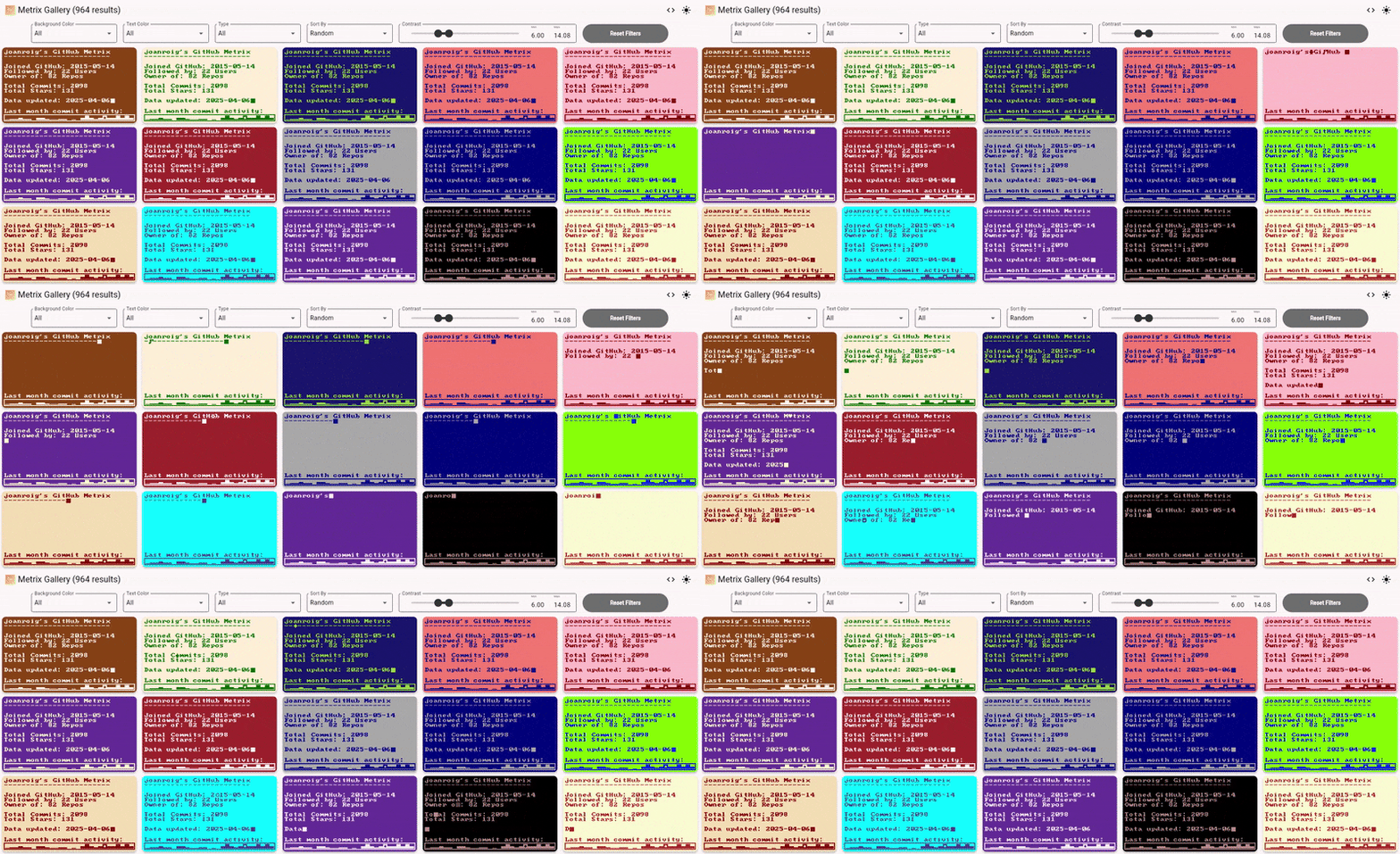
Choose your theme with the Metrix Gallery
Below are example themes with their corresponding configurations. To use any of these examples, copy the configuration snippet and add it to your GitHub action file:
---
> Notice that looping is deactivated by default!

```yaml
with:
GITHUB_USERNAME: "joanroig"
BACKGROUND_COLOR: "black"
TEXT_COLOR: "limegreen"
```
---

```yaml
with:
GITHUB_USERNAME: "joanroig"
BACKGROUND_COLOR: "black"
TEXT_COLOR: "red"
LOOP: "true"
```
---

```yaml
with:
GITHUB_USERNAME: "joanroig"
BACKGROUND_COLOR: "blue"
TEXT_COLOR: "white"
LOOP: "true"
```
---
### Yellow over a shaded dark color with disabled glitches

```yaml
with:
GITHUB_USERNAME: "joanroig"
BACKGROUND_COLOR: "shade-dark"
TEXT_COLOR: "yellow"
GLITCHES: "false"
LOOP: "true"
```
---
### Gold over dark gold, with custom texts

```yaml
with:
GITHUB_USERNAME: "joanroig"
BACKGROUND_COLOR: "darkgoldenrod"
TEXT_COLOR: "gold"
ACTIVITY_TEXT: "I worked a lot lately..."
TEXT: |
{username} is booting up.......
-----------------------------
Joined GitHub: {created_at}
Followed by: {followers} Users
Owner of: {total_repos} Repos
Total Commits: {total_commits}
Total Stars: {total_stars}
Data updated: {updated_date}
LOOP: "true"
```
---
### Yellow over purple, with data from another user, reduced activity days, and custom activity text

```yaml
with:
GITHUB_USERNAME: "torvalds"
TEXT_COLOR: "yellow"
BACKGROUND_COLOR: "purple"
ACTIVITY_TEXT: "Last two weeks were intense:"
ACTIVITY_DAYS: "14"
LOOP: "true"
```
---
### A gif with a custom size, a bigger font size, only text, a custom cursor and a generative text color shade based on a random light background color

```yaml
with:
FONT_SIZE: "29"
BACKGROUND_COLOR: "random-light"
TEXT_COLOR: "shade"
TEXT: "The size of the gif\ncan be customized!"
TYPING_CHARACTER: "|"
ACTIVITY: "false"
LOOP: "true"
WIDTH: "580"
HEIGHT: "80"
```
---
### Header (as seen at the top of this README)

```yaml
with:
FONT_SIZE: "36"
BACKGROUND_COLOR: "random-dark"
TEXT_COLOR: "shade-light"
TEXT: "Metrix"
ACTIVITY: "False"
FPS: "30"
LOOP: "true"
WIDTH: "272"
HEIGHT: "58"
GLITCHES: "false"
```
---
## ⚙️ Configuration Parameters
Metrix is highly customizable through GitHub Action arguments. A complete example, including the default parameters, is provided: [metrix-complete.yml](.github/workflows/metrix-complete.yml). Below is the full list of available parameters:
| **Parameter** | **Description** | **Example/Options** |
| ------------------ | ------------------------------------------------------------------------------------------------------------------------------------------------------------------------------- | ----------------------------------------------------------------------------------------- |
| GITHUB_TOKEN | GitHub token used for authentication. Defaults to `PAT_TOKEN` if available. | `${{ secrets.PAT_TOKEN \|\| secrets.GITHUB_TOKEN }}` |
| GITHUB_USERNAME | GitHub username to display the metrics for. | `${{ github.actor }}` |
| LOG_LEVEL | Application log level. | `'NOTSET'`, `'DEBUG'`, `'INFO'`, `'WARNING'`, `'ERROR'`, `'FATAL'` |
| FFMPEG_LOG_LEVEL | FFmpeg log level. | `'DEBUG'`, `'VERBOSE'`, `'INFO'`, `'WARNING'`, `'ERROR'`, `'FATAL'`, `'PANIC'`, `'QUIET'` |
| FONT_SIZE | Font size for the main text. Note: Not tested, may cause rendering issues. | `'20'` |
| SYMBOL_FONT_SIZE | Font size for symbols. Note: Not tested, may cause rendering issues. | `'20'` |
| FONT_PATH | Path to the primary font file. Note: Not tested, may cause rendering issues. | `'assets/MxPlus_IBM_BIOS.ttf'` |
| SYMBOL_FONT_PATH | Path to the symbol font file. Note: Not tested, may cause rendering issues. | `'assets/MxPlus_IBM_BIOS.ttf'` |
| BACKGROUND_COLOR | Background color. Options include CSS color names, hex codes, 'random', 'random-light', 'random-dark', 'complementary', 'contrasting', 'shade', 'shade-light', or 'shade-dark'. | `'red'`,`'#6e2e2a'`,`'random-dark'`,`'contrasting'`, `'shade-light'`, etc |
| TEXT_COLOR | Color of the text. Same options as BACKGROUND_COLOR. | `'blue'`,`'#c4a5a3'`,`'random'`, `'complementary'`, ``'shade'`, etc |
| MINIMUM_CONTRAST | Minimum contrast ratio between text and background (1 to 21). | `'2'` |
| TEXT | Text content for the Metrix display. Use variables for dynamic data. See [Text Variables](#variables) below. | `'I'm {username}`
`I love {preferred_languages[1]},`
` I have {total_stars} stars'` |
| TYPING_CHARACTER | Character used for the typing effect. | `'█'` |
| ACTIVITY | Enable or disable the activity section. | `'true'` or `'false'` |
| ACTIVITY_TEXT | Text to display for the activity section. | `'Last month commit activity:'` |
| ACTIVITY_DAYS | Number of days for the activity chart. | `'29'` |
| FPS | Frames per second for the GIF. | `'50'` |
| LOOP | Enable or disable infinite looping of the GIF. | `'true'` or `'false'` |
| WIDTH | Width of the generated GIF. | `'608'` |
| HEIGHT | Height of the generated GIF. | `'342'` |
| GLITCHES | Enable or disable glitches in the GIF. | `'true'` or `'false'` |
| MAX_GLITCHES | Maximum number of glitches that can occur simultaneously. | `'4'` |
| GLITCH_PROBABILITY | Probability of a glitch occurring in a frame (0 to 100). | `'3'` |
| OUTPUT_FILE_PATH | Path for the generated GIF. | `'metrix.gif'` |
### 📝 Text Variables (Curated GitHub API Data)
| **Variable** | **Description** | **Example Replacement** |
| ----------------------------------------------------- | ------------------------------------------------------------------------------------ | ---------------------------------- |
| `{username}` | GitHub username | `'joanroig'` |
| `{separator}` | Custom separator for formatting | `'------------------------------'` |
| `{updated_date}` | Date of the latest update | `'2025-04-05'` |
| `{total_repos}` | Total number of repositories | `'42'` |
| `{total_commits}` | Total number of commits | `'500'` |
| `{total_stars}` | Total number of stars across repositories | `'150'` |
| `{total_forks}` | Total number of forks | `'30'` |
| `{total_watchers}` | Total number of watchers | `'100'` |
| `{total_open_issues}` | Total number of open issues | `'10'` |
| `{preferred_languages}` or `{preferred_languages[X]}` | Preferred programming languages, where X can be set to a number to limit the results | `'TypeScript, Python, JavaScript'` |
| `{preferred_topics}` or `{preferred_topics[X]}` | Preferred topics, where X can be set to a number to limit the results | `'API, Hacking'` |
| `{preferred_licenses}` or `{preferred_licenses[X]}` | Preferred license types, where X can be set to a number to limit the results | `'MIT','GPL'` |
#### Extended Text Variables (Raw GitHub API Data)
These variables are sourced directly from the GitHub User API data without any transformations, except for the reformatting of dates. Please note that this data may change over time, and the variables listed were the ones available at the time of writing:
| **Variable** | **Description** | **Example** |
| ----------------------------- | ------------------------------------------ | ----------------------------------- |
| `{login}` | GitHub login name | `'joanroig'` |
| `{id}` | Unique GitHub user ID | `'123456789'` |
| `{node_id}` | Node identifier | `'MDQ6VXNlcjEyMzQ1Njc4OQ=='` |
| `{type}` | Type of account (e.g., "User") | `'User'` |
| `{user_view_type}` | User view type (e.g., "private") | `'private'` |
| `{site_admin}` | Site administrator status (Boolean) | `'false'` |
| `{name}` | Display name | `'Joan Roig'` |
| `{company}` | Company name (if provided) | `'Company Inc.'` |
| `{blog}` | Blog URL | `'https://blog.example.com'` |
| `{location}` | User location | `'Barcelona, Spain'` |
| `{email}` | Email address (if provided) | `'joan@example.com'` |
| `{hireable}` | Hireable status (if provided) | `'true'` |
| `{bio}` | Biography | `'Software developer and musician'` |
| `{twitter_username}` | Twitter username | `'@joanroig'` |
| `{public_repos}` | Count of public repositories | `'35'` |
| `{public_gists}` | Count of public gists | `'5'` |
| `{followers}` | Number of followers | `'200'` |
| `{following}` | Number of users followed | `'150'` |
| `{created_at}` | Date the GitHub account was created | `'2015-05-17'` |
| `{updated_at}` | Date the GitHub account was last updated | `'2025-04-05'` |
| `{private_gists}` | Count of private gists | `'10'` |
| `{total_private_repos}` | Total number of private repositories | `'10'` |
| `{owned_private_repos}` | Count of owned private repositories | `'5'` |
| `{disk_usage}` | Disk usage in kilobytes | `'50000'` |
| `{collaborators}` | Number of collaborators | `'10'` |
| `{two_factor_authentication}` | Two-factor authentication status (Boolean) | `'true'` |
## 🛠️ Development Setup
### Requirements
- **Conda** or **Miniconda** (alternatively, only Python)
- **FFmpeg**
- **VSCode** (optional, for debugging and development)
### Setup
1. Clone this repository and open it in your IDE (e.g., **VSCode**).
2. Add your **PAT** token to the `.github_token` file.
3. If you have **Conda** installed, run `rebuild_env.ps1` to set up the Conda environment, then execute `run.ps1` to start the application. Otherwise, read the two scripts to run the commands using Python.
### Running and Debugging with VS Code
The project includes preconfigured launch settings in the `.vscode/launch.json` file that make it easy to run Metrix:
1. **Python: Debug** - Runs the main application with a default configuration
- Renders a standard Metrix GIF with GitHub user stats
- Sets appropriate environment variables for colors, fonts, and display settings
To run the application:
1. Open the Debug panel in VS Code (Ctrl+Shift+D or click the debug icon in the sidebar)
2. Select "Python: Debug" from the dropdown at the top
3. Click the green play button or press F5
For running test scripts and bulk generation tools, see the [tests documentation](src/tests/README.md).
## 🙏 Credits
Fonts by **VileR**: [Oldschool PC Fonts](https://int10h.org/oldschool-pc-fonts/fontlist/)
## 📄 License
This project is licensed under the [MIT License](LICENSE).