https://github.com/joematthews/pi-smart-web-search
Web search tool for the pi coding agent — batch queries, ranked readable markdown results ready to fetch. Pairs with pi-smart-fetch.
https://github.com/joematthews/pi-smart-web-search
agentic ai-agents content-extraction defuddle llm-tools pi pi-coding-agent pi-extension pi-package search typescript web-scraping web-search wreq-js
Last synced: 14 days ago
JSON representation
Web search tool for the pi coding agent — batch queries, ranked readable markdown results ready to fetch. Pairs with pi-smart-fetch.
- Host: GitHub
- URL: https://github.com/joematthews/pi-smart-web-search
- Owner: joematthews
- License: mit
- Created: 2026-06-15T23:27:49.000Z (about 1 month ago)
- Default Branch: main
- Last Pushed: 2026-06-26T16:35:44.000Z (29 days ago)
- Last Synced: 2026-06-26T18:13:46.189Z (29 days ago)
- Topics: agentic, ai-agents, content-extraction, defuddle, llm-tools, pi, pi-coding-agent, pi-extension, pi-package, search, typescript, web-scraping, web-search, wreq-js
- Language: TypeScript
- Homepage: https://pi.dev/packages/pi-smart-web-search
- Size: 403 KB
- Stars: 5
- Watchers: 0
- Forks: 0
- Open Issues: 3
-
Metadata Files:
- Readme: README.md
Awesome Lists containing this project
README
# pi-smart-web-search
A [pi](https://pi.dev) extension that adds one tool — **`web_search`** — for batch web discovery.
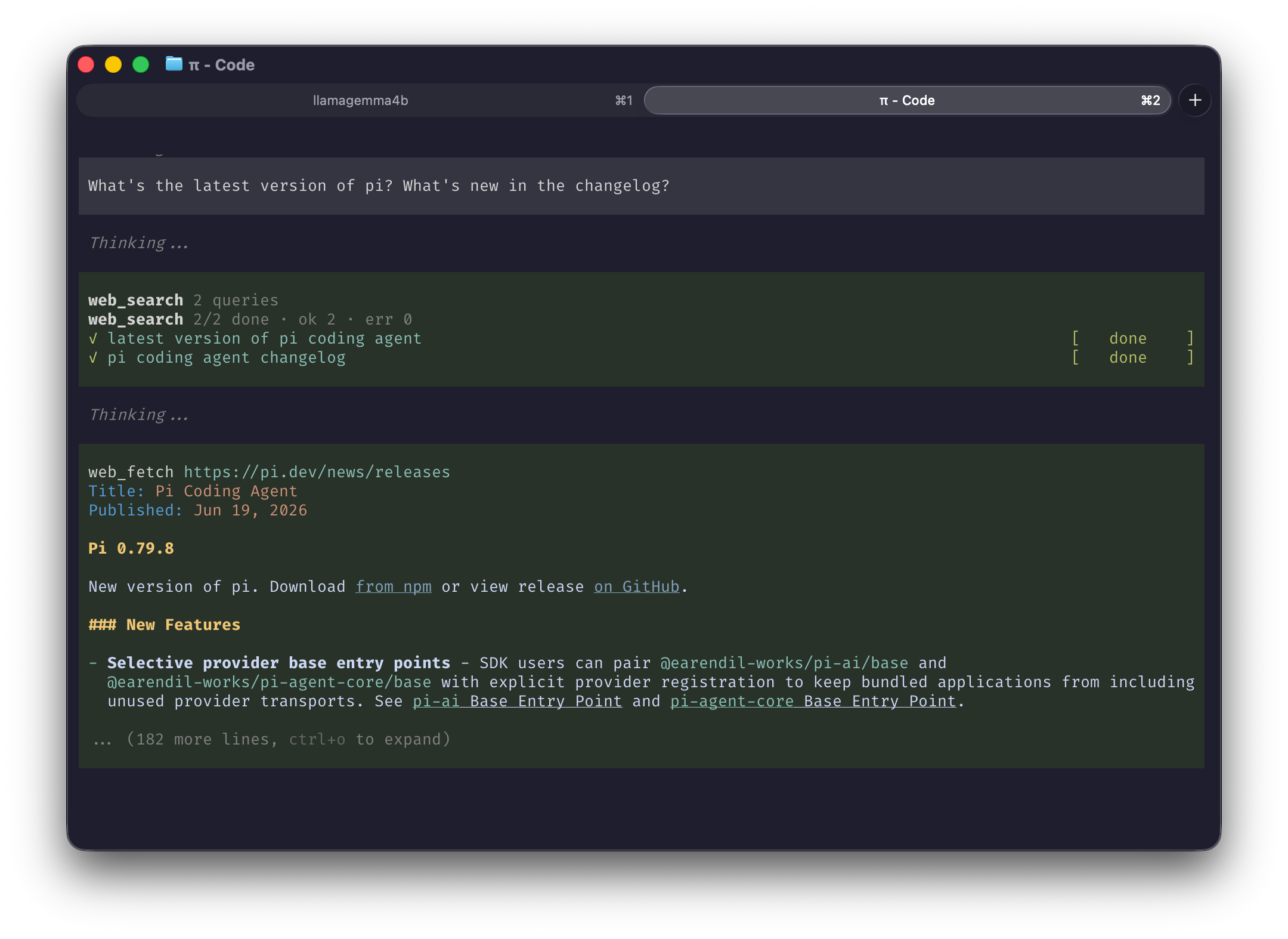
It takes an **array of queries**, turns each into a search URL,
and runs it through the same fetch→extract pipeline as [pi-smart-fetch](https://pi.dev/packages/pi-smart-fetch) (`wreq-js` → `linkedom` →
`Defuddle`). It returns the extracted search-results pages (titles, links, snippets as markdown),
prefaced with a `# Next step` header telling the model to open the best result URLs.
So the model **curates** which links to open (no SEO-trash auto-pulled into context), and the
follow-up nudge sits right next to the links.
## Install
```sh
pi install npm:pi-smart-web-search
pi install npm:pi-smart-fetch # companion (see below)
```
Then restart pi.
### Pairs with pi-smart-fetch
`web_search` finds sources; it hands off to **`batch_web_fetch`** (from
[`pi-smart-fetch`](https://pi.dev/packages/pi-smart-fetch)) to read the chosen pages. Install
it alongside, or the model has nothing to follow up with.
## Usage
Once installed, start up pi and just ask a question — `web_search` kicks in automatically when an
answer needs current or external info. Try:
```
What's the latest version of Node.js, and what's new in it?
```
```
Compare Bun and Deno for a new TypeScript API in 2026.
```
pi searches, opens the best results, and answers from what it read. No flags, no setup — just ask.
## Tool
```
web_search(searches: string[])
```
Pass several queries at once to cover a topic from multiple angles in one call.
## Development
Run from a local clone instead of the registry:
```sh
git clone https://github.com/joematthews/pi-smart-web-search
cd pi-smart-web-search
npm install
pi install .
```
Then restart pi.
`npm run check` runs typecheck, lint, format, spell, and tests.
`npx tsx debug.ts "your query"` prints what the model would receive for a search.
## Credits
Heavily inspired by [pi-smart-fetch](https://pi.dev/packages/pi-smart-fetch) by
[Thinkscape](https://github.com/Thinkscape) (MIT). It shares the same pipeline (`wreq-js` → `linkedom` → `Defuddle`), and the `web_search` result card mirrors `batch_web_fetch`'s look. Thanks to that project for the pattern.
## License
[MIT](LICENSE) © Joe Matthews