https://github.com/joerivandervelde/synthuesizer
Turn your regular PC keyboard into a MIDI synthesizer with Hue light show.
https://github.com/joerivandervelde/synthuesizer
hue hue-bridge hue-lights java java-8 java8 midi midi-keyboard
Last synced: 23 days ago
JSON representation
Turn your regular PC keyboard into a MIDI synthesizer with Hue light show.
- Host: GitHub
- URL: https://github.com/joerivandervelde/synthuesizer
- Owner: joerivandervelde
- License: gpl-3.0
- Created: 2019-12-09T11:32:53.000Z (over 6 years ago)
- Default Branch: master
- Last Pushed: 2023-09-26T06:38:25.000Z (almost 3 years ago)
- Last Synced: 2025-03-03T07:41:49.677Z (over 1 year ago)
- Topics: hue, hue-bridge, hue-lights, java, java-8, java8, midi, midi-keyboard
- Language: Java
- Homepage:
- Size: 155 KB
- Stars: 0
- Watchers: 1
- Forks: 0
- Open Issues: 0
-
Metadata Files:
- Readme: README.md
- License: LICENSE
Awesome Lists containing this project
README
# Synthuesizer
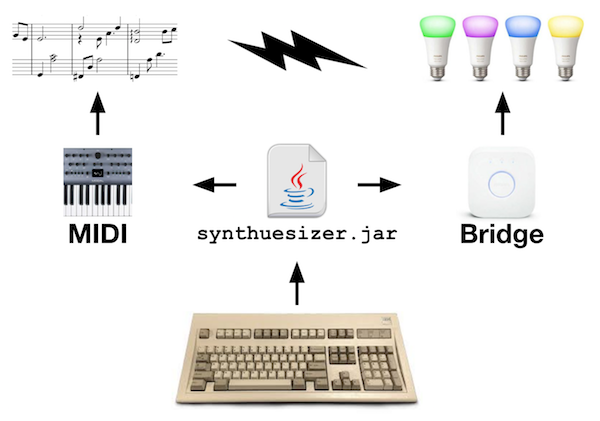
Turn your regular PC keyboard into a MIDI synthesizer with Hue light show.
Play on a scale of 36 chromatic notes, adjustable to the full MIDI note
range, as well as 128 selectable instruments and various Hue light modes.
## How to run
Create a properties file, for instance at `~/synthuesizer.properties`,
containing your Hue Bridge IP and an authorized user (i.e. API key). To get
these, please follow the steps at [meethue.com](https://developers.meethue.com/develop/get-started-2/).
Put them in the properties file like this:
```
bridge_ip = 192.168.x.x
api_key = xxxxxxxxxxxxxxxxxxxxxxxxxxxxxxxxxxxxxxxx
```
That's it, now start the app with:
```
java -jar synthuesizer.jar ~/synthuesizer.properties
```
and it should boot up:
```
Starting up Synthuesizer...
Loading properties file...
Creating JFrame...
Creating sound...
Setting instrument to nr. 1, Bright Acoustic Pian
Creating light...
Connecting with Hue bridge at IP 192.168.x.x using API key xxx
Setting lights to nr. 1, Angelic
Binding keys...
Synthuesizer active. How to use:
- Use alphanumericals to play notes (A-Z + 0-9).
- Change instrument with LEFT and RIGHT arrow.
- Change pitch with UP and DOWN arrow.
- Change lights with COMMA and PERIOD (< and >)
```
Changing the settings will result in notifications such as:
```
Setting instrument to nr. 2, Electric Grand Piano
Setting instrument to nr. 3, Honky-tonk Piano
Setting lights to nr. 2, Cyberpunk
Setting lights to nr. 3, Desert
Setting pitch to 41
Setting pitch to 42
```
Have fun!
## How to compile
In absence of a pom.xml, compile with Java 8 using these dependencies:
```
yetanotherhueapi-1.2.0.jar
jackson-databind-2.9.9.jar
jackson-core-2.9.9.jar
jackson-annotations-2.9.0.jar
```
## Troubleshooting
- Q: When I press keys, nothing happens. What's wrong?
- A: Make sure that the JFrame window is focused by clicking/selecting it.
- Q: I can only play so many notes simultaneously, why?
- A: You are probably using a keyboard that does not support N-key rollover.
- Q: The lights are reacting quite slowly. Can you make it faster?
- A: Hopefully soon, with newer versions of the underlying APIs.