https://github.com/johannlai/openai-function-calling-tools
🛠 openai function calling tools for JS/TS
https://github.com/johannlai/openai-function-calling-tools
function-calling functions javascript openai openai-api tools
Last synced: over 1 year ago
JSON representation
🛠 openai function calling tools for JS/TS
- Host: GitHub
- URL: https://github.com/johannlai/openai-function-calling-tools
- Owner: JohannLai
- License: mit
- Created: 2023-06-16T06:54:27.000Z (about 3 years ago)
- Default Branch: main
- Last Pushed: 2024-01-30T14:06:52.000Z (over 2 years ago)
- Last Synced: 2025-03-29T08:05:26.073Z (over 1 year ago)
- Topics: function-calling, functions, javascript, openai, openai-api, tools
- Language: TypeScript
- Homepage:
- Size: 426 KB
- Stars: 293
- Watchers: 3
- Forks: 28
- Open Issues: 4
-
Metadata Files:
- Readme: README.md
- License: LICENSE
Awesome Lists containing this project
README

# OpenAI Function calling tools

[](https://github.com/JohannLai/openai-function-calling-tools/blob/main/LICENSE)
[](https://codecov.io/github/JohannLai/openai-function-calling-tools)


---
OpenAI Function calling tools
OpenAI Function calling tools is a repository that offers a set of tools to help you easy to build a function calling model with OpenAI API.
[More information about function calling](https://platform.openai.com/docs/guides/gpt/function-calling)
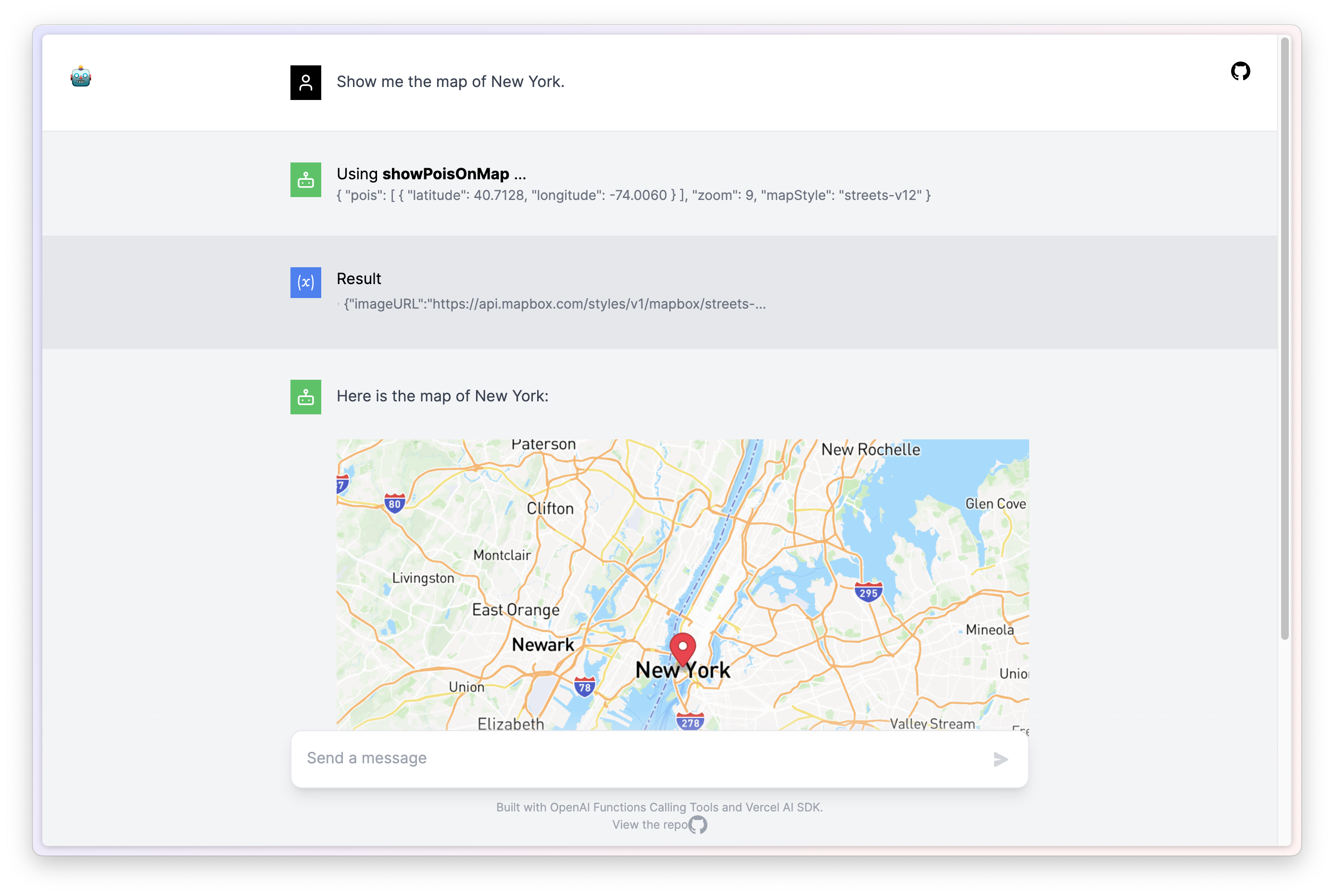
Sample: https://chatFn.io
## 🪓 Tools
The repo provides the following tools you can use out of the box:
- 🗺️ ShowPoisOnMap: A tool that can show points of interest on a map.
- 🌐 ReverseGeocode: A tool that can convert coordinates into a human-readable address.
- ⏰ Clock: A clock that can tell you the time.
- 🧮 Calculator: A simple calculator that can do basic arithmetic. Input should be a math expression.
- 🔍 GoogleCustomSearch: A wrapper around the Google Custom Search API. Useful for when you need to answer questions about current events. Input should be a search query.
- 🔍 BingCustomSearch: A wrapper around the Bing Custom Search API. Useful for when you need to answer questions about current events. Input should be a search query.
- 🔍 SerperCustomSearch: A wrapper around the SerpAPI. Useful for when you need to answer questions about current events. Input should be a search query.
- 🏞️ SerperImagesSearch: Use SerpAPI to search images. Input should be a search query.
- 📁 fs: WriteFileTool abd ReadFileTool access to the file system. Input should be a file path and text written to the file.
- 🪩 webbrowser: A web browser that can open a website. Input should be a URL.
- 🚧 sql: Input to this tool is a detailed and correct SQL query, output is a result from the database.
- 🚧 JavaScriptInterpreter: A JavaScript interpreter. Input should be a JavaScript program string.
> You can use `{ Tool }` factory function to create a tool instance. See `/tools` for more examples.
## 📦 Quick Install
```bash
npm install openai-function-calling-tools
```
## 📖 Usage
### Example 1: Function Calls
use JavaScriptInterpreter to calculate 0.1 + 0.2
```js
import { Configuration, OpenAIApi } from "openai";
import { createCalculator } from "openai-function-calling-tools"
const configuration = new Configuration({
apiKey: process.env.OPENAI_API_KEY,
});
const openai = new OpenAIApi(configuration);
const QUESTION = "What is 100*2?";
const messages = [
{
role: "user",
content: QUESTION,
},
];
# ✨ STEP 1: new the tools you want to use
const [calculator, calculatorSchema] = createCalculator();
# ✨ STEP 2: add the tools to the functions object
const functions = {
calculator,
};
const getCompletion = async (messages) => {
const response = await openai.createChatCompletion({
model: "gpt-3.5-turbo-0613",
messages,
# ✨ STEP 3: add the tools to the schema
functions: [calculatorSchema],
temperature: 0,
});
return response;
};
console.log("Question: " + QUESTION);
let response = await getCompletion(messages);
if (response.data.choices[0].finish_reason === "function_call") {
const fnName = response.data.choices[0].message.function_call.name;
const args = response.data.choices[0].message.function_call.arguments;
console.log("Function call: " + fnName);
console.log("Arguments: " + args);
# ✨ STEP 4: call the function
const fn = functions[fnName];
const result = fn(JSON.parse(args));
console.log("Calling Function Result: " + result);
messages.push({
role: "assistant",
content: null,
function_call: {
name: fnName,
arguments: args,
},
});
messages.push({
role: "function",
name: fnName,
content: JSON.stringify({ result: result }),
});
// call the completion again
response = await getCompletion(messages);
console.log(response.data.choices[0].message.content);
}
```
### Example 2: Function Calls with Google Custom Search
> 📝 Note: You need to apply for a Google Custom Search API key and a Google Custom Search Engine ID to use this tool.
#### The following is a sequence diagram of the example
```mermaid
sequenceDiagram
participant U as User
participant M as Main Function
participant O as OpenAI API
participant F as Functions Object
participant GC as Google Custom Search
U->>M: Execute main function
M->>M: Initialize configuration and API
M->>M: Define QUESTION variable
M->>M: Create Google Custom Search tool
M->>F: Add tool to functions object
loop Chat Completion Loop
M->>O: Request chat completion
O-->>M: Return response
alt If finish reason is "stop"
M->>U: Display answer and exit loop
else If finish reason is "function_call"
M->>M: Parse function call name and arguments
M->>F: Invoke corresponding function
F->>GC: Perform Google Custom Search
GC-->>F: Return search results
F->>M: Receive function result
M->>M: Add result to message queue
M->>M: Output function call details
else Other cases
M->>M: Continue loop
end
end
```
#### Code
```js
const { Configuration, OpenAIApi } = require("openai");
const { createGoogleCustomSearch } = require("openai-function-calling-tools");
const main = async () => {
const configuration = new Configuration({
apiKey: process.env.OPENAI_API_KEY,
});
const openai = new OpenAIApi(configuration);
const QUESTION = "How many tesla model 3 sale in 2022?"
const messages = [
{
role: "user",
content: QUESTION,
},
];
// ✨ STEP 1: new the tools you want to use
const [googleCustomSearch, googleCustomSearchSchema] =
createGoogleCustomSearch({
apiKey: process.env.GOOGLE_API_KEY,
googleCSEId: process.env.GOOGLE_CSE_ID,
});
// ✨ STEP 2: add the tools to the functions object
const functions = {
googleCustomSearch,
};
const getCompletion = async (messages) => {
const response = await openai.createChatCompletion({
model: "gpt-3.5-turbo-0613",
messages,
// ✨ STEP 3: add the tools schema to the functions parameter
functions: [googleCustomSearchSchema],
temperature: 0,
});
return response;
};
let response;
console.log("Question: " + QUESTION);
while (true) {
response = await getCompletion(messages);
if (response.data.choices[0].finish_reason === "stop") {
console.log(response.data.choices[0].message.content);
break;
} else if (response.data.choices[0].finish_reason === "function_call") {
const fnName = response.data.choices[0].message.function_call.name;
const args = response.data.choices[0].message.function_call.arguments;
const fn = functions[fnName];
const result = await fn(JSON.parse(args));
console.log(`Function call: ${fnName}, Arguments: ${args}`);
console.log(`Calling Function ${fnName} Result: ` + result);
messages.push({
role: "assistant",
content: "",
function_call: {
name: fnName,
arguments: args,
},
});
messages.push({
role: "function",
name: fnName,
content: JSON.stringify({ result: result }),
});
}
}
};
main();
```
### Example 3: Schema Extraction
Example to extract schema from a function call
Tree structure:
```js
import { Configuration, OpenAIApi } from "openai";
const configuration = new Configuration({
apiKey: process.env.OPENAI_API_KEY,
});
const openai = new OpenAIApi(configuration);
const getCompletion = async (messages) => {
const response = await openai.createChatCompletion({
model: "gpt-3.5-turbo-0613",
messages: [
{
role: "user",
content: `root
├── folder1
│ ├── file1.txt
│ └── file2.txt
└── folder2
├── file3.txt
└── subfolder1
└── file4.txt`
},
],
functions: [
{
"name": "buildTree",
"description": "build a tree structure",
"parameters": {
"type": "object",
"properties": {
"name": {
"type": "string",
"description": "The name of the node"
},
"children": {
"type": "array",
"description": "The tree nodes",
"items": {
"$ref": "#"
}
},
"type": {
"type": "string",
"description": "The type of the node",
"enum": [
"file",
"folder"
]
}
},
"required": [
"name",
"children",
"type"
]
}
}
],
temperature: 0,
});
return response;
};
let response = await getCompletion();
if (response.data.choices[0].finish_reason === "function_call") {
const args = response.data.choices[0].message.function_call.arguments;
// 🌟 output the Tree structure data
console.log(args);
}
```
## 💻 Supported Environments
- Node.js v16 or higher
- Cloudflare Workers
- Vercel / Next.js (Backend, Serverless and Edge functions 🔥)
- Supabase Edge Functions
- 🚧 Browser
## 🛡️ Safe for Production
[](https://www.murphysec.com/console/report/1671046840954470400/1671046841000607744)
## 🌟 Inspiration
- LangChainAI