https://github.com/johnnycode8/chromadb_quickstart
Tutorials to help you get started with ChromaDB. Chroma has built-in functionality to embed text and images so you can build out your proof-of-concepts on a vector database quickly. Associated videos:
https://github.com/johnnycode8/chromadb_quickstart
Last synced: 3 months ago
JSON representation
Tutorials to help you get started with ChromaDB. Chroma has built-in functionality to embed text and images so you can build out your proof-of-concepts on a vector database quickly. Associated videos:
- Host: GitHub
- URL: https://github.com/johnnycode8/chromadb_quickstart
- Owner: johnnycode8
- Created: 2023-12-23T06:27:47.000Z (about 2 years ago)
- Default Branch: main
- Last Pushed: 2024-08-16T16:27:43.000Z (over 1 year ago)
- Last Synced: 2024-10-09T17:05:55.456Z (over 1 year ago)
- Language: Jupyter Notebook
- Homepage: https://www.youtube.com/playlist?list=PL58zEckBH8fA-R1ifTjTIjrdc3QKSk6hI
- Size: 3.23 MB
- Stars: 33
- Watchers: 1
- Forks: 13
- Open Issues: 0
-
Metadata Files:
- Readme: README.md
Awesome Lists containing this project
- awesome-rainmana - johnnycode8/chromadb_quickstart - Tutorials to help you get started with ChromaDB. Chroma has built-in functionality to embed text and images so you can build out your proof-of-concepts on a vector database quickly. Associated videos: (Jupyter Notebook)
README
This repo contains companion video explanation and code walkthrough from my YouTube channel [@johnnycode](https://www.youtube.com/@johnnycode). If the code and video helped you, please consider:

## Getting Started with ChromaDB - The Vector Database with the Lowest Learning Curve
ChromaDB is a user-friendly vector database that lets you quickly start testing semantic searches locally and for free—no cloud account or Langchain knowledge required. I’ll guide you through installing ChromaDB, creating a collection, adding data, and querying the database using semantic search.
##### Code Reference:
* [chroma_quickstart.ipynb](https://github.com/johnnycode8/chromadb_quickstart/blob/main/chroma_quickstart.ipynb)
## Build Your Own Notetaker - Generate Notes From Instructional YouTube Videos with Gemini & ChromaDB
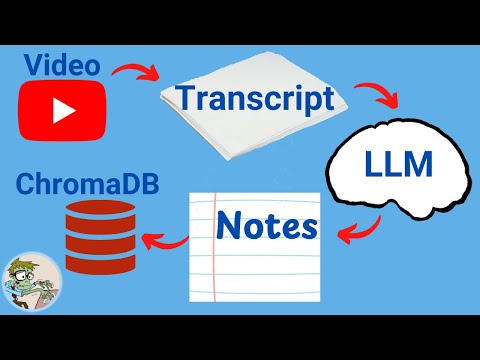
Do you use YouTube for learning? I'll show you how to generate high-quality notes from YouTube videos using just a bit of Python. We’ll extract transcripts from videos and use Google’s Gemini Flash Large Language Model (LLM) to convert them into concise notes. Then, we’ll save these notes in a vector database (ChromaDB) and show you how to use LLM to ask questions on your saved notes.
##### Code Reference:
* [chroma_quickstart.ipynb](https://github.com/johnnycode8/chromadb_quickstart/blob/main/chroma_yt_notes.ipynb)
## Set Up ChromaDB with Docker & Enable Role-Based Token Authentication
I'll guide you through how to set up a ChromaDB instance using Docker Compose, including configuring authentication methods like Token-based and Role-based access control. We’ll start by getting ChromaDB up and running quickly in a Docker container, accessible via an HTTP client without authentication. Then, we'll add token-based authentication for a single admin user, followed by role-based token authentication to support multiple users with different permissions. Additionally, see how to build a custom Docker image to resolve the 'ModuleNotFoundError: No module named hypothesis' error in ChromaDB version 0.5.2 and install additional packages into the container.
##### Code Reference:
* [chroma_docker](https://github.com/johnnycode8/chromadb_quickstart/tree/main/chroma_docker)
## Getting Started with ChromaDB - Multimodal (Image) Semantic Search
I’ll show you how to build a multimodal vector database using Python and the ChromaDB library. We’ll start by setting up an Anaconda environment, installing the necessary packages, creating a vector database, and adding images to it. I’ll guide you through querying the database with text to retrieve matching images and demonstrate how to use the 'Where' metadata filter to refine your search results.

##### Code Reference:
* [chroma_multimodal.ipynb](https://github.com/johnnycode8/chromadb_quickstart/blob/main/chroma_multimodal.ipynb)
## How to Use CUDA and Multiprocessing to Add Records/Embeddings Faster in ChromaDB
I'll show you how I was able to vectorize 33,000 embeddings in about 3 minutes using Python's Multiprocessing capability and my GPU (CUDA). The key is to split the work into two processes: a producer that reads data and puts it into a queue, and a consumer that pulls data from the queue and vectorizes it using a local model. I tested this on the entire Game of Thrones script, and the results show that using a GPU significantly speeds up the process compared to using the CPU. Give it a try and let me know how it goes for you!

##### Code Reference:
* [chroma_fast_vectorize.py](https://github.com/johnnycode8/chromadb_quickstart/blob/main/chroma_fast_vectorize.py)
* [chroma_fast_vectorize_qa.ipynb](https://github.com/johnnycode8/chromadb_quickstart/blob/main/chroma_fast_vectorize_qa.ipynb)
## How to Use Gemini Pro to Generate Smarter Vector Embeddings for ChromaDB
I’ll show you how to easily upgrade your semantic searches by swapping out the default ChromaDB model for the Gemini Pro embedding model. With just a few lines of code, you can enhance your search results using one of the best language models available.
##### Code Reference:
* [chroma_gemini_embed.ipynb](https://github.com/johnnycode8/chromadb_quickstart/blob/main/chroma_gemini_embed.ipynb)
## How to Work With and Persist ChromaDB Vector Database in Google Colab
I'll show you how to build a cooking recipe database using ChromaDB and persist the vector database in Google Colab and Google Drive. I first extracted recipes from YouTube cooking videos using Gemini Pro and then stored them in ChromaDB. You can then search for recipes and find the ones that are most relevant to your query! This is part of my Recipe Database tutorial series at [RecipeDB Repo](https://github.com/johnnycode8/recipedb).
