https://github.com/johnnyperdomo/breakpoint
iOS text-based Social Media app written in Swift 4 using Firebase
https://github.com/johnnyperdomo/breakpoint
chat firebase ios social-media swift-4
Last synced: about 2 months ago
JSON representation
iOS text-based Social Media app written in Swift 4 using Firebase
- Host: GitHub
- URL: https://github.com/johnnyperdomo/breakpoint
- Owner: johnnyperdomo
- License: mit
- Created: 2018-04-07T17:25:32.000Z (about 8 years ago)
- Default Branch: master
- Last Pushed: 2020-04-13T16:28:45.000Z (about 6 years ago)
- Last Synced: 2025-03-02T18:50:50.170Z (over 1 year ago)
- Topics: chat, firebase, ios, social-media, swift-4
- Language: Swift
- Homepage:
- Size: 27.5 MB
- Stars: 1
- Watchers: 1
- Forks: 1
- Open Issues: 0
-
Metadata Files:
- Readme: README.md
- License: LICENSE
Awesome Lists containing this project
README
# BreakPoint
iOS text-based Social Media app written in Swift 4 using Firebase
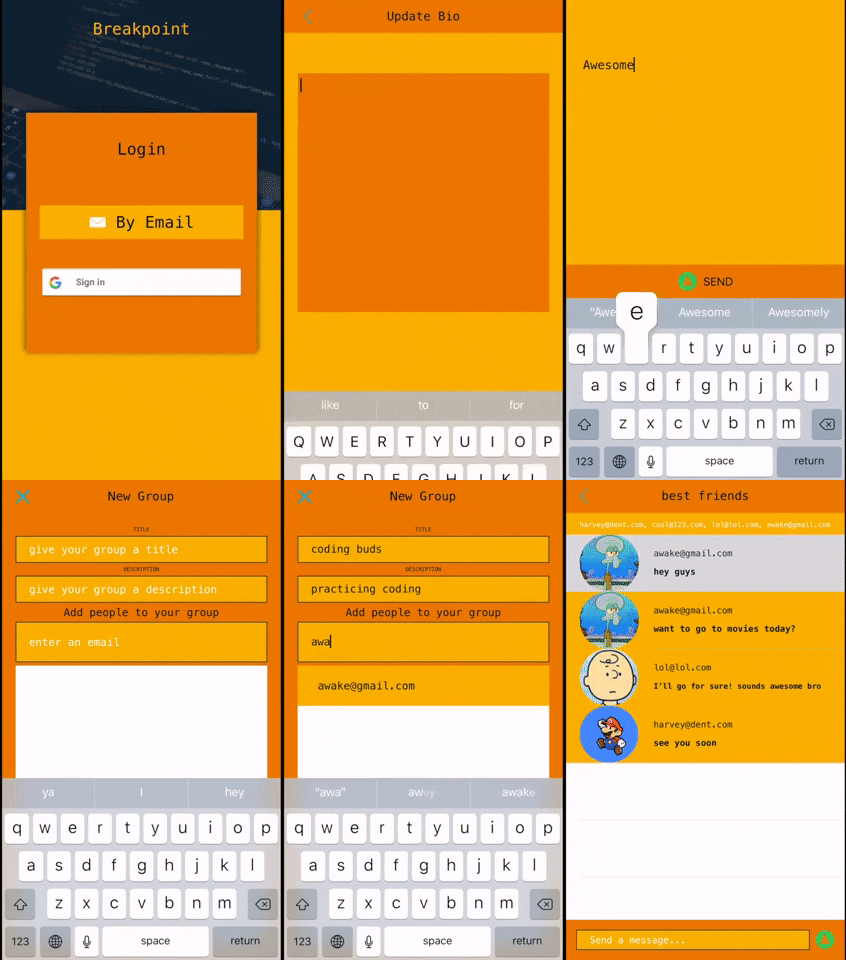
## Preview
**Built with**
- Ios 11.3
- Xcode 9.4
## Features
- **Post text that is instantly sent to ```Realtime Database``` and received instantly to chat with friends in real time.**
- **Create private Groups, and group messages**
- **Add a profile image using ```Firebase Storage```**
```swift
let picker = UIImagePickerController()
```
- **Create a custom user biography**
- **Login using ```GoogleSign``` or ```Email```**
- **Logout with ```UIAlertAction```**
## Requirements
```swift
import Firebase
import FirebaseStorage
import GoogleSignIn
```
**_Pod Files_**
```swift
pod 'Firebase/Core'
pod 'Firebase/Database'
pod 'Firebase/Auth'
pod 'GoogleSignIn'
pod 'Firebase/Storage'
```
## Documentation
- [Firebase Setup](https://firebase.google.com/docs/ios/setup)
- [Authentication](https://firebase.google.com/docs/auth/ios/start)
- [Google Sign In](https://firebase.google.com/docs/auth/ios/google-signin)
- [Realtime Database](https://firebase.google.com/docs/database/ios/start)
- [Storage](https://firebase.google.com/docs/storage/ios/start)
## Project Configuration
You'll have to configure your Xcode project in order to run the samples.
1. Your Xcode project should contain a ```GoogleService-Info.plist```, downloaded from ```Firebase console``` when you add your app to a Firebase project.
2. Update URL Types.
Go to ```Project Settings -> Info tab -> Url Types``` and update values for:
```REVERSED_CLIENT_ID``` (get value from ```GoogleService-Info.plist```)
3. Configure your Firebase App Database using Firebase console.
Database should contain appropriate read/write permissions and folders.
4. Enable Sign-In Providers to allow Sign-In Methods
```Firebase console -> Project Name -> Develop -> Authentication -> Sign-in method```
Enable: ```Email & Google```
### Credits
Devslopes Firebase Tuts
## License
Standard MIT [License](https://github.com/johnnyperdomo/BreakPoint/blob/master/LICENSE)