https://github.com/johnnyperdomo/uber
iOS Ride-Sharing App written in Swift 4 Using Map Kit and Core Data
https://github.com/johnnyperdomo/uber
coredata ios mapkit ridesharing swift-4 uber
Last synced: about 1 year ago
JSON representation
iOS Ride-Sharing App written in Swift 4 Using Map Kit and Core Data
- Host: GitHub
- URL: https://github.com/johnnyperdomo/uber
- Owner: johnnyperdomo
- License: mit
- Created: 2018-06-25T02:10:02.000Z (almost 8 years ago)
- Default Branch: master
- Last Pushed: 2020-03-27T19:05:01.000Z (about 6 years ago)
- Last Synced: 2025-03-07T10:26:35.022Z (over 1 year ago)
- Topics: coredata, ios, mapkit, ridesharing, swift-4, uber
- Language: Swift
- Homepage:
- Size: 3.83 MB
- Stars: 37
- Watchers: 6
- Forks: 24
- Open Issues: 0
-
Metadata Files:
- Readme: README.md
- License: LICENSE
Awesome Lists containing this project
README
# Uber
iOS Ride-Sharing App written in Swift 4 Using Map Kit and Core Data
## Preview
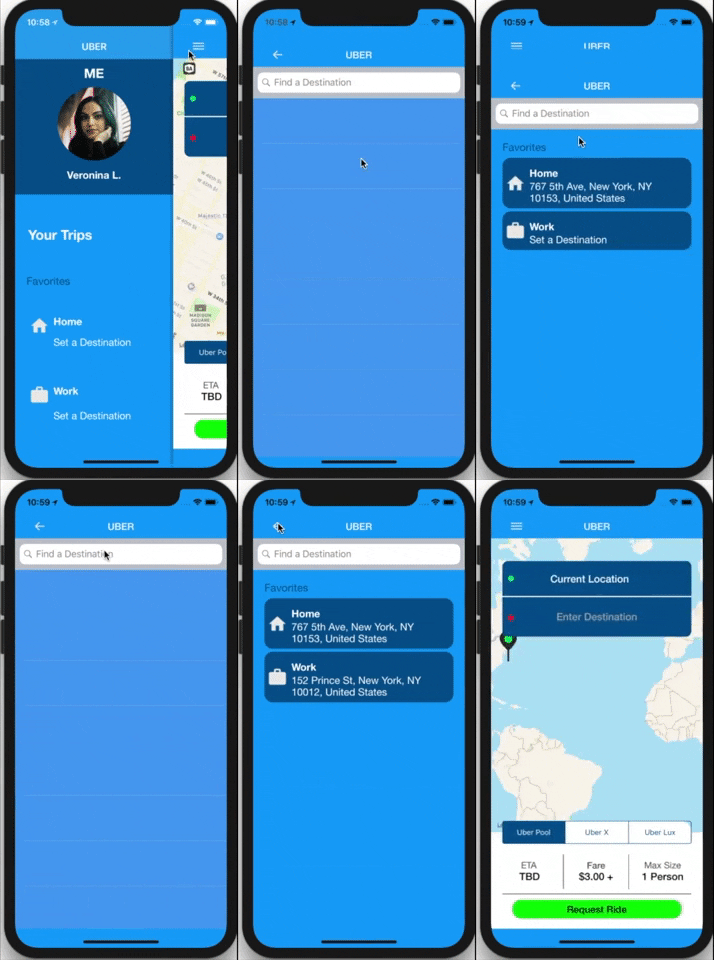 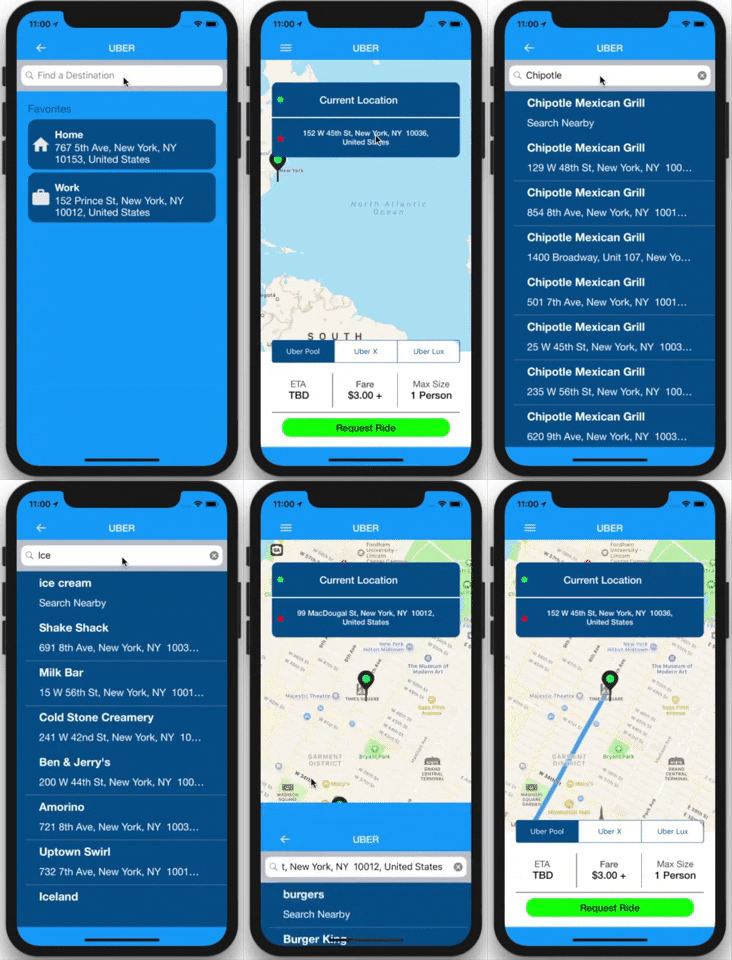 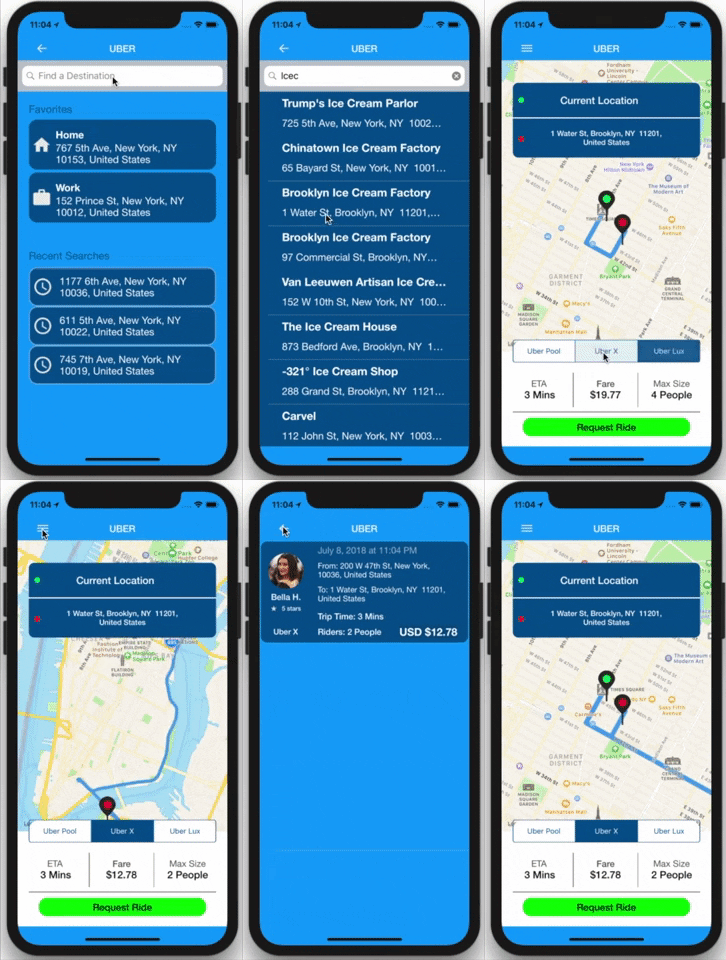
**Built with**
- Ios 11.4
- Xcode 9.4
## Features
- **Pick a Destination with a ```UISearchBar```**
- **Find locations near your area by using ```MKLocalSearchCompleter```**
```swift
var searchCompleter = MKLocalSearchCompleter()
var searchResults = [MKLocalSearchCompletion]()
...
func completerDidUpdateResults(_ completer: MKLocalSearchCompleter) {
searchResults = completer.results
searchTableView.reloadData()
}
```
- **Save and fetch user data using ```Core Data```**
- **Fully customizable Side Menu by [jonkykong](https://github.com/jonkykong/SideMenu)**
- **Set personal favorite locations**
- **See recently searched locations for reusable access**
- **Track current location using ```CLLocationManager()```**
- **See route of picked destination from current location using ```MKOverlay```**
```swift
let directionRequest = MKDirectionsRequest()
directionRequest.source = sourceMapItem //current location
directionRequest.destination = destinationMapItem //destination
...
let directions = MKDirections(request: directionRequest)
directions.calculate { () }
...
self.mapKitView.add(route.polyline, level: MKOverlayLevel.aboveRoads)
```
- **Convert Street names into map Coordinates and vice versa**
```swift
let geoCoder = CLGeocoder()
geoCoder.geocodeAddressString(location) //convert street names into coordinates
geoCoder.reverseGeocodeLocation(location) //convert coordinates into street names
```
- **Pick different type of uber using ```UISegmentedControl()```**
- **Simulate a ride with trip details and driver information**
- **Formated date to show when a ride took place**
```swift
let date = Date()
let formatter = DateFormatter()
//Saturday, July 8, 2018, 3:18 PM
```
- **See recent trip details in a ```TableView Cell```**
## Requirements
```swift
import CoreData
import MapKit
import SideMenu // project library used to implement a customized side menu
```
**_Pod Files_**
```swift
pod 'SideMenu'
```
[Side Menu Library by jonkykong](https://github.com/jonkykong/SideMenu)
## Project Configuration
You'll have to configure your Xcode project in order to track user Location with ```Map Kit```.
_Your Xcode project should contain an ```Info.plist``` file._
1. In Info.plist, open Information Property List.
2. Hover your cursor over the up-down arrows, or click on any item in the list,
to display the + and – symbols, then click the + symbol to create a new item.
3. Scroll down to select Privacy – Location When In Use Usage Description, then set its Value to something like:
> To show you cool things nearby
## License
Standard MIT [License](https://github.com/johnnyperdomo/Uber/blob/master/LICENSE)