https://github.com/jolicode/monologue
A bot to manage "monologue" rule in a Slack Channel
https://github.com/jolicode/monologue
bot php slack symfony
Last synced: about 1 year ago
JSON representation
A bot to manage "monologue" rule in a Slack Channel
- Host: GitHub
- URL: https://github.com/jolicode/monologue
- Owner: jolicode
- License: mit
- Created: 2022-11-16T10:54:20.000Z (over 3 years ago)
- Default Branch: main
- Last Pushed: 2025-06-04T12:04:48.000Z (about 1 year ago)
- Last Synced: 2025-06-07T00:09:38.675Z (about 1 year ago)
- Topics: bot, php, slack, symfony
- Language: PHP
- Homepage:
- Size: 477 KB
- Stars: 10
- Watchers: 12
- Forks: 1
- Open Issues: 1
-
Metadata Files:
- Readme: README.md
- Contributing: CONTRIBUTING.md
- License: LICENSE
- Code of conduct: CODE_OF_CONDUCT.md
Awesome Lists containing this project
README
# Monologue Bot
At [JoliCode](https://jolicode.com/) we use [Slack](https://slack.com/) to
communicate. And to bring fun to our daily life, we created a *#monologue* channel
where we can share our thoughts, our feelings, our dreams, our fears, our jokes,
our memes, our pictures, our videos, our music, our links, our code, our life.
But we have a special rule in this channel.
> Only **one person can use this channel per day**. The others cannot: no
> message, no reaction, no changing the topic, no message deleting, no poll. The
> pledge is to offer breakfast 🍪🍩🥐.
This bot is here to help us to respect this rule. It will post a message in the
channel as soon as someone breaks the rule!
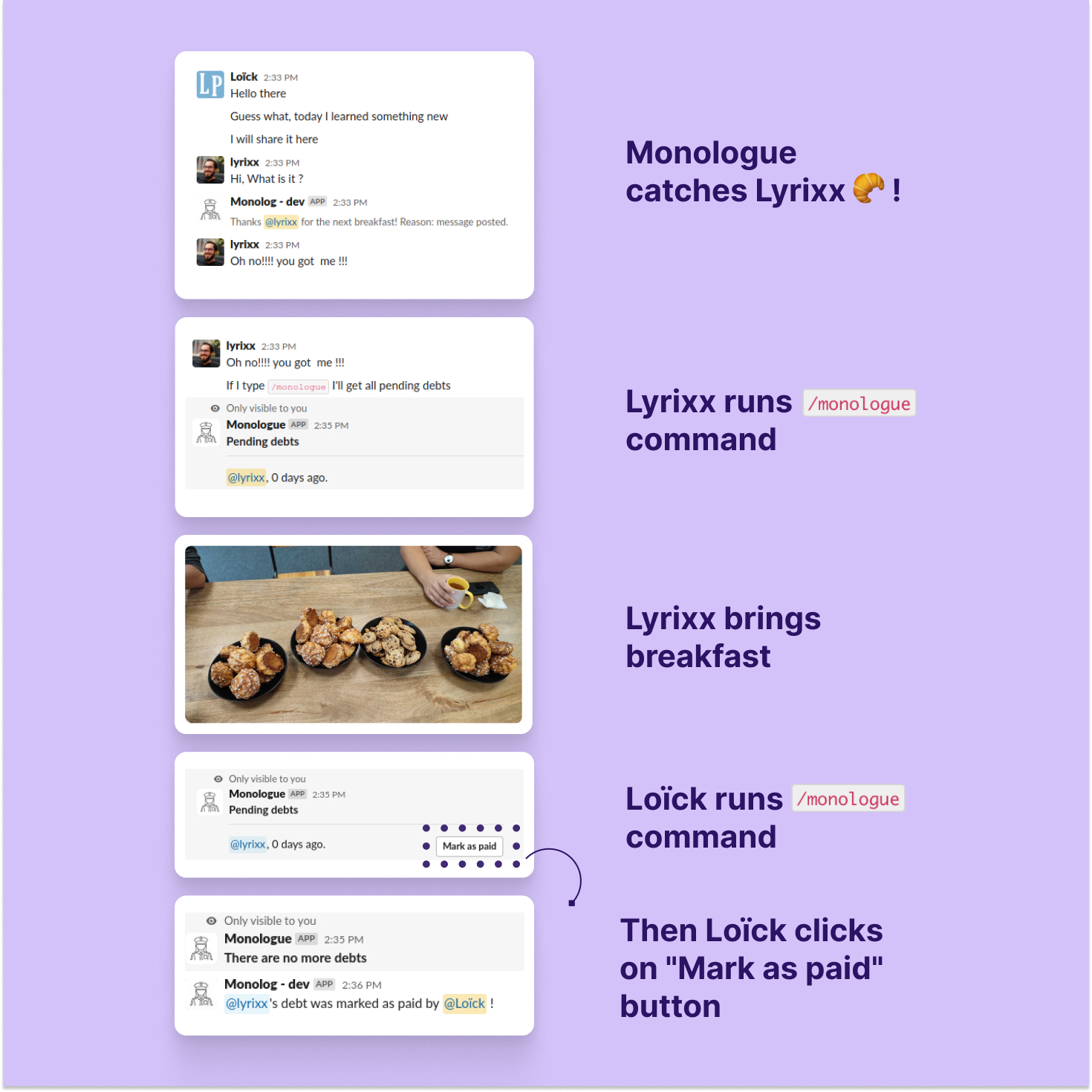
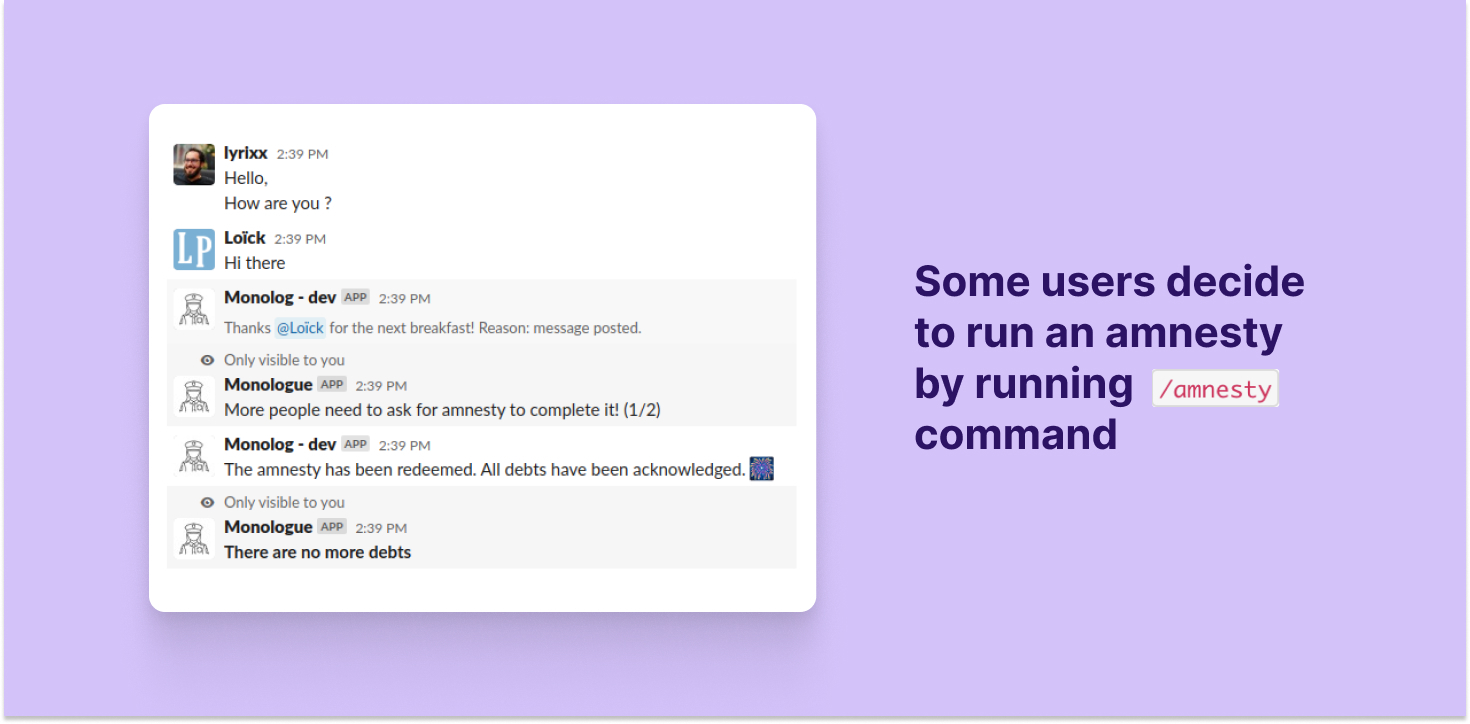
If you want to get more information, you can read the [announce of the release](https://jolicode.com/blog/we-are-open-sourcing-a-silly-slack-bot-guess-what-it-does).
## Installation
### Configure the Slack Application
We provide a app manifest to help you to create the Slack application. You can
load the file in `doc/slack.yaml` when adding a new application in your
workspace. Don't forget to replace all callback URLs!
Otherwise, you can follow the steps below:
* In "Basic Infirmation"
* Copy the `Signin secret` to the `.env.local` file, `SLACK_SIGNING_SECRET`
key
* Set permission on bot (in "OAuth & Permissions")
* `commands`
* `channels:history`
* `chat:write`
* Invite the bot/apps in your channel
* In "Interactivity & Shortcuts"
* Enable interactivity
* Add this URL: `https://example.com/action`
* Slack command
* Command: `/monologue` (or whatever you like)
* Request URL: `https://example.com/command/list`
* Short Description: `List all debts`
* Command: `/amnesty` (or whatever you like)
* Request URL: `https://example.com/command/amnesty`
* Short Description: `Ask for a general amnesty`
* Event Subscription
* Enable events
* URL: `https://example.com/message`
* Events:
* `message.channels`
* `reaction_added`
* In "Install App":
* install the application
* Copy the `Bot User OAuth Token` to the `.env.local` file, `SLACK_TOKEN`
key
* From somewhere (this information is always hard to find)
* Copy the channel ID (where you'll invite the bot) to the `.env.local`
file, `SLACK_CHANNEL` key
### Install the PHP application
This project uses [castor](https://github.com/jolicode/castor) to manage common
tasks. It's not mandatory but it's easier with it.
# configure remaining parameters in .env.local
castor start
## Test
castor qa:all
## Usage
In slack you have two commands
* `/monologue` to list all the debts;
* `/amnesty` to ask for a general amnesty.
## Credits
Thanks JoliCode for sponsoring this project.