https://github.com/jonashackt/plantuml-markdown
Example project showing how to use PlantUML and embed UML diagrams into a GitHub markdown
https://github.com/jonashackt/plantuml-markdown
Last synced: over 1 year ago
JSON representation
Example project showing how to use PlantUML and embed UML diagrams into a GitHub markdown
- Host: GitHub
- URL: https://github.com/jonashackt/plantuml-markdown
- Owner: jonashackt
- License: mit
- Created: 2019-10-22T06:16:37.000Z (almost 7 years ago)
- Default Branch: master
- Last Pushed: 2020-02-24T14:22:54.000Z (over 6 years ago)
- Last Synced: 2025-02-13T14:24:08.214Z (over 1 year ago)
- Size: 2.93 KB
- Stars: 98
- Watchers: 3
- Forks: 93
- Open Issues: 0
-
Metadata Files:
- Readme: README.md
- License: LICENSE
Awesome Lists containing this project
README
# plantuml-markdown
Example project showing how to use PlantUML and embed UML diagrams into a GitHub markdown
Often the need arises how to create and share UML diagrams for architecture documentation without pain-in-the-**** tools like MS Visio.
After some research, I found [this great post about PlantUML](https://blog.anoff.io/2018-07-31-diagrams-with-plantuml/). There are simply 2 components you need:
1. A PlantUML editor - simply use [http://www.plantuml.com/plantuml/uml/](http://www.plantuml.com/plantuml/uml/) (or host your own on-premise with the [plantUML Docker image](https://hub.docker.com/r/plantuml/plantuml-server/))
2. Integrate PlantUML render engine with GitHub `README.md` markdown
### 1. A PlantUML editor
Visit the online editor [http://www.plantuml.com/plantuml/uml/](http://www.plantuml.com/plantuml/uml/) and write your UML diagram with code & use a cheat sheet like this: https://ogom.github.io/draw_uml/plantuml/
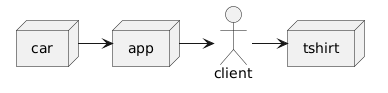
This project contains an example [example-uml.iuml](example-uml.iuml):
```
@startuml
actor client
node app
node car
node tshirt
car -> app
app -> client
client -> tshirt
@enduml
```
There's also [an IntelliJ plugin for PlantUML](https://plugins.jetbrains.com/plugin/7017-plantuml-integration/).
### 2. Integrate PlantUML render engine with GitHub markdown
This part is simple, yet effective :) Simply use the PlantUML proxy `http://www.plantuml.com/plantuml/proxy` to render your `*.iuml` files and embed them like images:
```
```
Use the `RAW` version of your `*.iuml` files like that: [https://raw.githubusercontent.com/jonashackt/plantuml-markdown/master/example-uml.iuml](https://raw.githubusercontent.com/jonashackt/plantuml-markdown/master/example-uml.iuml) and prefix it with `src=`.
Also you should use the `cache=no` option so that GitHub always renders the currently committed version of your PlantUML `*.iuml` files.
That's all - simply see the diagram live:
