https://github.com/jonathanmonga/flutter_colorize
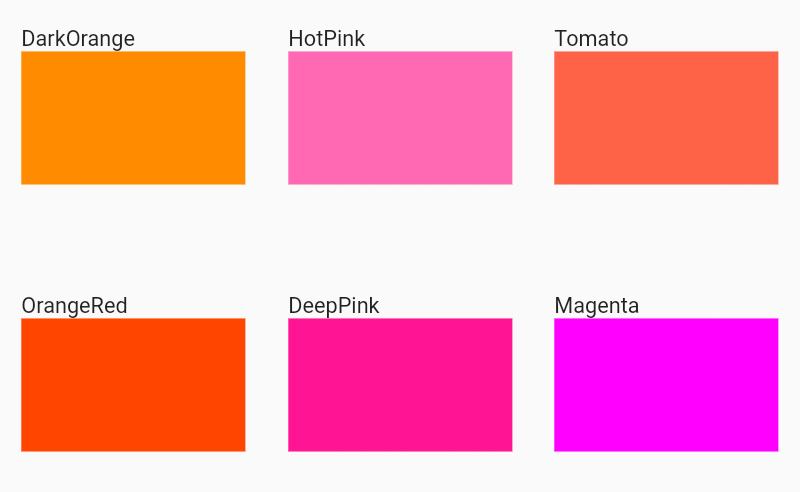
Collection of 1000 + pre-loaded colors for Flutter.
https://github.com/jonathanmonga/flutter_colorize
color dart flutter made-in-drc plugin widget
Last synced: 8 months ago
JSON representation
Collection of 1000 + pre-loaded colors for Flutter.
- Host: GitHub
- URL: https://github.com/jonathanmonga/flutter_colorize
- Owner: JonathanMonga
- License: mit
- Created: 2020-04-08T05:36:06.000Z (about 6 years ago)
- Default Branch: master
- Last Pushed: 2020-04-08T06:03:49.000Z (about 6 years ago)
- Last Synced: 2025-10-23T05:59:40.030Z (8 months ago)
- Topics: color, dart, flutter, made-in-drc, plugin, widget
- Language: Dart
- Homepage: https://pub.dev/packages/flutter_colorize
- Size: 214 KB
- Stars: 12
- Watchers: 1
- Forks: 1
- Open Issues: 0
-
Metadata Files:
- Readme: README.md
- License: LICENSE
Awesome Lists containing this project
README
# Flutter Colorize

Collection of 1000 + pre-loaded colors for Flutter.
[](https://pub.dev/packages/flutter_colorize)
[](https://travis-ci.org/JonathanMonga/flutter_colorize)
### Show some :heart: and star the repo to support the project
[](https://github.com/JonathanMonga/flutter_colorize) [](https://github.com/JonathanMonga/flutter_colorize/fork) [](https://github.com/JonathanMonga/flutter_colorize) [](https://github.com/JonathanMonga)
[](https://twitter.com/jonathan_monga)
## Installation
Add the Package
```yaml
dependencies:
flutter_colorize: ^1.0.0+1
```
# Usage
### Import the package
```dart
import 'package:flutter_colorize/flutter_colorize.dart';
```
## Overview
## How To Use
Very easy to use this library, find the color and use it.
```dart
Container(
color : FlutterColorize.fcZomp,
);
```
## Examples
Web and command-line examples can be found in the `example` folder.
### Web Examples
In order to run the web examples, please follow these steps:
1. Clone this repo and enter the directory
2. Run `pub get`
3. Run `pub run build_runner serve example`
4. Navigate to [http://localhost:8080/web/](http://localhost:8080/web/) in your browser
### Command Line Examples
In order to run the command line example, please follow these steps:
1. Clone this repo and enter the directory
2. Run `pub get`
3. Run `dart example/lib/main.dart`
### Flutter Example
#### Install Flutter
In order to run the flutter example, you must have Flutter installed. For installation instructions, view the online
[documentation](https://flutter.io/).
#### Run the app
1. Open up an Android Emulator, the iOS Simulator, or connect an appropriate mobile device for debugging.
2. Open up a terminal
3. `cd` into the `example/lib/` directory
4. Run `flutter doctor` to ensure you have all Flutter dependencies working.
5. Run `flutter packages get`
6. Run `flutter run`
## Thanks
- Image from : [Joe Theodore](https://unsplash.com/@joetheodore)
# License
MIT License
Copyright (c) 2020 Jonathan Monga
Permission is hereby granted, free of charge, to any person obtaining a copy
of this software and associated documentation files (the "Software"), to deal
in the Software without restriction, including without limitation the rights
to use, copy, modify, merge, publish, distribute, sublicense, and/or sell
copies of the Software, and to permit persons to whom the Software is
furnished to do so, subject to the following conditions:
The above copyright notice and this permission notice shall be included in all
copies or substantial portions of the Software.
THE SOFTWARE IS PROVIDED "AS IS", WITHOUT WARRANTY OF ANY KIND, EXPRESS OR
IMPLIED, INCLUDING BUT NOT LIMITED TO THE WARRANTIES OF MERCHANTABILITY,
FITNESS FOR A PARTICULAR PURPOSE AND NONINFRINGEMENT. IN NO EVENT SHALL THE
AUTHORS OR COPYRIGHT HOLDERS BE LIABLE FOR ANY CLAIM, DAMAGES OR OTHER
LIABILITY, WHETHER IN AN ACTION OF CONTRACT, TORT OR OTHERWISE, ARISING FROM,
OUT OF OR IN CONNECTION WITH THE SOFTWARE OR THE USE OR OTHER DEALINGS IN THE
SOFTWARE.