https://github.com/jonathanmonga/flutter_trianglify
Flutter library to generate beautiful triangle art views for android and ios.
https://github.com/jonathanmonga/flutter_trianglify
dart flutter trianglify widget
Last synced: 4 months ago
JSON representation
Flutter library to generate beautiful triangle art views for android and ios.
- Host: GitHub
- URL: https://github.com/jonathanmonga/flutter_trianglify
- Owner: JonathanMonga
- License: bsd-2-clause
- Created: 2019-11-29T17:53:34.000Z (over 6 years ago)
- Default Branch: master
- Last Pushed: 2019-12-24T13:47:09.000Z (over 6 years ago)
- Last Synced: 2025-10-23T06:04:14.143Z (8 months ago)
- Topics: dart, flutter, trianglify, widget
- Language: Dart
- Homepage:
- Size: 191 KB
- Stars: 33
- Watchers: 4
- Forks: 4
- Open Issues: 0
-
Metadata Files:
- Readme: README.md
- License: LICENSE
Awesome Lists containing this project
README
# Trianglify for Flutter
[](https://travis-ci.org/JonathanMonga/flutter_trianglify)
Flutter widget inspired by http://qrohlf.com/trianglify/
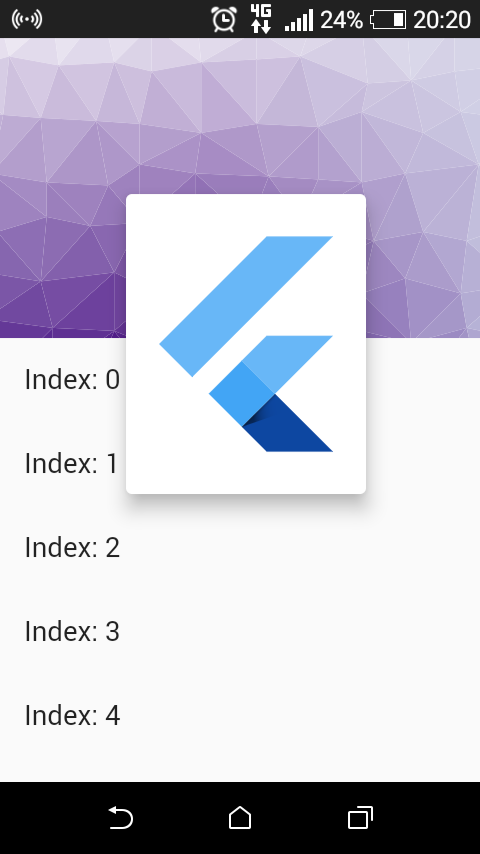
## Installation
[](https://pub.dev/packages/flutter_trianglify)
Add the Package
```yaml
dependencies:
flutter_trianglify: ^0.0.8
```
# Usage
Cell size, variance, bleeds, color generator can be initialized from Widget:
```dart
Trianglify(
bleedX: 0,
bleedY: 10,
cellSize: 35,
gridWidth: MediaQuery.of(context).size.width + (200 * scaleFactor),
gridHeight: 400 * scaleFactor,
isDrawStroke: true,
isFillTriangle: true,
isFillViewCompletely: false,
isRandomColoring: false,
generateOnlyColor: false,
typeGrid: Trianglify.GRID_RECTANGLE,
variance: 20,
palette: Palette.getPalette(Palette.BLUES),
)
```
## Examples
Web and command-line examples can be found in the `example` folder.
### Web Examples
In order to run the web examples, please follow these steps:
1. Clone this repo and enter the directory
2. Run `pub get`
3. Run `pub run build_runner serve example`
4. Navigate to [http://localhost:8080/web/](http://localhost:8080/web/) in your browser
### Command Line Examples
In order to run the command line example, please follow these steps:
1. Clone this repo and enter the directory
2. Run `pub get`
3. Run `dart example/lib/trianglify_example.dart`
### Flutter Example
#### Install Flutter
In order to run the flutter example, you must have Flutter installed. For installation instructions, view the online
[documentation](https://flutter.io/).
#### Run the app
1. Open up an Android Emulator, the iOS Simulator, or connect an appropriate mobile device for debugging.
2. Open up a terminal
3. `cd` into the `example/lib/trianglify_example` directory
4. Run `flutter doctor` to ensure you have all Flutter dependencies working.
5. Run `flutter packages get`
6. Run `flutter run`
# License
BSD 2-Clause License
Copyright (c) 2019, Jonathan Monga
All rights reserved.
Redistribution and use in source and binary forms, with or without
modification, are permitted provided that the following conditions are met:
1. Redistributions of source code must retain the above copyright notice, this
list of conditions and the following disclaimer.
2. Redistributions in binary form must reproduce the above copyright notice,
this list of conditions and the following disclaimer in the documentation
and/or other materials provided with the distribution.
THIS SOFTWARE IS PROVIDED BY THE COPYRIGHT HOLDERS AND CONTRIBUTORS "AS IS"
AND ANY EXPRESS OR IMPLIED WARRANTIES, INCLUDING, BUT NOT LIMITED TO, THE
IMPLIED WARRANTIES OF MERCHANTABILITY AND FITNESS FOR A PARTICULAR PURPOSE ARE
DISCLAIMED. IN NO EVENT SHALL THE COPYRIGHT HOLDER OR CONTRIBUTORS BE LIABLE
FOR ANY DIRECT, INDIRECT, INCIDENTAL, SPECIAL, EXEMPLARY, OR CONSEQUENTIAL
DAMAGES (INCLUDING, BUT NOT LIMITED TO, PROCUREMENT OF SUBSTITUTE GOODS OR
SERVICES; LOSS OF USE, DATA, OR PROFITS; OR BUSINESS INTERRUPTION) HOWEVER
CAUSED AND ON ANY THEORY OF LIABILITY, WHETHER IN CONTRACT, STRICT LIABILITY,
OR TORT (INCLUDING NEGLIGENCE OR OTHERWISE) ARISING IN ANY WAY OUT OF THE USE
OF THIS SOFTWARE, EVEN IF ADVISED OF THE POSSIBILITY OF SUCH DAMAGE.