https://github.com/jonelo/jacksum
A hash utility, est. 2002, FLOSS. 489 hash functions, HMAC support, cross platform, feature-rich, multi threaded. CLI and API. Recursive hashing, predefined and customizable formats, verify data integrity and find ok/failed/missing/new files, find files by their hashes, find the hash function to a hash. GUI provided by HashGarten.
https://github.com/jonelo/jacksum
checksums crc crc-finder hash hash-finder hash-functions hashing-algorithms hmac integrity-checker integrity-tool jacksum java linux macos message-digest multi-threading sha256 sha3 skein windows
Last synced: 11 months ago
JSON representation
A hash utility, est. 2002, FLOSS. 489 hash functions, HMAC support, cross platform, feature-rich, multi threaded. CLI and API. Recursive hashing, predefined and customizable formats, verify data integrity and find ok/failed/missing/new files, find files by their hashes, find the hash function to a hash. GUI provided by HashGarten.
- Host: GitHub
- URL: https://github.com/jonelo/jacksum
- Owner: jonelo
- License: gpl-3.0
- Created: 2021-09-02T22:19:35.000Z (almost 5 years ago)
- Default Branch: main
- Last Pushed: 2024-12-01T18:15:25.000Z (over 1 year ago)
- Last Synced: 2024-12-10T12:38:06.361Z (over 1 year ago)
- Topics: checksums, crc, crc-finder, hash, hash-finder, hash-functions, hashing-algorithms, hmac, integrity-checker, integrity-tool, jacksum, java, linux, macos, message-digest, multi-threading, sha256, sha3, skein, windows
- Language: Java
- Homepage: https://jacksum.net
- Size: 2.92 MB
- Stars: 44
- Watchers: 3
- Forks: 5
- Open Issues: 4
-
Metadata Files:
- Readme: README.md
- License: LICENSE
- Code of conduct: CODE_OF_CONDUCT.md
Awesome Lists containing this project
README







# Jacksum

**Jacksum** (**JAva ChecKSUM**) is a free, open source, cross-platform,
feature-rich, multi-threaded, command line utility that makes hash
functions available to you to solve particular tasks the smart way.
Jacksum covers many types of use cases in which hash values make sense:
- Calculating of hash values/fingerprints of almost any input
(command line arg, console, standard input, plain or encoded strings,
files, partitions, disks, NTFS ADS, pipes, sockets, doors, ...)
- Finding OK/failed/missing/new files (verify file/data integrity)
- Finding files by their fingerprints for positive matching
- Finding files that do not match certain fingerprints for negative matching
- Finding all duplicates of a file by its hash value
- Finding the algorithm(s) that generated a certain hash value
- Investigate polynomials of CRCs
- Investigate parameters of HMACs
In order to achieve the goals above Jacksum supports you with
- cross-platform executability
- Recursive traversal with depth control, policies to follow symbolic
links on files and/or folders, and file system cycle detection
- Multi-threading across platforms for parallel hash calculations and
data reads in order to take advantage of multi-core processors and
fast SSD storage
- 489 standard hash functions
- HMAC support for 414 hash functions
- 60+ command line options to control Jacksum's behavior
- Customizable CRCs from 1 to 64 bit width
- 15 different encodings for representing hash values
- 10 predefined standard styles for reading and writing files that
contain hash values
- Fully customizable output format
- 170+ different character sets to be able to read and write hash files
correctly
- 9200+ lines of with descriptions, examples, and compatibility
lists for all supported algorithms
Jacksum is also a library. You can use it for your projects. It is written entirely in **Java** ☕.
## Audience
Jacksum is for users with security in mind, advanced users, sysadmins, students of informatics, computer scientists, cybersecurity engineers, forensics engineers, penetration testers, white hat hackers, reverse engineers, CRC researchers, etc. Jacksum is for professionals, but since HashGarten bundles the Jacksum library, Jacksum is available even to users who don't even know how to open a terminal.
## System Requirements
- GNU/Linux, Microsoft Windows, or macOS
- JDK 11 or later
- 2 MiB disk space
Details ...
- To download the (Open)JDK 11 or later, you can go to any vendor that provides OpenJDK compatible builds, LTS (long term support) releases are recommended, examples are
- https://adoptium.net
- https://openjdk.java.net
- https://www.azul.com/downloads/?package=jdk
- https://bell-sw.com/pages/downloads/
- https://www.microsoft.com/openjdk/
- https://aws.amazon.com/de/corretto/
- https://sapmachine.io
- https://github.com/alibaba/dragonwell8
- Supported architectures are dependent on the OS and the JDK vendor:
- x86 64 bit (x64)
- x86 32 bit (x86)
- ARM 64 bit (AArch64, resp. Apple silicon)
- ARM 32 bit (AArch32)
- PPC 64 bit (ppc64)
- a GitHub user have had success to run Jacksum without modification even on a smartphone running Android on ARM 64 bit, see also https://github.com/jonelo/jacksum/issues/7
- GNU/Linux is the correct term to refer to "Linux", see also https://www.gnu.org/gnu/linux-and-gnu.en.html
- actual RAM requirement is dependent on the OS, the architecture, the JDK, the JRE's (default) garbage collector settings and usage. Tests have shown that Jacksum feels pretty comfortable with 512 MiB Java heap on a x64 Windows 10 system for example while verifying millions of files of all sizes (0 bytes to several GiB).
## Features
Go to [Features of Jacksum](https://github.com/jonelo/jacksum/wiki/Features).
## Algorithm Support
Jacksum supports **489 hash functions**, both cryptographic and non-cryptographic hash function sets, including CRCs and classic checksums.
Adler-32, ascon-hash, ascon-hasha, ascon-xof, ascon-xofa, AST strsum PRNG hash, BLAKE-[224,256,348,512], BLAKE2b-[8..512], BLAKE2s-[8..256], BLAKE2bp, BLAKE2sp, BLAKE3, cksum (Minix), cksum (Unix), CRC-8 (FLAC), CRC-16 (LHA/ARC), CRC-16 (Minix), FCS-16, CRC-24 (OpenPGP), CRC-32 (FCS-32), CRC-32 (MPEG-2), CRC-32 (bzip2), CRC-32 (FDDI), CRC-32 (UBICRC32), CRC-32 (PHP's crc32), CRC-64 (ISO 3309), CRC-64 (ECMA-182), CRC-64 (prog lang GO, const ISO), CRC-64 (.xz and prog lang GO, const ECMA), CRC-82/DARC, DHA-256, ECHO-[224,256,348,512], ed2k, ELF (Unix), esch256, esch384, Fletcher's Checksum, FNV-0_[32,64,128,256,512,1024], FNV-1_[32,64,128,256,512,1024], FNV-1a_[32,64,128,256,512,1024], FORK-256, Fugue-[224,256,348,512], GOST Crypto-Pro (GOST R 34.11-94), GOST R 34.11-94, Groestl-[224,256,384,512], HAS-160 (KISA), HAVAL-128-[3,4,5], HAVAL-[160,192,224,256]-[3,4,5], JH[224,256,284,512], joaat, KangarooTwelve, Keccak[224,256,384,512], Kupyna[256,384,512] (DSTU 7564:2014), LSH-256-[224,256], LSH-512-[224,256,384,512] (KS X 3262), Luffa-[224,256,348,512], MD2, MD4, MD5, MDC2, MarsupilamiFourteen, PANAMA, PRNG hash, RIPEMD-128, RIPEMD[160,256,320], RadioGatun[32,64], SHA-0, SHA-1, SHA-[224,256,384,512], SHA-512/[224,256] (NIST FIPS 180-4), SHA3-[224,256,384,512], SHAKE[128,256] (NIST FIPS 202), SM3, Skein-1024-[8..1024], Skein-256-[8..256], Skein-512-[8..512], Streebog-[256,512] (GOST R 34.11-2012), sum (BSD Unix), sum (Minix), sum (System V Unix), sum [8,16,24,32,40,48,56,64], Tiger, Tiger/128, Tiger/160, Tiger2, photon-beetle, PHP Tiger variants (tiger192,4, tiger160,4, and tiger128,4), VSH-1024, Whirpool-0, Whirlpool-T, Whirlpool, Xoodyak, xor8, and XXH32.
See also [Algorithms of Jacksum](https://github.com/jonelo/jacksum/wiki/Algorithms)
Jacksum supports **HMAC**, a mechanism for message authentication using any iterated cryptographic hash function in combination with a secret shared key.
Jacksum supports the **"Rocksoft (tm) Model CRC Algorithm"** to describe CRCs, so additional 1.0399*10^267 customized CRCs can be used.
## User Interfaces
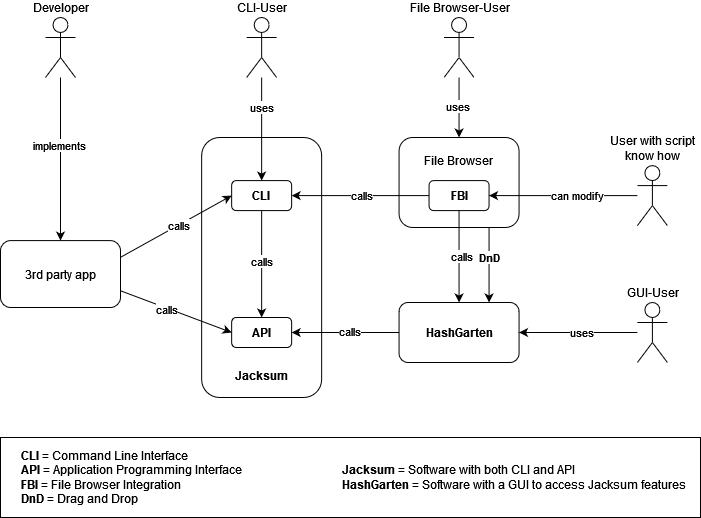
Jacksum provides a Command Line Interface (CLI), an Application Programming Interface (API). A Graphical User Interface (GUI) is provided by HashGarten which is a subproject of the Jacksum project. Also, there are File Browser Integrations (FBI) available.
### Architecture
### Command Line Interface (CLI)
If you are a skilled command line user you will benefit from the power on the command line and you can use Jacksum in scripts, cronjobs, etc. in order to automate file integration/verification tasks for example.
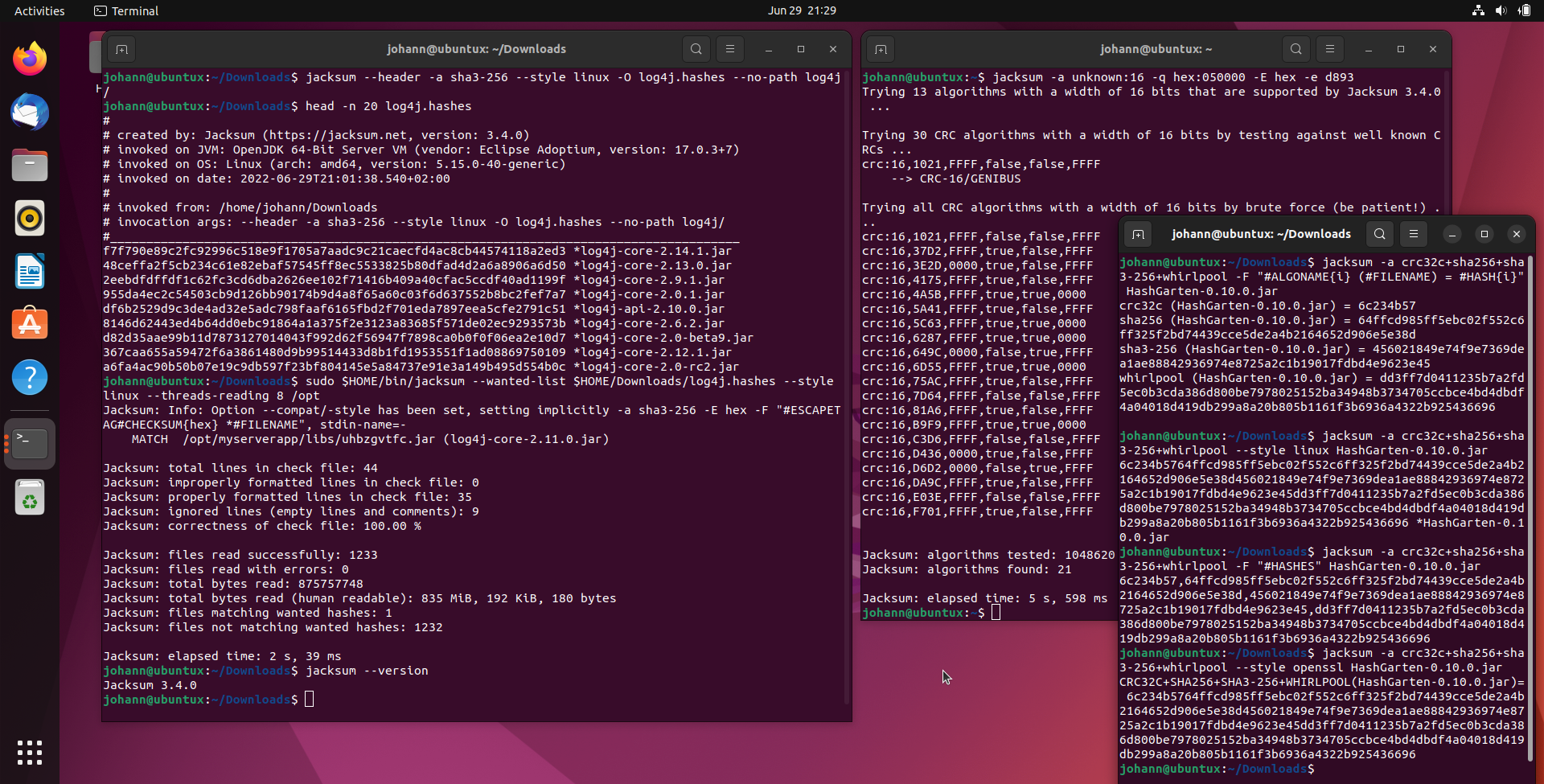
See also the [manual of Jacksum](https://github.com/jonelo/jacksum/wiki/Manpage).
### Graphical User Interface (GUI)
If you prefer a GUI and you just would like to calc and verify hashes with a graphical user interface, I recommend to download and use the Jacksum File Browser Integration (FBI) installer which comes with [HashGarten](https://github.com/jonelo/HashGarten) that is a GUI for Jacksum. HashGarten also runs standalone and it supports Drag and Drop.
### File Browser Integration (FBI)
The File Browser Integration (FBI) installer can integrate both Jacksum and HashGarten into your preferred file browser, such as Finder on macOS, Windows File Explorer on Microsoft Windows, and Caja, Dolphin, elementary Files, GNOME Nautilus, Konqueror, Krusader, muCommander, Nemo, ROX-Filter, SpaceFM, Thunar, Xfe, or zzzFM on GNU/Linux. See also [Integrations](https://github.com/jonelo/jacksum/tree/main?tab=readme-ov-file#integrations).
## Examples
### Calculate and represent hash values
A hash function H maps a bit string m ∈ {0, 1}* of arbitrary length to a bit string h ∈ {0, 1}n of fixed length n ∈ ℕ:
h = H(m)
m is often called the message or data, and dependent on the design, and security strength of the hash function H, h is called the checksum, CRC, hash, hash value, message digest, data's fingerprint, or data's thumbprint.
Calculating hash values is usually the first step you take to be able to check data integrity at all later on.
Jacksum supports not only hundreds of different algorithms for calculating hash values, it also supports many predefined styles and comprehensive formatting features to get the format you need.
Example 1: Default style (is dependent on the algorithm)
$ jacksum -a sha3-256 ubuntu-22.04-desktop-amd64.iso
c5e46426a3ca0ae848d297747ed3846452cc7b33d5b418af961dbd55de8dff43 ubuntu-22.04-desktop-amd64.iso
Example 2: GNU/Linux style
$ jacksum -a sha3-256 --style linux ubuntu-22.04-desktop-amd64.iso
c5e46426a3ca0ae848d297747ed3846452cc7b33d5b418af961dbd55de8dff43 *ubuntu-22.04-desktop-amd64.iso
Example 3: BSD style
$ jacksum -a sha3-256 --style bsd ubuntu-22.04-desktop-amd64.iso
SHA3-256 (ubuntu-22.04-desktop-amd64.iso) = c5e46426a3ca0ae848d297747ed3846452cc7b33d5b418af961dbd55de8dff43
Example 4: OpenSSL style
$ jacksum -a sha3-256 --style openssl ubuntu-22.04-desktop-amd64.iso
SHA3-256(ubuntu-22.04-desktop-amd64.iso)= c5e46426a3ca0ae848d297747ed3846452cc7b33d5b418af961dbd55de8dff43
Example 5: Solaris digest style
$ jacksum -a sha3-256 --style solaris-digest ubuntu-22.04-desktop-amd64.iso
(ubuntu-22.04-desktop-amd64.iso) = c5e46426a3ca0ae848d297747ed3846452cc7b33d5b418af961dbd55de8dff43
Example 6: Customized output, including customized algorithm selection (crc32c, sha-256, and sha3-256), customized hash value encoding (base64, nopadding), and algorithm names in uppercase for all files in the current directory (and below), each hash on a separate line:
$ jacksum -a crc32c+sha-256+sha3-256 -F "#ALGONAME{i,uppercase} (#FILENAME) = #HASH{i,base64-nopadding}" .
CRC32C (./kali-linux-2023.1-installer-amd64.iso) = dUWxuQ
SHA-256 (./kali-linux-2023.1-installer-amd64.iso) = RuBXOaILKdtgyh//LpBoXqYyBxwxSpwkFtfEas7ye/A
SHA3-256 (./kali-linux-2023.1-installer-amd64.iso) = ffPkMr8uVPCO5GIHm8YpAbmaOVeBMaxvdLPI/N4NkbE
CRC32C (./ubuntu-22.04.2-desktop-amd64.iso) = hIXQsw
SHA-256 (./ubuntu-22.04.2-desktop-amd64.iso) = uY2slAqCsRDmJlynjRMg8fcQOGHpIqoaVOQgJobpu9M
SHA3-256 (./ubuntu-22.04.2-desktop-amd64.iso) = bvOhwtwckCQuzgm4LLEJoqPbjcbWSRSuNUOcyY4/1L0
Example 7: Customized output like above, but encoded hash values are separated by comma
$ jacksum -a crc32c+sha-256+sha3-256 -F "#ALGONAMES{uppercase} (#FILENAME) = #HASHES{base64-nopadding}" .
CRC32C,SHA-256,SHA3-256 (./kali-linux-2023.1-installer-amd64.iso) = dUWxuQ,RuBXOaILKdtgyh//LpBoXqYyBxwxSpwkFtfEas7ye/A,ffPkMr8uVPCO5GIHm8YpAbmaOVeBMaxvdLPI/N4NkbE
CRC32C,SHA-256,SHA3-256 (./ubuntu-22.04.2-desktop-amd64.iso) = hIXQsw,uY2slAqCsRDmJlynjRMg8fcQOGHpIqoaVOQgJobpu9M,bvOhwtwckCQuzgm4LLEJoqPbjcbWSRSuNUOcyY4/1L0
Example 8: Customized output like above, but one hash only (encoded by base64-nopadding)
$ jacksum -a crc32c+sha-256+sha3-256 -F "#ALGONAMES{uppercase} (#FILENAME) = #HASH{base64-nopadding}" .
CRC32C,SHA-256,SHA3-256 (./kali-linux-2023.1-installer-amd64.iso) = dUWxuUbgVzmiCynbYMof/y6QaF6mMgccMUqcJBbXxGrO8nvwffPkMr8uVPCO5GIHm8YpAbmaOVeBMaxvdLPI/N4NkbE
CRC32C,SHA-256,SHA3-256 (./ubuntu-22.04.2-desktop-amd64.iso) = hIXQs7mNrJQKgrEQ5iZcp40TIPH3EDhh6SKqGlTkICaG6bvTbvOhwtwckCQuzgm4LLEJoqPbjcbWSRSuNUOcyY4/1L0
Example 9: Customized output in hashdeep format (filesize,hash1,...,hashN,filename) with modern algorithms
$ jacksum -a crc32c+sha-256+sha3-256 -F "#FILESIZE,#HASHES{hex},#FILENAME" .
3875536896,7545b1b9,46e05739a20b29db60ca1fff2e90685ea632071c314a9c2416d7c46acef27bf0,7df3e432bf2e54f08ee462079bc62901b99a39578131ac6f74b3c8fcde0d91b1,./kali-linux-2023.1-installer-amd64.iso
4927586304,8485d0b3,b98dac940a82b110e6265ca78d1320f1f7103861e922aa1a54e4202686e9bbd3,6ef3a1c2dc1c90242ece09b82cb109a2a3db8dc6d64914ae35439cc98e3fd4bd,./ubuntu-22.04.2-desktop-amd64.iso
### Customize CRCs
#### 6 parameters
Jacksum supports the quasi standard called "Rocksoft (tm) Model CRC Algorithm" to customize CRCs by setting 6 parameters.
Example 1: get the Castagnoli CRC-32 in lower hex
$ jacksum -a crc:32,1EDC6F41,FFFFFFFF,true,true,FFFFFFFF -x -q txt:123456789
e3069283 9
Example 2: as above by using an alias
$ jacksum -a crc32c -x -q txt:123456789
e3069283 9
#### 7 parameters
An extended model with 7 CRC parameters is also supported in order to define CRCs that incorporate the length of the message. If the 7th parameter is set to true, the most significant octet of the length will be processed first to the update method of the CRC. If it is set to false, the least significant octet of the length will be processed first to the update method of the CRC.
Example 1: get the POSIX 1003.2 CRC algorithm
$ jacksum -a crc:32,04C11DB7,0,false,false,FFFFFFFF,false -x -q txt:123456789
377a6011 9
Example 2: as above by using an alias
$ jacksum -a cksum -x -q txt:123456789
377a6011 9
#### 8 parameters
An extended model with 8 CRC parameters is also supported in order to define CRCs that incorporate the length of the message, and to XOR the length of the value before it gets included to the CRC.
Example 1: get the output of the sum command from [Plan 9](https://en.wikipedia.org/wiki/Plan_9_from_Bell_Labs):
$ jacksum -a crc:32,04C11DB7,0,true,true,0,true,CC55CC55 -x -q txt:123456789
afcbb09a 9
Example 2: as above by using an alias
$ jacksum -a sum_plan9 -x -q txt:123456789
afcbb09a 9
### Investigate CRC parameters
CRC parameters can be investigated by the CRC algorithm, and setting the `--info` option. It returns the polynomial value as a polynomial in math expression, normal, reversed, and Koopman representation, and the reciprocal poly. Example for the Castagnoli CRC-32:
$ jacksum -a crc32c --info
or by specifying all of the CRC's parameters explicitly:
$ jacksum -a crc:32,1EDC6F41,FFFFFFFF,true,true,FFFFFFFF --info
Result ...
```
algorithm:
name: crc32c
hash length:
bits: 32
bytes: 4
nibbles: 8
CRC parameters:
width (in bits): 32
polynomial [hex]: 1edc6f41
init [hex]: ffffffff
refIn: true
refOut: true
xorOut [hex]: ffffffff
Polynomial representations:
mathematical: x^32 + x^28 + x^27 + x^26 + x^25 + x^23 + x^22 + x^20 + x^19 + x^18 + x^14 + x^13 + x^11 + x^10 + x^9 + x^8 + x^6 + 1
normal/MSB first [binary]: 00011110110111000110111101000001
normal/MSB first [hex]: 1edc6f41
reversed/LSB first [binary]: 10000010111101100011101101111000
reversed/LSB first [hex]: 82f63b78
Koopman [binary]: 10001111011011100011011110100000
Koopman [hex]: 8f6e37a0
Reciprocal poly (similar error detection strength):
mathematical: x^32 + x^26 + x^24 + x^23 + x^22 + x^21 + x^19 + x^18 + x^14 + x^13 + x^12 + x^10 + x^9 + x^7 + x^6 + x^5 + x^4 + 1
normal [binary]: 00000101111011000111011011110001
normal [hex]: 5ec76f1
speed:
relative rank: 11/477
alternative/secondary implementation:
has been requested: false
is available and would be used: false
```
### Quick file integrity verification for one file only
From the ubuntu website we know the SHA256 hash value for the file called ubuntu-22.04-desktop-amd64.iso. We expect that the file is the one that we have downloaded.
#### by option -c/--check-file
We can pass the known hash value of the file by using a pipe, and telling Jacksum to check from standard input (option -c or --check-file):
$ echo c396e956a9f52c418397867d1ea5c0cf1a99a49dcf648b086d2fb762330cc88d *ubuntu-22.04.1-desktop-amd64.iso | jacksum -a sha256 -c -
OK ubuntu-22.04.1-desktop-amd64.iso
#### by option --check-line
Be aware that the echo command does not behave the same on all platforms. To go the platform independent way you can also pass the known hash value of the file by using the option --check-line. You do not need to specify option `--style linux`, because the default style understands the Linux hash value format.
$ jacksum -a sha256 --check-line "c396e956a9f52c418397867d1ea5c0cf1a99a49dcf648b086d2fb762330cc88d *ubuntu-22.04.1-desktop-amd64.iso"
OK ubuntu-22.04.1-desktop-amd64.iso
Here is an example of the hash/file record in the BSD style:
jacksum -a sha256 --style bsd --check-line "SHA-256 (ubuntu-22.04.1-desktop-amd64.iso) = c396e956a9f52c418397867d1ea5c0cf1a99a49dcf648b086d2fb762330cc88d" --verbose noinfo,nosummary
OK ubuntu-22.04.1-desktop-amd64.iso
#### by option -e
You can also pass the known hash value of the file to option -e (expectation).
$ jacksum -a sha256 -e c396e956a9f52c418397867d1ea5c0cf1a99a49dcf648b086d2fb762330cc88d ubuntu-22.04.1-desktop-amd64.iso
MATCH ubuntu-22.04.1-desktop-amd64.iso (c396e956a9f52c418397867d1ea5c0cf1a99a49dcf648b086d2fb762330cc88d)
Jacksum: Expectation met.
If you pass multiple files/directories as program arguments, Jacksum will find all files that match the expected hash value.
### Verify data integrity
Data integrity ensures that data items have not been changed, destroyed, or lost in an unauthorized or accidental manner since they were created,
transmitted, or stored.
As being a file/data integrity software Jacksum can generate, store, and compare hash values to detect changes made to files. Actually it can detect matching, non-matching, missing, and new files.
Example:
$ jacksum -a sha3-256 -c file.hashes .
Result ...
```
Jacksum: Error: ./drei: does not exist.
MISSING ./drei
NEW ./file.hashes
NEW ./fünf
FAILED ./eins
OK ./zwei
OK ./vier
Jacksum: total lines in check file: 4
Jacksum: improperly formatted lines in check file: 0
Jacksum: properly formatted lines in check file: 4
Jacksum: ignored lines (empty lines and comments): 0
Jacksum: correctness of check file: 100.00 %
Jacksum: matches (OK): 2
Jacksum: mismatches (FAILED): 1
Jacksum: new files (NEW): 2
Jacksum: missing files (MISSING): 1
Jacksum: total files read: 3
Jacksum: total bytes read: 12
Jacksum: total bytes read (human readable): 12 bytes
Jacksum: total file read errors: 1
Jacksum: elapsed time: 151 ms
```
### Find files by their hashes
#### by a single hash value
If you know the hash value of a file, you can search for the file even if you don't know the file name. Let's search for the Satoshi Nakamoto's Bitcoin whitepaper on macOS by specifying the expected (-e) 9sha256 hash (-a sha256) in hex encoding (-x), and traversing the folder tree recursively (default) starting from the current working directory (.):
$ jacksum -a sha256 -x -e b1674191a88ec5cdd733e4240a81803105dc412d6c6708d53ab94fc248f4f553 --threads-reading max .
Result ...
```
MATCH /System/Library/Image Capture/Devices/VirtualScanner.app/Contents/Resources/simpledoc.pdf (b1674191a88ec5cdd733e4240a81803105dc412d6c6708d53ab94fc248f4f553)
Jacksum: Expectation met.
Jacksum: 1 of the successfully read files matches the expected hash value.
```
#### by a precalculated hash list
Jacksum also helps you to find all files that match any of the hashes in a given set of known hash values. Both positive and negative matching is supported. Let's search for all vulnerable log4j libs:
$ jacksum --wanted-list log4j.hashes --style linux --threads-reading max --verbose summary /
Result ...
```
MATCH /opt/serverapp/log4j.jar (log4j-core-2.12.0.jar)
Jacksum: total lines in check file: 42
Jacksum: improperly formatted lines in check file: 0
Jacksum: properly formatted lines in check file: 33
Jacksum: ignored lines (empty lines and comments): 9
Jacksum: correctness of check file: 100.00 %
Jacksum: files read successfully: 252299
Jacksum: files read with errors: 0
Jacksum: total bytes read: 117670015750
Jacksum: total bytes read (human readable): 109 GiB, 602 MiB, 892 KiB, 774 bytes
Jacksum: files matching wanted hashes: 1
Jacksum: files not matching wanted hashes: 252266
Jacksum: elapsed time: 8 min, 38 s, 215 ms
```
See also [CVE-2021-44832: Find vulnerable .jar files using Jacksum](https://loefflmann.blogspot.com/2022/06/CVE-2021-44832%20Find%20vulnerable%20.jar%20files%20using%20Jacksum%203.4.0%20or%20later.html)
### Find all duplicates of a file using a hash value
Jacksum also helps you find all duplicates of a file.
$ jacksum -e c5e46426a3ca0ae848d297747ed3846452cc7b33d5b418af961dbd55de8dff43 .
c5e46426a3ca0ae848d297747ed3846452cc7b33d5b418af961dbd55de8dff43 .\ubuntu-22.04-desktop-amd64.iso
c5e46426a3ca0ae848d297747ed3846452cc7b33d5b418af961dbd55de8dff43 .\ubuntu-22.04-desktop-amd64 (1).iso
### Find the algorithm that had generated a hash value
Since Jacksum supports so many algorithms, Jacksum also helps you to find the algorithm to a checksum/CRC/hash by calling a fast and smart brute force algorithm if the hash is unknown, but the data is known.
$ jacksum -a unknown:16 -q hex:050000 -E hex -e d893
Result ...
```
Trying 13 algorithms with a width of 16 bits that are supported by Jacksum 3.0.0 ...
Trying 30 CRC algorithms with a width of 16 bits by testing against well known CRCs ...
crc:16,1021,FFFF,false,false,FFFF
--> CRC-16/GENIBUS
Trying all CRC algorithms with a width of 16 bits by brute force (be patient!) ...
crc:16,1021,FFFF,false,false,FFFF
crc:16,37D2,FFFF,true,false,FFFF
crc:16,3E2D,0000,true,false,FFFF
crc:16,4175,FFFF,true,false,FFFF
crc:16,4A5B,FFFF,true,true,0000
crc:16,5A41,FFFF,true,false,FFFF
crc:16,5C63,FFFF,true,true,0000
crc:16,6287,FFFF,true,true,0000
crc:16,649C,0000,false,true,FFFF
crc:16,6D55,FFFF,true,true,0000
crc:16,75AC,FFFF,true,false,FFFF
crc:16,7D64,FFFF,false,false,FFFF
crc:16,81A6,FFFF,true,false,FFFF
crc:16,B9F9,FFFF,true,true,0000
crc:16,C3D6,FFFF,false,false,FFFF
crc:16,D436,0000,true,false,FFFF
crc:16,D6D2,0000,false,true,FFFF
crc:16,DA9C,FFFF,true,false,FFFF
crc:16,E03E,FFFF,false,false,FFFF
crc:16,F701,FFFF,true,false,FFFF
Jacksum: algorithms tested: 1048620
Jacksum: algorithms found: 21
Jacksum: elapsed time: 6 s, 460 ms
```
Means Jacksum has tested more than one million algorithms in about 7 seconds and it found 21 matching algorithms. Each of those returns the same CRC value. Test with more input/output sequences and/or longer input sequences in order to find the right algorithm. The most likely algorithm is printed with a name if it is a well known CRC. In this example it has been identified as the CRC-16/GENIBUS.
Once you have identified the correct algorithm, you can calculate your own input data using the CRC definitions that have been found.
```
jacksum -a crc:16,1021,FFFF,false,false,FFFF -E hex -q txt:"Hello World"
```
### Jacksum hacks (unexpected free gifts)
See https://github.com/jonelo/jacksum/wiki/Jacksum-Hacks
### More examples
$ jacksum -h examples
See also the [EXAMPLES section of the manpage](https://github.com/jonelo/jacksum/wiki/Manpage#examples), and the [Cheat Sheet in the Wiki](https://github.com/jonelo/jacksum/wiki/Cheat-Sheet).
## More Features
Jacksum traverses file trees **recursively** with a **depth limit**.
Jacksum supports **multi-threading** on multi-processor and multi-core
computer systems. Jacksum can compute multiple **hashes simultaneously**,
and it can read/process multiple **files simultaneously** on SSDs.
The user can **control the number of threads** for multi-threading tasks.
**Input** data can come from almost **any source**: files, disks, partitions,
standard input stream (stdin), and/or provided directly by command
line arguments. Also platform specific input such as **NTFS Alternate
Data Streams (ADS)** on Microsoft Windows, and block devices, character
devices, named pipes (FIFOs), and sockets (Unix-like OS only), and
doors (Solaris only) are supported and can be hashed.
**Output** can occur in **predefined standard formats** (BSD-, GNU/Linux-, or
Solaris style, SFV or FCIV) or in a **user-defined format** which is highly
customizable, including many encodings for representing hash values:
Hex (lower- and uppercase), Base16, Base32 (with and without padding),
Base32hex (with and without padding), Base64 (with and without padding),
Base64url (with and without padding), BubbleBabble, and z-base-32.
**GNU filename escaping** is supported.
**Paths** can be omitted, printed absolutely or relative to a different path.
Jacksum supports **many charsets** for reading and writing hash files
properly, and it comes with full support for all common **Unicode** aware
charsets such as UTF-8, UTF-16, UTF-16BE, UTF-16LE, UTF-32, UTF-32LE,
UTF-32BE, and GB18030. A **Byte-Order Mark (BOM)** is supported for both
input and output, even if a BOM is optional for the selected charset.
For more details, see also the [comprehensive list of features](https://github.com/jonelo/jacksum/wiki/Features).
## Where to download?
The latest released .jar file can be found at https://github.com/jonelo/jacksum/releases/latest
The .zip file also contains simple scripts to call Jacksum on Windows, Linux, and macOS from the command line.
## How to install and configure it
Download the .jar (or .zip) file as described above, open a terminal (on Microsoft Windows, it is known as the "Command Prompt") and start Jacksum by typing
```
java -jar jacksum-3.4.0.jar
```
I recommend to adjust the Windows batch file (jacksum.bat) resp. the bash script (jacksum) for GNU/Linux and Unix operating systems (e.g. macOS) and to put the script to a folder that is reachable by your PATH environment variable in order to launch jacksum easily just by typing
```
jacksum
```
Details ...
The following snippet could help you to setup Jacksum on GNU/Linux. In the example below, the launch script will be stored in `$HOME/bin/` which will also be added to your PATH. The jar file will be stored to `/opt/java/apps/jacksum/` so other users on the computer have access to it as well.
```
$ echo 'export PATH="$PATH=$HOME/bin"' >> $HOME/.profile
$ export VERSION=3.4.0
$ unzip jacksum-$VERSION.zip
$ cp jacksum-$VERSION/unix/jacksum ~/bin && chmod +x ~/bin/jacksum
$ sudo mkdir -p /opt/java/apps/jacksum && cp jacksum-$VERSION/jacksum-$VERSION.jar /opt/java/apps/jacksum/
$ rm -R jacksum-$VERSION/
```
## Documentation
* [https://jacksum.net](https://jacksum.net) - Homepage
* [Features](https://github.com/jonelo/jacksum/wiki/Features)
* [Manpage](https://github.com/jonelo/jacksum/wiki/Manpage) (with many examples)
* [Wiki](https://github.com/jonelo/jacksum/wiki)
* [Release Notes](https://github.com/jonelo/jacksum/blob/main/RELEASE-NOTES.txt) - since 2002!
* [Developer Guide](https://github.com/jonelo/jacksum/wiki/Developer-Guide)
* [Source Code](https://github.com/jonelo/jacksum) (on GitHub, mavenized with a pom.xml and an IntelliJ .idea config)
* [References](https://github.com/jonelo/jacksum/wiki/References)
## Integrations
* [Jacksum for Windows](https://github.com/jonelo/jacksum-for-windows)
* [Jacksum for Linux](https://github.com/jonelo/jacksum-for-linux)
* [Jacksum for macOS](https://github.com/jonelo/jacksum-for-macos)
* [Jacksum on Docker](https://hub.docker.com/r/jonelo/jacksum)
* [HashGarten](https://github.com/jonelo/HashGarten) - a GUI for Jacksum
* NumericalChameleon, see http://www.numericalchameleon.net
## History
* [Release Notes](https://github.com/jonelo/jacksum/blob/main/RELEASE-NOTES.txt) - since 2002!
* The first release of Jacksum was published in July 2002 on https://sourceforge.net/projects/jacksum/
* I made a pause in Jacksum development beteween 2007 and 2020
* Jacksum is actively developed again
* In September 2021 I moved the repo to GitHub
## Contribution
I appreciate feedback from users, bug hunters, and fresh ideas from open minded people. Feel free and file [support requests, change requests, bug reports and feature requests on GitHub](https://github.com/jonelo/jacksum/issues)
Spread the word, or give a star here on GitHub.
## Credits
Jacksum implements a lot of algorithms, but it doesn't reinvent the wheel if an algorithm is available already in another mature crypto library. So Jacksum relies on [Bouncy Castle](https://www.bouncycastle.org), [java-crc](https://github.com/snksoft/java-crc), [GNU Crypto](https://www.gnu.org/software/gnu-crypto/) (abandoned), Flexiprovider (abandoned), and Projet RNRT SAPHIR (abandoned). Libraries that have been abandoned are now supported by Jacksum (the hash part only). The Jacksum manpage clearly points out the origin for each algorithm. Any algorithm that is accepted by the Jacksum project will benefit from the framework that applies to all algorithms. For more information on that subject please type `jacksum --copyright`or go to the [copyright page](https://jacksum.net/en/legal/copyright.html).
## License
The license that the project is offered under is the [GPL-3.0+](https://github.com/jonelo/jacksum/blob/main/LICENSE).