https://github.com/jongalloway/aspnetcore-app-workshop
This workshop has been migrated to https://github.com/dotnet-presentations/aspnetcore-app-workshop
https://github.com/jongalloway/aspnetcore-app-workshop
asp-net-core dotnet-core workshop
Last synced: 10 months ago
JSON representation
This workshop has been migrated to https://github.com/dotnet-presentations/aspnetcore-app-workshop
- Host: GitHub
- URL: https://github.com/jongalloway/aspnetcore-app-workshop
- Owner: jongalloway
- License: mit
- Created: 2017-06-02T17:28:58.000Z (about 9 years ago)
- Default Branch: master
- Last Pushed: 2018-03-28T19:58:32.000Z (about 8 years ago)
- Last Synced: 2025-04-12T19:45:02.438Z (about 1 year ago)
- Topics: asp-net-core, dotnet-core, workshop
- Language: C#
- Homepage:
- Size: 2.35 MB
- Stars: 103
- Watchers: 16
- Forks: 37
- Open Issues: 4
-
Metadata Files:
- Readme: README.md
- License: LICENSE
Awesome Lists containing this project
README
# ASP.NET Core - App Building Workshop
## Setup
### .NET Core SDK 2.0
#### Offline (on USB drive)
Run the appropriate SDK installer for your platform in the *dotnet-sdk-2.0.0* folder
#### Online
Download and run SDK installer for your platform:
- [Windows x64](https://aka.ms/dotnet-sdk-2.0.0-win-x64)
- [MacOS 10.12+](https://aka.ms/dotnet-sdk-2.0.0-osx-x64)
- [Ubuntu 16.04](https://aka.ms/dotnet-sdk-2.0.0-ubuntu.16.04-x64)
- [Linux DEB](https://aka.ms/dotnet-sdk-2.0.0-debian-x64)
### Visual Studio 2017 (Version 15.3)
If you're using Windows, you'll want to install Visual Studio 2017 15.3. You can install multiple versions of Visual Studio 2017 side by side, so you won't need to modify your existing Visual Studio 2017 install if you don't want. The Community edition is free to install and is suitable to complete this workshop.
#### Offline Installer (if available)
> Since conference WiFi can be a little slow, we'll try to have some USB sticks with offline installers.
1. Run *vs_community.exe* in *VS2017.3\Community* folder
1. Select **only** the following workloads:
- `.NET desktop development`
- `ASP.NET and web development`
- `Azure development`
- `.NET Core cross-platform development`
#### Web Based Installer
1. Download the installer from the button on the left of this page: https://www.visualstudio.com
1. Select **only** the following workloads:
- `.NET desktop development`
- `ASP.NET and web development`
- `Azure development`
- `.NET Core cross-platform development`
### Visual Studio Code
#### Offline (on USB drive)
Run the appropriate installer for your platform in the *VSCode* folder
#### Online
Install Visual Studio Code from http://code.visualstudio.com.
## What you'll be building
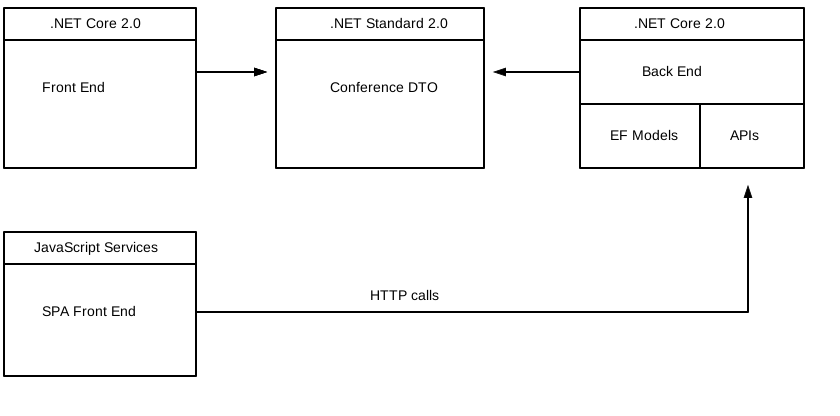
In this workshop, you'll learn by building a full-featured ASP.NET Core application from scratch. We'll start from File/ New and build up to an API back-end application, a web front-end application, and a common library for shared data transfer objects using .NET Standard.
## Sessions
| Session | Topics |
| ----- | ---- |
| [Session #1](/docs/1.%20Create%20BackEnd%20API%20project.md) | Get bits installed, build the back-end application with basic EF model |
| [Session #2](/docs/2.%20Build%20out%20BackEnd%20and%20Refactor.md) | Build out back-end, extract EF model | |
| [Session #3](/docs/3.%20Add%20front-end%2C%20render%20agenda%2C%20set%20up%20front-end%20models.md) | Add front-end, render agenda, set up front-end models |
| [Session #4](/docs/4.%20Add%20auth%20features.md) | Add authentication, add admin policy, allow editing sessions, users can sign-in with Twitter and Google, custom auth tag helper |
| [Session #5](/docs/5.%20Add%20personal%20agenda.md) | Add user association and personal agenda |
| [Session #6](docs/6.%20Deployment.md) | Deployment, Azure and other production environments, configuring environments, diagnostics |
| [Session #7](/docs/7.%20Challenges.md) | Challenges |