https://github.com/jonnyhyman/resolvecollaboration
Streamlining and Extending DaVinci Resolve's Live Collaboration
https://github.com/jonnyhyman/resolvecollaboration
davinci-resolve editing
Last synced: about 1 year ago
JSON representation
Streamlining and Extending DaVinci Resolve's Live Collaboration
- Host: GitHub
- URL: https://github.com/jonnyhyman/resolvecollaboration
- Owner: jonnyhyman
- License: gpl-3.0
- Created: 2021-04-02T19:15:10.000Z (over 5 years ago)
- Default Branch: main
- Last Pushed: 2022-04-20T18:07:13.000Z (about 4 years ago)
- Last Synced: 2025-04-07T01:11:11.310Z (about 1 year ago)
- Topics: davinci-resolve, editing
- Language: Jupyter Notebook
- Homepage:
- Size: 19.7 MB
- Stars: 34
- Watchers: 6
- Forks: 3
- Open Issues: 26
-
Metadata Files:
- Readme: README.md
- License: LICENSE
Awesome Lists containing this project
README
## NOTE : [DaVinci Resolve 18](https://www.blackmagicdesign.com/products/davinciresolve/whatsnew) introduced high performance global Cloud Collaboration. This code is available for reference but will no longer be maintained (4-20-2022)
----

#### Work on **DaVinci Resolve 17** Live Collaboration projects __with anyone, from anywhere__
## Features
- Secure __over the internet__ video editing collaboration for Resolve
- [Wireguard](https://www.wireguard.com/) VPN tunnel setup, management and control
- Secure user authentication
- Resolve database management, __replacing__ _the overly-limited DaVinci Resolve Project Server_
|Client (somewhere far away) | Server (home base) |
|:---|:---|
| |
|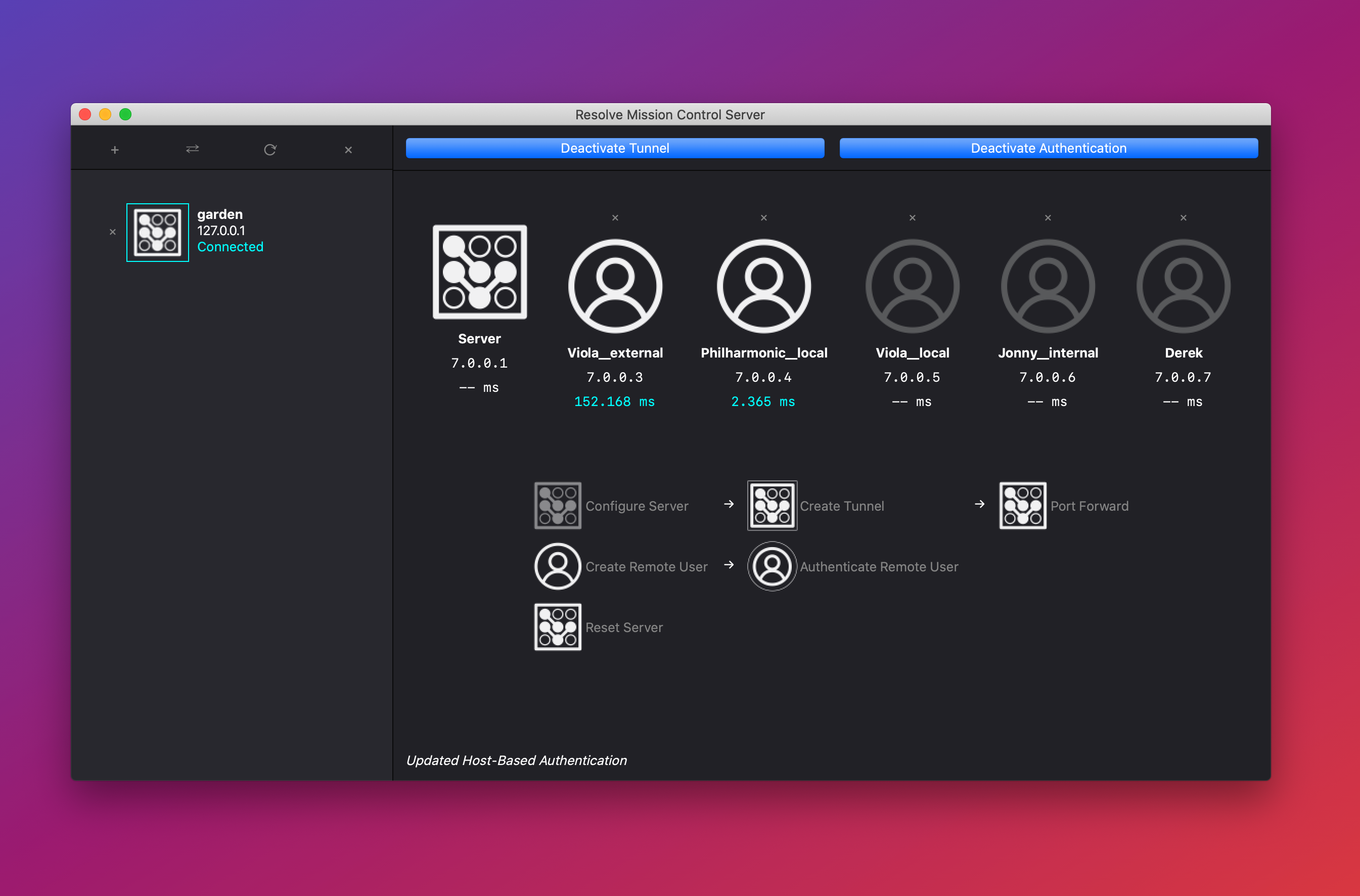 |
|
## Download the Client
There are mandatory installation instructions, [please see this page](https://github.com/jonnyhyman/ResolveCollaboration/releases/tag/0.1.0)
| Platform | Download |
|:---------|-------------:|
|macOS 10.15+ | [**macOS** .app](https://github.com/jonnyhyman/ResolveCollaboration/releases/download/0.1.2/macOS-Resolve.Mission.Control-v0.1.2.zip) |
|Windows 10 |[**Windows** .exe](https://github.com/jonnyhyman/ResolveCollaboration/releases/download/0.1.2/Win10-Resolve.Mission.Control-v0.1.2.zip) |
|Linux | Looking for beta testers |
---
## Setup video tutorial
[](http://www.youtube.com/watch?v=7j3QJOXx3bk "DaVinci Resolve Collaboration ... through the INTERNET! 🌎")
## Quickstart
- __Client__
- Open the app, [bypassing some OS preventions](https://github.com/jonnyhyman/ResolveCollaboration/releases/tag/0.1.0)
- Authenticate to the Resolve Mission Control Server
- Save the configuration file somewhere you remember
- Install [Wireguard](https://www.wireguard.com/install/)
- Import the configuration file into Wireguard
- Click the ⇄ button to connect to a Resolve database
- Use _Export Database Connection_ to save the database connection
- Double-click the exported file or drag-drop into Resolve to connect
- __Have fun!__
---
- __Server__
> For more details on what's below, read the [Server guide](https://github.com/jonnyhyman/ResolveCollaboration/wiki/Server-guide)
- Clone this repo's source code:
- Option 1) `git clone https://github.com/jonnyhyman/ResolveCollaboration.git`
- Option 2) [Download and unzip this](https://github.com/jonnyhyman/ResolveCollaboration/archive/refs/heads/main.zip)
- Open a shell (Powershell/Terminal) and change directory to the `rmc` folder `cd /path/to/ResolveCollaboration/rmc`
- __Server on macOS__
- Install [Homebrew](https://brew.sh/)
- Run in Terminal:
- `brew install wireguard-tools`
- `brew install python3` (if you don't already have Python 3)
- `pip install PyQt5==5.15.2 cryptography psycopg2-binary elevate`
- `sudo python rmc_server.py`
- __Server on Windows__
- Install [Python 3.9](https://www.python.org/downloads/)
- Install [Wireguard for Windows](https://www.wireguard.com/install/)
- Run in Powershell/Command Prompt:
- `pip install PyQt5==5.15.2 cryptography psycopg2-binary pywin32 elevate`
- `python rmc_server.py`
The GUI will automatically demand root/admin privileges using the `elevate` package, to allow:
- Control of Wireguard
- Opening of Firewall (macOS)
- Reconfiguring of Network Sharing settings (Windows)
- Read/write of configuration files in protected directories
- PostgreSQL Server restarts (macOS via pg_ctl, Windows via the postgres service)
---
## Plans for a fully-featured paid version
I'm trying to gauge interest for a paid version of this app, which would be far more powerful, adding:
- __Client__
- High performance, written in native languages (C++ Windows/Linux, Swift macOS)
- 2Fac Auth, Tunnel (embedded), Extended Userlist (IP/Loc, Machine ID, Productivity)
- Cloud Sync Info (Dropbox, Drive, etc…)
- [Interplanetary File System](https://ipfs.io/) project media storage and sync
- [Filecoin](https://filecoin.io/) long-term project media storage and archiving
- __Server__
- High performance, written in native languages (C++ Windows/Linux, Swift macOS)
- 2Fac Auth, Tunnel (embedded), Extended Userlist (IP/Loc, Machine ID, Productivity)
- Cloud Sync Info (Dropbox, Drive, etc…)
- Seamless support for linked-star tunnels or maybe meshes?
- More user information and security features (IP lock, Machine ID lock, etc…)
- Admin app:
- Control unlimited number of servers from afar through a powerful web app
__If the above sounds enticing to you, please go [upvote this post!](https://github.com/jonnyhyman/ResolveCollaboration/issues/4)__