https://github.com/joon610/mockup-server
this is mock server (Vue + TypeScript + Electron)
https://github.com/joon610/mockup-server
Last synced: 9 months ago
JSON representation
this is mock server (Vue + TypeScript + Electron)
- Host: GitHub
- URL: https://github.com/joon610/mockup-server
- Owner: joon610
- License: mit
- Created: 2019-09-08T14:55:06.000Z (over 6 years ago)
- Default Branch: master
- Last Pushed: 2022-12-11T04:51:25.000Z (over 3 years ago)
- Last Synced: 2025-04-04T16:11:08.490Z (12 months ago)
- Language: TypeScript
- Homepage:
- Size: 8.26 MB
- Stars: 125
- Watchers: 11
- Forks: 19
- Open Issues: 26
-
Metadata Files:
- Readme: README.md
- License: LICENSE
Awesome Lists containing this project
- awesome-vue - Mockup-server - this is mock server (Vue + TypeScript + Electron) ` 📝 5 months ago ` (Open Source [🔝](#readme))
- awesome-vue - Mockup-server - Mockup-server is easily create server from local directory. (Projects Using Vue.js / Open Source)
README

# MockUp Server [](https://github.com/joon610/mockup-server/blob/master/LICENSE) [](https://https://github.com/joon610/mockup-server/releases)
### DownLoad
- Mac, Windows:
-
※im' not Apple Developer. so you need clone repo and then build in your Mac
## Project setup
```
git clone https://github.com/joon610/mockup-server.git
cd mockup-server
yarn install
```
### Compiles and hot-reloads for development
```
yarn dev
```
### Compiles and minifies for production(electront)
```
build:electron
```
## Why make it
Used when developing Front-end and Back-ends at the same time. Since Front-End developers have to develop without a server, there is a possibility of future problems (async, variable names, object types, API, etc.). You can reduce the problems later by developing
## How to use it
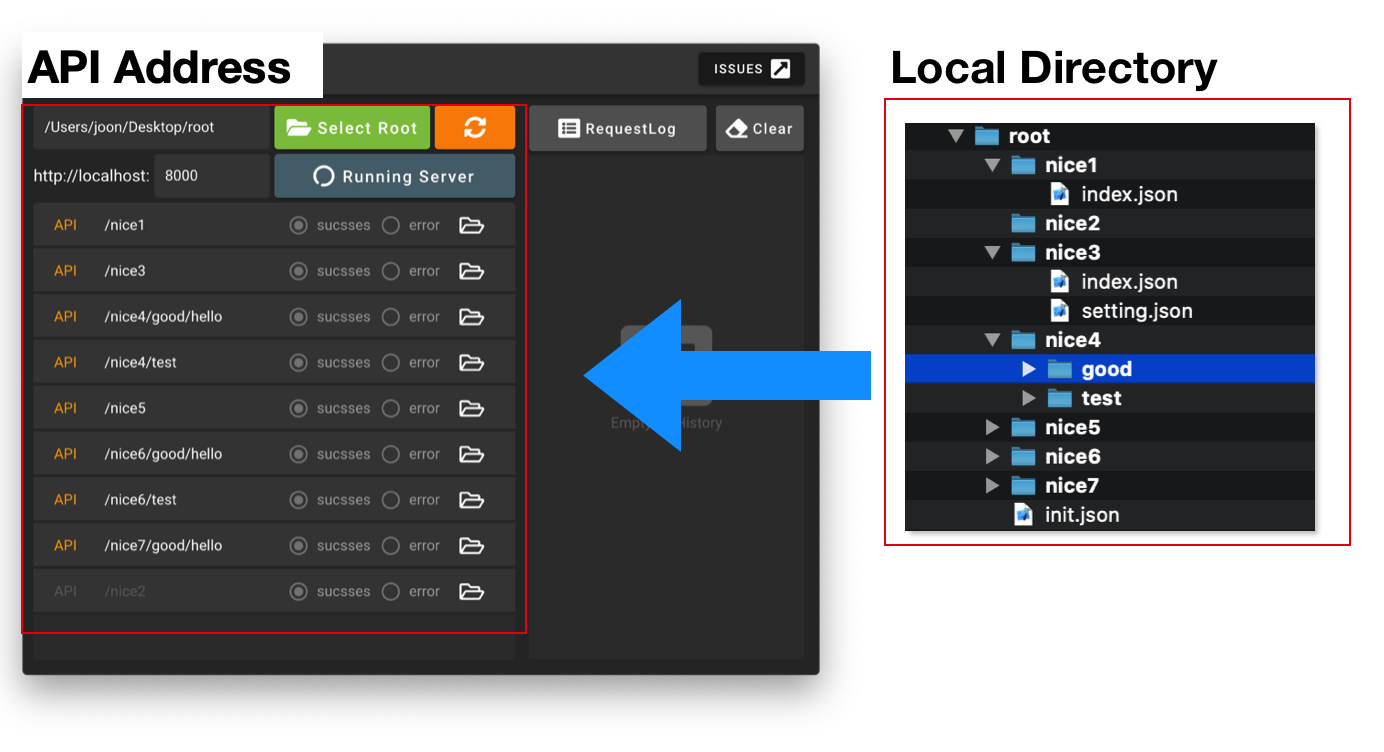
1. Make Directory. (will be API path)
2. make Json File in Directory ( response Data)
3. select Root Directory
4. Start Server .. finish.
5. Share to Github for Front-End and Back-End developers
6. Manage using GitHub
## Initialize directory.
## Click Events
- Radio Button
1. sucesses: response index.json
2. error: response error.json
- buttons
1. Select Root : choice root Directory
2. Refresh : re rendering screen
3. Folder icon : open current Directory
4. RequestLog : move recod request Parame Json file
5. Clear : logHistory clear
6. API bar : click API bar and then get index.json or error.json
## Setting Files
- index.json
1. this file is necessariness
2. make in api Directory
2. Json
``` jsonc
// index.json
{
{
"id": "1",
"name": "Sara",
"age": "13"
}
}
```
- setting.json
1. !this file will be change this json files
2. make json in Api Directory
3. Json
```jsonc
// setting header, cookies, api description etc
{
"header": {
"Content-Type": "application/json; charset=utf-8",
"Content-Length": "123",
"ETag": "12345"
},
"cookies": [
{ //cookie1
"cookiekey": "cookieName",
"options": {
"maxAge": 30000
}
},
{ //cookie2
"hello": "hi",
"options": {
"maxAge": 10000
}
}
],
"dynamicRoute":"hello", // ex) localhost/bla/:hello
"description": "this API is holy shit" // api description
}
```
- requestLog.json
1. in root Directory.
2. record request Parameta.
- init.json
1. in root Direcotory.
2. saved init port number;
## CRUD
- [`Get Post Put Delete`](#crud)
- Create, Read, Update, Delete example
### index.json
``` jsonc
// response json
[
{
"id": "1", //dynamic api key ex) localhost/bla/:id
"name": "Sara",
"age": "13"
},
{
"id": "2",
"name": "teddy",
"age": "14"
}
]
```
## CRUD (Create, Read, Update ,Delete)
## Post, Get
- http://localhost:9000/nice2/test
- if you want to send params object, and then add object in response data (POST)
```jsonc
//response data
[
{
"id": "1",
"name": "Sara",
"age": "13"
},
{
"id": "2",
"name": "teddy",
"age": "14"
}
]
```
- http://localhost:9000/nice2/test/1
```jsonc
//response data
[
{
"id": "1",
"name": "Sara",
"age": "13"
}
]
```
## Put
- http://localhost:9000/nice2/test/1
```jsonc
//request data
{
"id": "3",
"name": "Sara",
"age": "13"
}
```
```jsonc
//response data
[
{
"id": "3",
"name": "Sara",
"age": "13"
},
{
"id": "2",
"name": "teddy",
"age": "14"
}
]
```
## Delete
- http://localhost:9000/nice2/test/1
```jsonc
//response data
[
{
"id": "2",
"name": "teddy",
"age": "14"
}
]
```
## License
MIT License