https://github.com/joonb14/tfliteclassification
TensorFlow Lite Image Classification Python Implementation
https://github.com/joonb14/tfliteclassification
classification classification-model computer-vision efficientnet image-classification interpreter mobilenet python tensorflow tensorflow-lite tflite tflite-models vision
Last synced: 3 months ago
JSON representation
TensorFlow Lite Image Classification Python Implementation
- Host: GitHub
- URL: https://github.com/joonb14/tfliteclassification
- Owner: joonb14
- Created: 2021-03-08T06:00:03.000Z (over 5 years ago)
- Default Branch: main
- Last Pushed: 2021-03-09T02:19:07.000Z (over 5 years ago)
- Last Synced: 2025-08-13T07:26:02.982Z (11 months ago)
- Topics: classification, classification-model, computer-vision, efficientnet, image-classification, interpreter, mobilenet, python, tensorflow, tensorflow-lite, tflite, tflite-models, vision
- Language: Jupyter Notebook
- Homepage:
- Size: 38.3 MB
- Stars: 3
- Watchers: 1
- Forks: 2
- Open Issues: 0
-
Metadata Files:
- Readme: README.md
Awesome Lists containing this project
README
# TensorFlow Lite Image Classification in Python
This code snipset is heavily based on TensorFlow Lite Image Classification
The segmentation model can be downloaded from above link.
For the realtime implementation on Android look into the Android Image Classification Example
Follow the classification.ipynb to get information about how to use the TFLite model in your Python environment.
### Details
The mobilenet_v1_1.0_224_quant.tflite file's input takes normalized 224x224x3 shape image. And the output is 1001x1 where the 1001 denotes labels in below order, contains the probabilty of the image belongs to the class.. The specific labels of the 1001 classes are stored in the labels_mobilenet_quant_v1_224.txt file in below order
```python
lineList = ['background', 'tench', 'goldfish', 'great white shark', 'tiger shark', 'hammerhead', 'electric ray', 'stingray', 'cock', 'hen', 'ostrich', 'brambling', 'goldfinch', 'house finch', 'junco', 'indigo bunting', ...]
```
For model inference, we need to load, resize, typecast the image.
The mobileNet model uses uint8 format so typecast numpy array to uint8.
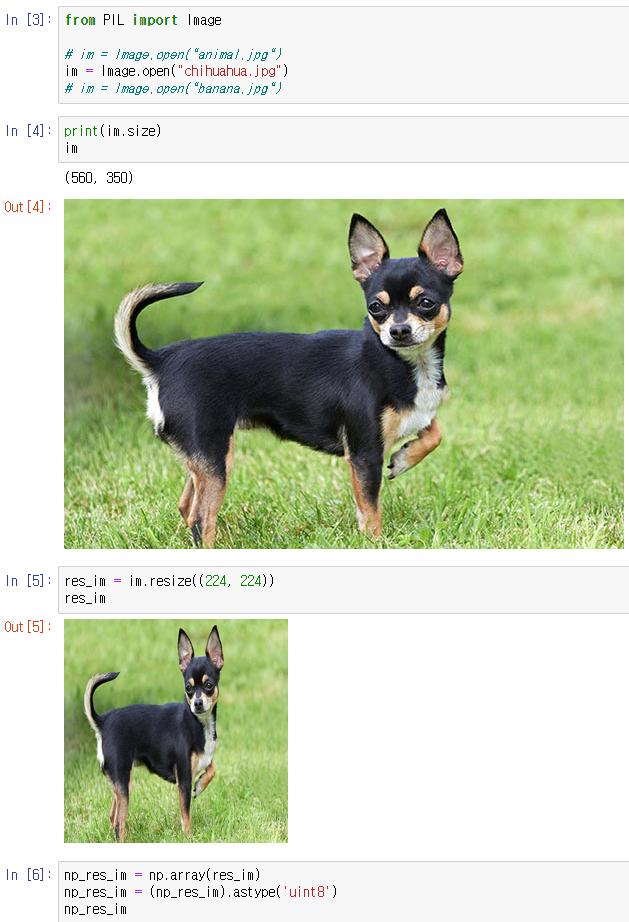
Then if you follow the correct instruction provided by Google in load_and_run_a_model_in_python, you would get output in below shape

Now we need to process this output to use it for classification
```python
import pandas as pd
import numpy as np
classification_prob = []
classification_label = []
total = 0
for index,prob in enumerate(output_data[0]):
if prob != 0:
classification_prob.append(prob)
total += prob
classification_label.append(index)
label_names = [line.rstrip('\n') for line in open("labels_mobilenet_quant_v1_224.txt")]
found_labels = np.array(label_names)[classification_label]
df = pd.DataFrame(classification_prob/total, found_labels)
sorted_df = df.sort_values(by=0,ascending=False)
sorted_df
```

The other models such as
```
efficientnet-lite0-fp32.tflite,
efficientnet-lite0-int8.tflite,
mobilenet_v1_1.0_224.tflite
```
are from the Android Image Classification Example Take a look at the github and consider changing the TFLite model if you want.
I believe you can modify the rest of the code as you want by yourself.
Thank you!