https://github.com/josluna98/address_search_field
An address search field which helps to autocomplete an address by a reference. It can be used to get Directions beetwen two (or more) points.
https://github.com/josluna98/address_search_field
android builder flutter ios web widgets
Last synced: 9 months ago
JSON representation
An address search field which helps to autocomplete an address by a reference. It can be used to get Directions beetwen two (or more) points.
- Host: GitHub
- URL: https://github.com/josluna98/address_search_field
- Owner: JosLuna98
- License: mit
- Created: 2020-03-27T23:24:01.000Z (over 6 years ago)
- Default Branch: master
- Last Pushed: 2024-04-22T13:37:21.000Z (about 2 years ago)
- Last Synced: 2025-10-23T02:51:52.780Z (9 months ago)
- Topics: android, builder, flutter, ios, web, widgets
- Language: Dart
- Homepage:
- Size: 114 MB
- Stars: 13
- Watchers: 1
- Forks: 37
- Open Issues: 14
-
Metadata Files:
- Readme: README.md
- Changelog: CHANGELOG.md
- License: LICENSE
Awesome Lists containing this project
README
# Address Search Field
Widget builders to create 'address search widgets' which helps to autocomplete an address using a reference. They can be used to get Directions beetwen two places with optional waypoints. These widgets are made to be showed by `onTap` in a `TextField` with the `showDialog` function.
It uses [Dio](https://pub.dev/packages/dio/versions/4.0.6), [Google Maps for Flutter](https://pub.dev/packages/google_maps_flutter/versions/2.1.5), [Flutter Riverpod](https://pub.dev/packages/flutter_riverpod/versions/1.0.3) plugins. (This last plugin is to use extended objects that can be usable with `GoogleMap` Widget).
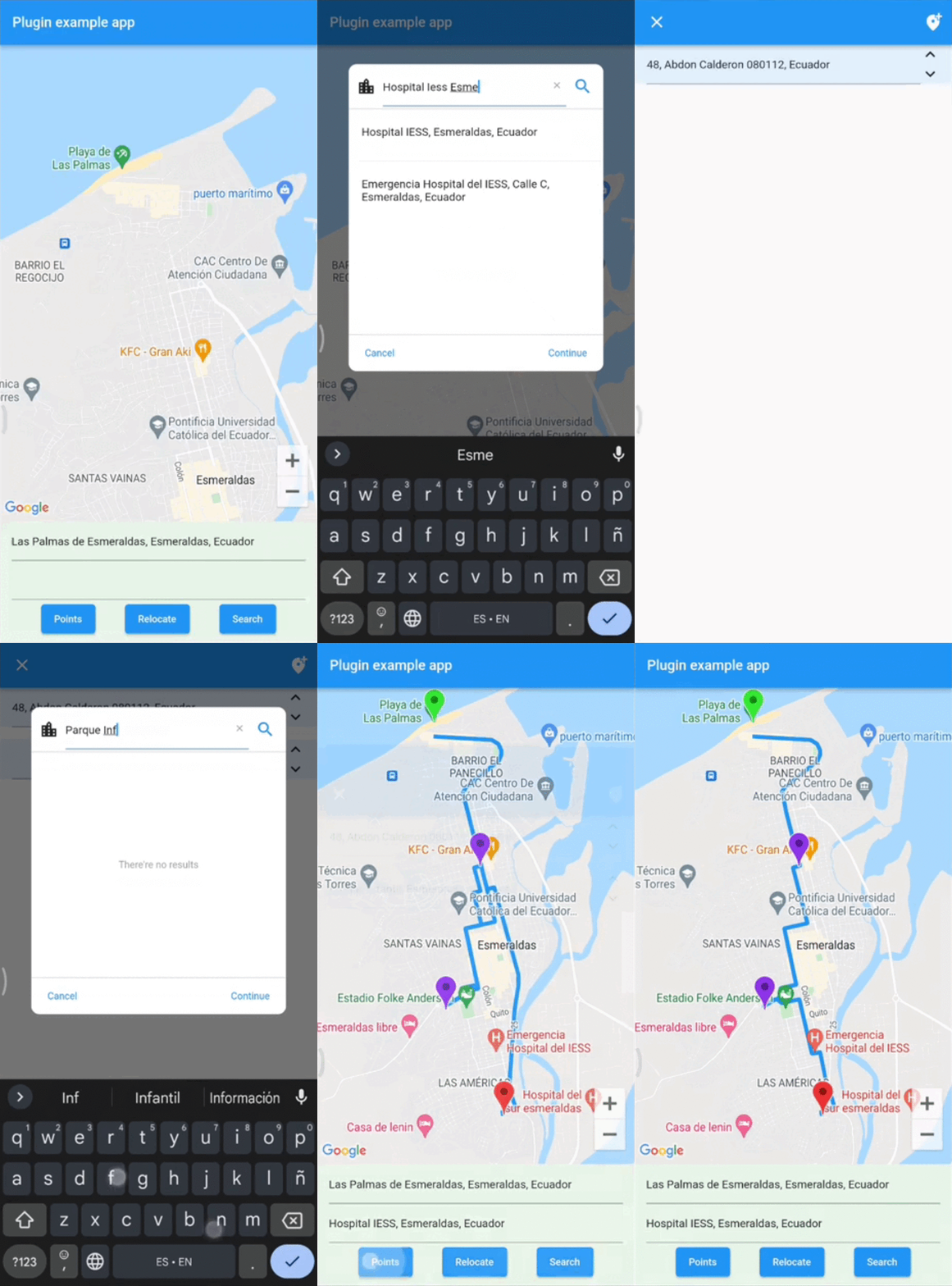
## Getting Started
To use this plugin, add `address_search_field` as a [dependency in your pubspec.yaml file](https://flutter.io/platform-plugins/). For example:
```yaml
dependencies:
address_search_field: ^5.0.3
```
## Permissions
### Android
On Android you'll need to add the internet permission to your Android Manifest file (located under android/app/src/main). To do so add next lines as direct child of the `manifest>` tag:
``` xml
```
## Usage
Import the package:
```dart
import 'package:address_search_field/address_search_field.dart';
```
## GeoMethods
```dart
GeoMethods(
googleApiKey: String,
language: String,
countryCode: String?,
countryCodes: List?,
country: String?,
city: String?,
mode: DirectionsMode?,
units: DirectionsUnits?,
);
```
* This object makes calls to Google APIs using the parameters set. It can do requests to Google places, geocode and directions APIs [Get API key](https://developers.google.com/maps/documentation/embed/get-api-key).
* Language support list [here](https://developers.google.com/maps/faq#languagesupport).
* List of countries [here](https://en.wikipedia.org/wiki/List_of_ISO_3166_country_codes).
Example:
```dart
final geoMethods = GeoMethods(
googleApiKey: 'GOOGLE_API_KEY',
language: 'en',
countryCode: 'us',
countryCodes: ['us', 'es', 'co'],
country: 'United States',
city: 'New York',
);
// It will search in unite states, espain and colombia. It just can filter up to 5 countries.
geoMethods.autocompletePlace(query: 'place streets or reference');
geoMethods.geoLocatePlace(
coords: Coords(0.10, 0.10,)
);
geoMethods.getPlaceGeometry(
reference: 'place streets',
placeId: 'ajFDN3662fNsa4hhs42FAjeb5n',
);
// It needs a specific region, it will search in unite states.
geoMethods.getDirections(
origin: Address(coords: Coords(0.10, 0.10)),
destination: Address(coords: Coords(0.10, 0.10))
);
```
## AddressSearchBuilder
This widget can search addresses and permits you to work with them using an `Address` object.
Example:
```dart
GeoMethods geoMethods;
TextEditingController controller;
Address destinationAddress;
TextField(
controller: controller,
onTap: () => showDialog(
context,
builder: (BuildContext context) => AddressSearchDialog(
geoMethods: geoMethods,
controller: controller,
onDone: (Address address) => destinationAddress = address,
)
),
);
```
>`AddressSearchDialog.custom` provides you a widget builder with the parameters and methods to create your own `AddressSearchDialog` and work with the addresses information.
Example:
```dart
GeoMethods geoMethods;
TextEditingController controller;
Address destinationAddress;
TextField(
controller: controller,
onTap: () => showDialog(
context,
builder: (BuildContext context) {
return AddressSearchDialog.custom(
geoMethods: geoMethods,
builder: (
BuildContext context,
AsyncSnapshot> snapshot,
Future Function() searchAddress,
Future
Function(Address address) getGeometry,
void Function() dismiss,
) {
return MyCustomWidget(
snapshot: snapshot,
searchAddress: searchAddress,
getGeometry: getGeometry,
dismiss: dismiss,
controller: controller,
address: destinationAddress,
);
}
);
}
),
);
```
## AddressLocator
This widget is a simple way to get an address reference in a `TextEditingController` from coordinates when the `AddressSearchDialog` is not created into a `RouteSearchBox`.
Example:
```dart
Coords coords;
GeoMethods geoMethods;
TextEditingController controller;
Address initialAddress;
// using coordinates you can get an address reference to be predefined in the widget and save all the address data in a variable.
AddressLocator(
coords: coords,
geoMethods: geoMethods,
controller: controller,
child: TextField(
controller: controller,
onTap: () => showDialog(
context: context,
builder: (BuildContext context) => AddressSearchDialog(
controller: controller,
geoMethods: geoMethods,
onDone: (Address address) => initialAddress = address;,
),
),
),
);
```
## RouteSearchBox
This widget helps you to works using a provider from `flutter_riverpod`. It permits you to work with `AddressSearchDialog` to search an origin `Address`, destination `Address` and optionally waypoints in a `List
`. This widget is used to get directions from the addresses gotten by an `AddressSearchDialog`. `provider.findRoute()` function permits to set an address as origin or destination from a coordinates parameter.
A completed example of how to use this widget could be found [here](https://pub.dev/packages/address_search_field/example).
Example:
```dart
final routeProvider =
ChangeNotifierProvider((ref) => RouteNotifier());
GeoMethods geoMethods;
TextEditingController originCtrl;
TextEditingController destCtrl;
Coords initialCoords;
RouteSearchBox(
provider: routeProvider,
geoMethods: geoMethods,
originController: originCtrl,
destinationController: destCtrl,
locationSetters: [
LocationSetter(
coords: initialCoords,
addressId: AddressId.origin,
),
],
child: Column(
children: [
TextField(
controller: originCtrl,
onTap: () => showDialog(
context: context,
builder:(context) =>
AddressSearchDialog.withProvider(
provider: routeProvider,
addressId: AddressId.origin,
),
),
),
TextField(
controller: destCtrl,
onTap: () => showDialog(
context: context,
builder:(context) =>
AddressSearchDialog.withProvider(
provider: routeProvider,
addressId: AddressId.destination,
),
),
),
Consumer(
builder: (BuildContext context, WidgetRef ref, Widget? _) {
return ElevatedButton(
child: const Text('Search'),
onPressed: () async {
final route = await ref.read(routeProvider).findRoute();
},
);
},
),
],
)
);
```
## License
MIT License
## Contact
You can contact me if you have problems or ideas. Hablo español e inglés.
josluna1098@gmail.com