https://github.com/joymon/github-dashboards
Dashboards for GitHub across all organizations and projects
https://github.com/joymon/github-dashboards
github github-actions github-api jq json powerbi powerbi-desktop powerbi-embedded powerbi-visuals powershell
Last synced: 3 months ago
JSON representation
Dashboards for GitHub across all organizations and projects
- Host: GitHub
- URL: https://github.com/joymon/github-dashboards
- Owner: joymon
- License: gpl-3.0
- Created: 2021-09-18T14:34:25.000Z (almost 5 years ago)
- Default Branch: main
- Last Pushed: 2021-09-21T20:06:33.000Z (almost 5 years ago)
- Last Synced: 2025-10-18T22:50:14.021Z (9 months ago)
- Topics: github, github-actions, github-api, jq, json, powerbi, powerbi-desktop, powerbi-embedded, powerbi-visuals, powershell
- Language: PowerShell
- Homepage:
- Size: 1.89 MB
- Stars: 0
- Watchers: 1
- Forks: 0
- Open Issues: 0
-
Metadata Files:
- Readme: README.md
- License: LICENSE
Awesome Lists containing this project
README
| Area | Badges |
|:---------- |:-------------|
| Build | [](https://github.com/joymon/github-dashboards/actions/workflows/etl-powershell.yml) |
| Code |   [](https://github.com/joymon/github-dashboards) |
| Issues | [](http://isitmaintained.com/project/joymon/github-dashboards "Average time to resolve an issue") [](http://isitmaintained.com/project/github-dashboards "Percentage of issues still open") |
# GitHub Dashboards
Power BI Dashboards for GitHub across all organizations and projects
Unfortunately GitHub [doesn't allow iframe embedding inside markdown.](https://github.github.com/gfm/#disallowed-raw-html-extension-). Hence no PowerBI report embeddeding in readme.md. Please view [live dashboard](https://app.powerbi.com/view?r=eyJrIjoiZjVkNTExMjgtYTYyMS00MWRmLWEwMmItZjBmNjcyYjJiMGIyIiwidCI6IjZiYTQxYTgzLTJmOWYtNGQzMi1iNmU0LTY1YWRlNTBiZDcyMiIsImMiOjN9) or click on the images below
# Images
## Screenshot of organizations dashboard
[][1]
## Screenshot of repositories dashboard
[][2]
## Screenshot of issues dashboard
[][3]
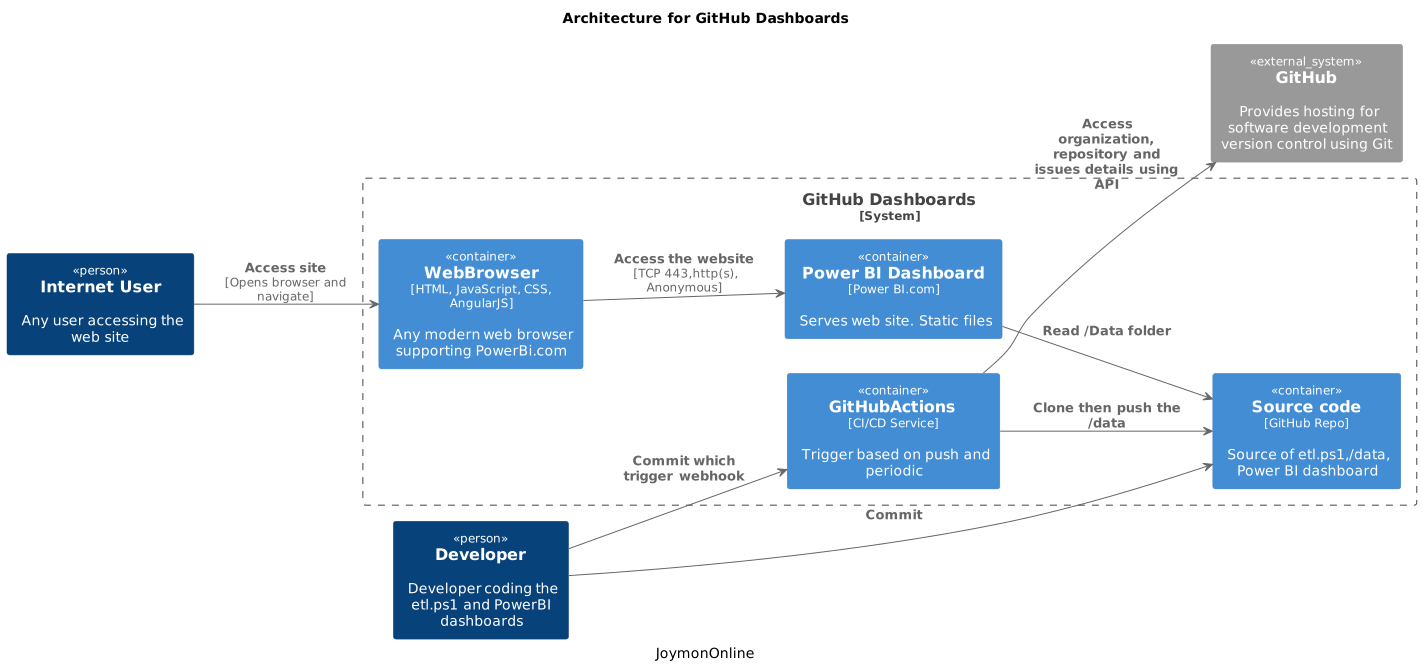
# Architecture
# Built-With
- [GitHub CLI - ETL tool to pull data from GitHub.com](https://cli.github.com)
- [PowerShell - Just to trigger GitHub CLI based ETL (Optional)](https://github.com/features/actions)
- :open_file_folder: [GitHub - as source control](github.com)
- :arrow_forward: [GitHub Actions - Run ETL pipeline using GitHub CLI](https://github.com/features/actions)
- [Power BI - Dashboards visualization](https://powerbi.microsoft.com/)
[1]: https://app.powerbi.com/view?r=eyJrIjoiZjVkNTExMjgtYTYyMS00MWRmLWEwMmItZjBmNjcyYjJiMGIyIiwidCI6IjZiYTQxYTgzLTJmOWYtNGQzMi1iNmU0LTY1YWRlNTBiZDcyMiIsImMiOjN9&pageName=ReportSection "Click to view Power BI Dashboard"
[2]: https://app.powerbi.com/view?r=eyJrIjoiZjVkNTExMjgtYTYyMS00MWRmLWEwMmItZjBmNjcyYjJiMGIyIiwidCI6IjZiYTQxYTgzLTJmOWYtNGQzMi1iNmU0LTY1YWRlNTBiZDcyMiIsImMiOjN9&pageName=ReportSection4d08403eadbb0e10ce84 "Click to view Power BI Dashboard"
[3]: https://app.powerbi.com/view?r=eyJrIjoiZjVkNTExMjgtYTYyMS00MWRmLWEwMmItZjBmNjcyYjJiMGIyIiwidCI6IjZiYTQxYTgzLTJmOWYtNGQzMi1iNmU0LTY1YWRlNTBiZDcyMiIsImMiOjN9&pageName=ReportSection784cb0d10859315038d5 "Click to view Power BI Dashboard"