https://github.com/jpsca/proper-cli
A minimal and ridiculously good looking command-line-interface toolkit
https://github.com/jpsca/proper-cli
cli command-line python text-interface
Last synced: 5 months ago
JSON representation
A minimal and ridiculously good looking command-line-interface toolkit
- Host: GitHub
- URL: https://github.com/jpsca/proper-cli
- Owner: jpsca
- License: mit
- Created: 2021-12-30T16:40:13.000Z (over 4 years ago)
- Default Branch: main
- Last Pushed: 2024-04-01T14:47:35.000Z (over 2 years ago)
- Last Synced: 2025-11-21T21:06:17.619Z (8 months ago)
- Topics: cli, command-line, python, text-interface
- Language: Python
- Homepage:
- Size: 318 KB
- Stars: 5
- Watchers: 1
- Forks: 0
- Open Issues: 0
-
Metadata Files:
- Readme: README.md
- License: MIT-LICENSE
Awesome Lists containing this project
README
# Proper CLI
Proper CLI is a Python library for creating composable, nestable, and ridiculously good looking command-line-**user**-interfaces from simple classes.
## Features
- Made for interfacing **with humans**.
- Arbitrary nesting and composition of commands.
- Automatic help page generation
- No need to redeclare paramaters and options with decorators, just write Python methods
- The help of a command is its docstring, why make it more complex?
## Usage
Declare a class that inherits from `proper_cli.Cli`. Every method/attribute that does not starts with an underscore will be a command.
```python
from proper_cli import Cli
class Manage(Cli):
def first(self, arg1, arg2=3):
pass
def second(self):
pass
def _not_a_command(self):
pass
```
Then, instance that class and call it.
```python
# run.py
cli = Manage()
if __name__ == "__main__":
cli()
```
The class dosctring will be printed at the beginning of the help page.
The arguments can be then passed by position:
```bash
python run.py first foo bar
```
or by name:
```bash
python run.py first -arg1 foo -arg2 bar
```
To pass a `True` use the name without a value, for a `False`, prepend the name of the argument with `no-`:
```bash
python run.py first -arg1 -no-arg2
```
### Subgroups
If an attribute is a subclass of `proper_cli.Cli`, it will be a subgroup:
```python
from proper_cli import Cli
class DBSub(Cli):
def migrate(self):
pass
class Manage(Cli):
# A subgroup
db = DBSub # NOT `DBSub()`
```
### Context
You can pass any named argument as context to be used by your commands. This will be stored at the `_env` attribute.
Example:
```python
>>> cli = Manage(lorem="ipsum")
>>> print(cli._env)
{"lorem": "ipsum"}
```
## An example
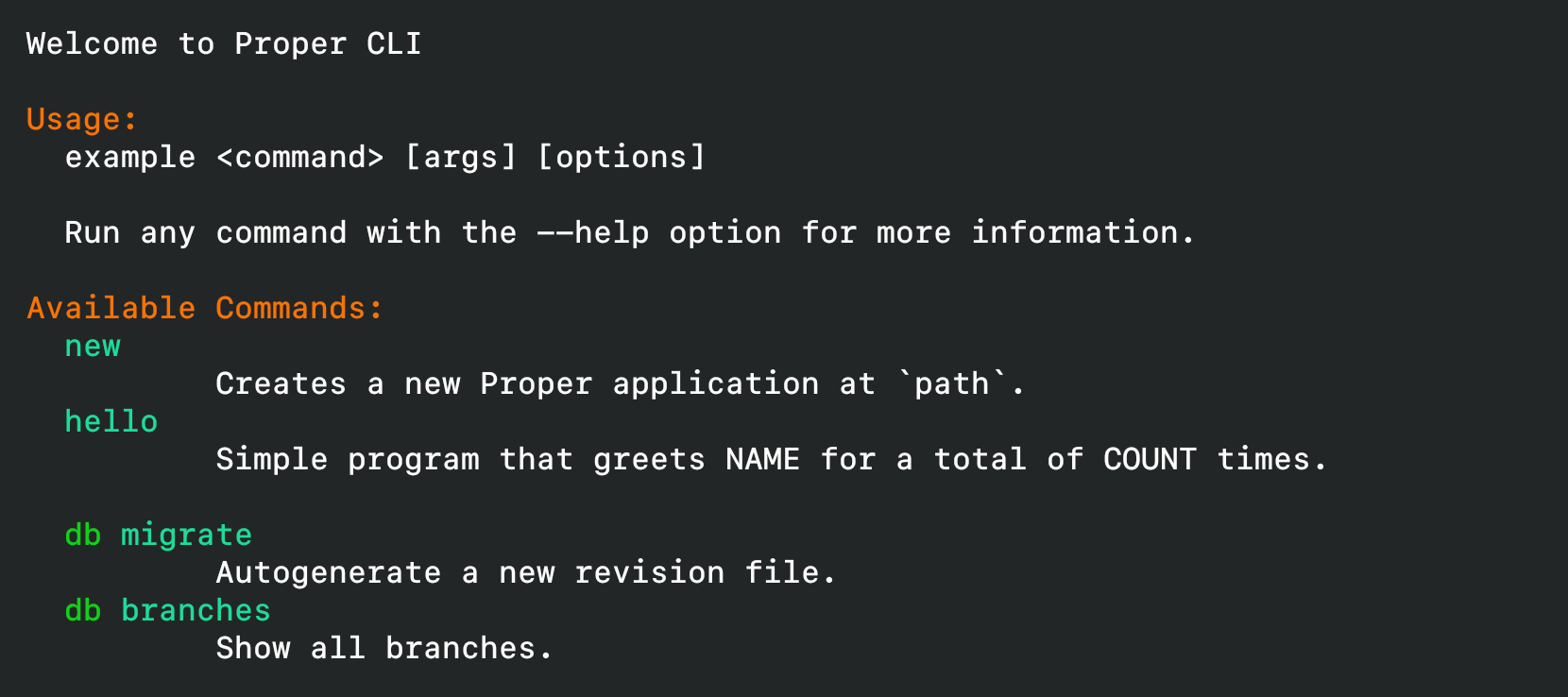
The image at the top was autogenerated by running this example:
```python
# example.py
from proper_cli import Cli
class DBCli(Cli):
"""Database-related commands
"""
def migrate(self, message):
"""Autogenerate a new revision file.
This is an alias for "revision --autogenerate".
Arguments:
- message: Revision message
"""
pass
def branches(self):
"""Show all branches."""
pass
class MyCli(Cli):
"""Welcome to Proper CLI 3
"""
def new(self, path, quiet=False):
"""Creates a new Proper application at `path`.
Arguments:
- path: Where to create the new application.
- quiet [False]: Supress all output.
"""
pass
def hello(count, name):
"""Simple program that greets NAME for a total of COUNT times."""
pass
# A subgroup!
db = DBCli
cli = MyCli()
if __name__ == "__main__":
cli()
```
## Coloring the Output
Whenever you output text, you can surround the text with tags to color its output (thanks to https://github.com/sdispater/pastel).
This is automatically enabled for the docstrings, but you can also have it by using `proper_cli.echo()`
as a drop-in replacement of `print()`.
```python
# green text
echo("foo")
# black text on a cyan background
echo("foo>")
# bold text on a yellow background
echo("foo>")
```
Available foreground and background colors are: black, red, green, yellow, blue, magenta, cyan and white.
The available options are: bold, underscore, blink, reverse and conceal.
The closing tag can be replaced by `>`, which revokes all formatting options established by the last opened tag.
## Custom styles
These four styles are available by default:
```python
# green text
echo("foo")
# yellow text
echo("foo")
# black text on a cyan background
echo("foo")
# white text on a red background
echo("foo")
```
It is possible to define your own styles using the `proper_cli.add_style()` method:
```python
add_style("fire", fg="red", bg="yellow", options=["bold", "blink"])
echo("foo")
```
## Helpers
Beyond the CLI builder, proper_cli also includes some commonly-used helper functions
### `confirm(question, default=False, yes_choices=YES_CHOICES, no_choices=NO_CHOICES)`
Ask a yes/no question via and return their answer.
### `ask(question, default=None, alternatives=None)`
Ask a question via input() and return their answer.
## FAQ
### Why don't just use optparse or argparse?
I find it too verbose.
### Why don't just use click?
Are you kidding? Because this looks better and is easier to use and understand.
### Why don't just use...?
Because this library fits better my mental model. I hope it matches yours as well.