https://github.com/jrhubott/adaptive-cover-pro
Adaptive sun-tracking cover control for Home Assistant: blinds, awnings, and venetian tilts with climate-aware positioning and a priority override pipeline.
https://github.com/jrhubott/adaptive-cover-pro
adaptive-control asyncio awning blinds climate-control covers custom-component custom-integration hacs hacs-integration home-assistant home-automation homeassistant python smart-home solar-position sun-tracking venetian-blinds
Last synced: 9 days ago
JSON representation
Adaptive sun-tracking cover control for Home Assistant: blinds, awnings, and venetian tilts with climate-aware positioning and a priority override pipeline.
- Host: GitHub
- URL: https://github.com/jrhubott/adaptive-cover-pro
- Owner: jrhubott
- License: mit
- Created: 2026-01-28T18:42:20.000Z (6 months ago)
- Default Branch: main
- Last Pushed: 2026-06-25T23:59:37.000Z (29 days ago)
- Last Synced: 2026-06-26T01:13:44.327Z (29 days ago)
- Topics: adaptive-control, asyncio, awning, blinds, climate-control, covers, custom-component, custom-integration, hacs, hacs-integration, home-assistant, home-automation, homeassistant, python, smart-home, solar-position, sun-tracking, venetian-blinds
- Language: Python
- Homepage:
- Size: 7.96 MB
- Stars: 114
- Watchers: 1
- Forks: 15
- Open Issues: 32
-
Metadata Files:
- Readme: README.md
- Contributing: docs/CONTRIBUTING.md
- Funding: .github/FUNDING.yaml
- License: LICENSE
Awesome Lists containing this project
README






# Adaptive Cover Pro
Sun-tracking cover automation with an inspectable decision pipeline, full venetian sequencing, glare zones, and a seasonal climate arbiter — for Home Assistant.
> Full documentation lives on the [Wiki](https://github.com/jrhubott/adaptive-cover-pro/wiki).
---
## What it does
- **Four cover types with full geometric modeling** — vertical blinds, horizontal awnings, tilt-only blinds, and venetian blinds; each uses real window and facade geometry, not rules of thumb.
- **Inspectable decision pipeline** — handlers run in priority order (weather safety, manual, custom positions with templated triggers, climate, glare, solar) and each reports its reason. A `decision_trace` sensor shows exactly why the cover is at 45% — no black boxes.
- **Venetian blinds done properly** — dual-axis sequencer waits for the carriage to settle before sending tilt, handles back-rotation across a 45-second post-settle window, and pre-positions tilt on opening to eliminate flicker. Covers KNX, Shelly, and Somfy IO buses.
- **Climate mode with a full seasonal arbiter** — winter heating, winter insulation, summer cooling, and glare comfort each have independent logic; presence, lux, irradiance, and cloud cover are all suppression inputs.
- **Glare zones** — name the floor areas you want protected (TV, dining table); the cover deploys further than pure sun tracking when a protected zone would receive direct sun.
- **15 runtime services** — every parameter is scriptable from automations; no UI interaction needed to change mode, position limits, or overrides at runtime.
More detail: **[How It Decides](https://github.com/jrhubott/adaptive-cover-pro/wiki/How-It-Decides)** · **[Climate Mode](https://github.com/jrhubott/adaptive-cover-pro/wiki/Climate-Mode)** · **[Enhanced Geometric Accuracy](https://github.com/jrhubott/adaptive-cover-pro/wiki/Enhanced-Geometric-Accuracy)**
## Companion Lovelace card
The **[Adaptive Cover Pro Card](https://github.com/jrhubott/adaptive-cover-pro-card)** turns the integration's sensors into a dashboard you can read at a glance. It's HACS-installable and ships three cards in one bundle.
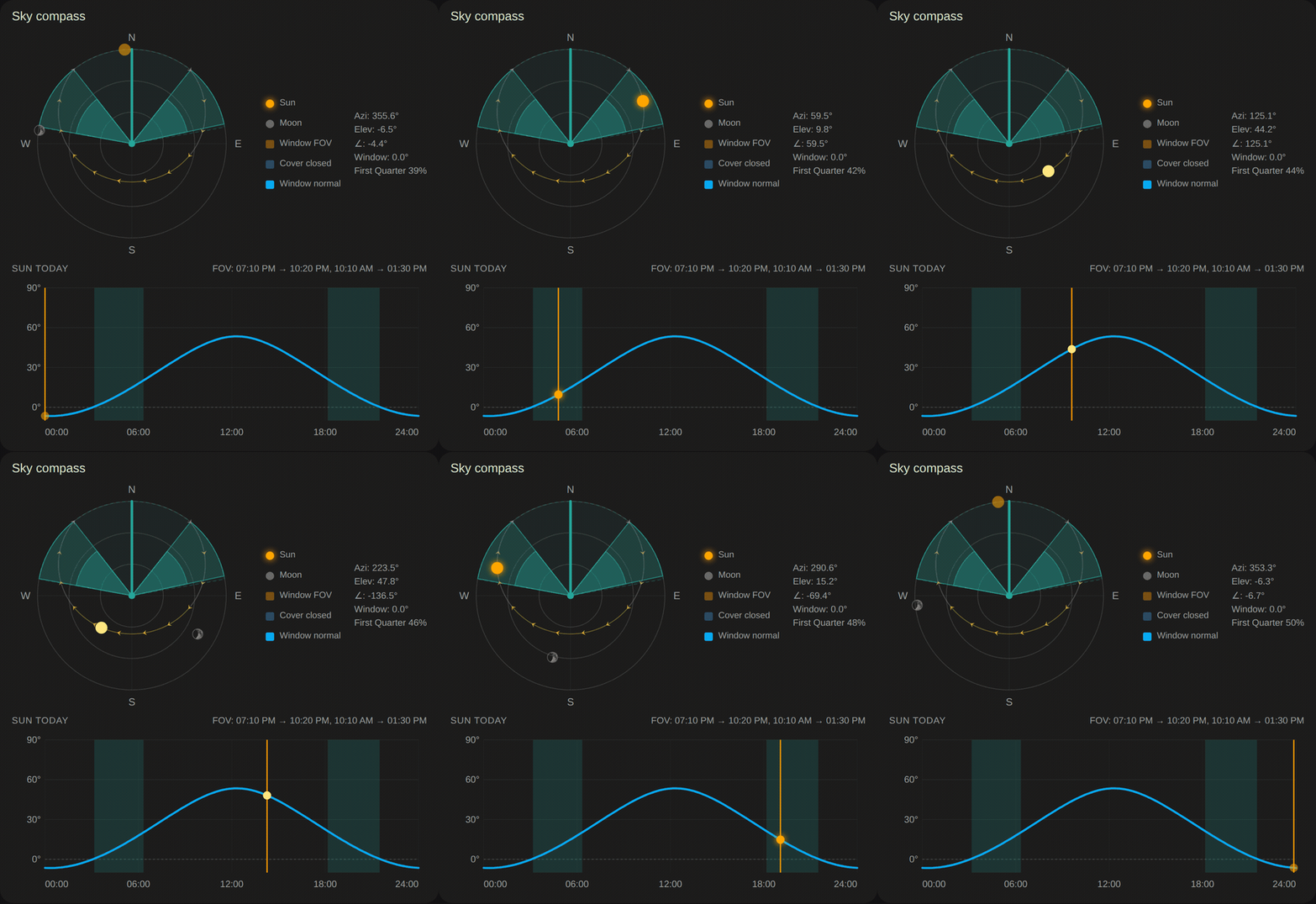
**Sky compass** — watch the sun cross each window in real time: its arc through the field of view, the shaded wedge of the cover closing to track it, sunrise and sunset, and the day's elevation curve underneath.
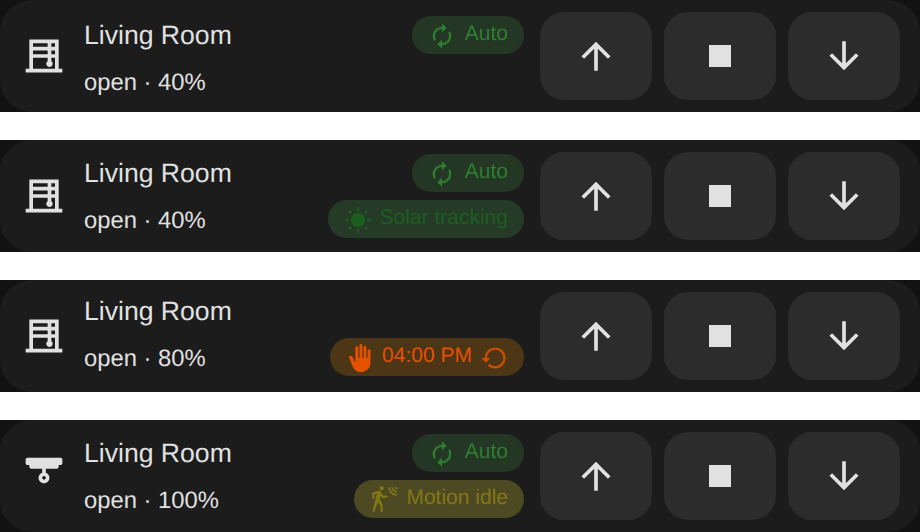
**Tile card** — one compact row per shade: icon, live position, `↑ ■ ▼` controls, and a badge that tells you which automation is driving the cover right now (Auto, Solar tracking, a Manual override with its expiry and a resume button, Motion, and more). Tap any tile for the full pipeline trace, today's forecast, the compass, and override controls.
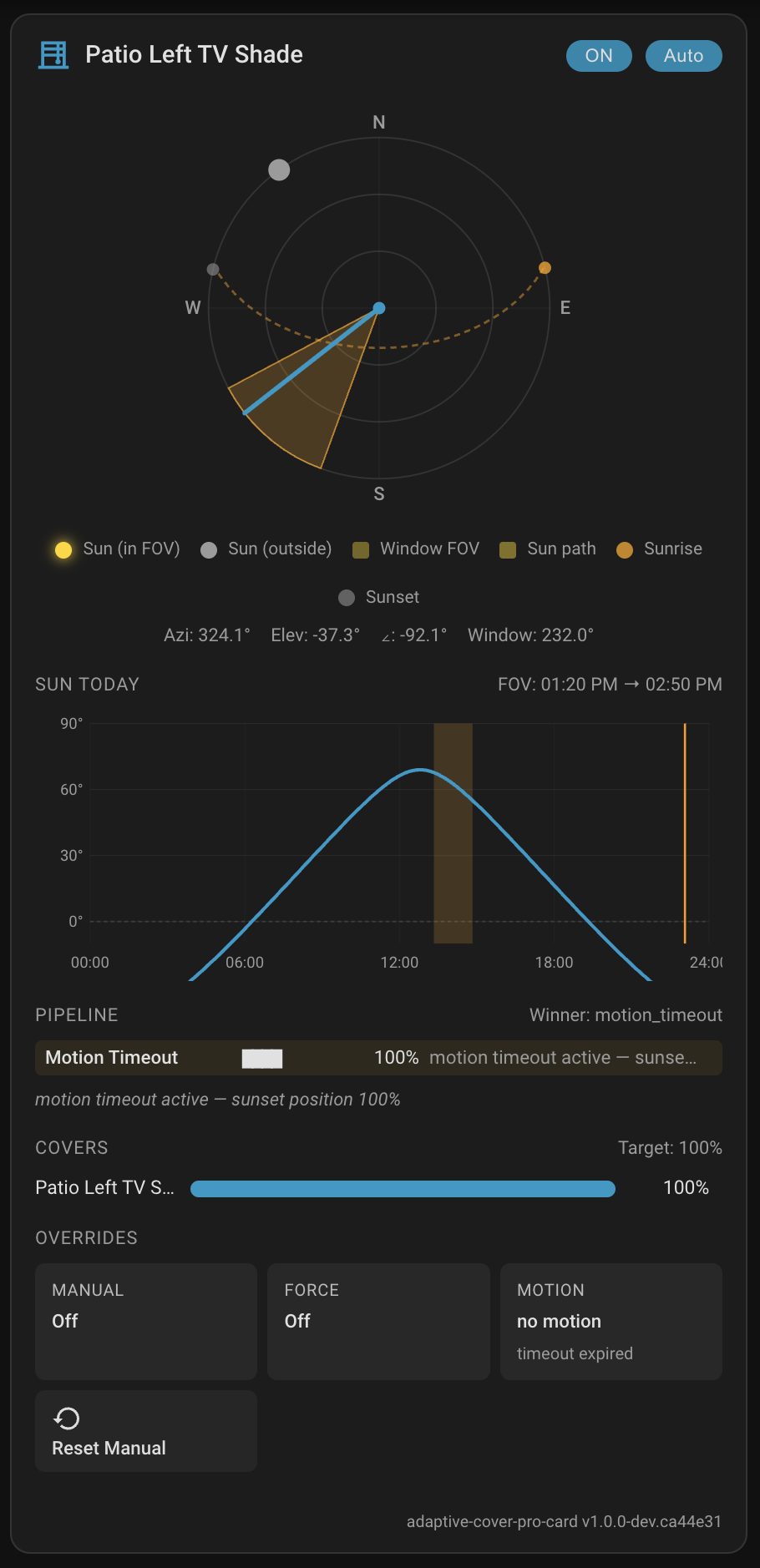
**Full card** — everything in one place: the compass, the elevation chart, the pipeline decision strip with the winning handler highlighted, per-cover position bars, and override controls.
Setup and options: **[Lovelace Card](https://github.com/jrhubott/adaptive-cover-pro/wiki/Lovelace-Card)** · **[Sky Compass Card](https://github.com/jrhubott/adaptive-cover-pro/wiki/Sky-Compass-Card)**.
---
## Quick install
**HACS (recommended):** In HACS, search **Adaptive Cover Pro**, download, restart Home Assistant, then add the integration.
**Manual:** Copy `custom_components/adaptive_cover_pro/` into `config/custom_components/`, restart Home Assistant, and add the integration.
Full steps: **[Installation](https://github.com/jrhubott/adaptive-cover-pro/wiki/Installation)** · **[First-Time Setup](https://github.com/jrhubott/adaptive-cover-pro/wiki/First-Time-Setup)**
## Documentation
| | |
| -------------------------- | ---------------------------------------------------------------------------------------------------------------------------------------------------------------------------------------------------------------------------------------------------------------------------------------------------------------------------------------------------------------------------------------------------------------------------------------------------------------------------------------------- |
| 🚀 **Getting started** | [Installation](https://github.com/jrhubott/adaptive-cover-pro/wiki/Installation) · [First-Time Setup](https://github.com/jrhubott/adaptive-cover-pro/wiki/First-Time-Setup) · [Cover Types](https://github.com/jrhubott/adaptive-cover-pro/wiki/Cover-Types) · [Migrating from Adaptive Cover](https://github.com/jrhubott/adaptive-cover-pro/wiki/Migrating-from-Adaptive-Cover) |
| 🧠 **How it works** | [How It Decides](https://github.com/jrhubott/adaptive-cover-pro/wiki/How-It-Decides) · [Basic Mode](https://github.com/jrhubott/adaptive-cover-pro/wiki/Basic-Mode) · [Climate Mode](https://github.com/jrhubott/adaptive-cover-pro/wiki/Climate-Mode) · [Enhanced Geometric Accuracy](https://github.com/jrhubott/adaptive-cover-pro/wiki/Enhanced-Geometric-Accuracy) |
| 🎨 **Dashboard** | [Lovelace Card](https://github.com/jrhubott/adaptive-cover-pro/wiki/Lovelace-Card) — install, configure, and use the companion card that visualizes the full pipeline |
| ⚙️ **Configuration** | [Sun Tracking](https://github.com/jrhubott/adaptive-cover-pro/wiki/Configuration-Sun-Tracking) · [Glare Zones](https://github.com/jrhubott/adaptive-cover-pro/wiki/Configuration-Glare-Zones) · [Weather Safety](https://github.com/jrhubott/adaptive-cover-pro/wiki/Configuration-Weather-Safety) · [Climate](https://github.com/jrhubott/adaptive-cover-pro/wiki/Configuration-Climate) · [Summary Screen](https://github.com/jrhubott/adaptive-cover-pro/wiki/Configuration-Summary-Screen) |
| 🔌 **Entities & services** | [Entities](https://github.com/jrhubott/adaptive-cover-pro/wiki/Entities) · [Runtime Configuration Services](https://github.com/jrhubott/adaptive-cover-pro/wiki/Runtime-Configuration-Services) · [Position Verification](https://github.com/jrhubott/adaptive-cover-pro/wiki/Position-Verification) · [Somfy RTS (My Position)](https://github.com/jrhubott/adaptive-cover-pro/wiki/My-Position-Support-Somfy-RTS) |
| 🛠️ **Operations** | [Troubleshooting](https://github.com/jrhubott/adaptive-cover-pro/wiki/Troubleshooting) (incl. [stopping false manual overrides](https://github.com/jrhubott/adaptive-cover-pro/wiki/Troubleshooting#workaround--stop-unexpected-manual-overrides-entirely)) · [Known Limitations](https://github.com/jrhubott/adaptive-cover-pro/wiki/Known-Limitations) |
## Support
If Adaptive Cover Pro has been useful, you can support the project:
[](https://www.buymeacoffee.com/jrhubott)