https://github.com/jsa2/aad---azuread-sql
https://github.com/jsa2/aad---azuread-sql
Last synced: 12 months ago
JSON representation
- Host: GitHub
- URL: https://github.com/jsa2/aad---azuread-sql
- Owner: jsa2
- Created: 2021-08-14T06:22:31.000Z (almost 5 years ago)
- Default Branch: main
- Last Pushed: 2021-09-13T06:35:13.000Z (almost 5 years ago)
- Last Synced: 2025-07-26T18:43:05.215Z (12 months ago)
- Language: JavaScript
- Size: 176 KB
- Stars: 0
- Watchers: 2
- Forks: 0
- Open Issues: 0
-
Metadata Files:
- Readme: readme.md
Awesome Lists containing this project
README
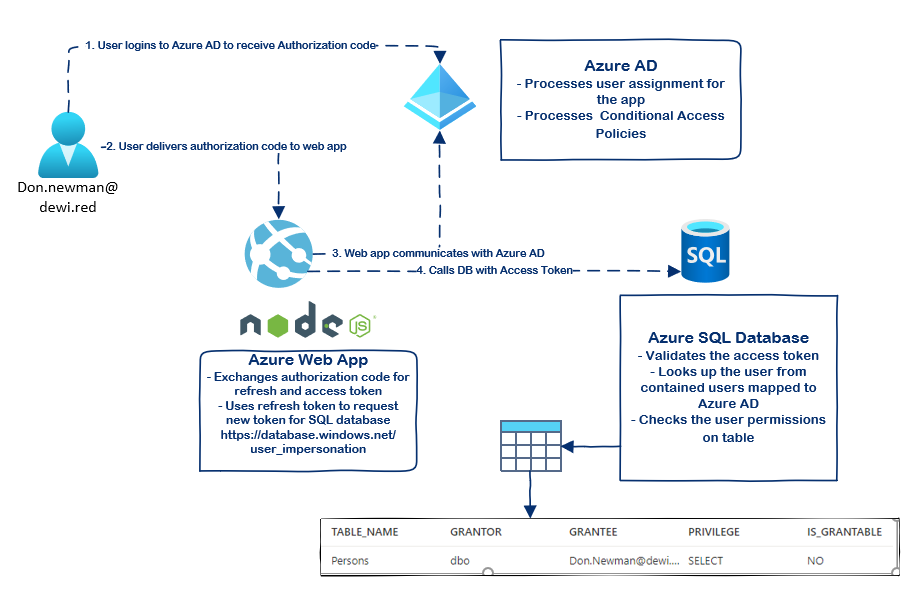
# E2E authentication using Azure AD for Azure SQL Database
- [E2E authentication using Azure AD for Azure SQL Database](#e2e-authentication-using-azure-ad-for-azure-sql-database)
- [Benefits](#benefits)
- [Setup](#setup)
- [Ensure Azure AD Application has permissions for Azure SQL Database](#ensure-azure-ad-application-has-permissions-for-azure-sql-database)
- [Enable Azure AD Admin on database](#enable-azure-ad-admin-on-database)
- [Add principal for the database and grant access to existing database using the azure ad admin user](#add-principal-for-the-database-and-grant-access-to-existing-database-using-the-azure-ad-admin-user)
- [Query with Node.JS using tedious](#query-with-nodejs-using-tedious)
- [Logging example](#logging-example)
## Benefits
Provides end to end Azure AD authorization and logging all the way to authorizing user in SQL table level.
Source | LogName
---|---|
Azure AD ➡ | ``AADNonInteractiveUserSignInLogs, SigninLogs``
| Web App ➡ | `` WebApp Logs (AppServiceConsoleLogs...,...,)``
Database / Table 📑 | `` AzureDiagnostics - SQLSecurityAuditEvents``
## Setup
setting | value
---|---|
Tested on Azure SQL Database | `` Standard S1: 20 DTUs & Basic `` |
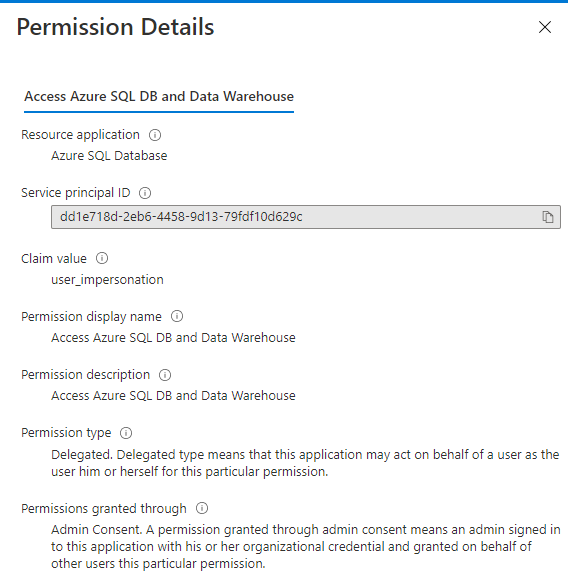
| Azure AD Application Configured for API scope |``https://database.windows.net/user_impersonation``
| MS Docs Source 1 | [provision-azure-ad-admin-sql-database](https://docs.microsoft.com/en-us/azure/azure-sql/database/authentication-aad-configure?tabs=azure-powershell#provision-azure-ad-admin-sql-database)
MS Docs Source 2| [connect-query-nodejs](https://docs.microsoft.com/en-us/azure/azure-sql/database/connect-query-nodejs?tabs=windows)
app that you can use to get access tokens | I am using simple Node.JS app for this. various tutorials exist for this part if needed
### Ensure Azure AD Application has permissions for Azure SQL Database
### Enable Azure AD Admin on database
- This step is outlined in the [provision-azure-ad-admin-sql-database](https://docs.microsoft.com/en-us/azure/azure-sql/database/authentication-aad-configure?tabs=azure-powershell#provision-azure-ad-admin-sql-database)
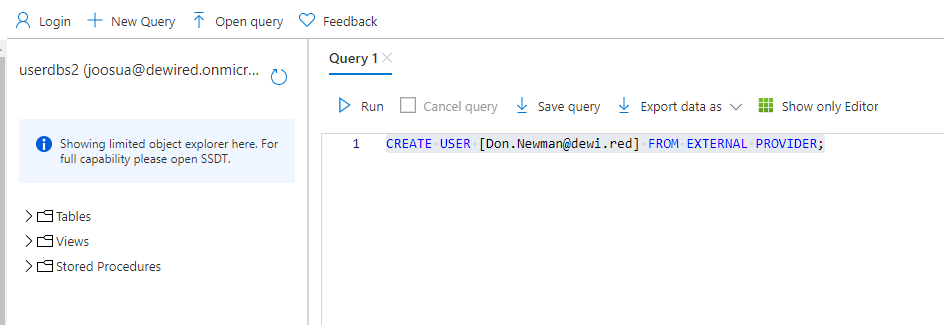
### Add principal for the database and grant access to existing database using the azure ad admin user
- You can use the query editor in portal to create the user in DB
- Create table Persons and insert some records there
```sql
CREATE TABLE Persons (
PersonID int,
LastName varchar(255),
FirstName varchar(255),
);
INSERT INTO [Persons]
VALUES (122,'john','doe');
```
```sql
CREATE USER [apimdeveos] FROM EXTERNAL PROVIDER
CREATE USER [Dennis.Hale@dewi.red] FROM EXTERNAL PROVIDER;
GRANT SELECT ON [dbo].[Persons] TO [Dennis.Hale@dewi.red];
EXEC sp_table_privileges
@table_name = 'Persons%';
```
### Query with Node.JS using tedious
- Below is example snippet
```javascript
// Token is provided by app of your choosing (Not included in this sample)
const config = {
server: "latestings.database.windows.net",
authentication: {
type: 'azure-active-directory-access-token',
options:{
token
}
},
options: {
database: 'userdbs2',
encrypt: true,
port: 1433,
token,
}
};
const connection = new Connection(config);
// Attempt to connect and execute queries if connection goes through
connection.on("connect", err => {
if (err) {
console.error(err.message);
} else {
queryDatabase();
}
});
connection.connect();
function queryDatabase() {
console.log("Reading rows from the Table...");
// Read all rows from table
const request = new Request(
`SELECT * FROM [dbo].[Persons]`,
(err, rowCount) => {
if (err) {
console.error(err.message);
} else {
console.log(`${rowCount} row(s) returned`);
}
}
);
request.on("row", columns => {
columns.forEach(column => {
console.log("%s\t%s", column.metadata.colName, column.value);
})
});
connection.execSql(request);
}
```
- Example result
```
Reading rows from the Table...
PersonID 1234
LastName John
FirstName Doe
PersonID 334
LastName jake
FirstName as
2 row(s) returned
```
## Logging example

```
union AADNonInteractiveUserSignInLogs, SigninLogs
| where ResourceDisplayName == "Azure SQL Database"
| summarize make_set(Location) by UserPrincipalName, ResourceDisplayName, tokenRefreshed= TimeGenerated, AppDisplayName
| join kind=inner (AzureDiagnostics
| where ResourceProvider =="MICROSOFT.SQL" | project session_server_principal_name_s, statement_s, sqlTime=TimeGenerated) on $left.UserPrincipalName == $right.session_server_principal_name_s
| project session_server_principal_name_s, tokenRefreshed, sqlTime, query=statement_s, app=strcat(AppDisplayName, '-', ResourceDisplayName)
```