https://github.com/jslite/calendar
:date: 日历控件
https://github.com/jslite/calendar
Last synced: 11 months ago
JSON representation
:date: 日历控件
- Host: GitHub
- URL: https://github.com/jslite/calendar
- Owner: JSLite
- Created: 2016-03-05T17:12:45.000Z (over 10 years ago)
- Default Branch: master
- Last Pushed: 2016-03-25T04:25:34.000Z (about 10 years ago)
- Last Synced: 2025-03-25T11:11:17.600Z (about 1 year ago)
- Language: JavaScript
- Homepage:
- Size: 110 KB
- Stars: 10
- Watchers: 1
- Forks: 2
- Open Issues: 0
-
Metadata Files:
- Readme: README.md
Awesome Lists containing this project
README
# 日历控件
[](https://github.com/JSLite/JSLite) [](https://segmentfault.com/t/jslite) [](https://segmentfault.com/t/jslite)
> 引用JSLit.js 下载 [JSLite.io](http://JSlite.io),兼容 `JSLite` 和 `jQuery`

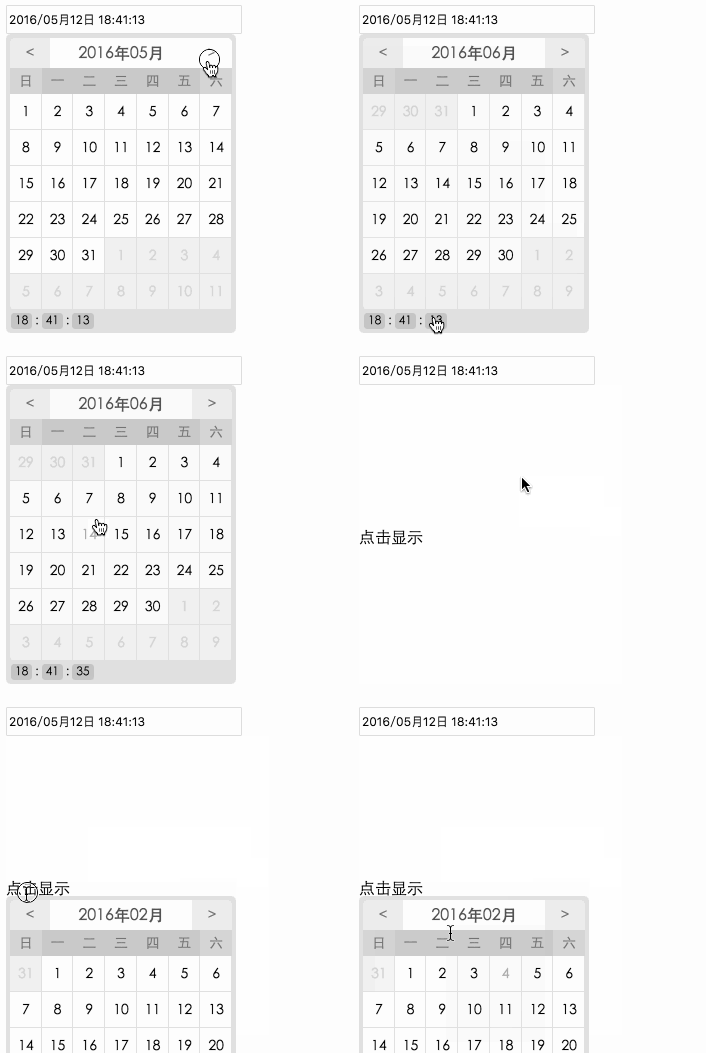
## 安装方法
页面引用 `JSLite` 或者`jQuery`
```html
var obj4 = document.getElementById("JSLiteCalenbar4")
var cal=new $.calendar($("#JSLiteCalenbar4")[0],function(date){
console.log(date);
//返回更改的时间值date=2014-10-11
$('#JSLiteCalenbar4 input').val()
this.calBoxs.prev().val(date)
})
.hide()
.time("yyyy/MM月dd日 hh:mm:ss",'default')
console.log(cal);
```
# 扩展方法
- `hidePrevBtn`:隐藏上一页 按钮 显示未来时间,不能翻阅历史
- `hide`:点击显示界面
- `setDate`:设置时间,传json
- `time`:设置是否可以选则时间 (时分)
"yyyy/MM月dd日 hh:mm:ss" 序列号时间格式
'default' 默认再`input`中显示默认时间或者指定时间
## hide
> 点击显示界面
```html
点击显示
var obj3 = document.getElementById("JSLiteCalenbar2")
new $.calendar(obj3,{
"now":"2014-09-15"
},function(date){
//返回更改的时间值date=2014-10-11
console.log(date)
}).hide();
```
## 例子一
```js
var obj3 = document.getElementById("JSLiteCalenbar2")
new JSLite.calendar(obj3,{
"now":"2014-09-15"
},function(date){
//返回更改的时间值date=2014-10-11
console.log(date)
console.log("obj3")
}).time("yyyy/MM月dd日 hh:mm:ss",'default');
var cal = new JSLite.calendar(obj,function(){
return {
"now":"2014-09-15",//服务器当前时间
"change":true,//是否更改当前时间以前的内容
"interfaceNum":3,//显示当前以后多少个日历
"workdate":[
{
"date":"2013-12",
"day":["1", "2", "3", "4", "5", "6", "7", "8", "9", "10", "20"]
},{
"date":"2014-09",
"day":["10", "2", "3", "4", "5", "6", "20"]
},{
"date":"2014-05",
"day":["10", "2", "3", "4", "5", "6", "20"]
},{
"date":"2014-10",
"day":["12", "2", "3", "4", "5", "6", "20"]
}
]
}
},function(date){
//返回更改的时间值date=["2014-10-10,0","2014-10-11,0"]
console.log(date)
}).hidePrevBtn()
```
## 例子二
```js
var obj3 = document.getElementById("JSLiteCalenbar2")
new JSLite.calendar(obj3,function(date){
//返回更改的时间值date=2014-10-11
console.log(date)
console.log("obj3")
}).hidePrevBtn().hide()
```