https://github.com/jsonquerylang/jsonquery-python
A lightweight, flexible, and expandable JSON query language
https://github.com/jsonquerylang/jsonquery-python
Last synced: over 1 year ago
JSON representation
A lightweight, flexible, and expandable JSON query language
- Host: GitHub
- URL: https://github.com/jsonquerylang/jsonquery-python
- Owner: jsonquerylang
- License: other
- Created: 2024-11-07T19:51:26.000Z (almost 2 years ago)
- Default Branch: main
- Last Pushed: 2025-04-14T11:04:26.000Z (over 1 year ago)
- Last Synced: 2025-04-14T12:22:51.549Z (over 1 year ago)
- Language: Python
- Size: 101 KB
- Stars: 8
- Watchers: 0
- Forks: 0
- Open Issues: 1
-
Metadata Files:
- Readme: README.md
- License: LICENSE.md
Awesome Lists containing this project
README
# jsonquery-python

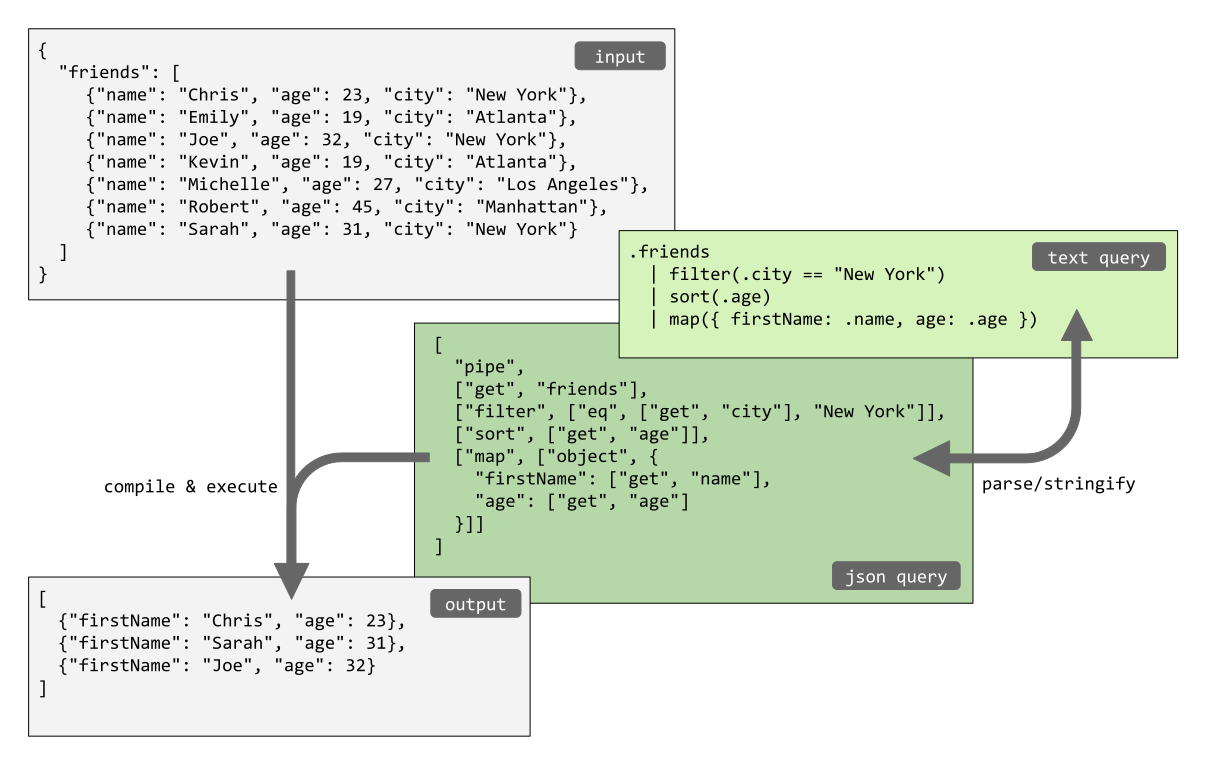
This is a Python implementation of **JSON Query**, a small, flexible, and expandable JSON query language.
Try it out on the online playground:
## Install
Install via PyPi: https://pypi.org/project/jsonquerylang/
```
pip install jsonquerylang
```
## Use
```python
from jsonquerylang import jsonquery
from pprint import pprint
data = {
"friends": [
{"name": "Chris", "age": 23, "city": "New York"},
{"name": "Emily", "age": 19, "city": "Atlanta"},
{"name": "Joe", "age": 32, "city": "New York"},
{"name": "Kevin", "age": 19, "city": "Atlanta"},
{"name": "Michelle", "age": 27, "city": "Los Angeles"},
{"name": "Robert", "age": 45, "city": "Manhattan"},
{"name": "Sarah", "age": 31, "city": "New York"}
]
}
# Get the array containing the friends from the object, filter the friends that live in New York,
# sort them by age, and pick just the name and age out of the objects.
output = jsonquery(data, """
.friends
| filter(.city == "New York")
| sort(.age)
| pick(.name, .age)
""")
pprint(output)
# [{'age': 23, 'name': 'Chris'},
# {'age': 31, 'name': 'Sarah'},
# {'age': 32, 'name': 'Joe'}]
# The same query can be written using the JSON format instead of the text format.
# Note that the functions `parse` and `stringify` can be used
# to convert from text format to JSON format and vice versa.
pprint(jsonquery(data, [
"pipe",
["get", "friends"],
["filter", ["eq", ["get", "city"], "New York"]],
["sort", ["get", "age"]],
["pick", ["get", "name"], ["get", "age"]]
]))
# [{'age': 23, 'name': 'Chris'},
# {'age': 31, 'name': 'Sarah'},
# {'age': 32, 'name': 'Joe'}]
```
### Syntax
The JSON Query syntax is described on the following page: https://github.com/jsonquerylang/jsonquery?tab=readme-ov-file#syntax.
## API
### jsonquery
Compile and evaluate a JSON query.
Syntax:
```
jsonquery(data, query [, options])
```
Where:
- `data` is a JSON object or array
- `query` is a JSON query or string containing a text query
- `options` is an optional object which can have the following options:
- `functions` an object with custom functions
Example:
```python
from pprint import pprint
from jsonquerylang import jsonquery
input = [
{"name": "Chris", "age": 23, "scores": [7.2, 5, 8.0]},
{"name": "Joe", "age": 32, "scores": [6.1, 8.1]},
{"name": "Emily", "age": 19},
]
query = ["sort", ["get", "age"], "desc"]
output = jsonquery(input, query)
pprint(output)
# [{'age': 32, 'name': 'Joe', 'scores': [6.1, 8.1]},
# {'age': 23, 'name': 'Chris', 'scores': [7.2, 5, 8.0]},
# {'age': 19, 'name': 'Emily'}]
```
### compile
Compile a JSON Query. Returns a function which can execute the query repeatedly for different inputs.
Syntax:
```
compile(query [, options])
```
Where:
- `query` is a JSON query or string containing a text query
- `options` is an optional object which can have the following options:
- `functions` an object with custom functions
The function returns a lambda function which can be executed by passing JSON data as first argument.
Example:
```python
from pprint import pprint
from jsonquerylang import compile
input = [
{"name": "Chris", "age": 23, "scores": [7.2, 5, 8.0]},
{"name": "Joe", "age": 32, "scores": [6.1, 8.1]},
{"name": "Emily", "age": 19},
]
query = ["sort", ["get", "age"], "desc"]
queryMe = compile(query)
output = queryMe(input)
pprint(output)
# [{'age': 32, 'name': 'Joe', 'scores': [6.1, 8.1]},
# {'age': 23, 'name': 'Chris', 'scores': [7.2, 5, 8.0]},
# {'age': 19, 'name': 'Emily'}]
```
### parse
Parse a string containing a JSON Query into JSON.
Syntax:
```
parse(textQuery, [, options])
```
Where:
- `textQuery`: A query in text format
- `options`: An optional object which can have the following properties:
- `functions` an object with custom functions
- `operators` an object with the names of custom operators both as key and value
Example:
```python
from pprint import pprint
from jsonquerylang import parse
text_query = '.friends | filter(.city == "new York") | sort(.age) | pick(.name, .age)'
json_query = parse(text_query)
pprint(json_query)
# ['pipe',
# ['get', 'friends'],
# ['filter', ['eq', ['get', 'city'], 'New York']],
# ['sort', ['get', 'age']],
# ['pick', ['get', 'name'], ['get', 'age']]]
```
### stringify
Stringify a JSON Query into a readable, human friendly text format.
Syntax:
```
stringify(query [, options])
```
Where:
- `query` is a JSON Query
- `options` is an optional object that can have the following properties:
- `operators` an object with the names of custom operators both as key and value
- `indentation` a string containing the desired indentation, defaults to two spaces: `" "`
- `max_line_length` a number with the maximum line length, used for wrapping contents. Default value: `40`.
Example:
```python
from jsonquerylang import stringify
jsonQuery = [
"pipe",
["get", "friends"],
["filter", ["eq", ["get", "city"], "New York"]],
["sort", ["get", "age"]],
["pick", ["get", "name"], ["get", "age"]],
]
textQuery = stringify(jsonQuery)
print(textQuery)
# '.friends | filter(.city == "new York") | sort(.age) | pick(.name, .age)'
```
## License
Released under the [ISC license](LICENSE.md).