https://github.com/jtang613/binassist
Binary Ninja plugin to provide LLM assistance analyzing binaries.
https://github.com/jtang613/binassist
ai binary-ninja binary-ninja-plugin llm ml openai reverse-engineering
Last synced: 4 months ago
JSON representation
Binary Ninja plugin to provide LLM assistance analyzing binaries.
- Host: GitHub
- URL: https://github.com/jtang613/binassist
- Owner: jtang613
- License: mit
- Created: 2024-08-03T23:56:37.000Z (almost 2 years ago)
- Default Branch: master
- Last Pushed: 2026-02-16T15:20:14.000Z (5 months ago)
- Last Synced: 2026-02-16T22:55:53.091Z (5 months ago)
- Topics: ai, binary-ninja, binary-ninja-plugin, llm, ml, openai, reverse-engineering
- Language: Python
- Homepage:
- Size: 11.2 MB
- Stars: 49
- Watchers: 2
- Forks: 5
- Open Issues: 0
-
Metadata Files:
- Readme: README.md
- Funding: .github/FUNDING.yml
- License: LICENSE
Awesome Lists containing this project
README
# BinAssist
Author: **Jason Tang**
_A comprehensive LLM-powered Binary Ninja plugin for intelligent binary analysis and reverse engineering._
## Description
BinAssist is an advanced LLM plugin designed to enhance binary analysis and reverse engineering workflows through intelligent automation. It leverages local and remote LLM capabilities to provide context-aware assistance throughout the binary analysis process. It supports fully agentic reverse engineering through its MCP client and MCP servers like [BinAssistMCP](https://github.com/jtang613/BinAssistMCP)
The plugin supports any OpenAI v1-compatible or Anthropic API, making it compatible with popular LLM providers including Ollama, LM Studio, Open-WebUI, OpenAI, Anthropic, AWS Bedrock (via LiteLLM), and others.
**Recommended models:**
- **With Reasoning Support**: Claude Sonnet 4+, OpenAI GPT-5+, GPT-OSS (supports extended thinking for complex analysis)
- **General Purpose**: DeepSeek, LLaMA-based coder models, Claude Sonnet 3.5, GPT-4
## Core Features
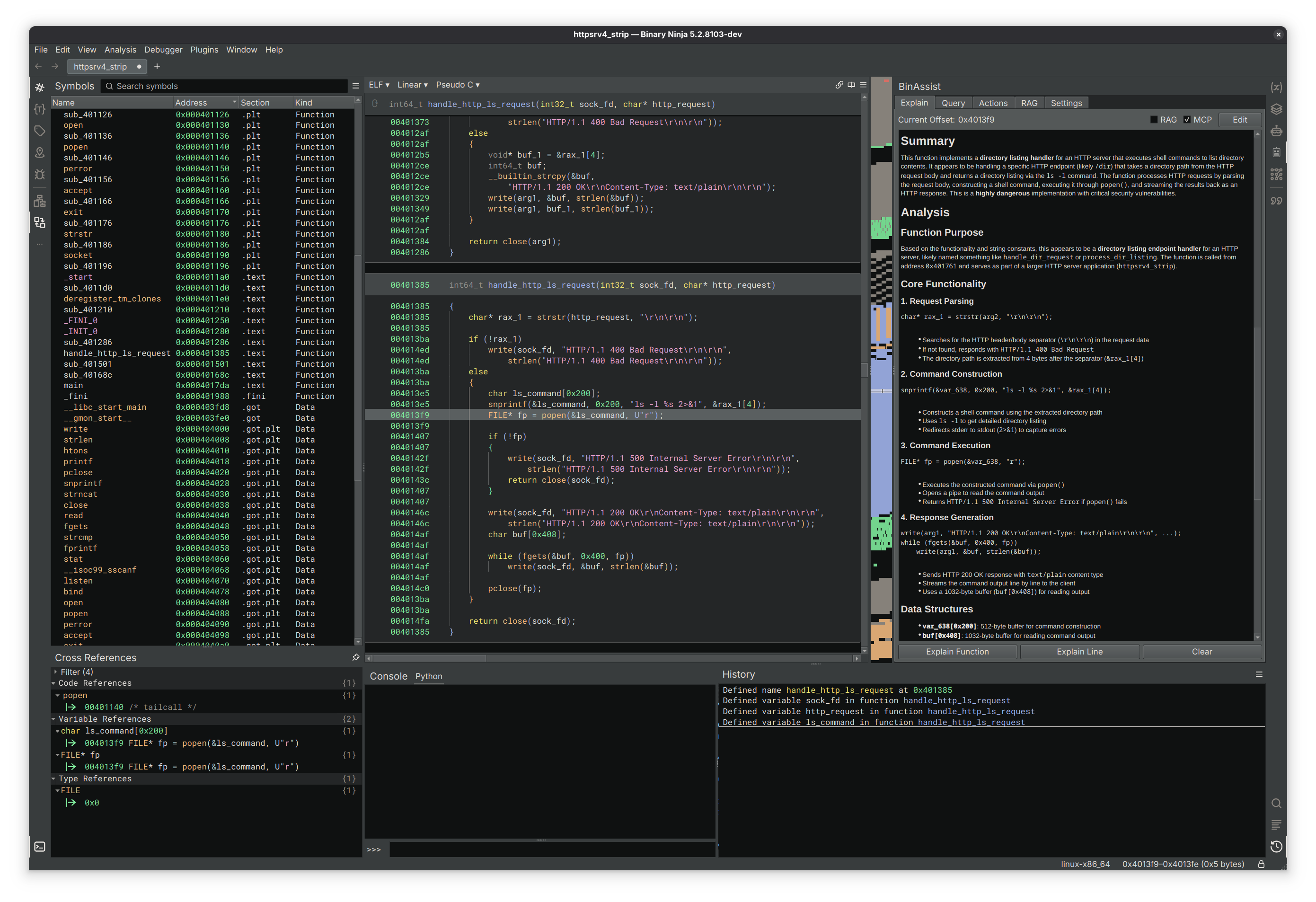
### Explain Tab
- **Function Analysis**: Comprehensive analysis of functions at all IL levels (LLIL, MLIL, HLIL)
- **Instruction Analysis**: Detailed explanations of individual instructions and their purpose
- **Context-Aware**: Stores responses at a function level, allowing you to easily keep track
- **Edit Responses**: Tweak the response as needed and save it for later
### Query Tab
- **Interactive LLM Chat**: Direct conversation interface with the LLM
- **ReAct Agent**: Autonomous multi-step reasoning and analysis using the ReAct (Reasoning + Acting) framework
- Iterative problem-solving with reflection and self-correction
- Automatic tool selection and execution via MCP
- Step-by-step reasoning traces for transparency
- Up to 15 iterations with intelligent termination
- **Extended Thinking**: Support for reasoning effort control on compatible models
- Configurable thinking depth (None, Low, Medium, High)
- Compatible with Claude Sonnet 4+, OpenAI o1/o3/gpt-5, and gpt-oss
- Increases analysis quality for complex reverse engineering tasks
- **Binary Context**: Automatically includes relevant binary information in queries
- **Flexible Prompting**: Support for custom queries and analysis requests
- **Streaming Responses**: Real-time response generation with cancellation support
### Actions Tab
- **Intelligent Suggestions**: LLM-powered recommendations for improving binary analysis
- **Four Action Types**:
- **Rename Function**: Suggest semantically meaningful function names
- **Rename Variable**: Propose descriptive variable names based on usage
- **Retype Variable**: Recommend appropriate data types for variables
- **Auto Create Struct**: Generate structure definitions from data patterns
- **Confidence Scoring**: Each suggestion includes confidence metrics (0.0-1.0)
- **Selective Application**: Choose which suggestions to apply via interactive UI
- **Status Tracking**: Real-time feedback on action application success/failure
- **Tool-Based Architecture**: Uses native LLM tool calling for precise suggestions
### Semantic Graph Tab
- **GraphRAG Architecture**: Graph-based Retrieval-Augmented Generation for binary analysis
- **ReIndex Binary**: Build a semantic graph of all functions with call relationships
- **Semantic Analysis**: LLM-powered function summarization and categorization
- Automatic purpose inference from function names and behavior
- Security flag detection (network, file I/O, crypto, etc.)
- Activity profiling and risk assessment
- **Security Analysis**: Taint analysis for vulnerability detection
- Source-to-sink path finding (e.g., `recv` → `strcpy`)
- Automatic detection of dangerous API usage patterns
- TAINT_FLOWS_TO and VULNERABLE_VIA edge creation
- **Community Detection**: Function clustering using Label Propagation algorithm
- Groups related functions based on call relationships
- Automatic module/purpose inference (Network I/O, Crypto, File Operations, etc.)
- Runs automatically after ReIndex completes
- **Visual Graph View**: Interactive visualization of function relationships
- **Full-Text Search**: FTS5-powered search across function names and summaries
- **Query Tools**: MCP-exposed tools for LLM to query the semantic graph
### Advanced Capabilities
- **ReAct Autonomous Agent**: Full implementation of the ReAct framework for multi-step analysis
- **Extended Thinking/Reasoning Effort**: Provider-agnostic reasoning control for deeper analysis
- Anthropic: Extended thinking with configurable token budgets (2K-25K tokens)
- OpenAI: Reasoning effort levels for o1/o3/gpt-5 models
- Ollama: Native thinking parameter support for compatible models (gpt-oss)
- **Function Calling**: LLM can directly interact with Binary Ninja API to navigate and modify analysis
- **MCP Integration**: Model Context Protocol support for extensible tool integration
- **RLHF Dataset Generation**: Collect interaction data to enable model fine-tuning
- **RAG Augmentation**: Enhance queries with relevant documentation and context
- **Async Processing**: Non-blocking UI with background LLM processing
- **Streaming Support**: Real-time response generation with proper cancellation
### Configuration & Settings
- **Flexible API Configuration**: Support for multiple LLM providers and endpoints
- **Model Selection**: Choose from available models for different analysis tasks
- **Reasoning Effort Control**: Session-specific thinking depth configuration
- Adjustable per-query or globally in Settings tab
- Four levels: None (standard), Low (~2K tokens), Medium (~10K), High (~25K)
- Cost and latency warnings for higher levels
- **Token Limits**: Configurable maximum tokens for cost and performance optimization
- **Database Management**: Built-in RLHF and RAG database configuration
- **Thread Safety**: Proper async handling for Binary Ninja's threading requirements
## Future Roadmap
### Planned Features
- **Model Fine-tuning**: Leverage collected RLHF data for specialized model training
- **Collaborative Features**: Share analysis insights and suggestions across teams
- **Hierarchical Communities**: Multi-level community detection for large binaries
### Research Areas
- **Domain-Specific Models**: Fine-tuned models for specific binary types
- **Code Generation**: Automated exploit development and patching suggestions
- **Enhanced Vulnerability Detection**: Expanded taint analysis with data flow tracking
- **Performance Optimization**: Enhanced suggestion accuracy and speed
## Quick Start Guide
### 1. Installation
Windows users should start with: [BinAssist on Windows](docs/binassist-on-windows.md)
```bash
# Install dependencies from the plugin directory
pip install -r requirements.txt
```
### 2. Configuration
1. Open **Settings → BinAssist** in Binary Ninja
2. Configure your LLM provider:
- **API Host**: Point to your preferred API endpoint (e.g., `http://localhost:11434` for Ollama)
- **API Key**: Set authentication key if required
- **Model**: Choose your preferred model (e.g., `gpt-oss:20b`, `claude-sonnet-4-5`, `gpt-5.2-codex`)
3. Set database paths for RLHF and RAG features
4. Adjust token limits based on your needs
5. Configure **Reasoning Effort** in the Settings tab for models that support extended thinking
### 3. Usage
1. Load a binary in Binary Ninja
2. Click the **🤖 robot icon** in the sidebar to open BinAssist
3. Navigate between tabs based on your analysis needs:
- **Explain**: Analyze functions and instructions
- **Query**: Interactive chat with the LLM
- **Actions**: Get intelligent improvement suggestions
- **Semantic Graph**: Build and explore the binary's semantic graph
- **RAG**: Manage external documentation for context
### 4. Workflow Examples
**Function Analysis:**
1. Navigate to a function in Binary Ninja
2. Switch to the **Explain** tab
3. Click **"Explain Function"** for comprehensive analysis
**Getting Suggestions:**
1. Go to the **Actions** tab
2. Select desired action types (Rename Function, etc.)
3. Click **"Analyse"** to get LLM-powered suggestions
4. Review confidence scores and apply selected actions
**Interactive Queries:**
1. Use the **Query** tab for free-form questions
2. Ask about specific functions, algorithms, or analysis techniques
3. The LLM has full context of your current binary
**Agentic Analysis (ReAct):**
1. Enable **Agentic** mode in the Query tab
2. Enable **MCP** to provide tools for autonomous exploration
3. Ask complex questions like "What does this binary do?" or "Find security vulnerabilities"
4. Watch as the agent autonomously:
- Decompiles and analyzes functions
- Follows cross-references
- Builds understanding through iterative reasoning
- Provides comprehensive analysis with step-by-step traces
**Semantic Graph Analysis:**
1. Go to the **Semantic Graph** tab
2. Click **"ReIndex Binary"** to build the function graph
- Community detection runs automatically after indexing
3. Use **"Semantic Analysis"** for LLM-powered function summaries
4. Run **"Security Analysis"** to find vulnerable source→sink paths
5. Explore the **Visual Graph** to see function relationships
6. Use **Search** to find functions by name or summary content
## Screenshot

## Homepage
https://github.com/jtang613/BinAssist
## Technical Architecture
### Design Patterns
- **Model-View-Controller (MVC)**: Clean separation of concerns across all tabs
- **Service-Oriented Architecture**: Modular services for different analysis tasks
- **Observer Pattern**: Qt signal-slot communication for responsive UI
- **Async/Await**: Non-blocking operations with proper thread management
### Key Components
**Controllers:**
- `ExplainController`: Manages function and instruction analysis
- `QueryController`: Handles interactive LLM conversations
- `ActionsController`: Coordinates intelligent suggestion generation
- `SemanticGraphController`: Orchestrates GraphRAG indexing and analysis
**Services:**
- `BinaryContextService`: Extracts and formats binary information
- `ActionsService`: Validates and applies code improvements
- `RLHFService`: Manages training data collection
- `RAGService`: Handles document retrieval and context enhancement
- `GraphRAGService`: Manages semantic graph indexing and queries
- `GraphStore`: SQLite-backed graph node and edge storage
- `CommunityDetector`: Label Propagation algorithm for function clustering
- `TaintAnalyzer`: Source-to-sink vulnerability path detection
**Threading:**
- `ExplainLLMThread`: Background processing for explanations
- `QueryLLMThread`: Async chat processing with streaming
- `ActionsLLMThread`: LLM tool calling for suggestion generation
- `ReActOrchestratorThread`: Autonomous multi-step agent execution
**Tools & Integration:**
- **MCP Tools**: Native LLM tool calling for precise actions
- **Binary Ninja API**: Direct integration with analysis engine
- **OpenAI Compatibility**: Works with any OpenAI v1-compatible endpoint
## Installation & Compatibility
### System Requirements
- **Binary Ninja**: Version 4000 or higher
- **Python**: 3.8+ with Binary Ninja's Python environment
- **Memory**: 4GB+ recommended for local LLM usage
- **Storage**: ~100MB for plugin + model-dependent storage
### Platform Support
**Linux** (Primary Development Platform)
- Fully tested and supported
- Recommended for production use
**Windows**
- Should work but less tested
- Submit issues for Windows-specific problems
**macOS**
- Should work but less tested
- Submit issues for macOS-specific problems
### LLM Provider Setup
**Local LLMs (Recommended):**
```bash
# Ollama setup
curl -fsSL https://ollama.ai/install.sh | sh
# Pull a general-purpose model
ollama pull llama3.1:8b
# Or pull a reasoning model (recommended for complex analysis)
ollama pull gpt-oss:20b
ollama serve # Runs on http://localhost:11434
```
**Other Compatible Providers:**
- **LM Studio**: Desktop GUI for local models
- **Ollama**: Advanced local LLM interface CLI
- **Open-WebUI**: Advanced local LLM interface GUI
- **OpenAI API**: Cloud-based (requires API key)
- **Anthropic API**: Cloud-based (requires API key)
- **LiteLLM Proxy**: Access AWS Bedrock, Azure, and 100+ providers
- **OpenRouter**: Access to multiple models via API
### Installation Steps
1. **Install Dependencies**:
```bash
cd /path/to/BinAssist
pip install -r requirements.txt
```
2. **Configure Binary Ninja**:
- Install as a plugin in Binary Ninja's plugin directory
- Or run directly from development directory
3. **Set up LLM Provider**:
- Configure your preferred provider (see LLM Provider Setup above)
- Update BinAssist settings with correct API endpoints
## Dependencies
**Required Python Packages:**
```
openai # OpenAI and LiteLLM provider API
anthropic # Anthropic Claude API
pysqlite3 # Database operations
markdown # Documentation formatting
httpx # HTTP client for API calls
anyio>=4.6 # Async I/O support
mcp # Model Context Protocol client
whoosh # Full-text search for RAG documents
aiohttp # OAuth clients
```
## Contributing
We welcome contributions! Please see our contributing guidelines:
- **Bug Reports**: Submit detailed issues with reproduction steps
- **Feature Requests**: Propose new functionality with clear use cases
- **Code Contributions**: Follow existing patterns
## Support & Community
- **GitHub Issues**: Primary support channel for bugs and features
## License
This plugin is released under the **MIT License** - see LICENSE file for details.
**Minimum Binary Ninja Version**: 5000
**Metadata Version**: 2