https://github.com/jtsiomb/xmon
Graphical system monitor for UNIX/X11
https://github.com/jtsiomb/xmon
cpu-usage system-monitor
Last synced: 6 months ago
JSON representation
Graphical system monitor for UNIX/X11
- Host: GitHub
- URL: https://github.com/jtsiomb/xmon
- Owner: jtsiomb
- License: gpl-3.0
- Created: 2025-11-29T21:16:51.000Z (7 months ago)
- Default Branch: master
- Last Pushed: 2025-12-22T08:28:41.000Z (6 months ago)
- Last Synced: 2025-12-22T09:16:04.106Z (6 months ago)
- Topics: cpu-usage, system-monitor
- Language: C
- Homepage:
- Size: 133 KB
- Stars: 2
- Watchers: 1
- Forks: 1
- Open Issues: 0
-
Metadata Files:
- Readme: README.md
- License: COPYING
Awesome Lists containing this project
README
xmon - graphical system monitor
===============================
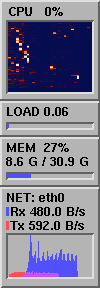
Xmon is a simple graphical system monitoring utility for UNIX and windows.
Xmon strives to:
- Run on as many systems as possible.
- Be as lighweight and efficient as possible.
- Run well on systems with reduced colors.
- Run well both locally and over the network on X11.
- Be as configurable as possible.
Currently xmon supports: Linux, IRIX, FreeBSD, MacOS X, and Windows.
History
-------
Xmon started as an experiment to find a good way to present CPU usage of more
than a handful of cores. I was disappointed by existing system monitors which
either show the average usage (which for a 32-thread processor will be mostly
blank if you're not maxing most cores), or attempt to fit N different CPU
graphs onto my screen which are just meaningless noise and clutter.
The idea behind Xmon's CPU usage display, was to use a waterfall plot display,
similar to plots often used in frequency analysis. The horizontal axis is split
among the CPUs/cores, the vertical axis is time, and the plot intensity/color is
a function of the usage of the corresponding core.
I got the idea to use a waterfall plot from a comment Dave Plummer made, while
interviewing Dave Cutler, about potentially using a "heatmap" to visualize CPU
utilization for hundreds of cores/threads. I ended up going with a waterfall
plot instead of a heatmap, because it also conveys utilization over time.
License
-------
Copyright (C) 2025 John Tsiombikas
Xmon is Free Software. Feel free to use, modify, and/or redistribute under the
terms of the GNU General Public License v3, or at your option any later version
published by the Free Software Foundation. See COPYING for details.
Build instructions
------------------
### GNU/Linux
Just run `make`, and `make install` if you wish to install xmon system-wide. The
default installation prefix is `/usr/local`, which can be changed by modifying
the first line of `GNUmakefile`.
### IRIX
To build on IRIX with MIPSPro C and the native make utility, run `make -f
Makefile.sgi`, and then `make -f Makefile.sgi install` to install xmon
system-wide. The default installation prefix is `/usr/local`, which can be
changed by modifying the first line of `Makefile.sgi`.
To build with gcc and GNU make, run `gmake CC=gcc`, then `gmake install` to
install. Again, to change the installation prefix, edit the first line of
`GNUmakefile`.
### FreeBSD
On FreeBSD GNU make is required. Type `gmake` to build, `gmake install` to
install. See the GNU/Linux instructions about the installation prefix.
### MacOS X
Make sure XQuartz is installed, and you have all the necessary Xlib headers.
You can install both with homebrew: `brew install xquartz libx11`.
Then just run `make` to compile, and `make install` to install.
### Windows
#### MS Visual C
To build with the microsoft compiler, from a console with the msvc build
environment set up (run `vcvars32` or equivalent), run `nmake -f Makefile.vc`.
#### MinGW
You may also use MinGW/gcc to compile xmon. From a terminal with the
appropriate mingw32/mingw64 build environment, just run `make`.
Notes
-----
### IRIX
#### setuid root
On IRIX xmon is installed as setuid-root, to be able to access kernel memory to
read the load average. Root priviledges are dropped immediately after /dev/kmem
is opened. See `load_init` in `src/irix/load.c`.
#### network traffic unit is packets
On IRIX xmon can't compute traffic in bytes. Only packet counters are
available. So all displayed numbers are packets or packets / sec.
### MacOS X
Currently the only modules implemented on MacOS X are CPU and memory usage.
### Windows
Xmon should be able to run on every version of windows starting from windows 95,
and Windows NT 4.0 with some caveats. Might also work on NT 3.1, but hasn't been
tested yet.
#### issues
- currently CPU usage collection is implemented with `NtQuerySystemInformation`
and so it only works on NT-based windows.
- currently the network interface statistics module, uses the "IP Helper API",
which is available on windows 98 and windows NT 4.0 SP4 or newer.