https://github.com/jukkan/power-bookmarklets
Power Platform development and administration scripts to be run as browser bookmarks
https://github.com/jukkan/power-bookmarklets
dataverse dynamics365 powerapps powerautomate powerplatform
Last synced: about 2 months ago
JSON representation
Power Platform development and administration scripts to be run as browser bookmarks
- Host: GitHub
- URL: https://github.com/jukkan/power-bookmarklets
- Owner: jukkan
- License: mit
- Created: 2025-11-04T11:05:22.000Z (8 months ago)
- Default Branch: main
- Last Pushed: 2026-01-16T15:31:56.000Z (5 months ago)
- Last Synced: 2026-01-17T04:49:37.131Z (5 months ago)
- Topics: dataverse, dynamics365, powerapps, powerautomate, powerplatform
- Language: JavaScript
- Homepage: https://jukkan.github.io/power-bookmarklets/
- Size: 452 KB
- Stars: 10
- Watchers: 0
- Forks: 0
- Open Issues: 0
-
Metadata Files:
- Readme: README.md
- License: LICENSE
Awesome Lists containing this project
README
# Power Platform Bookmarklets & Tools
Quick browser helpers for Power Platform admins, makers, and power users. The repo now hosts both classic bookmarklets and richer Tampermonkey userscripts so everything lives in one place.
## What's inside
- Bookmarklets that you can drag straight to your bookmarks bar from the public site
- Tampermonkey / userscripts for scenarios where a side panel or heavier UI makes sense
- Documentation, screenshots, and install links so you (or future-you after a device reset) can rehydrate everything fast
## 🛠️ Bookmarklet install
**👉 [Go to installation page](https://jukkan.github.io/power-bookmarklets)**
Drag bookmarklets from that page to your browser's bookmarks bar. Don't use the raw `.js` files in the repo.
## Bookmarklets
### 📋 Get Table Metadata
Extracts Dataverse table schema from a model-driven app view and copies it as a markdown table. Perfect for pasting into AI tools like Claude, Copilot, or ChatGPT.
**Usage:**
1. Navigate to a table view in a model-driven app (⚠️**IMPORTANT!** This is where you get the auth.)
2. Click the bookmarklet
3. Schema is copied to clipboard
**Output example:**
```markdown
**Table: pre_mytablename**
| LogicalName | DisplayName | AttributeType |
|-------------|-------------|---------------|
| pre_name | Task Name | String |
| pre_notes | Notes | Memo |
| pre_stage | Stage | Picklist [1: Draft, 2: In Progress, 3: Complete] |
| pre_actualdate | Actual Date | DateTime |
| pre_year | Year | Integer |
| pre_parentrecordid | Parent Record | Uniqueidentifier |
| pre_displaysequence | Display Sequence | Decimal |
...
```
**What it does:**
- Filters out system fields (created, modified, owner, etc.)
- Uses Web API `v9.2` (works on most environments)
- Copies to clipboard automatically
**See it in action:**
[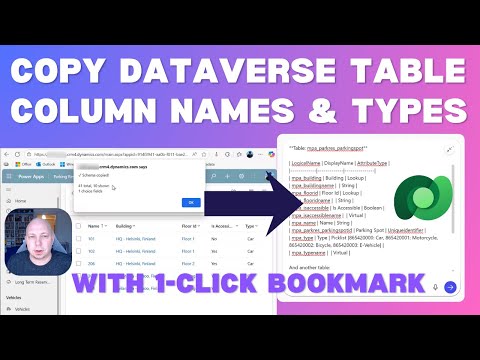](https://www.youtube.com/watch?v=K_k0p8gnQIg "Copy Dataverse Table Metadata with 1-Click")
*1-minute demo showing how to extract table schema and use it with AI tools*
**Source:** [`bookmarklets/get-table-metadata.js`](bookmarklets/get-table-metadata.js)
### ⚡ Get Flow JSON
Extracts Power Automate cloud flow definition from Dataverse and displays it in a rich, formatted viewer. Perfect for analyzing flow structure, sharing with AI tools like Claude or ChatGPT, or creating documentation.
**Usage:**
1. Navigate to a table view in a model-driven app (⚠️**IMPORTANT!** This is where you get the auth.)
2. Click the bookmarklet
3. Enter a Flow ID (GUID) — either the Dataverse ID or Maker Portal ID
4. Flow definition opens in a new window with a formatted viewer
**Key features:**
- **Recent flows history:** Remembers the last 10 flows you've viewed for quick access
- **Flow search:** Can search flows by name if ID lookup fails (useful for flows in the Default Solution)
- **Two export formats:** Full JSON or AI-optimized minimized version
- **Variable analysis:** Shows all flow variables grouped by type with usage tracking
- **Trigger details:** Displays trigger type, schedule, table, and event information
- **Connection references:** Lists all connections used by the flow
- **Both flow IDs shown:** Displays both Dataverse ID (`workflowid`) and Maker Portal ID (`workflowidunique`)
**Screenshot:**

**What it does:**
- Fetches flow definition using Dataverse Web API `v9.2`
- Parses the full flow JSON including triggers, actions, variables, and connections
- Opens a formatted viewer with syntax highlighting
- Tracks variable usage across all actions
- Provides AI-optimized export that reduces token count by ~70%
**Source:** [`bookmarklets/get-flow-json.js`](bookmarklets/get-flow-json.js)
## Tampermonkey scripts
### ⚡ PPAC Known Issues Enhanced
Side panel experience for the Power Platform Admin Center Known Issues page with filtering, watchlists, keyboard shortcuts, and export.

**Rapid install (what you need after a clean PC):**
1. Install the [Tampermonkey](https://www.tampermonkey.net/) extension for your browser.
2. Open the raw script URL: https://raw.githubusercontent.com/jukkan/power-bookmarklets/main/tampermonkey/ppac-enhanced.user.js
3. Tampermonkey prompts you to install/update the script. Confirm.
4. Visit [PPAC Known Issues](https://admin.powerplatform.microsoft.com/support/knownIssues), load any results with the native filters, and use the lightning button to open the panel.
See the full feature list, screenshots, and maintenance notes in [tampermonkey/ppac-enhanced.user.md](tampermonkey/ppac-enhanced.user.md).
### 🔬 Power Apps Checker Formula Export
Intercepts Power Apps Studio authoring API traffic while you run the built-in checker. Extracts formula diagnostics (errors and warnings with precise character offsets), the Power Fx source text for every flagged property, performance findings, and accessibility results — then gives you one-click export to three formats optimised for different audiences.

**Why this exists:**
The official Power Apps Checker API does not expose formula evaluation results for canvas apps. The Studio runs that evaluation client-side, but the output is never available outside the browser tab. This script fills that gap by tapping the internal `/api/v1/invoke` and `/api/v2/invoke` calls the Studio already makes.
**Key capabilities:**
- **Semantic formula errors** — type mismatches, missing columns, invalid `Patch` arguments, unrecognised names
- **Delegation warnings with character offsets** — precisely which characters triggered the warning, not just which screen
- **Formula source text** — the actual Power Fx script for each flagged property, ready to paste into an AI coding agent prompt
- **Performance & accessibility** — `InefficientDelayLoading` warnings, accessibility issue groups
**Export formats:**
| Button | Format | Best for |
|--------|--------|----------|
| **Copilot** | Compact plain-text | Pasting into GitHub Copilot, Claude Code, or any AI coding agent |
| **Markdown** | Full structured report | Docs, issue trackers, PR comments |
| **JSON** | Structured data | Programmatic processing |
| **Save** | JSON file download | Offline archiving |
**Rapid install (what you need after a clean PC):**
1. Install the [Tampermonkey](https://www.tampermonkey.net/) extension for your browser.
2. Open the raw script URL: https://raw.githubusercontent.com/jukkan/power-bookmarklets/main/tampermonkey/Power%20Apps%20Checker%20formula%20export.user.js
3. Tampermonkey prompts you to install/update the script. Confirm.
4. Open any canvas app in [Power Apps Studio](https://make.powerapps.com), open the **App Checker / Formulas** panel to trigger a check run, and the export panel appears at the bottom-right.
See the full feature list, console API, and technical notes in [tampermonkey/Power Apps Checker formula export.user.md](tampermonkey/Power%20Apps%20Checker%20formula%20export.user.md).