https://github.com/juliaarrays/mosaicviews.jl
Julia package for lazily viewing a 3D or 4D array as an expanded 2D array in the form of a mosaic of matrix slices
https://github.com/juliaarrays/mosaicviews.jl
julia
Last synced: 10 months ago
JSON representation
Julia package for lazily viewing a 3D or 4D array as an expanded 2D array in the form of a mosaic of matrix slices
- Host: GitHub
- URL: https://github.com/juliaarrays/mosaicviews.jl
- Owner: JuliaArrays
- License: other
- Created: 2017-12-15T20:14:24.000Z (over 8 years ago)
- Default Branch: master
- Last Pushed: 2024-11-06T21:52:29.000Z (over 1 year ago)
- Last Synced: 2025-07-24T11:48:04.833Z (11 months ago)
- Topics: julia
- Language: Julia
- Homepage:
- Size: 106 KB
- Stars: 25
- Watchers: 5
- Forks: 2
- Open Issues: 3
-
Metadata Files:
- Readme: README.md
- License: LICENSE.md
Awesome Lists containing this project
README
# MosaicViews
[](https://codecov.io/github/JuliaArrays/MosaicViews.jl)
[![PkgEval][pkgeval-img]][pkgeval-url]
## Motivations
When visualizing images, it is not uncommon to provide a 2D view of different image sources.
For example, comparing multiple images of different sizes, getting a preview of machine
learning dataset. This package aims to provide easy-to-use tools for such tasks.
## Usage
### Compare two or more images
When comparing and showing multiple images, `cat`/`hcat`/`vcat/hvcat` can be helpful if the image
sizes and element types are the same. But if not, you'll need `mosaic` for this purpose.
```julia
# ImageCore reexports MosaicViews with some glue code for images
julia> using ImageCore, ImageShow, TestImages, ColorVectorSpace
julia> toucan = testimage("toucan") # 150×162 RGBA image
julia> moon = testimage("moon") # 256×256 Gray image
julia> mosaic(toucan, moon; nrow=1)
```
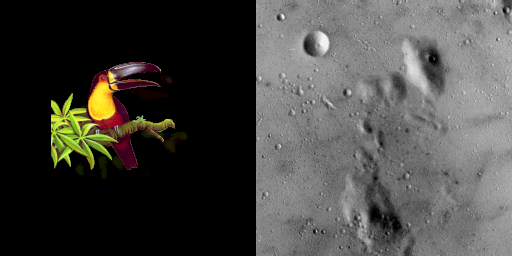
Like `cat`, `mosaic` makes a copy of the inputs.
### Get a preview of dataset
Many datasets in machine learning field are stored as 3D/4D array, where different images are different slices
along the 3rd and 4th dimensions.
`mosaicview` provides a convenient way to visualize a single higher-dimensional array as a 2D grid-of-images.
```julia
julia> using MosaicViews, ImageShow, MLDatasets
julia> A = MNIST.convert2image(MNIST.traintensor(1:9))
28×28×9 Array{Gray{Float64},3}:
[...]
julia> mosaicview(A, fillvalue=.5, nrow=2, npad=1, rowmajor=true)
57×144 MosaicViews.MosaicView{Gray{Float64},4,...}:
[...]
```

Unlike `mosaic`, `mosaicview` does not copy the input--it provides an alternative interpretation of the input data.
Consequently, if you modify pixels of the output of `mosaicview`, those modifications also apply to the parent array `A`.
`mosaicview` is essentially a flexible way of constructing a `MosaicView`; it provides
additional customization options via keyword arguments.
If you do not need the flexibility of `mosaicview`, you can directly call the `MosaicView` constructor.
The remainder of this page illustrates the various options for `mosaic` and `mosaicview` and then covers the low-level `MosaicView` constructor.
### More on the keyword options
`mosaic` and `mosaicview` use almost all the same keyword arguments (all except `center`, which is not relevant for `mosaicview`).
Let's illustrate some of the effects you can achieve.
First, in the simplest case:
```julia
julia> A1 = fill(1, 3, 1)
3×1 Array{Int64,2}:
1
1
1
julia> A2 = fill(2, 1, 3)
1×3 Array{Int64,2}:
2 2 2
# A1 and A2 will be padded to the common size and shifted
# to the center, this is a common operation to visualize
# multiple images
julia> mosaic(A1, A2)
6×3 MosaicView{Int64,4, ...}:
0 1 0
0 1 0
0 1 0
0 0 0
2 2 2
0 0 0
```
If desired, you can disable the automatic centering:
```julia
# disable center shift
julia> mosaic(A1, A2; center=false)
6×3 MosaicView{Int64,4, ...}:
1 0 0
1 0 0
1 0 0
2 2 2
0 0 0
0 0 0
```
You can also control the placement of tiles. Here this is illustrated for `mosaicview`, but
the same options apply for `mosaic`:
```julia
julia> A = [k for i in 1:2, j in 1:3, k in 1:5]
2×3×5 Array{Int64,3}:
[:, :, 1] =
1 1 1
1 1 1
[:, :, 2] =
2 2 2
2 2 2
[:, :, 3] =
3 3 3
3 3 3
[:, :, 4] =
4 4 4
4 4 4
[:, :, 5] =
5 5 5
5 5 5
# number of tiles in column direction
julia> mosaicview(A, ncol=2)
6×6 MosaicViews.MosaicView{Int64,4,...}:
1 1 1 4 4 4
1 1 1 4 4 4
2 2 2 5 5 5
2 2 2 5 5 5
3 3 3 0 0 0
3 3 3 0 0 0
# number of tiles in row direction
julia> mosaicview(A, nrow=2)
4×9 MosaicViews.MosaicView{Int64,4,...}:
1 1 1 3 3 3 5 5 5
1 1 1 3 3 3 5 5 5
2 2 2 4 4 4 0 0 0
2 2 2 4 4 4 0 0 0
# take a row-major order, i.e., tile-wise permute
julia> mosaicview(A, nrow=2, rowmajor=true)
4×9 MosaicViews.MosaicView{Int64,4,...}:
1 1 1 2 2 2 3 3 3
1 1 1 2 2 2 3 3 3
4 4 4 5 5 5 0 0 0
4 4 4 5 5 5 0 0 0
# add empty padding space between adjacent mosaic tiles
julia> mosaicview(A, nrow=2, npad=1, rowmajor=true)
5×11 MosaicViews.MosaicView{Int64,4,...}:
1 1 1 0 2 2 2 0 3 3 3
1 1 1 0 2 2 2 0 3 3 3
0 0 0 0 0 0 0 0 0 0 0
4 4 4 0 5 5 5 0 0 0 0
4 4 4 0 5 5 5 0 0 0 0
# fill spaces with -1
julia> mosaicview(A, fillvalue=-1, nrow=2, npad=1, rowmajor=true)
5×11 MosaicViews.MosaicView{Int64,4,...}:
1 1 1 -1 2 2 2 -1 3 3 3
1 1 1 -1 2 2 2 -1 3 3 3
-1 -1 -1 -1 -1 -1 -1 -1 -1 -1 -1
4 4 4 -1 5 5 5 -1 -1 -1 -1
4 4 4 -1 5 5 5 -1 -1 -1 -1
```
### The `MosaicView` Type
The `MosaicView` constructor is simple and straightforward;
if you need more layout options, consider calling it indirectly
through `mosaicview`.
The layout of the mosaic is encoded in the third
(and optionally fourth) dimension. Creating a `MosaicView` this
way is type stable, non-copying, and should in general give
decent performance when accessed with `getindex`.
Let us look at a couple examples to see the type in action. If
`size(A)` is `(2,3,4)`, then the resulting `MosaicView` will have
the size `(2*4,3)` which is `(8,3)`.
```julia
julia> A = [k for i in 1:2, j in 1:3, k in 1:4]
2×3×4 Array{Int64,3}:
[:, :, 1] =
1 1 1
1 1 1
[:, :, 2] =
2 2 2
2 2 2
[:, :, 3] =
3 3 3
3 3 3
[:, :, 4] =
4 4 4
4 4 4
julia> MosaicView(A)
8×3 MosaicViews.MosaicView{Int64,3,Array{Int64,3}}:
1 1 1
1 1 1
2 2 2
2 2 2
3 3 3
3 3 3
4 4 4
4 4 4
```
Alternatively, `A` is also allowed to have four dimensions. More
concretely, if `size(A)` is `(2,3,4,5)`, then the resulting size
will be `(2*4,3*5)` which is `(8,15)`. For the sake of brevity
here is a slightly smaller example:
```julia
julia> A = [(k+1)*l-1 for i in 1:2, j in 1:3, k in 1:2, l in 1:2]
2×3×2×2 Array{Int64,4}:
[:, :, 1, 1] =
1 1 1
1 1 1
[:, :, 2, 1] =
2 2 2
2 2 2
[:, :, 1, 2] =
3 3 3
3 3 3
[:, :, 2, 2] =
5 5 5
5 5 5
julia> MosaicView(A)
4×6 MosaicViews.MosaicView{Int64,4,Array{Int64,4}}:
1 1 1 3 3 3
1 1 1 3 3 3
2 2 2 5 5 5
2 2 2 5 5 5
```
### Customizing promotion
When the inputs are heterogeneous, `mosaic` attempts to convert the elements of all input arrays to a common type;
if this promotion step throws an error, consider extending `MosaicViews.promote_wrapped_type` for your types.
`ImageCore` provides such extensions for colors defined in [ColorTypes](https://github.com/JuliaGraphics/ColorTypes.jl).
You will likely want to load that package if you're using MosaicViews with `Colorant` arrays.
(`ImageCore` gets loaded by nearly all the packages in the JuliaImages suite, so you may find that it is already loaded.)
[travis-img]: https://travis-ci.org/JuliaArrays/MosaicViews.jl.svg?branch=master
[travis-url]: https://travis-ci.org/JuliaArrays/MosaicViews.jl
[codecov-img]: http://codecov.io/github/JuliaArrays/MosaicViews.jl/coverage.svg?branch=master
[codecov-url]: http://codecov.io/github/JuliaArrays/MosaicViews.jl?branch=master
[pkgeval-img]: https://juliaci.github.io/NanosoldierReports/pkgeval_badges/M/MosaicViews.svg
[pkgeval-url]: https://juliaci.github.io/NanosoldierReports/pkgeval_badges/report.html