https://github.com/justinribeiro/chrome-nfc
Chrome App NFC Library. JDR: Implemented NFC Forum Type 4 Tag Operation.
https://github.com/justinribeiro/chrome-nfc
chrome-app nfc nfc-forum web
Last synced: 5 months ago
JSON representation
Chrome App NFC Library. JDR: Implemented NFC Forum Type 4 Tag Operation.
- Host: GitHub
- URL: https://github.com/justinribeiro/chrome-nfc
- Owner: justinribeiro
- License: other
- Fork: true (googlearchive/chrome-nfc)
- Created: 2014-11-13T00:13:45.000Z (over 11 years ago)
- Default Branch: master
- Last Pushed: 2014-11-20T03:27:29.000Z (over 11 years ago)
- Last Synced: 2024-05-02T05:38:37.416Z (about 2 years ago)
- Topics: chrome-app, nfc, nfc-forum, web
- Language: JavaScript
- Homepage:
- Size: 368 KB
- Stars: 11
- Watchers: 2
- Forks: 3
- Open Issues: 0
-
Metadata Files:
- Readme: README.md
- Contributing: CONTRIBUTING.md
- License: LICENSE
Awesome Lists containing this project
README
# Chrome App NFC Library
With this simple library, you can build a [Chrome App](https://developer.chrome.com/apps) that communicates over USB with NFC Readers.
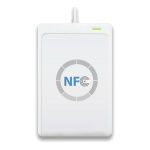
## Supported NFC Readers
[ACR122U](http://www.acs.com.hk/en/products/3/acr122u-usb-nfc-reader) | [SCL3711](http://www.identive-group.com/products-and-solutions/identification-products/mobility-solutions/mobile-readers/scl3711-contactless-usb-smart-card-reader)
--- | ---
 |
| 
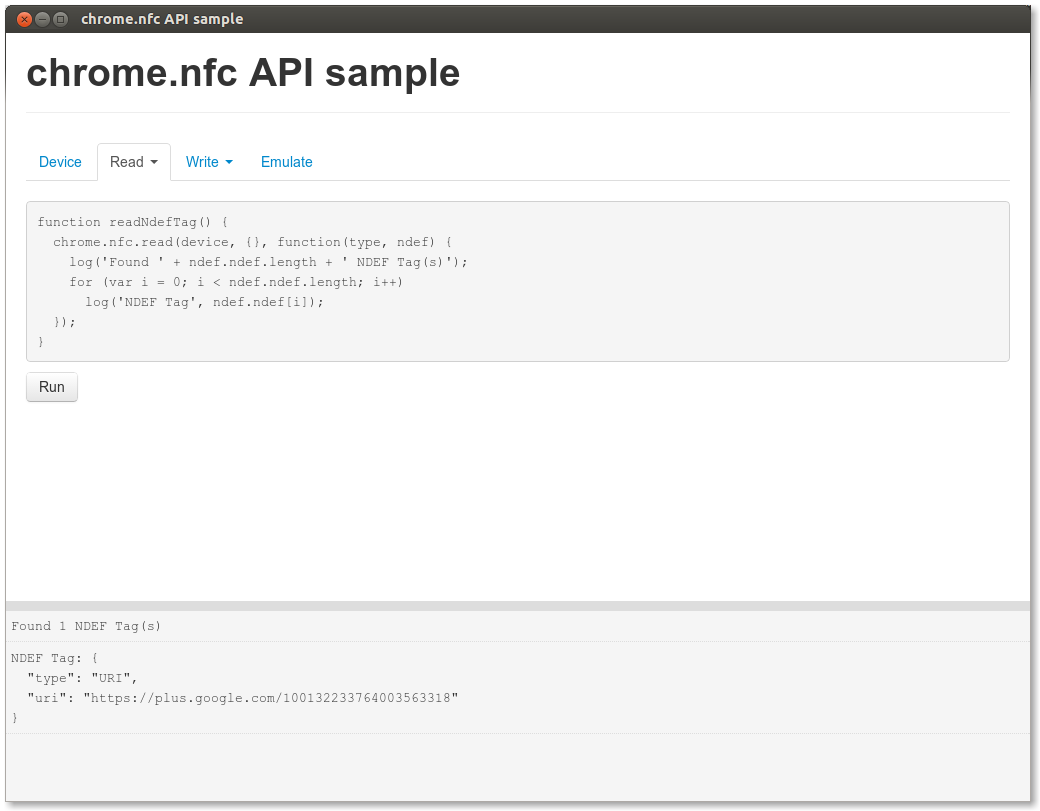
## Play with the Chrome App sample
* Check `Developer Mode` in `chrome://extensions`
* Click "Load unpacked extension..." in `chrome://extensions` and select the [sample](/sample) folder.
* Launch it.
## Caveats
Learn more about USB Devices Caveats at https://developer.chrome.com/apps/app_usb#caveats
## Usage
Once you've imported the [chrome-nfc.js](https:///raw.github.com/GoogleChrome/chrome-nfc/master/sample/chrome-nfc.js) javascript library into your Chrome App, you need to add the permissions below to your manifest file:
```javascript
"permissions": [
"usb",
{
"usbDevices": [
{ "vendorId": 1254, "productId": 21905 }, // SCL3711
{ "vendorId": 1839, "productId": 8704 } // ACR122U
]
}
]
```
### Enumerate NFC readers
``` javascript
chrome.nfc.findDevices(function(devices) {
console.log("Found " + devices.length + " NFC device(s)");
for (var i = 0; i < devices.length; i++) {
var device = devices[i];
console.log(device.vendorId, device.productId);
}
});
```
### Read NFC tag
``` javascript
chrome.nfc.findDevices(function(devices) {
var device = devices[0];
chrome.nfc.read(device, {}, function(type, ndef) {
console.lof(ndef);
var uri = ndef.ndef[0]["uri"];
console.log(uri);
var text = ndef.ndef[1]["text"];
console.log(text);
});
});
```
### Write NFC tag
``` javascript
chrome.nfc.findDevices(function(devices) {
var device = devices[0];
var ndef = [
{"text": "Chromium.org website" },
{"uri": "http://chromium.org" },
{"aar": "com.google.samples.apps.iosched" },
];
chrome.nfc.write(device, {"ndef": ndef}, function(rc) {
if (!rc) {
console.log("WRITE() success!");
} else {
console.log("WRITE() FAILED, rc = " + rc);
}
});
});
```
### Emulate NFC tag
``` javascript
chrome.nfc.findDevices(function(devices) {
var device = devices[0];
var ndef = [
{"type": "URI", "uri": "http://chromium.org"}
];
chrome.nfc.emulate_tag(device, {"ndef": ndef}, function(rc) {
if (!rc) {
console.log("EMULATE() success!");
} else {
console.log("EMULATE() FAILED, rc = " + rc);
}
});
});
```
### Read Mifare Classic tag (Logic Mode)
``` javascript
chrome.nfc.findDevices(function(devices) {
var device = devices[0];
chrome.nfc.read_logic(device, 0, 2, function(rc, data) {
console.log(UTIL_BytesToHex(data));
});
});
```
### Write Mifare Classic tag (Logic Mode)
``` javascript
chrome.nfc.findDevices(function(devices) {
var device = devices[0];
var data = new Uint8Array([ // NDEF(http://google.com)
0xdb, 0x00, 0x03, 0xe1, 0x00, 0x00, 0x00, 0x00, // block 0 (MAD1)
0x00, 0x00, 0x00, 0x00, 0x00, 0x00, 0x00, 0x00,
0x00, 0x00, 0x00, 0x00, 0x00, 0x00, 0x00, 0x00, // block 1 (MAD1)
0x00, 0x00, 0x00, 0x00, 0x00, 0x00, 0x00, 0x00,
0x03, 0x0f, 0xd1, 0x01, 0x0b, 0x55, 0x03, 0x67, // block 2 (NDEF)
0x6f, 0x6f, 0x67, 0x6c, 0x65, 0x2e, 0x63, 0x6f,
0x6d, 0xfe, 0x00, 0x00, 0x00, 0x00, 0x00, 0x00, // block 3 (NDEF)
0x00, 0x00, 0x00, 0x00, 0x00, 0x00, 0x00, 0x00,
]);
chrome.nfc.write_logic(device, 0, data, function(rc) {
console.log("WRITE_LOGIC() SUCCESS");
});
});
```
## Compiling the library
Compiling script requires [Python 3.0](http://www.python.org/download/releases/3.0/) and will use online [Closure Compiler](https://developers.google.com/closure/). Just run
python3 compile.py
and the library will be written to `chrome-nfc.js`.