https://github.com/jwill9999/openrouter-cli
CLI tool for OpenRouter
https://github.com/jwill9999/openrouter-cli
ai chatbot cli models openrouter
Last synced: 6 months ago
JSON representation
CLI tool for OpenRouter
- Host: GitHub
- URL: https://github.com/jwill9999/openrouter-cli
- Owner: jwill9999
- License: other
- Created: 2025-09-06T23:20:42.000Z (11 months ago)
- Default Branch: main
- Last Pushed: 2025-09-24T22:11:44.000Z (10 months ago)
- Last Synced: 2025-09-25T00:11:54.311Z (10 months ago)
- Topics: ai, chatbot, cli, models, openrouter
- Language: TypeScript
- Homepage: http://letuscode.co.uk/openrouter-cli/
- Size: 765 KB
- Stars: 0
- Watchers: 0
- Forks: 0
- Open Issues: 0
-
Metadata Files:
- Readme: README.md
- Contributing: docs/CONTRIBUTING.md
- License: LICENSE
- Agents: AGENTS.md
Awesome Lists containing this project
README
# openrouter-cli
[](https://www.npmjs.com/package/@letuscode/openrouter-cli)
[](https://www.npmjs.com/package/@letuscode/openrouter-cli?activeTab=versions)
## 📽️ Video Overview
Want to see OpenRouter CLI in action? Watch our [video overview](https://youtu.be/UhWFaFXR1Vs?si=O1nr95-VMvXEbXZ0)!
[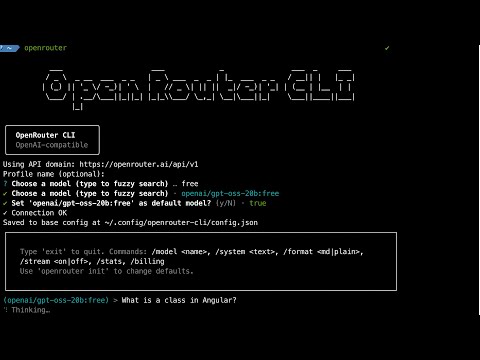](https://youtu.be/UhWFaFXR1Vs?si=O1nr95-VMvXEbXZ0)
OpenAI‑compatible CLI for `OpenRouter`. Ask questions, chat in a REPL, and fuzzy‑search models.
> **Note**: This project is in MVP development. Beta releases are for testing, and stable releases are for general use. See [Release Strategy](docs/RELEASE_STRATEGY.md) for details.
You can change your model any time. In a terminal, run `openrouter models` to browse, or in the REPL type `/model` to search inline. Tip: search for `free` to see free models.

Monitor your current session costs

Get Billing Information
## Fuzzy Search Models

Monitor your current session costs
## Repl Chat Configurations

Repl Chat Configurations
## Install
### Stable Release (Recommended)
- Global: `npm i -g @letuscode/openrouter-cli`
- One‑off: `npx @letuscode/openrouter-cli --help`
### Beta Release (Testing)
- Global: `npm i -g @letuscode/openrouter-cli@beta`
- One‑off: `npx @letuscode/openrouter-cli@beta --help`
Tip: Running `openrouter` with no args starts the setup wizard and then opens the REPL (in a terminal).
### Requirements
- Node.js 18.17+ (ESM)
## Quick start
1. Create an API key: https://openrouter.ai/keys
2. Run setup: `openrouter` (or `openrouter init`) — enter your key if asked, then pick a model
3. Ask once: `openrouter ask "Hello!"` — formatted answer by default
4. Chat: `openrouter repl` — formatted replies; toggle streaming when you like
## Everyday commands
- `openrouter` (or `openrouter init`) — setup; uses the OpenRouter domain automatically; asks for a key only if missing; lets you pick a model; opens the REPL afterwards
- `openrouter ask "…"` — answer a single question (formatted by default)
- `openrouter repl` — interactive chat
- In the REPL:
- `/model` → inline search; type a few letters, pick a match
- `/model ` → set a specific model
- `/format md|plain` → formatted or plain replies (non‑stream)
- `/stream on|off` → stream tokens or wait for a full reply
- `exit` → quit
- `openrouter models [query]` — browse models (fuzzy search) in a terminal; prints a table in non‑TTY
- `openrouter config --list` — show current settings (keys are masked)
- `openrouter config --api-key sk-…` — set your key once (or use the env var below)
## Behavior & defaults
- Ask: non‑stream + markdown rendering by default. Add `--stream` to stream tokens.
- REPL: streaming OFF by default; markdown rendering for full replies; inline `/model` search.
## Configuration
- API key via env (recommended): `export OPENROUTER_API_KEY=…` (or `OPENAI_API_KEY`)
- Global config file: `~/.config/openrouter-cli/config.json` (private; keys never logged)
- Project overrides: add `.openrouterrc` (JSON or YAML) in your project root
- Example `.openrouterrc` (JSON):
{
"domain": "https://openrouter.ai/api/v1",
"model": "openrouter/auto"
}
- Domain: fixed to the OpenRouter domain today (no prompt); kept in config for future provider choices
- Change your default model any time by running `openrouter` again
- Precedence: project rc > profile > global; env keys override persisted keys
## Model search
- `openrouter models` opens an interactive search in a terminal (type 2–3 letters)
- `openrouter models llama` starts with “llama” suggestions; prints a table in non‑TTY
### Example: inline model search in REPL
```text
(openai/gpt-oss-20b:free) > /model
Search models (>=2 chars, blank to cancel): free
Matches:
1. openai/gpt-oss-120b:free — OpenAI: gpt-oss-120b (free)
2. openai/gpt-oss-20b:free — OpenAI: gpt-oss-20b (free)
…
Pick 1-10 or type a model id:
```
## Output & accessibility
- Non‑stream answers render markdown (bold/italic, headings, lists, inline code). Streaming prints raw tokens for responsiveness.
- A “Thinking” spinner shows while waiting; colors/spinners honor `NO_COLOR` and TTY detection.
## Troubleshooting
- Missing API key: set `OPENROUTER_API_KEY` or run `openrouter` again. View current config: `openrouter config --list`.
- “Policy / free endpoints” error: open https://openrouter.ai/settings/privacy and enable free endpoints, or choose a different model (`openrouter models`).
- Picker shows a table: run in a terminal (TTY). Check: `node -p "process.stdout.isTTY && process.stdin.isTTY"`.
- Friendly errors are shown; details are logged to `~/.config/openrouter-cli/cli.log`.
## Advanced flags (optional)
- Ask: `--stream`, `--format auto|plain|md`, `-s, --system `, `--profile `, `--no-init`
- Models: `--non-interactive`
- Config (debug): `--danger-reset`, `--override-json ''`
## License
- Polyform Noncommercial License 1.0.0