https://github.com/k-cermak/email-notifier
Many e-mail inboxes? Find out how many unread emails you have with a simple browser extension.
https://github.com/k-cermak/email-notifier
chrome email extension imap notifications php self-hosted
Last synced: about 2 months ago
JSON representation
Many e-mail inboxes? Find out how many unread emails you have with a simple browser extension.
- Host: GitHub
- URL: https://github.com/k-cermak/email-notifier
- Owner: K-cermak
- License: other
- Created: 2025-06-15T16:30:52.000Z (about 1 year ago)
- Default Branch: main
- Last Pushed: 2025-06-17T11:04:06.000Z (about 1 year ago)
- Last Synced: 2025-06-17T12:19:28.472Z (about 1 year ago)
- Topics: chrome, email, extension, imap, notifications, php, self-hosted
- Language: JavaScript
- Homepage: https://karlosoft.com
- Size: 118 KB
- Stars: 1
- Watchers: 0
- Forks: 0
- Open Issues: 0
-
Metadata Files:
- Readme: README.md
- License: LICENSE.md
Awesome Lists containing this project
README
# Email Notifier Extension
By Karel Cermak | [Karlosoft](https://karlosoft.com).
## Description
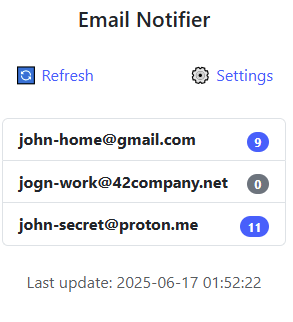
- Many e-mail inboxes? Find out how many unread emails you have with this simple browser extension.
- Available as a self-hosted backend (API) and browser extension for Chrome (Chromium based browsers).
- Periodically checks your inboxes and sums up the number of unread emails.
- Especially useful for people with multiple email accounts.
## Installation
### Backend (API)
> [!NOTE]
> You need to have a server with a PHP and need to be able to access it from the browser, where you install the extension.
1. Download the latest release and move files from the `API` folder to your web server.
2. Rename the `credentials.example.php` file to `credentials.php`.
3. Open the `credentials.php` file and set:
- `API_TOKEN`: A unique token for your API. You can generate it using any random string generator. This token will be used in the extension to authenticate with the API, but it cannot be used to optain the email inboxes passwords.
- `$emails`: An array of email accounts you want to check. Each account should have the following structure:
```php
'name' => [
'host' => '{imap.example.com:993/imap/ssl}INBOX', //More info: https://www.php.net/manual/en/function.imap-open.php
'username' => 'email@example.com',
'password' => 'YourPassword',
],
...
```
4. Now you should set a cron job to run the `cron.php` file periodically (e.g. every 5 minutes). This will update the number of unread emails. For example, edit your crontab with `crontab -e` and add the following line:
```bash
*/5 * * * * php /path/to/your/api/cron.php
```
5. Make sure, that PHP IMAP extension is installed and enabled on your server. You can check this by creating a simple PHP file with `phpinfo()` function and check for the IMAP section.
- On Ubuntu, you can install it with:
```bash
sudo apt-get install php-imap
```
6. Great, your backend is ready! You can now access the API at `https://yourdomain.com/api.php` (or wherever you placed the files).
### Extension
1. Go to the Chrome Extensions: `chrome://extensions/`
2. Enable "Developer mode" in the top right corner.
3. Click on "Load unpacked" and select the `Extension/chrome-extension` folder from the downloaded release.
4. Open the extension and click on the `⚙️ Settings` button.
5. Set the API URL to your backend URL (e.g. `https://yourdomain.com/api.php`).
6. Set the API token to the token you set in the `credentials.php` file.
7. Set the refresh interval in minutes.
8. Click on "Save" and the extension will start checking your email accounts.
- By clicking on the `🔄 Refresh` button, you can manually refresh the email account and get the newest data immediately.