https://github.com/kaitranntt/ccs
Switch between Claude accounts, Gemini, Copilot, OpenRouter (300+ models) via CLIProxyAPI OAuth proxy. Visual dashboard, remote proxy support, WebSearch fallback. Zero-config to production-ready.
https://github.com/kaitranntt/ccs
ai-gateway anthropic-api claude claude-code cli-tool cliproxyapi developer-productivity gemini github-copilot multi-account nodejs oauth openrouter profile-switching react-dashboard typescript websearch
Last synced: 1 day ago
JSON representation
Switch between Claude accounts, Gemini, Copilot, OpenRouter (300+ models) via CLIProxyAPI OAuth proxy. Visual dashboard, remote proxy support, WebSearch fallback. Zero-config to production-ready.
- Host: GitHub
- URL: https://github.com/kaitranntt/ccs
- Owner: kaitranntt
- License: mit
- Created: 2025-11-01T21:01:53.000Z (5 months ago)
- Default Branch: main
- Last Pushed: 2026-02-26T15:39:50.000Z (about 1 month ago)
- Last Synced: 2026-02-26T15:40:06.879Z (about 1 month ago)
- Topics: ai-gateway, anthropic-api, claude, claude-code, cli-tool, cliproxyapi, developer-productivity, gemini, github-copilot, multi-account, nodejs, oauth, openrouter, profile-switching, react-dashboard, typescript, websearch
- Language: TypeScript
- Homepage: https://ccs.kaitran.ca/
- Size: 13.6 MB
- Stars: 1,182
- Watchers: 7
- Forks: 99
- Open Issues: 18
-
Metadata Files:
- Readme: README.md
- Changelog: CHANGELOG.md
- Contributing: CONTRIBUTING.md
- Funding: .github/FUNDING.yml
- License: LICENSE
- Agents: AGENTS.md
Awesome Lists containing this project
- awesome-AI-driven-development - CCS - Claude Code Switch - Switch between Claude Sonnet 4.5, GLM 4.6, and Kimi for Coding instantly. Stop hitting rate limits. Start optimizing costs. (Frameworks & Libraries / Copilot Extensions & Alternatives)
README
# CCS - Claude Code Switch

### The universal AI profile manager for Claude Code.
Run Claude, Gemini, GLM, and any Anthropic-compatible API - concurrently, without conflicts.
[](LICENSE)
[](https://www.npmjs.com/package/@kaitranntt/ccs)
[](https://claudekit.cc?ref=HMNKXOHN)

**[Features & Pricing](https://ccs.kaitran.ca)** | **[Documentation Hub](https://docs.ccs.kaitran.ca)**
## The Three Pillars
| Capability | What It Does | Manage Via |
|------------|--------------|------------|
| **Multiple Claude Accounts** | Run work + personal Claude subs simultaneously | Dashboard |
| **OAuth Providers** | Gemini, Codex, Antigravity - zero API keys needed | Dashboard |
| **API Profiles** | GLM, Kimi, or any Anthropic-compatible API | Dashboard |
## Quick Start
Looking for the full setup guide, command reference, provider guides, or troubleshooting?
Start at **https://docs.ccs.kaitran.ca**.
## Contribute And Report Safely
- Contributing guide: [CONTRIBUTING.md](./CONTRIBUTING.md)
- Starter work: [good first issue](https://github.com/kaitranntt/ccs/labels/good%20first%20issue), [help wanted](https://github.com/kaitranntt/ccs/labels/help%20wanted)
- Questions: [open a question issue](https://github.com/kaitranntt/ccs/issues/new/choose)
- Security reports: [SECURITY.md](./SECURITY.md) and the [private advisory form](https://github.com/kaitranntt/ccs/security/advisories/new)
### 1. Install
```bash
npm install -g @kaitranntt/ccs
```
Alternative package managers
```bash
yarn global add @kaitranntt/ccs # yarn
pnpm add -g @kaitranntt/ccs # pnpm (70% less disk space)
bun add -g @kaitranntt/ccs # bun (30x faster)
```
### 2. Open Dashboard
```bash
ccs config
# Opens a local browser URL
```
CCS uses the runtime's system-default bind. If that bind is reachable beyond loopback,
the CLI also prints bind/network details plus an auth reminder.
Force all-interface binding for remote devices:
```bash
ccs config --host 0.0.0.0
# Terminal prints the reachable URLs to open from the other device
```
If you expose the dashboard beyond localhost, protect it first with `ccs config auth setup`.
Use `ccs config --host 127.0.0.1` to force local-only binding.
Dashboard updates hub: `http://localhost:3000/updates`
Want to run the dashboard in Docker or pull the prebuilt image? See `docker/README.md`.
### 3. Configure Your Accounts
The dashboard provides visual management for all account types:
- **Claude Accounts**: Isolation-first by default (work, personal, client), with explicit shared context opt-in
- **OAuth Providers**: One-click auth for Gemini, Codex, Antigravity, Kiro, Copilot
- **AI Providers**: Configure Gemini, Codex, Claude, Vertex, and OpenAI-compatible API keys under `CLIProxy -> AI Providers`
- **API Profiles**: Configure GLM, Kimi, OpenRouter, and other Anthropic-compatible APIs as CCS-native profiles
- **Codex CLI**: Dedicated dashboard page for native runtime diagnostics and guarded `config.toml` editing
- **Factory Droid**: Track Droid install location and BYOK settings health
- **Updates Center**: Track support rollouts (Droid target, CLIProxy provider changes, WebSearch integrations)
- **Health Monitor**: Real-time status across all profiles
- **Language Switcher**: Toggle dashboard locale between English, Simplified Chinese, and Vietnamese
**Analytics Dashboard**

**Live Auth Monitor**

**CLI Proxy API & Copilot Integration**


**WebSearch Fallback**

## Built-in Providers
| Provider | Auth Type | Command | Best For |
|----------|-----------|---------|----------|
| **Claude** | Subscription | `ccs` | Default, strategic planning |
| **Gemini** | OAuth | `ccs gemini` | Zero-config, fast iteration |
| **Codex** | OAuth | `ccs codex` | Code generation |
| **Copilot** | OAuth | `ccs copilot` or `ccs ghcp` | GitHub Copilot models |
| **Cursor IDE** | Local Token | `ccs cursor` | Cursor subscription models via local daemon |
| **Kiro** | OAuth (AWS default) | `ccs kiro` | AWS CodeWhisperer (Claude-powered) |
| **Antigravity** | OAuth | `ccs agy` | Alternative routing |
| **OpenRouter** | API Key | `ccs openrouter` | 300+ models, unified API |
| **Ollama** | Local | `ccs ollama` | Local open-source models, privacy |
| **llama.cpp** | Local | `ccs llamacpp` | Local GGUF inference via llama.cpp server |
| **Ollama Cloud** | API Key | `ccs ollama-cloud` | Cloud-hosted open-source models |
| **GLM** | API Key | `ccs glm` | Cost-optimized execution |
| **KM (Kimi API)** | API Key | `ccs km` | Long-context, thinking mode |
| **Kimi (OAuth)** | OAuth | `ccs kimi` | Device-code OAuth via CLIProxy |
| **Azure Foundry** | API Key | `ccs foundry` | Claude via Microsoft Azure |
| **Minimax** | API Key | `ccs mm` | M2 series, 1M context |
| **DeepSeek** | API Key | `ccs deepseek` | V3.2 and R1 reasoning |
| **Novita AI** | API Key | `ccs api create --preset novita` | Anthropic-compatible Novita endpoint for Claude Code |
| **Qwen (OAuth)** | OAuth | `ccs qwen` | Qwen Code via CLIProxy |
| **Qwen API** | API Key | `ccs api create --preset qwen` | DashScope Anthropic-compatible API |
| **Alibaba Coding Plan** | API Key | `ccs api create --preset alibaba-coding-plan` | Model Studio Coding Plan endpoint |
**OpenRouter Integration** (v7.0.0): CCS v7.0.0 adds OpenRouter with interactive model picker, dynamic discovery, and tier mapping (opus/sonnet/haiku). Create via `ccs api create --preset openrouter` or dashboard.
**Alibaba Coding Plan Integration**: Configure via `ccs api create --preset alibaba-coding-plan` (or preset alias `alibaba`) with Coding Plan keys (`sk-sp-...`) and endpoint `https://coding-intl.dashscope.aliyuncs.com/apps/anthropic`.
**Ollama Integration**: Run local open-source models (qwen3-coder, gpt-oss:20b) with full privacy. Use `ccs api create --preset ollama` - requires [Ollama v0.14.0+](https://ollama.com) installed. For cloud models, use `ccs api create --preset ollama-cloud`.
> **Third-party WebSearch steering:** Claude-backed third-party launches keep Anthropic's native `WebSearch` disabled, provision `ccs-websearch.WebSearch` when the managed runtime is available, and append a short system hint so Claude prefers that managed tool over ad hoc Bash or `curl` lookups whenever current web information is needed.
> Setting `websearch.enabled: false` disables the managed local runtime, but CCS still suppresses Anthropic's native `WebSearch` on third-party backends because those providers cannot execute it correctly.
> **Image backend visibility:** `ccs config image-analysis --set-fallback ` defines the backend CCS should use when a profile alias cannot be inferred directly. Use `--set-profile-backend ` and `--clear-profile-backend ` for explicit per-profile mappings. In the dashboard, the global `Settings -> Image` section now shows the shared backend routing state, while each profile editor keeps a compact `Image` status card that links back to those global controls.
> **Copilot config behavior:** Opening the dashboard or other read-only Copilot endpoints does not rewrite `~/.ccs/copilot.settings.json`. If CCS detects deprecated Copilot model IDs such as `raptor-mini`, it shows warnings immediately and only persists replacements when you explicitly save the Copilot configuration.
**llama.cpp Integration**: Run a local llama.cpp OpenAI-compatible server and create a profile with `ccs api create --preset llamacpp`. CCS defaults to `http://127.0.0.1:8080`, matching the standard llama.cpp server port.
**Azure Foundry**: Use `ccs api create --preset foundry` to set up Claude via Microsoft Azure AI Foundry. Requires Azure resource and API key from [ai.azure.com](https://ai.azure.com).

> **OAuth providers** authenticate via browser on first run. Tokens are cached in `~/.ccs/cliproxy/auth/`.
> **Kiro / Copilot account naming:** Manual nicknames are optional. If the provider does not expose an email, CCS derives a safe internal identifier automatically and you can rename it later.
> **AI Providers dashboard:** Configure CLIProxy-managed API key families at `ccs config` -> `CLIProxy` -> `AI Providers`. Use `API Profiles` only for CCS-native Anthropic-compatible profiles.
**Powered by:**
- [CLIProxyAPIPlus](https://github.com/router-for-me/CLIProxyAPIPlus) - Extended OAuth proxy with Kiro ([@fuko2935](https://github.com/fuko2935), [@Ravens2121](https://github.com/Ravens2121)) and Copilot ([@em4go](https://github.com/em4go)) support
- [CLIProxyAPI](https://github.com/router-for-me/CLIProxyAPI) - Core OAuth proxy for Gemini, Codex, Antigravity
- [copilot-api](https://github.com/ericc-ch/copilot-api) - GitHub Copilot API integration
> [!TIP]
> **Need more?** CCS supports **any Anthropic-compatible API**. Create custom profiles for self-hosted LLMs, enterprise gateways, or alternative providers. See [API Profiles documentation](https://docs.ccs.kaitran.ca/providers/api-profiles).
## Usage
### Basic Commands
```bash
ccs # Default Claude session
ccs gemini # Gemini (OAuth)
ccs codex # OpenAI Codex (OAuth)
ccs cursor # Cursor IDE integration (token import + local daemon)
ccs kiro # Kiro/AWS CodeWhisperer (OAuth)
ccs ghcp # GitHub Copilot (OAuth device flow)
ccs agy # Antigravity (OAuth)
ccs qwen # Qwen Code (OAuth via CLIProxy)
ccs ollama # Local Ollama (no API key needed)
ccs llamacpp # Local llama.cpp (no API key needed)
ccs glm # GLM (API key)
ccs km # Kimi API profile (API key)
ccs api create --preset alibaba-coding-plan # Alibaba Coding Plan profile
ccs api discover --register # Auto-register orphan *.settings.json
ccs api copy glm glm-backup # Duplicate profile config + settings
ccs api export glm --out ./glm.ccs-profile.json # Export for cross-device transfer
ccs api import ./glm.ccs-profile.json # Import exported profile bundle
```
### Runtime Aliases (built-in bins / `argv[0]` pattern)
Built-in Droid and native Codex runtime aliases are installed with the package:
```bash
ccs-droid glm # explicit alias
ccsd glm # legacy shortcut
ccs-codex # explicit native Codex alias
ccsx # short native Codex alias
```
CCS also ships an opinionated Codex provider shortcut:
```bash
ccsxp # same as: ccs codex --target codex
```
Need additional alias names? First create the matching symlink or another launcher that
preserves the invoked basename, then map that name with `CCS_TARGET_ALIASES` (preferred) or legacy
target-specific env vars:
```bash
ln -s "$(command -v ccs)" /usr/local/bin/mydroid
ln -s "$(command -v ccs)" /usr/local/bin/mycodex
CCS_TARGET_ALIASES='droid=mydroid;codex=mycodex'
# Legacy fallback still supported:
CCS_DROID_ALIASES='mydroid'
CCS_CODEX_ALIASES='mycodex'
```
For Factory BYOK compatibility, CCS also stores a per-profile Droid provider hint
(`CCS_DROID_PROVIDER`) using one of:
`anthropic`, `openai`, or `generic-chat-completion-api`.
If the hint is missing, CCS resolves provider from base URL/model at runtime.
CCS also persists Droid's active model selector in `~/.factory/settings.json`
(`model: custom:`). This avoids passing `-m` argv in interactive mode,
which Droid treats as queued prompt text.
CCS supports structural Droid command passthrough after profile selection:
```bash
ccs-droid codex exec --skip-permissions-unsafe "fix failing tests"
ccs-droid codex --skip-permissions-unsafe "fix failing tests" # auto-routed to: droid exec ...
ccs-droid codex -m custom:gpt-5.3-codex "fix failing tests" # short exec flags auto-routed too
```
If you pass exec-only flags without a prompt (for example `--skip-permissions-unsafe`),
Droid `exec` will return its native "No prompt provided" usage guidance.
If multiple reasoning flags are provided in Droid exec mode, CCS keeps the first
flag and warns about duplicates.
Dashboard parity: `ccs config` -> `Factory Droid`
### Native Codex Runtime (runtime-only in v1)
CCS can launch native Codex as a first-class runtime target without rewriting your
`~/.codex/config.toml` on every run. CCS uses transient `codex -c key=value` overrides for
Codex-routed sessions and leaves your existing Codex home/config in place.
Supported in v1:
```bash
ccs --target codex # native Codex default session
ccs-codex # explicit Codex alias
ccsx # short native Codex alias
ccsxp # built-in CCS Codex provider on native Codex
ccs codex --target codex # explicit equivalent of ccsxp
ccs api create codex-api --cliproxy-provider codex
ccs codex-api --target codex # Codex bridge profile on native Codex
```
Not supported in v1:
- Claude account profiles on Codex target
- Copilot profiles on Codex target
- Generic API profiles that are not Codex-routed CLIProxy bridges
- Non-Codex CLIProxy providers on Codex target
- Composite CLIProxy variants on Codex target
Dashboard parity: `ccs config` -> `Compatible` -> `Codex CLI`
The dedicated Codex dashboard reads and writes the user layer only: `~/.codex/config.toml`
(or `$CODEX_HOME/config.toml`). It now ships as a split-view control center:
- left pane: guided controls for top-level runtime defaults, project trust, profiles,
model providers, MCP servers, and supported feature toggles
- right pane: raw `config.toml` editor for unsupported or exact-fidelity edits
- overview/docs tabs: binary detection, user-layer summary, support matrix guidance, and
upstream OpenAI references
Structured saves intentionally normalize TOML formatting and drop comments. Use the raw editor
when exact layout matters. Structured edits also refresh the raw snapshot immediately. Guided
controls stay disabled while the raw editor has unsaved or invalid TOML, project trust paths must
be absolute or start with `~/`, and supported feature flags can be cleared back to Codex defaults
with `Use default`. CCS also keeps warning that transient runtime overrides such as
`codex -c key=value` and `CCS_CODEX_API_KEY` can change the effective runtime without persisting
back into the user config file.
#### CLIProxy-backed native Codex
There are two supported ways to use CLIProxy with native Codex:
1. `ccsxp` or `ccs codex --target codex`
Uses the built-in CCS Codex provider route on native Codex. This path relies on transient
CCS-managed `-c` overrides and does **not** require changing your saved `model_provider`.
2. Plain `codex` or a personal alias like `cxp`
Save CLIProxy as the native default provider in `~/.codex/config.toml` (or
`$CODEX_HOME/config.toml`), then export `CLIPROXY_API_KEY` in your shell.
```toml
model_provider = "cliproxy"
[model_providers.cliproxy]
base_url = "http://127.0.0.1:8317/api/provider/codex"
env_key = "CLIPROXY_API_KEY"
wire_api = "responses"
```
The top-level `model_provider = "cliproxy"` line is required. Defining only
`[model_providers.cliproxy]` is not enough for plain `codex` to pick it by default.
```bash
export CLIPROXY_API_KEY="ccs-internal-managed"
ccsxp "your prompt" # CCS shortcut for the built-in provider route
codex "your prompt" # native Codex using your saved cliproxy default
```
Dashboard parity: `ccs config` -> `Compatible` -> `Codex CLI`
- `Overview`: explains `ccsx` vs `ccsxp`
- `Top-level settings`: set **Default provider** to `cliproxy`
- `Model providers`: save `cliproxy` with `env_key = "CLIPROXY_API_KEY"`
### Per-Profile Target Defaults
You can pin a default target (`claude` or `droid`) per profile:
```bash
# API profile defaults to Droid
ccs api create myglm --preset glm --target droid
# CLIProxy variant defaults to Droid
ccs cliproxy create mycodex --provider codex --target droid
```
Built-in CLIProxy providers also work with Droid alias/target override:
```bash
ccs-droid codex
ccs-droid agy
ccs codex --target droid
ccs-droid codex exec --auto high "triage this bug report"
```
Dashboard parity:
- `ccs config` -> `API Profiles` -> set **Default Target**
- `ccs config` -> `CLIProxy` -> create/edit variant -> set **Default Target**
### Kiro Auth Methods
`ccs kiro --auth` defaults to AWS Builder ID Device OAuth (best support for AWS org accounts).
```bash
ccs kiro --auth --kiro-auth-method aws # AWS Builder ID device code (default)
ccs kiro --auth --kiro-auth-method aws-authcode # AWS Builder ID auth code
ccs kiro --auth --kiro-auth-method google # Google OAuth
ccs kiro --auth --kiro-auth-method github # Dashboard management OAuth flow
```
Dashboard parity: `ccs config` -> Accounts -> Add Kiro account -> choose `Auth Method`.
### Cursor IDE Quick Start
```bash
ccs cursor enable
ccs cursor auth
ccs cursor start
ccs cursor status
```
If auto-detect is unavailable:
```bash
ccs cursor auth --manual --token --machine-id
```
Defaults:
- Port: `20129`
- Ghost mode: enabled
- Dashboard page: `ccs config` -> `Cursor IDE`
Detailed guide: [`docs/cursor-integration.md`](./docs/cursor-integration.md)
### Claude IDE Extension Setup
CCS now has a native setup flow for the Anthropic Claude extension in VS Code and compatible hosts.
Use the same resolver in both the CLI and dashboard, so API profiles, CCS auth accounts,
CLIProxy-backed profiles, Copilot, and default-profile continuity all map to the correct env shape.
Preferred shared-settings path:
```bash
ccs persist glm
ccs persist work
ccs persist default
```
This writes the resolved setup to `~/.claude/settings.json`, which is the best option when you want
the Claude CLI and the IDE extension to share one CCS profile.
IDE-local snippet path:
```bash
ccs env glm --format claude-extension --ide vscode
ccs env work --format claude-extension --ide cursor
ccs env default --format claude-extension --ide windsurf
```
This prints a copy-ready `settings.json` snippet for the installed Claude extension host:
- `vscode` / `cursor`: `claudeCode.environmentVariables` plus `claudeCode.disableLoginPrompt`
- `windsurf`: `claude-code.environmentVariables`
Account and continuity-aware flows use `CLAUDE_CONFIG_DIR` instead of Anthropic transport env vars.
CLIProxy and Copilot flows emit the required `ANTHROPIC_*` variables and still depend on their local
proxy/daemon being reachable.
Dashboard parity:
- `ccs config` -> `Claude Extension`
- Select a CCS profile and IDE host to copy either the shared `~/.claude/settings.json` payload or the IDE-local extension snippet
### Parallel Workflows
Run multiple terminals with different providers:
> Delegation compatibility: when CCS spawns child Claude sessions, it strips the `CLAUDECODE` guard variable to avoid nested-session blocking in Claude Code v2.1.39+.
```bash
# Terminal 1: Planning (Claude Pro)
ccs work "design the authentication system"
# Terminal 2: Execution (GLM - cost optimized)
ccs glm "implement the user service from the plan"
# Terminal 3: Local testing (Ollama - offline, privacy)
ccs ollama "run tests and generate coverage report"
# Terminal 4: Review (Gemini)
ccs gemini "review the implementation for security issues"
```
### Multi-Account Claude
Create isolated Claude instances for work/personal separation:
```bash
ccs auth create work
# Run concurrently in separate terminals
ccs work "implement feature" # Terminal 1
ccs "review code" # Terminal 2 (personal account)
```
#### Account Context Modes (Isolation-First)
Account profiles are isolated by default.
| Mode | Default | Requirements |
|------|---------|--------------|
| `isolated` | Yes | No `context_group` required |
| `shared` | No (explicit opt-in) | Valid non-empty `context_group` |
Shared mode continuity depth:
- `standard` (default): shares project workspace context only
- `deeper` (advanced opt-in): additionally syncs `session-env`, `file-history`, `shell-snapshots`, `todos`
Opt in to shared context when needed:
```bash
# Share context with default group
ccs auth create backup --share-context
# Share context only within named group
ccs auth create backup2 --context-group sprint-a
# Advanced deeper continuity mode (requires shared mode)
ccs auth create backup3 --context-group sprint-a --deeper-continuity
```
Update existing accounts without recreating login:
1. Run `ccs config`
2. Open `Accounts`
3. Click the pencil icon in Actions and set `isolated` or `shared` mode + continuity depth
Shared mode metadata in `~/.ccs/config.yaml`:
```yaml
accounts:
work:
created: "2026-02-24T00:00:00.000Z"
last_used: null
context_mode: "shared"
context_group: "team-alpha"
continuity_mode: "standard"
```
`context_group` rules:
- lowercase letters, numbers, `_`, `-`
- must start with a letter
- max length `64`
- non-empty after normalization
- normalized by trim + lowercase + whitespace collapse (`" Team Alpha "` -> `"team-alpha"`)
Shared context with `standard` depth links project workspace data. `deeper` depth links additional continuity artifacts. Credentials remain isolated per account.
#### Cross-Profile Continuity Inheritance (Claude Target)
You can map non-account profiles (API, CLIProxy, Copilot, or `default`) to reuse continuity artifacts from an account profile:
```yaml
continuity:
inherit_from_account:
glm: pro
gemini: pro
copilot: pro
```
With this config, `ccs glm`, `ccs gemini`, and `ccs copilot` run with `pro`'s `CLAUDE_CONFIG_DIR` continuity context while keeping each profile's own provider credentials/settings.
Alternative path for lower manual switching:
- Use CLIProxy Claude pool (`ccs cliproxy auth claude`) and manage pool behavior in `ccs config` -> `CLIProxy Plus`.
Technical details: [`docs/session-sharing-technical-analysis.md`](docs/session-sharing-technical-analysis.md)
## Maintenance
### Health Check
```bash
ccs doctor
```
Verifies: Claude CLI, config files, symlinks, permissions.
### Update
```bash
ccs update # Update to latest
ccs update --force # Force reinstall
ccs update --beta # Install dev channel
```
### CI Parity Gate (for contributors)
Before opening or updating a PR, run:
```bash
bun run validate:ci-parity
```
This mirrors CI behavior (build + validate + base-branch freshness check) and is also enforced by the local `pre-push` hook.
### Sync Shared Items
```bash
ccs sync
```
Re-creates symlinks for shared commands, skills, and settings.
### Quota Management
```bash
ccs cliproxy doctor # Check quota status for all agy accounts
ccs cliproxy quota # Show agy/claude/codex/gemini/ghcp quotas (Claude/Codex: 5h + weekly reset schedule)
```
**Auto-Failover**: When a managed account runs out of quota, CCS automatically switches to another account with remaining capacity. Shared GCP project accounts are excluded (pooled quota).
### CLIProxy Lifecycle
```bash
ccs cliproxy start # Start CLIProxy background service
ccs cliproxy status # Check running status
ccs cliproxy restart # Restart CLIProxy service
ccs cliproxy stop # Stop running CLIProxy service
```
## Configuration
CCS auto-creates config on install. Dashboard is the recommended way to manage settings.
**Config location**: `~/.ccs/config.yaml`
Custom Claude CLI path
If Claude CLI is installed in a non-standard location:
```bash
export CCS_CLAUDE_PATH="/path/to/claude" # Unix
$env:CCS_CLAUDE_PATH = "D:\Tools\Claude\claude.exe" # Windows
```
CCS sanitizes child Claude spawn environments by stripping `CLAUDECODE` (case-insensitive) to prevent nested-session guard failures during delegation. `CCS_CLAUDE_PATH` is still respected after this sanitization step.
Windows symlink support
Enable Developer Mode for true symlinks:
1. **Settings** → **Privacy & Security** → **For developers**
2. Enable **Developer Mode**
3. Reinstall: `npm install -g @kaitranntt/ccs`
Without Developer Mode, CCS falls back to copying directories.
## WebSearch
Third-party profiles (Gemini, Codex, GLM, etc.) cannot use Anthropic's native WebSearch. CCS now provisions a first-class local `ccs-websearch` MCP tool when the managed runtime is available, disables native `WebSearch` on third-party launches, and steers Claude toward real local providers instead of surfacing a denied native-tool call.
### How It Works
| Profile Type | WebSearch Method |
|--------------|------------------|
| Claude (native) | Anthropic WebSearch API |
| Third-party profiles | CCS local MCP `WebSearch` tool when available; otherwise Bash/network fallback |
### Local Search Backend Chain
For third-party profiles, CCS steers Claude toward the managed `ccs-websearch.WebSearch` MCP tool when it is available. The tool is intentionally named to match the native `WebSearch` concept, which helps Claude prefer it over ad hoc Bash or `curl` fetches, but Bash/network fallback can still happen if the tool is unavailable or ignored. When the tool is used, CCS routes that request through deterministic search providers in this order:
| Priority | Provider | Setup | Notes |
|----------|----------|-------|-------|
| 1st | Exa | `EXA_API_KEY` | API-backed search with extracted content |
| 2nd | Tavily | `TAVILY_API_KEY` | Agent-oriented search API |
| 3rd | Brave Search | `BRAVE_API_KEY` | Cleaner API-backed results |
| 4th | DuckDuckGo | None | Built-in default fallback |
| 5th | Gemini / OpenCode / Grok | Optional | Legacy compatibility fallback only |
### Configuration
Configure via dashboard (**Settings** page) or `~/.ccs/config.yaml`:
```yaml
websearch:
enabled: true # Enable/disable (default: true)
providers:
exa:
enabled: false # Enable when EXA_API_KEY is set
tavily:
enabled: false # Enable when TAVILY_API_KEY is set
duckduckgo:
enabled: true # Built-in zero-setup fallback
brave:
enabled: false # Enable when BRAVE_API_KEY is set
gemini:
enabled: false # Optional legacy fallback
```
> [!TIP]
> **DuckDuckGo** still works out of the box. Add **Exa**, **Tavily**, or **Brave Search** if you want API-backed results, then keep Gemini/OpenCode/Grok only if you explicitly want legacy fallback behavior.
> CCS manages the user-scope MCP entry in `~/.claude.json` and syncs it into isolated account configs when needed.
> [!NOTE]
> Set `CCS_WEBSEARCH_TRACE=1` to write correlated launch, MCP, provider, and headless summary records to `~/.ccs/logs/websearch-trace.jsonl`. That trace is designed to answer whether CCS exposed the managed tool, whether Claude called it, which provider won, and when a headless run likely bypassed it via `Bash` or `WebFetch`.
See [docs/websearch.md](./docs/websearch.md) for detailed configuration and troubleshooting.
## Remote CLIProxy
CCS v7.x supports connecting to remote CLIProxyAPI instances, enabling:
- **Team sharing**: One CLIProxyAPI server for multiple developers
- **Cost optimization**: Centralized API key management
- **Network isolation**: Keep API credentials on a secure server
### Quick Setup
Configure via dashboard (**Settings > CLIProxy Server**) or CLI flags:
```bash
ccs gemini --proxy-host 192.168.1.100 --proxy-port 8317
ccs codex --proxy-host proxy.example.com --proxy-protocol https
```
### CLI Flags
| Flag | Description |
|------|-------------|
| `--proxy-host` | Remote proxy hostname or IP |
| `--proxy-port` | Remote proxy port (default: 8317 for HTTP, 443 for HTTPS) |
| `--proxy-protocol` | `http` or `https` (default: http) |
| `--proxy-auth-token` | Bearer token for authentication |
| `--local-proxy` | Force local mode, ignore remote config |
| `--remote-only` | Fail if remote unreachable (no fallback) |
See [Remote Proxy documentation](https://docs.ccs.kaitran.ca/features/remote-proxy) for detailed setup.
## Standard Fetch Proxy
CCS also respects standard proxy environment variables for fetch-based quota, dashboard,
and provider management requests:
```bash
export HTTPS_PROXY=http://proxy.example.com:8080
export HTTP_PROXY=http://proxy.example.com:8080
export ALL_PROXY=http://proxy.example.com:8080
export NO_PROXY=localhost,127.0.0.1,.internal.corp
```
Notes:
- CCS automatically bypasses loopback addresses (`localhost`, `127.0.0.1`, `::1`) for its own local services.
- If `HTTPS_PROXY` is unset, CCS falls back to `HTTP_PROXY` for HTTPS fetches.
- `ALL_PROXY` is used when protocol-specific proxy variables are not configured.
- Proxy URLs must use `http://` or `https://`.
## Documentation Hub
If you are not sure where to start, open **https://docs.ccs.kaitran.ca** first.
The hosted docs are the best entry point for setup, command reference, provider guides, and troubleshooting.
| Topic | Link |
|-------|------|
| Docs Home | [docs.ccs.kaitran.ca](https://docs.ccs.kaitran.ca) |
| Installation | [docs.ccs.kaitran.ca/getting-started/installation](https://docs.ccs.kaitran.ca/getting-started/installation) |
| Configuration | [docs.ccs.kaitran.ca/getting-started/configuration](https://docs.ccs.kaitran.ca/getting-started/configuration) |
| OAuth Providers | [docs.ccs.kaitran.ca/providers/oauth-providers](https://docs.ccs.kaitran.ca/providers/oauth-providers) |
| Multi-Account Claude | [docs.ccs.kaitran.ca/providers/claude-accounts](https://docs.ccs.kaitran.ca/providers/claude-accounts) |
| API Profiles | [docs.ccs.kaitran.ca/providers/api-profiles](https://docs.ccs.kaitran.ca/providers/api-profiles) |
| Remote Proxy | [docs.ccs.kaitran.ca/features/remote-proxy](https://docs.ccs.kaitran.ca/features/remote-proxy) |
| Cursor IDE (local guide) | [./docs/cursor-integration.md](./docs/cursor-integration.md) |
| Dashboard i18n (local guide) | [./docs/i18n-dashboard.md](./docs/i18n-dashboard.md) |
| CLI Reference | [docs.ccs.kaitran.ca/reference/cli-commands](https://docs.ccs.kaitran.ca/reference/cli-commands) |
| Architecture | [docs.ccs.kaitran.ca/reference/architecture](https://docs.ccs.kaitran.ca/reference/architecture) |
| Troubleshooting | [docs.ccs.kaitran.ca/reference/troubleshooting](https://docs.ccs.kaitran.ca/reference/troubleshooting) |
## Uninstall
```bash
npm uninstall -g @kaitranntt/ccs
```
Alternative package managers
```bash
yarn global remove @kaitranntt/ccs
pnpm remove -g @kaitranntt/ccs
bun remove -g @kaitranntt/ccs
```
## Philosophy
- **YAGNI**: No features "just in case"
- **KISS**: Simple, focused implementation
- **DRY**: One source of truth (config)
## Contributing
See [CONTRIBUTING.md](./CONTRIBUTING.md). For suspected vulnerabilities, use [SECURITY.md](./SECURITY.md) instead of a public issue.
## License
MIT License - see [LICENSE](LICENSE).
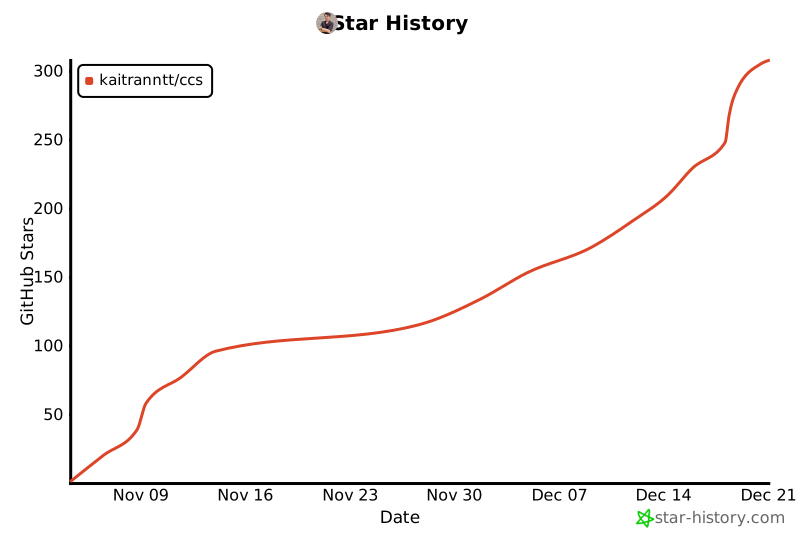
## Star History
[](https://www.star-history.com/#kaitranntt/ccs&type=date&legend=top-left)
---
**[ccs.kaitran.ca](https://ccs.kaitran.ca)** | **[docs.ccs.kaitran.ca](https://docs.ccs.kaitran.ca)** | [Issue Templates](https://github.com/kaitranntt/ccs/issues/new/choose) | [Private Security Report](https://github.com/kaitranntt/ccs/security/advisories/new) | [Star on GitHub](https://github.com/kaitranntt/ccs)