https://github.com/kako-jun/cdand
a CLI command that makes it possible to execute every commands in your target directory without `cd`
https://github.com/kako-jun/cdand
cli-command golang-package
Last synced: 12 months ago
JSON representation
a CLI command that makes it possible to execute every commands in your target directory without `cd`
- Host: GitHub
- URL: https://github.com/kako-jun/cdand
- Owner: kako-jun
- License: mit
- Created: 2019-02-26T13:50:31.000Z (over 7 years ago)
- Default Branch: master
- Last Pushed: 2019-03-19T09:55:02.000Z (over 7 years ago)
- Last Synced: 2025-07-20T06:06:10.908Z (12 months ago)
- Topics: cli-command, golang-package
- Language: Go
- Homepage:
- Size: 7.37 MB
- Stars: 1
- Watchers: 1
- Forks: 0
- Open Issues: 0
-
Metadata Files:
- Readme: README.md
- License: LICENSE
Awesome Lists containing this project
README
[日本語はこっち (Let's try reading in Japanese.)](https://github.com/kako-jun/cdand/blob/master/README_ja.md)
# :file_folder: cdand
[](https://travis-ci.org/kako-jun/cdand)
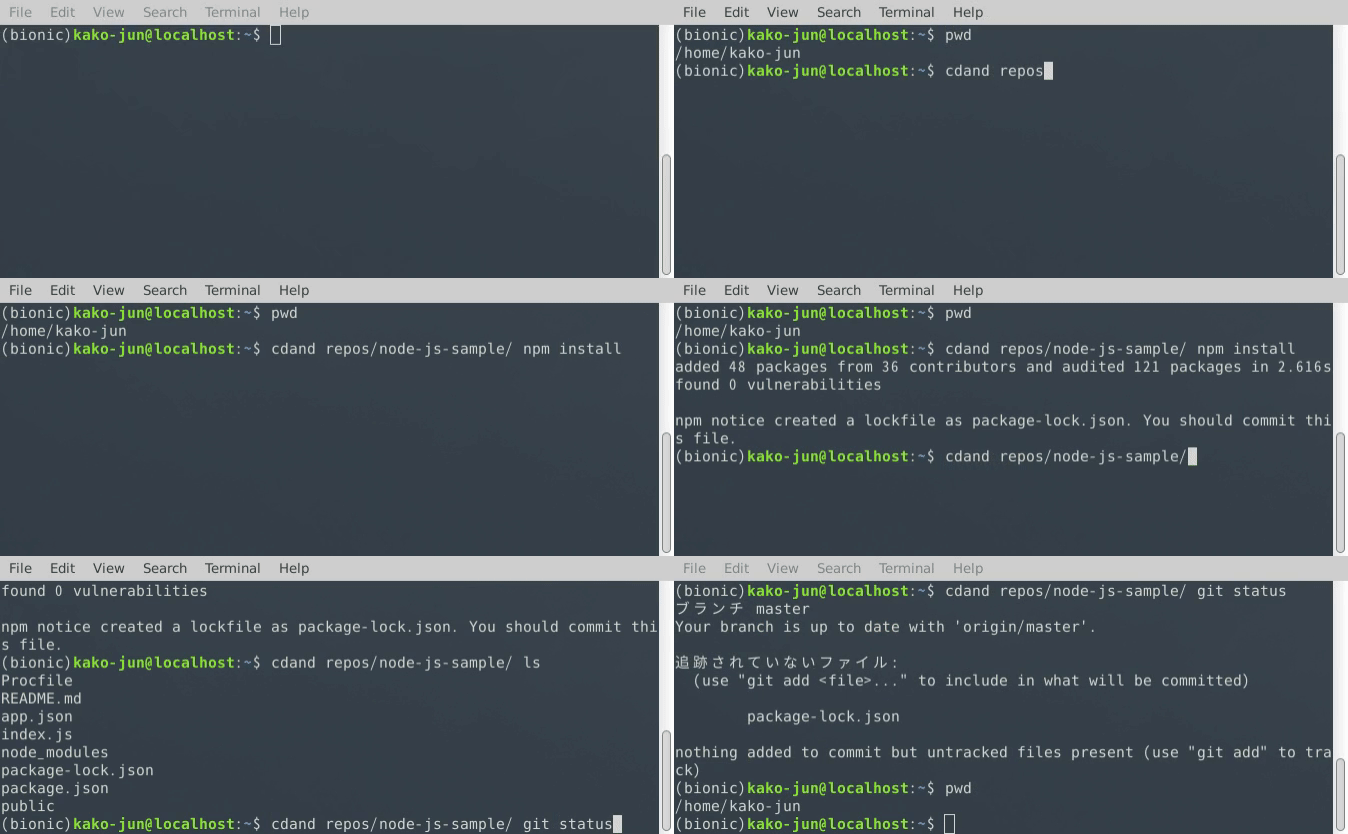
`cdand` is a simple CLI command.
It can launch every commands(e.g. `git`, `yarn`) in your target directory without `cd`.
It's written in Go, so it will work on many operating systems.
## Description
### Demo
### VS.
There are many commands that expect you already changed the current directory before launch.
For example, `pwd`.
```sh
$ pwd
/media/removable/SD Card/current
$ pwd subdir/subsubdir
/media/removable/SD Card/current
```
By using `cdand`, you can type simply.
```sh
$ cdand subdir/subsubdir pwd
/media/removable/SD Card/current/subdir/subsubdir
```
If you don't use `cdand`, there is no way to get expected results without changing the current directory.
And one more command will be required to restore the current directory.
```sh
$ cd subdir/subsubdir; pwd
$ cd ../..
```
By adding `cdand` to PATH, you can say good-bye to `cd ../..`.
## Installation
### Requirements
- Operating System
- Windows
- macOS
- Linux
### Download binaries
- Windows: [cdand_win.zip](https://github.com/kako-jun/cdand/releases/latest)
- macOS: [cdand_mac.dmg](https://github.com/kako-jun/cdand/releases/latest)
- Linux ( `chmod u+x cdand` required)
- x64: [cdand_linux_amd64.tar.gz](https://github.com/kako-jun/cdand/releases/latest)
- ARM: [cdand_linux_arm64.tar.gz](https://github.com/kako-jun/cdand/releases/latest)
- Raspberry Pi: [cdand_linux_armv7l.tar.gz](https://github.com/kako-jun/cdand/releases/latest)
### go get
```sh
$ go get github.com/kako-jun/cdand
```
## Features
### Usage
```sh
$ cdand subdir/subsubdir ls -alF
drwxrwxr-x. 2 kako-jun kako-jun 4096 Apr 2 04:20 ./
drwxr-xr-x. 10 kako-jun kako-jun 4096 Apr 2 04:20 ../
-rw-rw-r--. 1 kako-jun kako-jun 0 Apr 2 04:20 my_secrets.txt
```
"Why is `cdand` useful?" Here are the examples.
#### Examples
##### e.g. No need to call `cd` before executing Git commands.
```sh
$ cdand your/git/repository git status
```
##### e.g. No need to call `cd` before executing Node commands.
```sh
$ cdand your/node/project yarn
```
The point is, you don't need to care the difference between options of each command.
e.g.
- `-C` option of `git`
- `-prefix`, `-cwd` options of `node`
They are hard to remember, aren't they?
How is the following?
```sh
$ (cd subdir/subsubdir; ls)
```
It's a cool way for who likes typing many brackets.
After you typed `cd`, if you saw a troublesome future, let's append `and`.
After that, use TAB key to autocomplete the target directory name.
```sh
$ cdand ../sister_project npm install
```
It's also helpful to keep indoors(subdirectory).
##### e.g. appendix
`cdand` can be called recursively.
```sh
$ cdand subdir cdand .. cdand subdir cdand .. ls
```
Ummmm...are there any merits? (Probably nothing.)
#### Unsupported
##### Coloring on stdout will be disabled.
e.g. `ls -G`
##### For incomplete commands, you may get unexpected results.
- `vim` can launch, but not shown in terminal.
- `less` can launch, but cannnot paging.
- The stdout from interactive command is shown at the same time.
##### The target of pipe and redirect is `cdand` itself.
For example, in case you type as below
```sh
$ cdand subdir cat my_secrets.txt | grep treasure
```
At first,
```sh
$ cdand subdir cat my_secrets.txt
```
runs.
Next,
```sh
$ grep treasure
```
runs for the first result.
In pipe case, the above order may not be a problem.
But in redirect case, a problem occurs.
```sh
$ cdand subdir cat my_secrets.txt > my_will.txt
```
`my_will.txt` isn't created in `subdir` but in the current directory.
If you want to get it in `subdir`, you have to create a script as below.
```sh
cat my_secrets.txt > my_will.txt
```
And put the above script in `subdir`.
Lastly,
```sh
$ cdand subdir foo.sh
```
But it probably has no benefit... :sob:
### Coding
```golang
import "github.com/kako-jun/cdand/cdand-core"
cdand.Exec("subdir/subsubdir", "ls", "-alF")
```
### Contributing
I'm always looking for new contributing.
- Adding features
- Overwriting with better code
- Finding (and fixing) bugs
- Improving translation
## Authors
kako-jun
- :octocat: https://github.com/kako-jun
- :notebook: https://gist.github.com/kako-jun
- :house: https://llll-ll.com
- :bird: https://twitter.com/kako_jun_42
### :lemon: Lemonade stand
Your donation turns into my cat's food.
Please open the following link, and enter `kako.hydrajin@gmail.com` into 'To' box.
**[:hearts: Donate](https://www.amazon.com/gp/product/B004LLIKVU/ref=as_li_tl?ie=UTF8&tag=llll-ll-20&camp=1789&creative=9325&linkCode=as2&creativeASIN=B004LLIKVU&linkId=40379992af00bad986f2d38a4f0cf745)**
- Tell me your impressions in 'Message' box.
- The sender is hidden.
- From $1
## License
This project is licensed under the MIT License.
See the [LICENSE](https://github.com/kako-jun/cdand/blob/master/LICENSE) file for details.
## Acknowledgments
- [Go](https://golang.org/)
- and you