https://github.com/kaleb110/bookmarkly
🔖a minimal bookmark manager
https://github.com/kaleb110/bookmarkly
bookmarks docker expressjs full-stack jwt minimal nextjs nodejs nodemailer reactjs saas stripe tailwindcss typescript web
Last synced: 6 months ago
JSON representation
🔖a minimal bookmark manager
- Host: GitHub
- URL: https://github.com/kaleb110/bookmarkly
- Owner: kaleb110
- License: mit
- Created: 2024-11-05T18:54:41.000Z (over 1 year ago)
- Default Branch: main
- Last Pushed: 2025-12-28T12:06:27.000Z (6 months ago)
- Last Synced: 2025-12-30T23:13:43.794Z (6 months ago)
- Topics: bookmarks, docker, expressjs, full-stack, jwt, minimal, nextjs, nodejs, nodemailer, reactjs, saas, stripe, tailwindcss, typescript, web
- Language: TypeScript
- Homepage: https://bookmark-manager-liart.vercel.app
- Size: 27.1 MB
- Stars: 12
- Watchers: 1
- Forks: 2
- Open Issues: 0
-
Metadata Files:
- Readme: README.md
- License: LICENSE
Awesome Lists containing this project
README
# Easyboxify - a Bookmark Manager
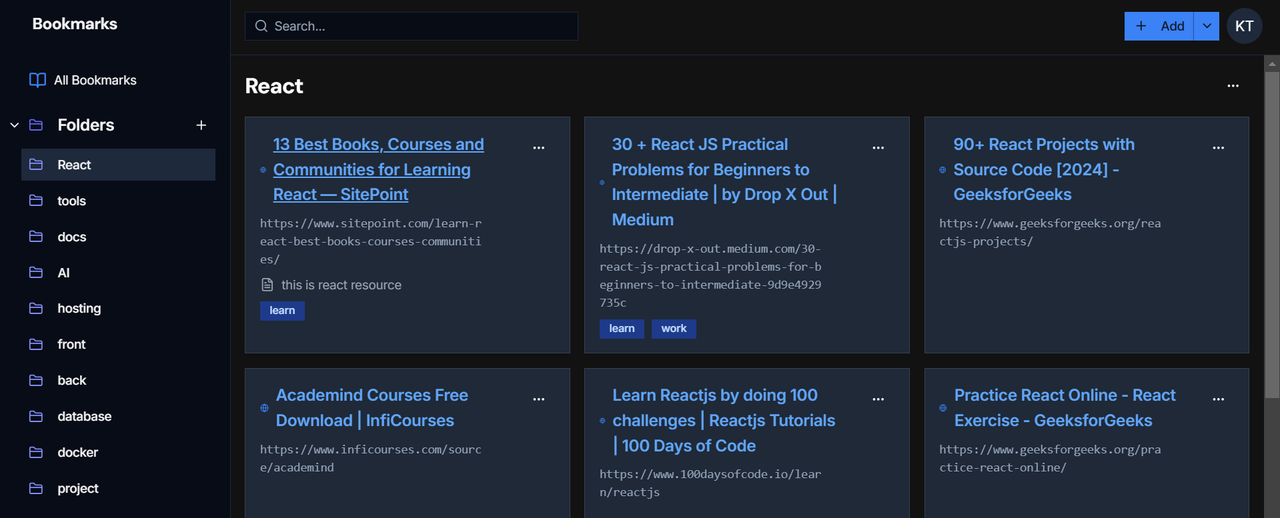
Easyboxify is A minimalist and fast bookmark manager designed to boost productivity by helping users organize, search, and manage their bookmarks with ease. It offers a clean, intuitive interface and robust features tailored to meet the needs of casual users and power users alike.
## Table of Contents
- [Project Overview](#project-overview)
- [Features](#features)
- [Tech Stack](#tech-stack)
- [Setup Instructions](#setup-instructions)
- [Prerequisites](#prerequisites)
- [Environment Variables](#environment-variables)
- [Database Initialization](#database-initialization)
- [Running the App](#running-the-app)
- [Usage](#usage)
- [Future Plans](#future-plans)
- [Contribution Guidelines](#contribution-guidelines)
- [License](#license)
## Project Overview
Bookmark Manager simplifies bookmark management with features like secure login, seamless import/export, and intuitive organization tools. With both free and pro tiers, it caters to a wide range of users by balancing essential functionality with advanced productivity tools.
### Target Audience
- Individuals seeking a simple, organized way to manage bookmarks efficiently.
- Productivity enthusiasts who value fast search and clutter-free design.
## Features
### Free Tier
- Up to 100 bookmarks.
- Create 3 folders and 3 tags max.
### Pro Tier
- Unlimited bookmarks, folders, and tags.
- Advanced features and priority support and upcoming features.
### Core Features
- **Bookmark Import/Export**: Supports Chrome HTML format for easy data portability.
- **Add/edit bookmark**: users can add bookmark with title, url, notes and tags.
- **Search Functionality**: Quickly locate bookmarks with efficient search algorithms.
- **Minimalist UI**: Designed for ease of use and productivity.
## Tech Stack
- **Frontend**: Next.js
- **Backend**: Express.js (TypeScript)
- **Database**: PostgreSQL (using Drizzle ORM)
- **Styling**: Tailwind CSS with shadcn/ui components.
- **Authentication**: JSON Web Tokens (JWT), OAuth2, and Nodemailer.
- **Payments**: Stripe for managing Pro subscriptions (monthly/yearly).
- **Deployment**:
- Frontend: Vercel
- Backend: Render
- Database: Neon
## Setup Instructions
### Prerequisites
- Node.js (v16 or above)
- Docker (optional, for containerized setup)
- PostgreSQL (if running without Docker)
- A Stripe account for subscription management.
### Environment Variables
Create a `.env` file in the backend directory and include the following variables:
```env
NODE_ENV=development
DATABASE_URL=your_neon_database_url
PORT=5000
BASE_URL=http://localhost:3000
BASE_URL_PROD=production_base_url
JWT_SECRET_KEY=your_jwt_secret
TOKEN_EXPIRATION=15m
REFRESH_TOKEN_EXPIRATION=7d
CLIENT_ID=your_oauth_client_id
CLIENT_SECRET=your_oauth_client_secret
REFRESH_TOKEN=refrsh_token_generated_from_oauth-playground
EMAIL_USER=your_email_address
STRIPE_SECRET_KEY=your-stripe-secret-key
STRIPE_WEBHOOK_SECRET=your-stripe-webhook-secret
STRIPE_MONTHLY_PRICE_ID=the_product_monthly_price-id
STRIPE_YEARLY_PRICE_ID=the_product_yearly_price-id
```
Create a `.env.local` file in the frontend directory and include the following variables:
```env
NODE_ENV=development
NEXT_PUBLIC_BASE_URL=http://localhost:5000
NEXT_PUBLIC_BASE_URL_PROD=production_base_url
```
### Database Initialization
1. Install the necessary dependencies for database migration.
```bash
npm install --legacy-peer-deps
```
2. Apply migrations using Drizzle ORM.
```bash
npm run db:migrate or npx drizzle-orm generate/migrate/push
```
### Running the App
#### Using Docker
1. Build and run the Docker containers.
```bash
docker-compose up --build
```
2. Access the app at `http://localhost:3000`.
#### Running Locally
1. Install dependencies.
```bash
npm install --legacy-peer-deps
```
2. Start the backend server.
```bash
cd ./backend
npm run dev
```
3. Start the frontend server.
```bash
cd ./frontend
npm run dev
```
4. Access the app at `http://localhost:3000`.
## Usage
1. **Register/Login**: Create an account or log in using your email.
2. **Manage Bookmarks**: Add, edit, organize into folders, and tag bookmarks.
3. **Search**: Use the search bar to quickly find(filter) bookmarks by keyword.
4. **Upgrade to Pro**: Unlock advanced features via Stripe-powered subscriptions.
5. **Import/Export**: Import bookmarks from Chrome or export for backup.
## Future Plans
- Browser extensions for Chrome and others.
- Mobile-friendly interface for seamless access on the go.
- Collaborative features like shared folders and tags.
- better folder and tag organization
- improved ui/ux with high customization
- ai based bookmark/tag suggestion
## 🌐 Live Demo
Check out the live demo of the App [here](https://easyboxify.com).
## Contribution Guidelines
We welcome contributions to improve Bookmark Manager! Follow these steps:
1. Fork the repository.
2. Create a new branch for your feature or fix.
```bash
git checkout -b feature/your-feature-name
```
3. Commit your changes with descriptive messages.
```bash
git commit -m "Add feature: your feature name"
```
4. Push to your branch.
```bash
git push origin feature/your-feature-name
```
5. Create a pull request and describe your changes.
6. i will merge any fixes weather tiny or big.
## 📧 Contact
If you have any questions, feel free to reach out:
- **Kaleb**: [kalisha123k.com](mailto:kalisha123k@gmail.com)
- [GitHub Issues](https://github.com/kaleb110/ecom/issues)
## License
This project is licensed under the MIT License. See the [LICENSE](./LICENSE) file for details.
## Star History
[](https://star-history.com/#bookmarkly/diagram&Date)
---
Start managing your bookmarks with ease! 🚀