https://github.com/kalix127/secret-stripper
A small Rust CLI that strips secrets from your clipboard on demand. Bind a hotkey, highlight text, press the chord - the clipboard holds a redacted version.
https://github.com/kalix127/secret-stripper
cli clipboard pii privacy redaction rust secrets security
Last synced: about 1 month ago
JSON representation
A small Rust CLI that strips secrets from your clipboard on demand. Bind a hotkey, highlight text, press the chord - the clipboard holds a redacted version.
- Host: GitHub
- URL: https://github.com/kalix127/secret-stripper
- Owner: kalix127
- License: mit
- Created: 2026-05-24T05:12:05.000Z (about 1 month ago)
- Default Branch: main
- Last Pushed: 2026-05-24T06:30:53.000Z (about 1 month ago)
- Last Synced: 2026-05-24T07:19:35.913Z (about 1 month ago)
- Topics: cli, clipboard, pii, privacy, redaction, rust, secrets, security
- Language: Rust
- Homepage:
- Size: 1.15 MB
- Stars: 0
- Watchers: 0
- Forks: 0
- Open Issues: 1
-
Metadata Files:
- Readme: README.md
- Changelog: CHANGELOG.md
- Contributing: CONTRIBUTING.md
- Funding: .github/FUNDING.yml
- License: LICENSE
- Code of conduct: CODE_OF_CONDUCT.md
- Security: SECURITY.md
Awesome Lists containing this project
README

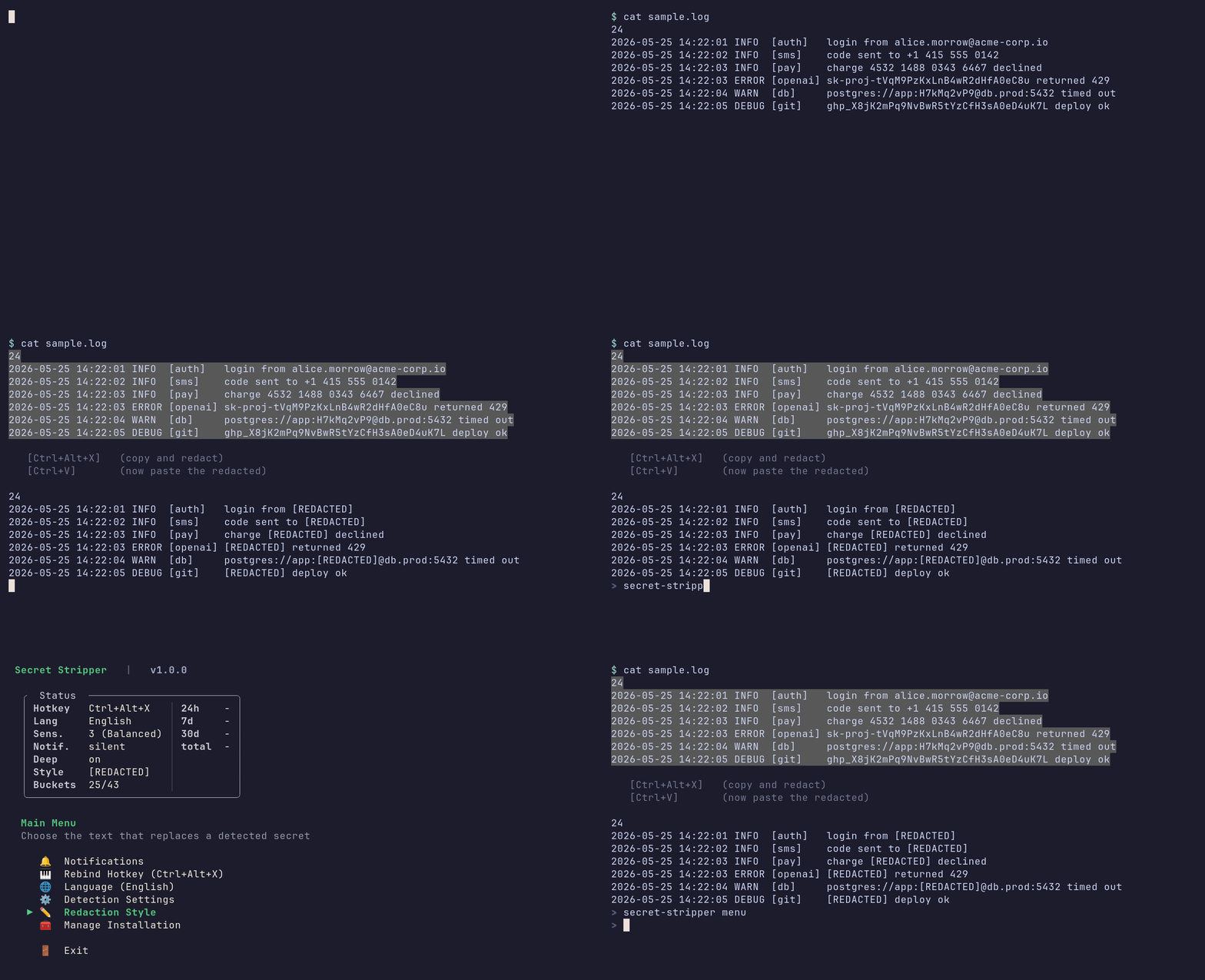
**A small Rust CLI that strips secrets from your clipboard on demand. Bind a hotkey, highlight text, press the chord - the clipboard holds a redacted version. Normal Ctrl+C / Ctrl+V is never intercepted.**
## Contents
- [Quick Start](#quick-start)
- [Supported OS](#supported-os)
- [Platform setup](#platform-setup)
- [macOS setup](#macos-setup)
- [Windows setup](#windows-setup)
- [What It Detects](#what-it-detects)
- [Auto-redact paste into AI TUIs](#auto-redact-paste-into-ai-tuis)
- [Contributing](#contributing)
- [Star history](#star-history)
- [License](#license)
---
## Quick Start
**Linux** - one command, no extra setup:
```bash
curl -sSf https://secretstripper.download/install.sh | bash
```
Default chord: `Ctrl+Alt+X`.
**macOS** - needs a one-time global-hotkey helper (skhd or Hammerspoon). See [macOS setup](#macos-setup) for permissions and troubleshooting.
```bash
brew install koekeishiya/formulae/skhd
curl -sSf https://secretstripper.download/install.sh | bash
# Grant skhd Accessibility: System Settings -> Privacy & Security -> Accessibility
skhd --restart-service
```
Default chord: `Cmd+Shift+C`.
**Windows (PowerShell)** - needs AutoHotkey v2. See [Windows setup](#windows-setup) for the full flow.
```powershell
winget install AutoHotkey.AutoHotkey
iwr -useb https://secretstripper.download/install.ps1 | iex
```
Default chord: `Ctrl+Alt+C`.
**From [crates.io](https://crates.io/crates/secret-stripper) (Rust)** - same per-OS prerequisites apply (skhd on macOS, AutoHotkey on Windows):
```bash
cargo install secret-stripper && secret-stripper init
```
**From source (git):**
```bash
cargo install --git https://github.com/kalix127/secret-stripper.git --locked && secret-stripper init
```
After install, highlight text and press your chord. On Linux the PRIMARY selection is read directly, so you can skip the `Ctrl+C`. Paste with `Ctrl+V` (`Cmd+V` on macOS).
Run `secret-stripper menu` to tune settings, or `secret-stripper --help` for all commands.
---
## Supported OS
| OS | Status | Hotkey backend |
|----|--------|----------------|
| Linux | ✅ Supported | gsettings (GNOME / Cinnamon / Unity / Budgie / Pantheon), gsettings (MATE schema), xfconf-query (XFCE), kwriteconfig + qdbus (KDE Plasma 5/6) |
| macOS | ✅ Supported | skhd (`~/.skhdrc`) or Hammerspoon (`~/.hammerspoon/init.lua`); manual instructions if neither is installed |
| Windows | ✅ Supported | AutoHotkey v2 (`%APPDATA%\secret-stripper\secret-stripper.ahk`) - install via `winget install AutoHotkey.AutoHotkey` |
## Platform setup
### macOS setup
There is no zero-install way to register a true global hotkey on macOS without a resident process. Secret Stripper itself stays one-shot, so it delegates hotkey capture to one of two well-known helpers: [skhd](https://github.com/koekeishiya/skhd) (lightweight, recommended) or [Hammerspoon](https://www.hammerspoon.org/) (heavier, scriptable). If neither is installed, `init` falls back to printing manual binding instructions.
1. **Install skhd via Homebrew:**
```bash
brew install koekeishiya/formulae/skhd
```
2. **Run `secret-stripper init`.** It writes `~/.skhdrc`, the launchd LaunchAgent for the daily update check, and the config file. Output includes a "DE binding" line: `OK` if skhd / Hammerspoon was detected, `FAILED` with install hints if not.
3. **Grant skhd Accessibility permission.** skhd needs this to intercept global hotkeys, otherwise it silently captures nothing. Open **System Settings -> Privacy & Security -> Accessibility**, click `+`, add `/usr/local/bin/skhd`, and toggle it on. If skhd was already running, restart it so the new permission takes effect:
```bash
skhd --restart-service
```
4. **Test the chord:**
```bash
echo "test@example.com" | pbcopy
# Press your chord (default: Cmd+Shift+C)
pbpaste # expect: [REDACTED]
```
*Hammerspoon alternative:* `brew install --cask hammerspoon`, open it once to grant Accessibility, then run `secret-stripper init` - it writes the binding into `~/.hammerspoon/init.lua` instead of `~/.skhdrc`.
*Default chord:* `Cmd+Shift+C`. macOS apps often claim Cmd-modifier chords, so if it conflicts with something you use (browser DevTools, Finder "Copy Path", etc.), rebind from `secret-stripper menu -> Rebind Hotkey`. Two safer options if you want to plan ahead: `Cmd+Option+X` or `Cmd+Ctrl+X`.
### Windows setup
Windows has no zero-install way to register a true global hotkey. Same constraint as macOS - Secret Stripper delegates hotkey capture to [AutoHotkey](https://www.autohotkey.com/) v2 (the Windows analogue of skhd). AutoHotkey uses the Win32 `RegisterHotKey` API under the hood and is the only mechanism that delivers the chord reliably across focused windows, full-screen apps, and elevated processes. AutoHotkey is required - `init` aborts with an install hint if it cannot find it.
1. **Install AutoHotkey via winget:**
```powershell
winget install AutoHotkey.AutoHotkey
```
The package installs AutoHotkey v2 to `C:\Program Files\AutoHotkey\v2\`.
2. **Run `secret-stripper init`.** It writes `%APPDATA%\secret-stripper\secret-stripper.ahk`, drops a startup `.lnk` so AHK re-launches the script at every login, and starts the AHK process immediately so the chord is live without a logout.
3. **Test the chord:**
```powershell
Set-Clipboard "test@example.com"
# Press your chord (default: Ctrl+Alt+C)
Get-Clipboard # expect: [REDACTED]
```
- The hotkey is limited to `Ctrl+Alt+` (optionally with `Shift`); other chords are rejected.
- No PRIMARY selection: the flow is two steps (`Ctrl+C`, then your chord).
- The AHK script runs the redaction with a hidden console, so no window flashes on each trigger.
- The daily update check runs as a `schtasks` daily task at 11:00.
- *Uninstall* kills the AHK process bound to our script and removes the `.ahk` file and the startup `.lnk`. Other AHK scripts you have running are untouched.
---
## What It Detects
| Category | Examples |
|----------|---------|
| **🔴 Cloud Secrets** | AWS keys, Google API keys, Azure credentials, OpenAI tokens, Stripe keys, Heroku API keys |
| **🔴 Auth Tokens** | GitHub tokens, GitLab tokens, Slack tokens, Discord tokens, JWTs, bearer tokens, NPM tokens |
| **🔴 Cryptographic Keys** | RSA/EC/OpenSSH private keys, PGP private keys, SSH public keys |
| **🔴 PII** | Credit card numbers, SSNs, phone numbers, email addresses, passport numbers |
| **🟠 Connection Strings** | PostgreSQL, MongoDB, Redis, MySQL, JDBC URLs with credentials |
| **🟡 Heuristic** | Unusual strings, env files with secrets, JSON with password fields, base64-encoded content |
| **🟢 Safe** | Normal text, emails, documents - no false alerts |
For the full list of buckets, severity tiers, and patterns, see [DETECTION_COVERAGE.md](DETECTION_COVERAGE.md).
---
## Redaction styles
Pick how detected secrets are replaced from `secret-stripper menu` -> **Redaction Style**:
| Style | Output for `aws=AKIAIOSFODNN7EXAMPLE` |
|-------|----------------------------------------|
| **Marker** (default) | `aws=[REDACTED]` - uses a configurable marker string (eight presets + custom) |
| **Drop** | `aws=` - removes the matched bytes entirely |
| **Typed** | `aws=[AWS_ACCESS_KEY_ID]` - replaces each span with a tag derived from the matched pattern name |
| **Placeholder** | `aws=AKIAIOSFODNN7EXAMPLE` - swaps in a realistic but fake sample value for the matched pattern (an email becomes `user@example.com`, a Stripe key `sk_test_4eC39HqLyjWDarjtT1zdp7dc`) |
The same setting applies to the hotkey trigger, the `redact` pipeline subcommand, and the `paste-guard` AI-TUI wrapper.
---
## Auto-redact paste into AI TUIs
`secret-stripper init` looks for installed AI terminal tools (Claude Code, Codex CLI, aider, Gemini CLI, Continue, opencode) and prints a ready-to-copy shell alias block. Each alias routes the tool through `paste-guard`, a PTY wrapper that intercepts clipboard pastes and redacts secrets before they reach the AI's prompt - typing and normal output are untouched. Copy the snippet into your shell config (`~/.zshrc`, `~/.bashrc`, `~/.config/fish/config.fish`, or your PowerShell profile) and open a new shell:
```bash
# ----------------------------------
alias claude='secret-stripper paste-guard -- claude'
alias codex='secret-stripper paste-guard -- codex'
# ----------------------------------
```
Secret Stripper never writes to your shell rc on its own. To stop routing through `paste-guard`, delete the block between the dashed comment lines.
**Scope.** `paste-guard` is a per-process wrapper - it only filters pastes into the *one* command you ran it on. Daily use of `ssh`, `psql`, `vim`, `kubectl`, the bare shell prompt, GUI apps, the system clipboard - all completely untouched. You can also add aliases for non-AI tools by hand (live demos against `psql` / `mysql`, screen-recordings) - wrapping leaf commands is fine, wrapping a whole shell usually is not.
You can also pipe arbitrary text through the same engine:
```bash
cat secrets.log | secret-stripper redact > clean.log
```
**Limitations.** Bracketed paste must be supported by your terminal (every modern emulator does, including the VSCode integrated terminal and tmux passthrough); typed secrets are never modified, only pasted ones; paste payloads above 1 MiB fall through unredacted.
---
## Contributing
See [CONTRIBUTING.md](CONTRIBUTING.md) for build, test, lint, and commit conventions.
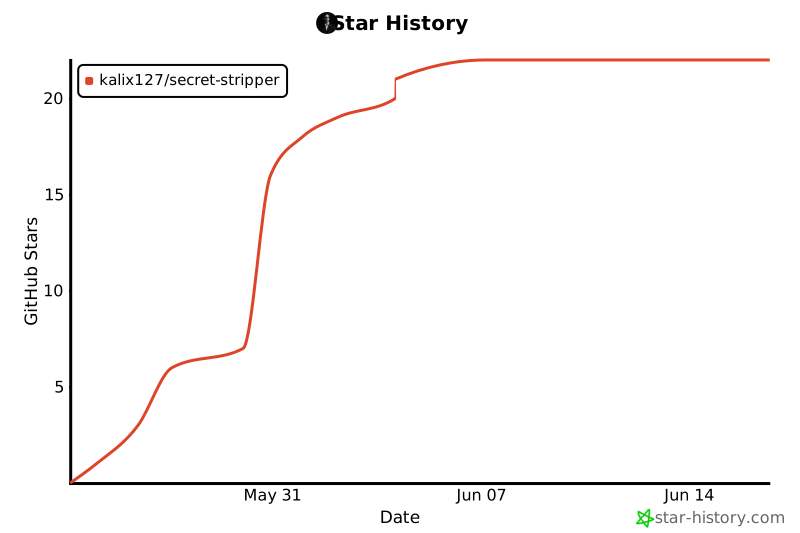
## Star history
## License
[MIT](LICENSE)