https://github.com/kamangir/blue-options
🌀 options for Bash.
https://github.com/kamangir/blue-options
ai bash bash-scripting languages
Last synced: 12 months ago
JSON representation
🌀 options for Bash.
- Host: GitHub
- URL: https://github.com/kamangir/blue-options
- Owner: kamangir
- License: cc0-1.0
- Created: 2024-07-03T03:12:45.000Z (almost 2 years ago)
- Default Branch: main
- Last Pushed: 2025-03-16T00:03:47.000Z (over 1 year ago)
- Last Synced: 2025-05-17T04:11:15.752Z (about 1 year ago)
- Topics: ai, bash, bash-scripting, languages
- Language: Python
- Homepage: https://pypi.org/project/blue-options/
- Size: 183 KB
- Stars: 2
- Watchers: 1
- Forks: 0
- Open Issues: 1
-
Metadata Files:
- Readme: README.md
- License: LICENSE
Awesome Lists containing this project
README
# 🌀 blue-options
🌀 `blue_options` implements an `options` argument for Bash.
here is an example use of an `options` in the [vancouver-watching 🌈](https://github.com/kamangir/vancouver-watching) ingest command:
```bash
> @help vanwatch ingest
```
```bash
vanwatch \
ingest \
[area=,count=<-1>,~download,dryrun,~upload] \
[-|] \
[process,count=<-1>,~download,dryrun,gif,model=,publish,~upload] \
[--detect_objects 0] \
[--overwrite 1] \
[--verbose 1]
```
this command takes in an `options`, an `object`, and `args`. an `options` is a string representation of a dictionary, such as,
```bash
area=,~batch,count=<-1>,dryrun,gif,model=,~process,publish,~upload
```
which is equivalent, in json notation, to,
```json
{
"area": "vancouver",
"batch": false,
"count": -1,
"dryrun": true,
"gif": true,
"model": "",
"process": false,
"publish": true,
"upload": false,
}
```
for more refer to 🔻 [giza](https://github.com/kamangir/giza).
## installation
```bash
pip install blue_options
```
add this line to your `~/.bash_profile` or `~/.bashrc`,
```bash
source $(python3 -m blue_options locate)/.bash/blue_options.sh
```
## usage
let your function receive an `options` argument, then parse it with `abcli_options` and `abcli_options_int`.
```bash
function func() {
local options=$1
local var=$(abcli_options "$options" var default)
local key=$(abcli_options_int "$options" key 0)
[[ "$key" == 1 ]] &&
echo "var=$var"
}
```
## example 1
from [reddit](https://www.reddit.com/r/bash/comments/1duw6ac/how_can_i_automate_these_tree_commands_i/)
> How can I automate these tree commands I frequently need to type out?
I would like to run:
```bash
git add .
git commit -m "Initial "commit"
git push
```
> I got bored of typing them out each time. Can I make an alias or something like "gc" (for git commit). The commit message is always the same "Initial commit".
first, install `blue-options`. this will also install [`blueness`](https://github.com/kamangir/blueness).
```bash
pip install blue_options
```
then, copy [`example1.sh`](./blue_options/assets/example1.sh) to your machine and add this line to the end of your `bash_profile`,
```bash
source
```
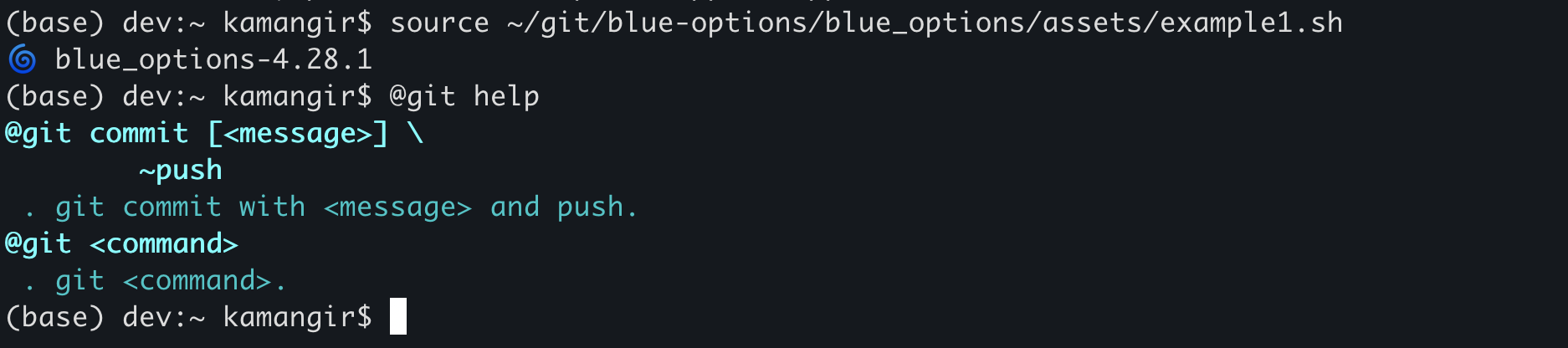
now, you have access to the `@git` super command. here is how it works.
1. `@git help` shows usage instructions (see below).
1. `@git commit` runs the three commands. you can customize the message by running `@git commit `. you can also avoid the push by running `@git commit ~push`.
1. for any `` other than `commit`, `@git ` runs `git `.
```
> @git help
@git commit [] \
~push
. git commit with and push.
@git
. git .
```
---
[](https://github.com/kamangir/blue-options/actions/workflows/pylint.yml) [](https://github.com/kamangir/blue-options/actions/workflows/pytest.yml) [](https://pypi.org/project/blue-options/) [](https://pypistats.org/packages/blue-options)