https://github.com/kami/firefox-website-to-remarkable
Project which allows you to convert website to a (grayscale) PDF and send it to your Remarkable device using Firefox. It includes self hosted service for converting websites to PDFs, simple Firefox extension and scripts for adding PDFs to Remarkable using rmapi or Nextcloud.
https://github.com/kami/firefox-website-to-remarkable
Last synced: 4 months ago
JSON representation
Project which allows you to convert website to a (grayscale) PDF and send it to your Remarkable device using Firefox. It includes self hosted service for converting websites to PDFs, simple Firefox extension and scripts for adding PDFs to Remarkable using rmapi or Nextcloud.
- Host: GitHub
- URL: https://github.com/kami/firefox-website-to-remarkable
- Owner: Kami
- License: apache-2.0
- Created: 2020-12-15T21:12:12.000Z (over 5 years ago)
- Default Branch: master
- Last Pushed: 2020-12-19T18:28:57.000Z (over 5 years ago)
- Last Synced: 2025-03-20T11:19:02.192Z (over 1 year ago)
- Language: Shell
- Size: 238 KB
- Stars: 1
- Watchers: 1
- Forks: 0
- Open Issues: 0
-
Metadata Files:
- Readme: README.md
- License: LICENSE
Awesome Lists containing this project
README
# Website to PDF to Remarkable 2 (Firefox)
This repository contains components and code pieces which allow you to send PDF version of the
website you are currently viewing to your Remarkable.
It consists of the following components:
1. Python web service which generates PDF of a provided URL and places it in a specific directory.
2. Firefox extension which sends URL of the website you are currently viewing to Python web service
3. Script which adds / pulls that content to Remarkable
Right now there are multiple options for 3), depending on how comfortable you feel with using
Remarkable cloud to push content to your device.
First approach uses a simple bash script which runs as a cron job and periodically checks directory
where the PDFs are saved and uploads any new files to RM2 using Remarkable cloud.
Second one relies on uploading those PDFs to Nextcloud directory and nextcloud running a systemd
timer which uses rclone to periodically pull down next files from Nextcloud (e.g.
https://github.com/merqurio/remarkable-syncthing).
This approach supports moving files directly to a directory (when the service is co-located with
Nextcloud) or uploading it using WebDAV protocol.
Nice thing about this "composable" approach is that you can add additional steps to the pipeline.
For example, bash script which I used to sync content to Nextcloud also runs imagemagick on the
PDFs and darkness them to increase the contrast and make them easier to read.
## Directory Layout
* ``python_app/`` - Python flask service for converting website to PDF
* ``firefox_extension`` - Firefox extension.
* ``scripts/`` - Scripts for moving / syncing files to Remarkable.
## Usage
To run the service, you can use example ``docker-compose.yml`` file in the root directory -
make sure you modify necessary environment variables.
## Notes, Limitations
1. Firefox extension can't directly generate a PDF which means we need to have an intermediate
service which takes care of generating the PDFs.
Service will generate the PDF by visiting and rendering the website which means it will only
work for public website and situations where no state (e.g. cookies or being logged in) is
involved.
Technically, pdfkit and wkhtmltopdf (https://wkhtmltopdf.org/) which is used underneath
allows you to send custom cookies, etc. but sending custom cookies from Firefox to extension
to the service would open a whole can of security related issues and it's not a good idea.
2. For any kind of serious deployment, you should deploy Python service behind TLS (that's easy to
do with docker compose, example configuration is stored inside .examples/ directory).
Service supports simple "secret in query parameter" based authentication, but you are encouraged
to add another layer of protection by putting Nginx basic auth in-front of it (that's again trivial
to do with nginx proxy running inside Docker container).
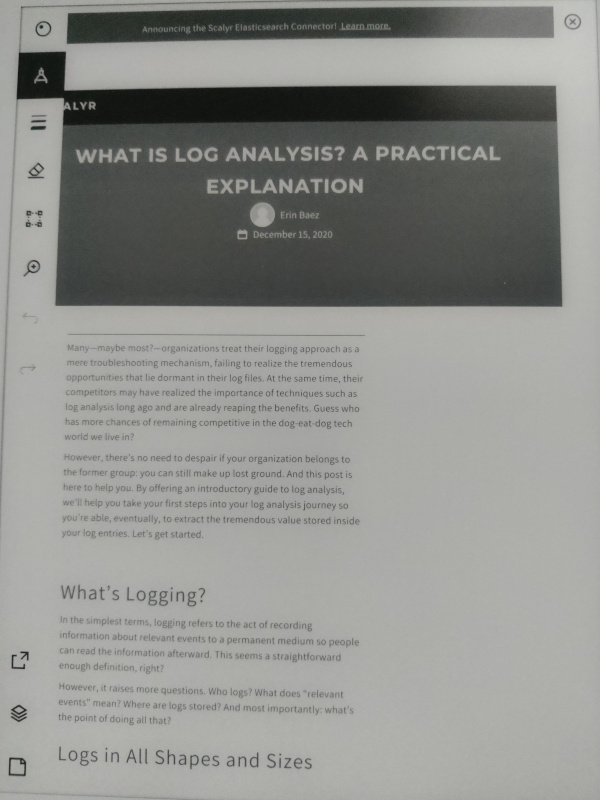
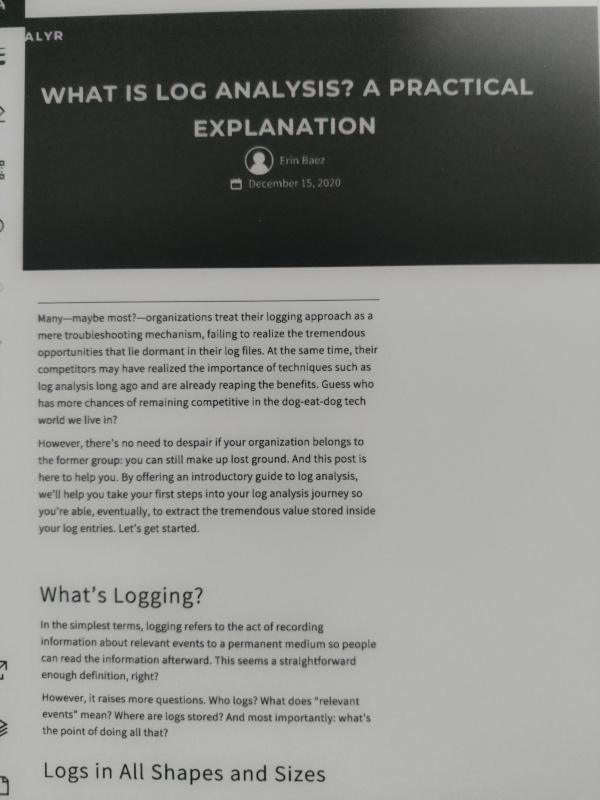
## Note on the generated PDF contrast
As mentioned above, the web app will generate a grayscale PDF. Depending on the original website
font color, etc. the output PDF may have a low contrast which may be hard to read on Remarkable.
To work around that, this repo contains a script which utilizes imagemagick to darken the
generated PDF and increase the contrast.
In fact, this script may also come handy in many other situations where you have a low contrast PDF
which is not easy to read on Remarkable.
Before darken:
After darken:
## Copyright, License, and Contributors Agreement
Copyright 2020 Tomaz Muraus
Licensed under the Apache License, Version 2.0 (the "License"); you may not use this work except in
compliance with the License. You may obtain a copy of the License in the [LICENSE](LICENSE) file, or at:
[http://www.apache.org/licenses/LICENSE-2.0](http://www.apache.org/licenses/LICENSE-2.0)