https://github.com/kamon-io/domino
Reports key metrics for docker containers
https://github.com/kamon-io/domino
Last synced: 6 months ago
JSON representation
Reports key metrics for docker containers
- Host: GitHub
- URL: https://github.com/kamon-io/domino
- Owner: kamon-io
- License: other
- Created: 2015-09-19T18:07:52.000Z (over 10 years ago)
- Default Branch: master
- Last Pushed: 2015-10-09T19:20:47.000Z (over 10 years ago)
- Last Synced: 2025-04-27T16:42:44.033Z (9 months ago)
- Language: Scala
- Homepage:
- Size: 423 KB
- Stars: 17
- Watchers: 3
- Forks: 2
- Open Issues: 0
-
Metadata Files:
- Readme: README.md
- License: LICENSE
Awesome Lists containing this project
README
Domino [](https://travis-ci.org/kamon-io/domino)
--------------
Reports key metrics for docker containers.
###Overview
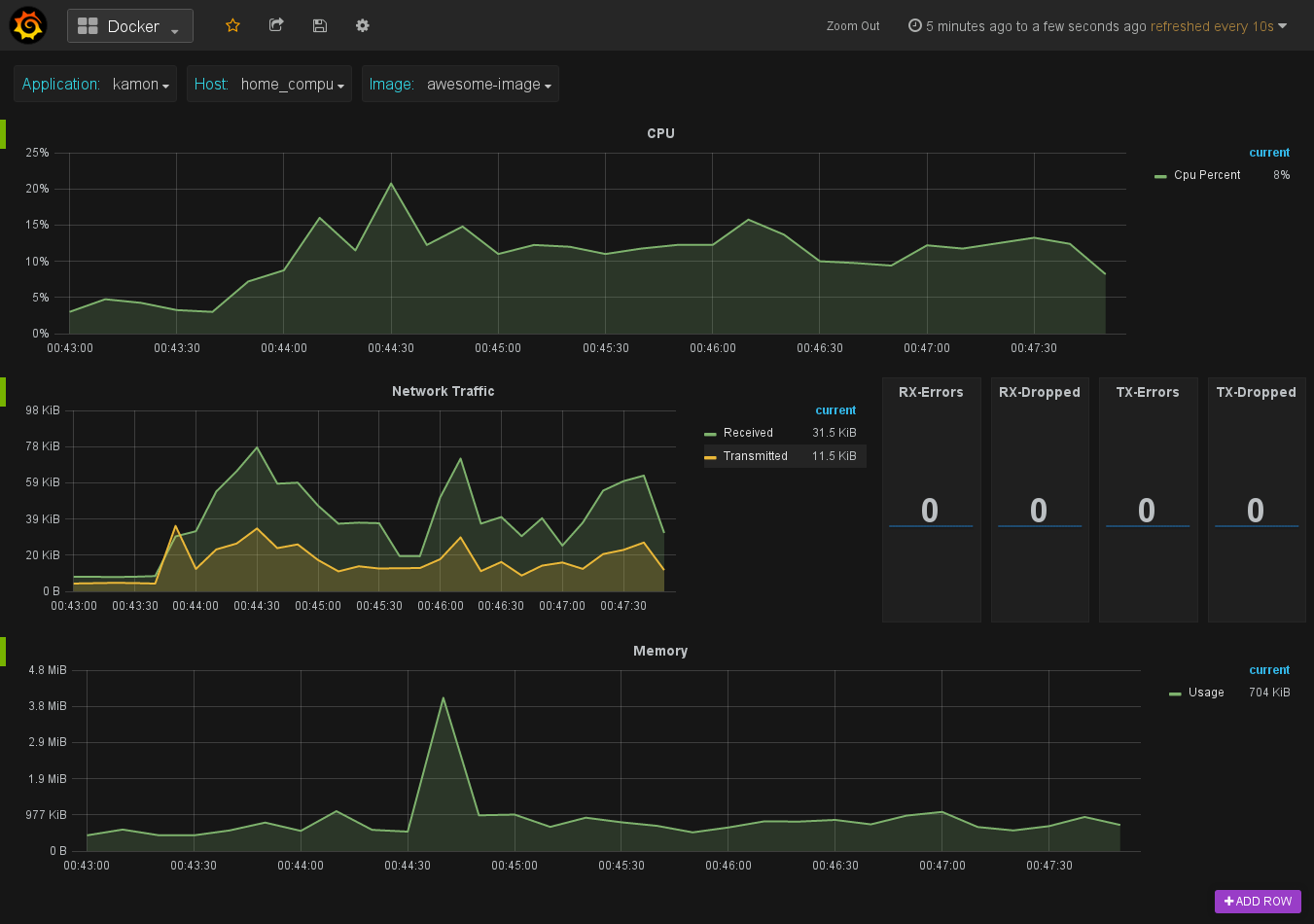
Reports key performance metrics for docker containers, including:
* CPU Usage %
* Memory limit
* Memory usage
* Network in
* Network out
* Disk Activity (coming soon)
* Container Events (coming soon)
### Setup
Clone the repo:
```
git clone https://github.com/kamon-io/docker-monitor.git
```
###Configuration
In `application.conf` we must specify a comma-separated list of container IDs and an alias in order to facilitates the visualization and `host` and `port` of Docker daemon.
```
docker {
# The Docker Host.
host = "127.0.0.1"
# The Docker TCP port.
port = 2375
# List of images they need to be monitored.
# For convenience must provide an alias in order to facilitate the visualization
# [{"container-id","container-alias"}]
containers = [{"container-1":"awesome-container-1"}]
}
```
### Build
Run the assembly task:
```
sbt assembly
```
### Run
To run the default:
```scala
java -jar domino.jar
```
###Overriding configuration file
System properties can be used to force a different config source:
* **config.resource**: ```java -jar domino.jar -Dconfig.resource=whatever.conf```
* **config.file**: ```java -jar domino.jar -Dconfig.file=conf/environments/dev/other.conf```
* **config.url**:```java -jar domino.jar -Dconfig.url=http://site.com/my/awesome/configuration.conf```
These system properties specify a replacement for `application.conf`, not an addition.
### For the impatient
just download the [release jar] and run the following:
```scala
java -jar domino.jar -Dconfig.resource=whatever.conf
```
### Visualization
By default the application is configured for use with [StatsD] through `Kamon`. For this reason, the only thing what we need is our [Docker-Grafana-Graphite] image that have a built-in Docker dashboard.
To start a container with this image you just need to run the following command:
```scala
docker run -d -p 80:80 -p 8125:8125/udp -p 8126:8126 --name kamon-grafana-dashboard kamon/grafana_graphite
```
###Future work
Possible future work for this tool includes:
* Include `Disk Utilization` metrics
* Monitoring of `Docker Events`
* Docker package
[StatsD]: http://kamon.io/backends/statsd/
[Docker-Grafana-Graphite]:https://github.com/kamon-io/docker-grafana-graphite
[release jar]:https://github.com/kamon-io/domino/releases