https://github.com/kamon-io/kamon-jmx
Kamon JMX Integration
https://github.com/kamon-io/kamon-jmx
Last synced: 6 months ago
JSON representation
Kamon JMX Integration
- Host: GitHub
- URL: https://github.com/kamon-io/kamon-jmx
- Owner: kamon-io
- License: other
- Created: 2016-12-03T04:01:05.000Z (about 9 years ago)
- Default Branch: master
- Last Pushed: 2017-11-30T09:06:17.000Z (about 8 years ago)
- Last Synced: 2025-04-27T16:42:41.425Z (9 months ago)
- Language: Scala
- Homepage: http://kamon.io/backends/jmx
- Size: 38.1 KB
- Stars: 2
- Watchers: 3
- Forks: 5
- Open Issues: 7
-
Metadata Files:
- Readme: README.md
- Contributing: CONTRIBUTING.md
- License: LICENSE
Awesome Lists containing this project
README
JMX Integration 
==========================
[](https://gitter.im/kamon-io/Kamon?utm_source=badge&utm_medium=badge&utm_campaign=pr-badge&utm_content=badge)
[](https://maven-badges.herokuapp.com/maven-central/io.kamon/kamon-jmx_2.11)
Reporting Metrics to JMX MBeans
==============================
[JMX] is a Java technology that supplies tools for managing and monitoring applications, system objects, devices and service-oriented networks. Those resources are represented by objects called MBeans (for Managed Bean).
### Getting Started
Kamon jmx module is currently available for Scala 2.10, 2.11 and 2.12.
Supported releases and dependencies are shown below.
| kamon-jmx | status | jdk | scala | akka |
|:------:|:------:|:----:|------------------|:------:|
| 0.6.5 | stable | 1.7+, 1.8+ | 2.10, 2.11, 2.12 | 2.3.x, 2.4.x |
To get started with SBT, simply add the following to your `build.sbt`
file:
```scala
libraryDependencies += "io.kamon" %% "kamon-jmx" % "0.6.7"
```
Configuration
-------------
The JMX module subscribes itself to the entities included in the `kamon.jmx.subscriptions` key. By default, the following subscriptions are included:
```typesafeconfig
kamon.jmx {
subscriptions {
histogram = [ "**" ]
min-max-counter = [ "**" ]
gauge = [ "**" ]
counter = [ "**" ]
trace = [ "**" ]
trace-segment = [ "**" ]
akka-actor = [ "**" ]
akka-dispatcher = [ "**" ]
akka-router = [ "**" ]
system-metric = [ "**" ]
http-server = [ "**" ]
}
}
```
If you are interested in reporting additional entities to JMX please ensure that you include the categories and name patterns accordingly.
Integration Notes
-----------------
For all single instrument entities (those tracking counters, histograms, gaugues and min-max-counters) the generated metric key will follow the `kamon.instrument-type.entity-name` pattern. Additionaly all tags supplied when creating the instrument will also be reported.
* __Connection__: For connect to your application you need [add some JVM parameters] for start JMX agent and install a JMX client (for example [VisualVM])
* __Histogram percentile__: You may calculate any percentile on hystogram values.

Visualization and Fun
---------------------
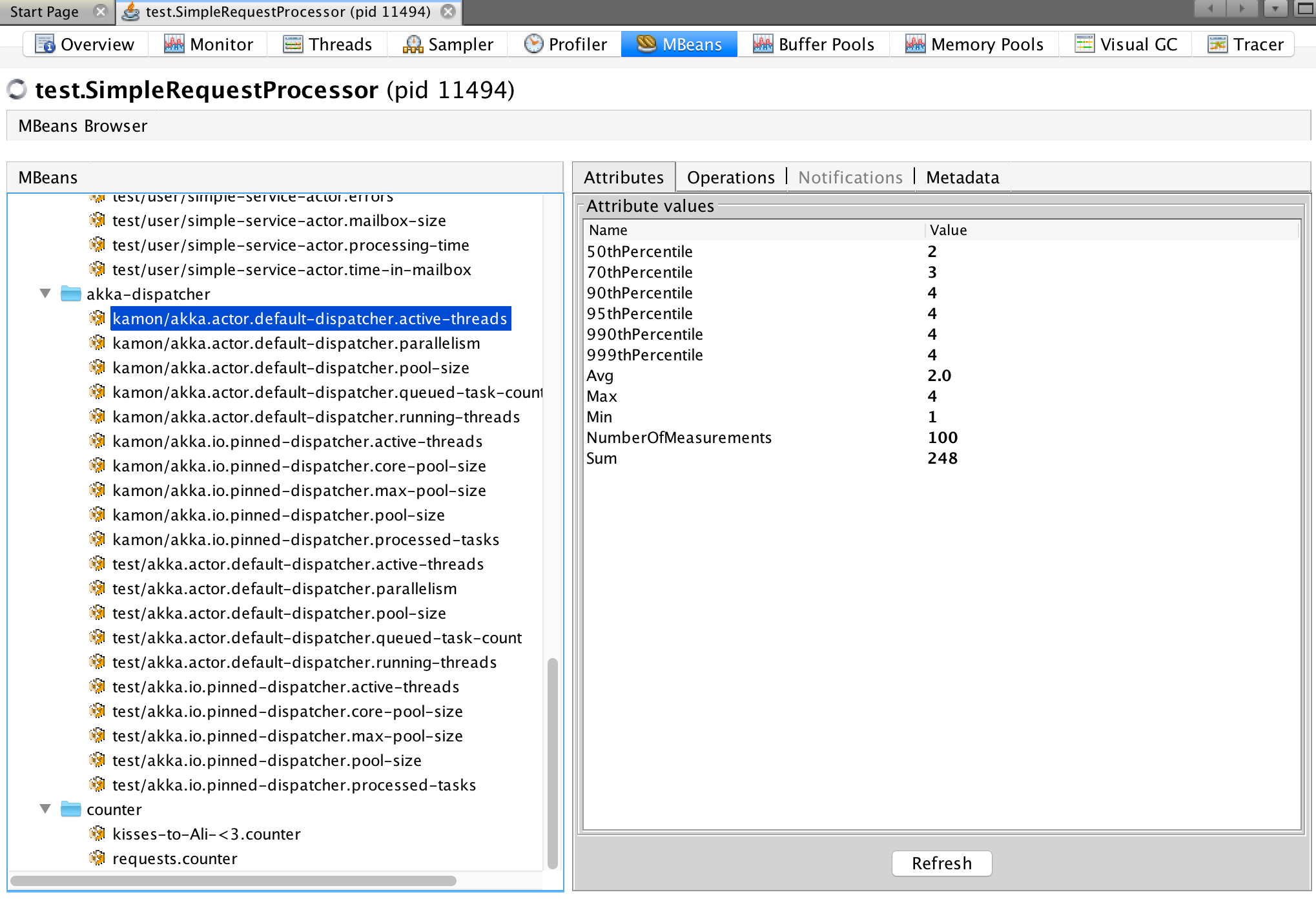
Here is a very simple example of a JMX values in VisualVM MBeans plugin with metrics reported by Kamon:
[JMX]: https://en.wikipedia.org/wiki/Java_Management_Extensions
[VisualVM]: http://visualvm.java.net/download.html
[add some JVM params]: https://theholyjava.wordpress.com/2012/09/21/visualvm-monitoring-remote-jvm-over-ssh-jmx-or-not/
Importing JMX Metrics into Kamon
================================
Installation
-------------
The kamon-jmx module now provides both moving metrics data into JMX and exporting metrics out of JMX. So just like above, add the `kamon-jmx` dependency to your project and ensure that it is in your classpath at runtime, that’s it. Kamon’s module loader will detect that the JMX module is in the classpath and automatically start it.
Configuration
-------------
To use the JMX to Kamon functionality, you must do three things. First, you add a subscription named kamon-mxbeans to the kamon.jmx.subscriptions key. Here is an example:
```typesafeconfig
kamon.jmx {
subscriptions {
histogram = [ "**" ]
min-max-counter = [ "**" ]
gauge = [ "**" ]
counter = [ "**" ]
trace = [ "**" ]
trace-segment = [ "**" ]
system-metric = [ "**" ]
http-server = [ "**" ]
kamon-mxbeans = [ "**" ]
}
}
```
Note: only the kamon-mxbeans line is important here. You can add or remove other subscriptions here without effecting the behavior of the JMX metrics exporting.
---------------
Second, add the kamon-mxbeans module to the kamon.modules part of the configuration. Here is an example:
```typesafeconfig
kamon.modules {
kamon-mxbeans {
auto-start = yes
requires-aspectj = no
extension-class = "kamon.jmx.extension.JMXMetricImporter"
}
}
```
-----------------
Finally, add a kamon.kamon-mxbeans configuration object to your config. Here is an example:
```
kamon.kamon-mxbeans {
mbeans = [
{ "name": "example-mbean", "jmxQuery": "example:type=myBean,name=*",
"attributes": [
{ "name": "Counter1", "type": "counter" },
{ "name": "Counter2", "type": "counter" }
]
}
],
identify-delay-interval-ms = 1000,
identify-interval-ms = 1000,
value-check-interval-ms = 1000
}
```
The jmxQuery allows this Kamon module to find the mbean(s) that should be exported to Kamon. The name is the Kamon name of this new metric. The attributes are metrics to export to Kamon and the type of metric to export. The supported types are counter, guage, min_max_counter and histogram. The identify-delay-interval-ms is the number of milliseconds to wait before querying JMX the first time. The identify-interval-ms is how often to query JMX for new mxbeans. And value-check-interval-ms is the number of milliseconds between polling of known mxbeans for new metric values.
Full Example
------------
```typesafeconfig
kamon {
jmx {
subscriptions {
histogram = [ "**" ]
min-max-counter = [ "**" ]
gauge = [ "**" ]
counter = [ "**" ]
trace = [ "**" ]
trace-segment = [ "**" ]
akka-actor = [ "**" ]
akka-dispatcher = [ "**" ]
akka-router = [ "**" ]
system-metric = [ "**" ]
http-server = [ "**" ]
# Here is the addition of the JMX exporting functionality to the subscriptions
kamon-mxbeans = [ "**" ]
}
}
# adding the JMX to Kamon module
modules {
kamon-mxbeans {
auto-start = yes
requires-aspectj = no
extension-class = "kamon.jmx.extension.JMXMetricImporter"
}
}
# Configuring what JMX metrics to export to Kamon
kamon-mxbeans {
mbeans = [
{ "name": "my-mbean", "jmxQuery": "test:type=exampleBean,name=*",
"attributes": [
{ "name": "Value1", "type": "counter" },
{ "name": "Value2", "type": "counter" } ] }
],
identify-delay-interval-ms = 1000,
identify-interval-ms = 1000,
value-check-interval-ms = 1000
}
}
```