https://github.com/kanchitank/simple-flask-application
A simple application using Flask.
https://github.com/kanchitank/simple-flask-application
flask flask-application html html5 python python3
Last synced: 2 months ago
JSON representation
A simple application using Flask.
- Host: GitHub
- URL: https://github.com/kanchitank/simple-flask-application
- Owner: kanchitank
- Created: 2020-10-08T10:11:56.000Z (over 5 years ago)
- Default Branch: main
- Last Pushed: 2021-06-28T14:13:54.000Z (about 5 years ago)
- Last Synced: 2025-04-04T08:46:02.319Z (about 1 year ago)
- Topics: flask, flask-application, html, html5, python, python3
- Language: Python
- Homepage:
- Size: 12.7 KB
- Stars: 0
- Watchers: 1
- Forks: 0
- Open Issues: 0
-
Metadata Files:
- Readme: README.md
Awesome Lists containing this project
README
# FLASK
## What is Flask?

### [Flask](https://flask.palletsprojects.com/en/1.1.x/) is a web application framework written in Python.
This means flask provides you with **tools, libraries and technologies** that allow you **to build a web application**.
This web application can be some web pages, a blog, a wiki or go as big as a web-based calendar application or a commercial website.
Flask is part of the categories of the micro-framework. Micro-framework are normally framework with little to no dependencies to external libraries. This has pros and cons. Pros would be that the framework is light, there are little dependency to update and watch for security bugs, cons is that some time you will have to do more work by yourself or increase yourself the list of dependencies by adding plugins. In the case of Flask, its dependencies are:
- **Werkzeug** a WSGI utility library
- **Jinja2** which is its template engine
### WSGI
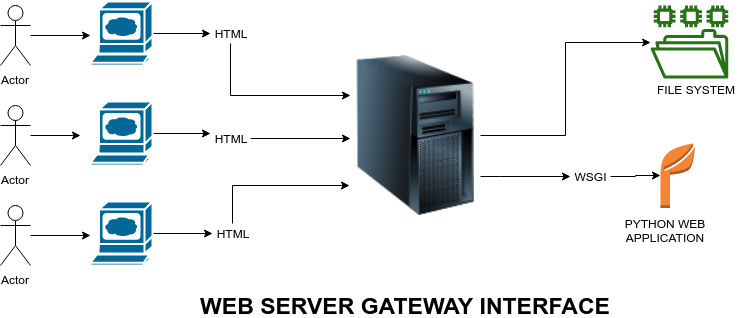
**[WSGI](https://werkzeug.palletsprojects.com/en/1.0.x/)** stands for **"Web Server Gateway Interface"**. It is used to forward requests from a web server (such as Apache or NGINX) to a backend Python web application or framework. From there, responses are then passed back to the webserver to reply to the requestor.
### Jinja2
**[Jinja](https://jinja.palletsprojects.com/en/2.11.x/)** is a modern and designer-friendly templating language for Python, modelled after Django’s templates. It is fast, widely used and secure with the optional sandboxed template execution environment.
## Prerequisites for the better understanding of Flask
- **Python**
- **HTML**
## Installation of FLASK
### A simple application in flask
We are going to perform a very basic application with flask.
## Step 1: Install latest version of [Python](https://www.python.org/downloads/windows/)
## Step 2: Creation of a directory and virtual environment
Type the following commands in the command prompt.

The above command **"py -3 -m venv venv"** is for virtual environment creation.
## Step 3: Activation
Now type the following command in the command prompt to activate the virtual environment.

## Step 4: Install FLASK

## Step 5: Creation of the application using a text editor
After completing the installation, let’s get our hands on the code.

## Step 6: Create a HTML login page
Below is source code of the file.

## Step 7: Set FLASK_APP and run the flask

## Step 8: Open login.html in the browser
After the development server starts running, open login.html in the browser, **enter Name** in the text field and **click Submit** button.

### The output would be the following:

### And we're done! We've successfully created a simple application in FLASK!