https://github.com/kapilyadav-dev/kotresume
Dynamic KMP based resume.
https://github.com/kapilyadav-dev/kotresume
compose compose-multiplatform compose-wasm compose-web kmp wasm
Last synced: about 1 year ago
JSON representation
Dynamic KMP based resume.
- Host: GitHub
- URL: https://github.com/kapilyadav-dev/kotresume
- Owner: KapilYadav-dev
- Created: 2023-08-12T17:34:22.000Z (almost 3 years ago)
- Default Branch: main
- Last Pushed: 2023-09-09T14:42:37.000Z (almost 3 years ago)
- Last Synced: 2025-03-26T00:41:26.555Z (about 1 year ago)
- Topics: compose, compose-multiplatform, compose-wasm, compose-web, kmp, wasm
- Language: JavaScript
- Homepage: https://kapil-resume.netlify.app/
- Size: 6.2 MB
- Stars: 28
- Watchers: 2
- Forks: 2
- Open Issues: 0
-
Metadata Files:
- Readme: README.MD
Awesome Lists containing this project
README
# KotResume
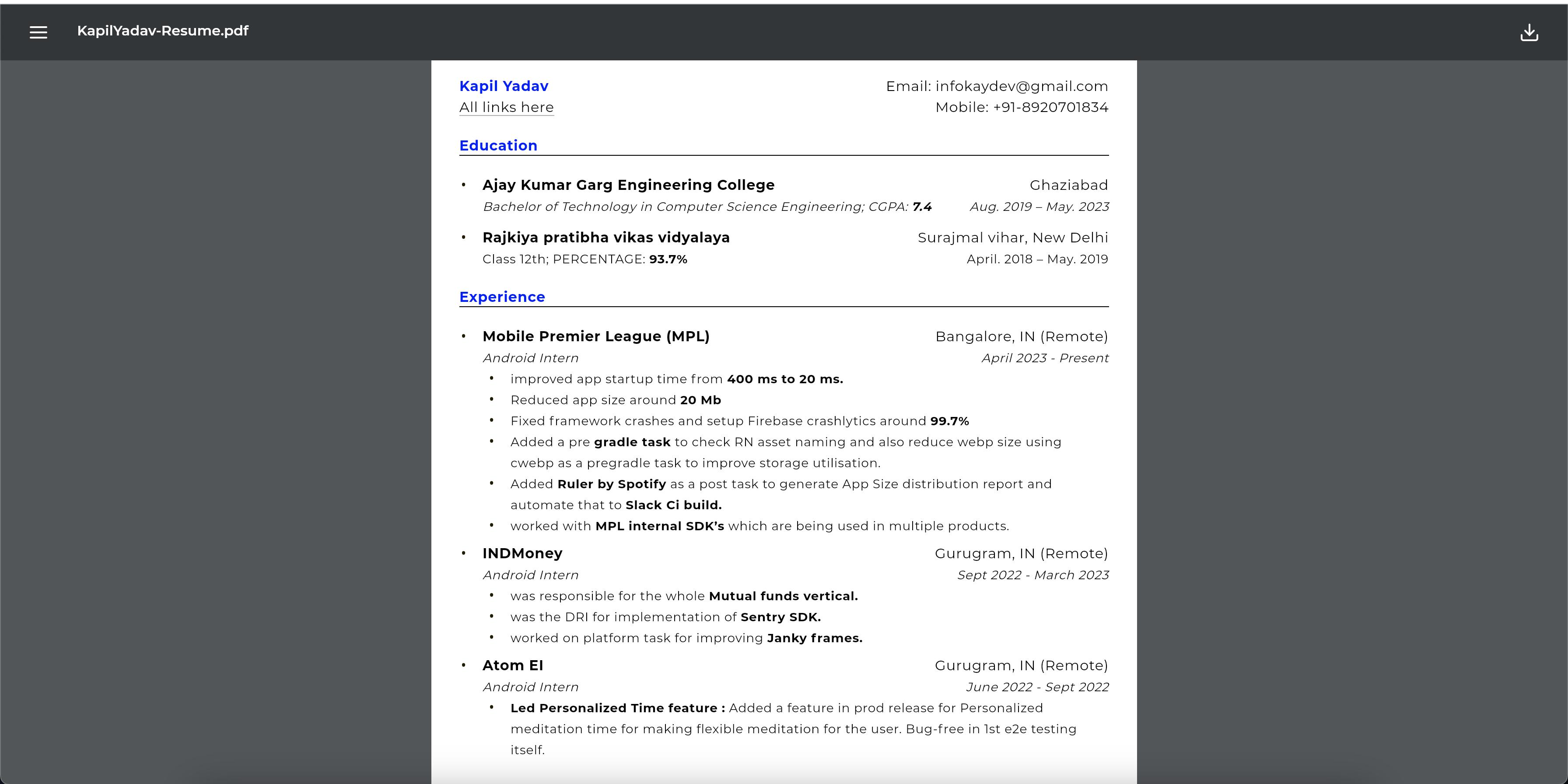
This is a resume generator website built using Kotlin Multiplatform (KMP) WebAssembly (wasm). The
website allows users to create their resumes by providing input in JSON format. It offers a variety
of customization options for text appearance, such as colors, font weights, and styles. The
generated resume can be customized using predefined colors, font weights, and styles.
## Demo
## Features
- Generate personalized resumes using JSON input.
- Customize text appearance with predefined colors, font weights, and styles.
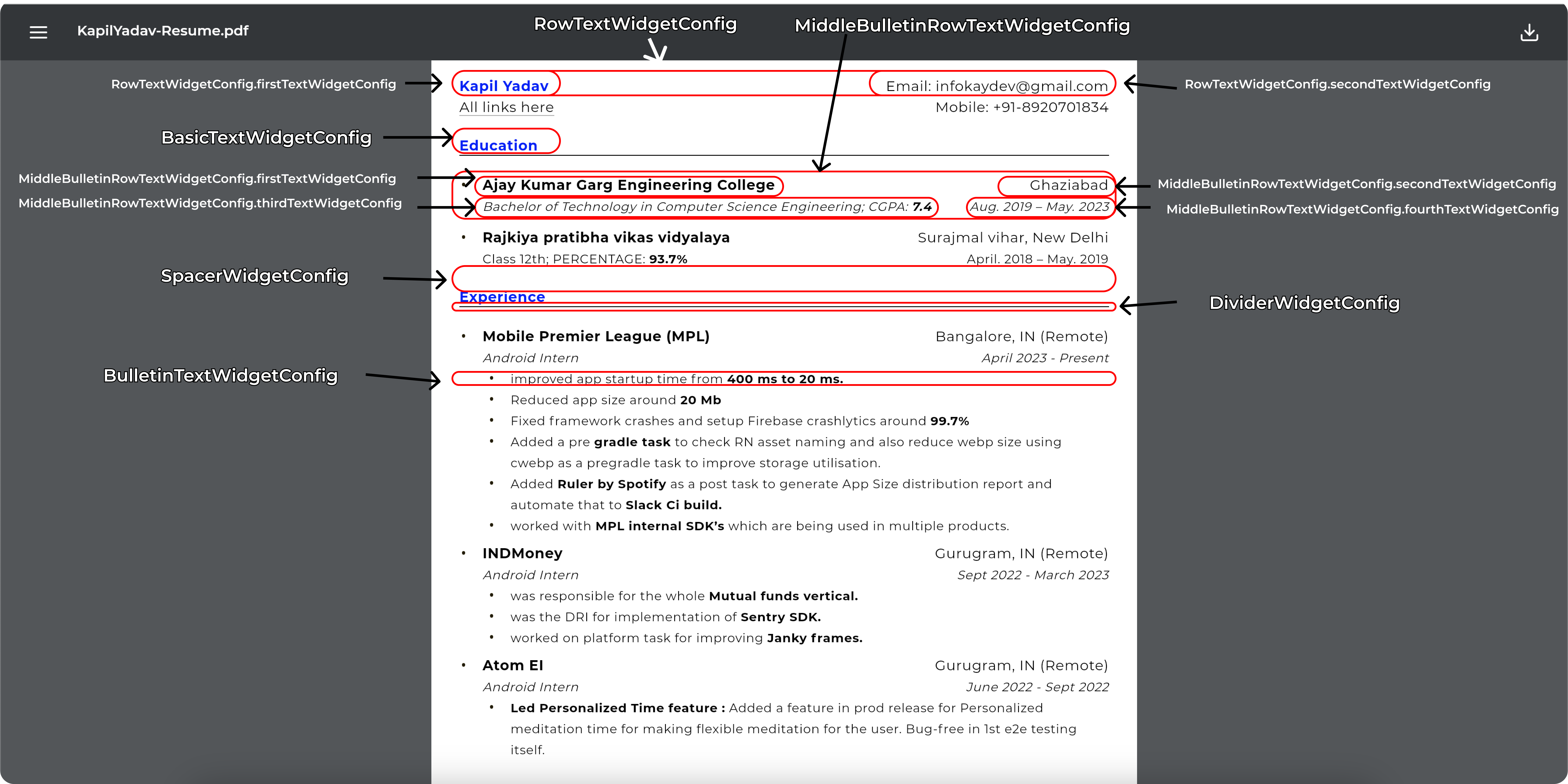
- Various components available for structuring the resume:
- **BasicTextWidgetConfig**: Represents a basic text element with customizable attributes.
- **BulletinTextWidgetConfig**: Creates a bullet-point list with customizable text
configurations.
- **DividerWidgetConfig**: Adds a horizontal divider with customizable thickness and color.
- **MiddleBulletinRowTextWidgetConfig**: Creates a row of text elements with bullet points and
customizable configurations.
- **RowTextWidgetConfig**: Represents a row of two text elements with customizable
configurations.
- **SpacerWidgetConfig**: Adds vertical spacing between components.
## Customization Options
### Colors
The following colors can be used:
- "black" -> Color.Black
- "white" -> Color.White
- "red" -> Color.Red
- "green" -> Color.Green
- "blue" -> Color.Blue
- "yellow" -> Color.Yellow
- "cyan" -> Color.Cyan
- "magenta" -> Color.Magenta
- "gray", "grey" -> Color.Gray
- "lightGray", "lightGrey" -> Color.LightGray
- "darkGray", "darkGrey" -> Color.DarkGray
- "transparent" -> Color.Transparent
- else -> Color.Black
### Font Weights
Choose from the following font weights:
- "light", "thin" -> FontWeight.Light
- "normal", "regular" -> FontWeight.Normal
- "medium" -> FontWeight.Medium
- "bold" -> FontWeight.Bold
- "semiBold" -> FontWeight.SemiBold
- else -> FontWeight.Normal
### Styles
Select text styles:
- "italic", "italics" -> FontStyle.Italic
- "normal" -> FontStyle.Normal
- else -> FontStyle.Normal
## Components
### BasicTextWidgetConfig
A basic text element with customizable attributes:
```kotlin
data class BasicTextWidgetConfig(
val text: String? = null,
val url: String? = null,
val shouldUnderLineUrl: Boolean? = true,
@JsonNames("config","textConfig") val textConfig: TextConfig = TextConfig(),
val widgetId: String = Widgets.BasicTextWidgetId.widgetName,
val topPadding: Int = 0,
val bottomPadding: Int = 0,
val startPadding: Int = 0,
val endPadding: Int = 0
) {
@kotlinx.serialization.Serializable
data class TextConfig(
val color: String? = null,
val fontWeight: String? = null,
val textSize: Int? = null,
val fontStyle: String? = null
)
}
```
- **text**: The text content.
- **url**: URL associated with the text.
- **shouldUnderLineUrl**: Whether the URL should be underlined (default: true).
- **textConfig**: Text configuration containing color in String, font weight in String , text size
in Int, and font style in String.
- **widgetId**: I"BasicTextWidgetId"
- **topPadding**, **bottomPadding**, **startPadding**, **endPadding**: Padding values in int. ( e.g
32 i.e 32.dp )
### BulletinTextWidgetConfig
Creates a bullet-point list with customizable text configurations:
- **bulletinText**: The bullet point character (default: "•").
- **textConfigsList**: List of BasicTextWidgetConfig for the bullet points.
- **widgetId**: "BulletinTextWidgetId"
- **topPadding**, **bottomPadding**, **startPadding**, **endPadding**: Padding values in int. ( e.g
32 i.e 32.dp )
### DividerWidgetConfig
Adds a horizontal divider with customizable attributes:
```kotlin
data class BulletinTextWidgetConfig(
val bulletinText: String = "•",
@JsonNames("textList","list")val textConfigsList: List? = null,
val widgetId: String = Widgets.BulletinTextWidgetId.widgetName,
val topPadding: Int = 0,
val bottomPadding: Int = 0,
val startPadding: Int = 32,
val endPadding: Int = 0
)
```
- **thickness**: The thickness of the divider line.
- **color**: Color of the divider.
- **colorAlpha**: Alpha value for the color (default: 1.0).
- **widgetId**: "DividerWidgetId"
- **topPadding**, **bottomPadding**, **startPadding**, **endPadding**: Padding values in int. ( e.g
32 i.e 32.dp )
### MiddleBulletinRowTextWidgetConfig
Creates a row of text elements with bullet points and customizable configurations:
```kotlin
data class MiddleBulletinRowTextWidgetConfig(
val bulletinText: String = "•",
@JsonNames("firstText","firstTextWidgetConfig") val firstTextWidgetConfig: BasicTextWidgetConfig? = null,
@JsonNames("secondText","secondTextWidgetConfig") val secondTextWidgetConfig: BasicTextWidgetConfig? = null,
@JsonNames("thirdText","thirdTextWidgetConfig") val thirdTextWidgetConfig: BasicTextWidgetConfig? = null,
@JsonNames("fourthText","fourthTextWidgetConfig") val fourthTextWidgetConfig: BasicTextWidgetConfig? = null,
val widgetId: String = Widgets.MiddleBulletinRowTextWidgetId.widgetName,
val topPadding: Int = 0,
val bottomPadding: Int = 0,
val startPadding: Int = 0,
val endPadding: Int = 0
)
```
- **bulletinText**: The bullet point character (default: "•").
- **firstTextWidgetConfig**, **secondTextWidgetConfig**, **thirdTextWidgetConfig**, **
fourthTextWidgetConfig**: BasicTextWidgetConfig for each element.
- **widgetId**: "MiddleBulletinRowTextWidgetId"
- **topPadding**, **bottomPadding**, **startPadding**, **endPadding**: Padding values in int. ( e.g
32 i.e 32.dp )
### RowTextWidgetConfig
Represents a row of two text elements with customizable configurations:
```kotlin
data class RowTextWidgetConfig(
@JsonNames("firstText","firstTextWidgetConfig") val firstTextWidgetConfig: BasicTextWidgetConfig? = null,
@JsonNames("secondText","secondTextWidgetConfig") val secondTextWidgetConfig: BasicTextWidgetConfig? = null,
val widgetId: String = Widgets.RowTextWidgetId.widgetName,
val topPadding: Int = 0,
val bottomPadding: Int = 0,
val startPadding: Int = 0,
val endPadding: Int = 0
)
```
- **firstTextWidgetConfig**, **secondTextWidgetConfig**: BasicTextWidgetConfig for each element.
- **widgetId**: "RowTextWidgetId"
- **topPadding**, **bottomPadding**, **startPadding**, **endPadding**: Padding values in int. ( e.g
32 i.e 32.dp )
### SpacerWidgetConfig
Adds vertical spacing between components:
```kotlin
data class SpacerWidgetConfig(
val space: Int? = null,
val widgetId: String = Widgets.SpacerWidgetId.widgetName,
val topPadding: Int = 0,
val bottomPadding: Int = 0,
val startPadding: Int = 0,
val endPadding: Int = 0
)
```
- **space**: The amount of spacing in int. ( e.g 32 i.e 32.dp )
- **widgetId**: "SpacerWidgetId"
- **topPadding**, **bottomPadding**, **startPadding**, **endPadding**: Padding values.
## Example Json
Click to expand the code for example json
```json
{
"resumeName": "KapilYadav-Resume.pdf",
"resumeUrl": "https://d1fdloi71mui9q.cloudfront.net/Pz93R8fISZm11vhLK3Qx_KapilResume.pdf",
"githubUrl": "https://github.com/KapilYadav-dev/KotResume",
"resumeDataList": [
{
"firstText": {
"text": "Kapil Yadav",
"config": {
"color": "blue",
"fontWeight": "bold",
"textSize": 16
}
},
"secondText": {
"text": "Email: infokaydev@gmail.com",
"config": {
"color": "black",
"fontWeight": "normal",
"textSize": 16
}
},
"widgetId": "RowTextWidgetId",
"topPadding": 0,
"bottomPadding": 0,
"startPadding": 0,
"endPadding": 0
},
{
"firstText": {
"text": "All links here",
"url": "https://linktr.ee/mrkaydev",
"config": {
"color": "black",
"fontWeight": "normal",
"textSize": 16
}
},
"secondText": {
"text": "Mobile: +91-8920701834",
"config": {
"color": "black",
"fontWeight": "normal",
"textSize": 16
}
},
"widgetId": "RowTextWidgetId"
},
{
"space": 20,
"widgetId": "SpacerWidgetId"
},
{
"text": "Education",
"config": {
"color": "blue",
"fontWeight": "bold",
"textSize": 16
},
"widgetId": "BasicTextWidgetId"
},
{
"thickness": 1,
"color": "black",
"topPadding": 0,
"widgetId": "DividerWidgetId",
"bottomPadding": 0,
"startPadding": 0,
"endPadding": 0
},
{
"space": 20,
"widgetId": "SpacerWidgetId"
},
{
"bulletinText": "•",
"firstText": {
"text": "Ajay Kumar Garg Engineering College",
"config": {
"color": "black",
"fontWeight": "bold",
"textSize": 16
}
},
"secondText": {
"text": "Ghaziabad",
"config": {
"color": "black",
"fontWeight": "normal",
"textSize": 16
}
},
"thirdText": {
"text": "Bachelor of Technology in Computer Science Engineering; CGPA: 7.4",
"config": {
"color": "black",
"fontWeight": "normal",
"textSize": 14,
"fontStyle": "italics"
}
},
"fourthText": {
"text": "Aug. 2019 – May. 2023",
"config": {
"color": "black",
"fontWeight": "normal",
"textSize": 14,
"fontStyle": "italics"
}
},
"widgetId": "MiddleBulletinRowTextWidgetId"
},
{
"space": 12,
"widgetId": "SpacerWidgetId"
},
{
"bulletinText": "•",
"firstText": {
"text": "Rajkiya pratibha vikas vidyalaya",
"config": {
"color": "black",
"fontWeight": "bold",
"textSize": 16
}
},
"secondText": {
"text": "Surajmal vihar, New Delhi",
"config": {
"color": "black",
"fontWeight": "normal",
"textSize": 16
}
},
"thirdText": {
"text": "Class 12th; PERCENTAGE: 93.7%",
"config": {
"color": "black",
"fontWeight": "normal",
"textSize": 14
}
},
"fourthText": {
"text": "April. 2018 – May. 2019",
"config": {
"color": "black",
"fontWeight": "normal",
"textSize": 14
}
},
"widgetId": "MiddleBulletinRowTextWidgetId"
},
{
"space": 20,
"widgetId": "SpacerWidgetId"
},
{
"text": "Experience",
"config": {
"color": "blue",
"fontWeight": "bold",
"textSize": 16
},
"widgetId": "BasicTextWidgetId"
},
{
"thickness": 1,
"color": "black",
"topPadding": 0,
"widgetId": "DividerWidgetId",
"bottomPadding": 0,
"startPadding": 0,
"endPadding": 0
},
{
"space": 20,
"widgetId": "SpacerWidgetId"
},
{
"bulletinText": "•",
"firstText": {
"text": "Mobile Premier League (MPL)",
"config": {
"color": "black",
"fontWeight": "bold",
"textSize": 16
}
},
"secondText": {
"text": "Bangalore, IN (Remote)",
"config": {
"color": "black",
"fontWeight": "normal",
"textSize": 16
}
},
"thirdText": {
"text": "Android Intern",
"config": {
"color": "black",
"fontWeight": "normal",
"textSize": 14,
"fontStyle": "italics"
}
},
"fourthText": {
"text": "April 2023 - Aug",
"config": {
"color": "black",
"fontWeight": "normal",
"textSize": 14,
"fontStyle": "italics"
}
},
"widgetId": "MiddleBulletinRowTextWidgetId"
},
{
"list": [
{
"text": "improved app startup time from 400 ms to 20 ms.",
"config": {
"color": "black",
"fontWeight": "normal",
"textSize": 14
}
},
{
"text": "Reduced app size around 20 Mb",
"config": {
"color": "black",
"fontWeight": "normal",
"textSize": 14
}
},
{
"text": "Fixed framework crashes and setup Firebase crashlytics around 99.7%",
"config": {
"color": "black",
"fontWeight": "normal",
"textSize": 14
}
},
{
"text": "Added a pre gradle task to check RN asset naming and also reduce webp size using cwebp as a pregradle task to improve storage utilisation.",
"config": {
"color": "black",
"fontWeight": "normal",
"textSize": 14
}
},
{
"text": "Added Ruler by Spotify as a post task to generate App Size distribution report and automate that to Slack Ci build.",
"config": {
"color": "black",
"fontWeight": "normal",
"textSize": 14
}
},
{
"text": "worked with MPL internal SDK’s which are being used in multiple products.",
"config": {
"color": "black",
"fontWeight": "normal",
"textSize": 14
}
}
],
"widgetId": "BulletinTextWidgetId"
},
{
"space": 8,
"widgetId": "SpacerWidgetId"
},
{
"bulletinText": "•",
"firstText": {
"text": "INDMoney",
"url": "https://drive.google.com/file/d/1IL10x96P53Uyc4Hjqj6Y5eAoYPC7M2xU/view?usp=sharing",
"config": {
"color": "black",
"fontWeight": "bold",
"textSize": 16
}
},
"secondText": {
"text": "Gurugram, IN (Remote)",
"config": {
"color": "black",
"fontWeight": "normal",
"textSize": 16
}
},
"thirdText": {
"text": "Android Intern",
"config": {
"color": "black",
"fontWeight": "normal",
"textSize": 14,
"fontStyle": "italics"
}
},
"fourthText": {
"text": "Sept 2022 - March 2023",
"config": {
"color": "black",
"fontWeight": "normal",
"textSize": 14,
"fontStyle": "italics"
}
},
"widgetId": "MiddleBulletinRowTextWidgetId"
},
{
"list": [
{
"text": "was responsible for the whole Mutual funds vertical.",
"config": {
"color": "black",
"fontWeight": "normal",
"textSize": 14
}
},
{
"text": "was the DRI for implementation of Sentry SDK.",
"config": {
"color": "black",
"fontWeight": "normal",
"textSize": 14
}
},
{
"text": "worked on platform task for improving Janky frames.",
"config": {
"color": "black",
"fontWeight": "normal",
"textSize": 14
}
}
],
"widgetId": "BulletinTextWidgetId"
},
{
"space": 8,
"widgetId": "SpacerWidgetId"
},
{
"bulletinText": "•",
"firstText": {
"text": "Atom EI",
"url": "https://drive.google.com/file/d/1Cm_g5iXFo9rEiXPYUZXr5GbiKUnjfiXG/view?usp=sharing",
"config": {
"color": "black",
"fontWeight": "bold",
"textSize": 16
}
},
"secondText": {
"text": "Gurugram, IN (Remote)",
"config": {
"color": "black",
"fontWeight": "normal",
"textSize": 16
}
},
"thirdText": {
"text": "Android Intern",
"config": {
"color": "black",
"fontWeight": "normal",
"textSize": 14,
"fontStyle": "italics"
}
},
"fourthText": {
"text": "June 2022 - Sept 2022",
"config": {
"color": "black",
"fontWeight": "normal",
"textSize": 14,
"fontStyle": "italics"
}
},
"widgetId": "MiddleBulletinRowTextWidgetId"
},
{
"list": [
{
"text": "Led Personalized Time feature : Added a feature in prod release for Personalized meditation time for making flexible meditation for the user. Bug-free in 1st e2e testing itself.",
"config": {
"color": "black",
"fontWeight": "normal",
"textSize": 14
}
},
{
"text": "Image similarity algorithm : Worked upon Phash algorithm which converted to a library in kotlin for internal use so that we can achieve Image similarity stable way with more than 85% accuracy.",
"config": {
"color": "black",
"fontWeight": "normal",
"textSize": 14
}
},
{
"text": "Fixed bug on the production line : Fixed a critical bug which leads to crashing, thus Firebase crashlytics events dropped by 90%.",
"config": {
"color": "black",
"fontWeight": "normal",
"textSize": 14
}
}
],
"widgetId": "BulletinTextWidgetId"
},
{
"space": 20,
"widgetId": "SpacerWidgetId"
},
{
"text": "Projects",
"config": {
"color": "blue",
"fontWeight": "bold",
"textSize": 16
},
"widgetId": "BasicTextWidgetId"
},
{
"thickness": 1,
"color": "black",
"topPadding": 0,
"widgetId": "DividerWidgetId",
"bottomPadding": 0,
"startPadding": 0,
"endPadding": 0
},
{
"space": 20,
"widgetId": "SpacerWidgetId"
},
{
"bulletinText": "",
"firstText": {
"text": "1SecMailApp",
"url": "https://github.com/KapilYadav-dev/1SecMail",
"config": {
"color": "black",
"fontWeight": "bold",
"textSize": 16
}
},
"widgetId": "MiddleBulletinRowTextWidgetId"
},
{
"list": [
{
"text": "An unofficial app of 1SecMail api. Made with KMP ( Made with Compose Multiplatform )",
"config": {
"color": "black",
"fontWeight": "normal",
"textSize": 14
}
},
{
"text": "Opensource and quite popular on github.",
"config": {
"color": "black",
"fontWeight": "normal",
"textSize": 14
}
},
{
"text": "From single codebase it delivers Ios, MacOs, Windows, Linux and Android",
"config": {
"color": "black",
"fontWeight": "normal",
"textSize": 14
}
}
],
"widgetId": "BulletinTextWidgetId"
},
{
"space": 8,
"widgetId": "SpacerWidgetId"
},
{
"bulletinText": "",
"firstText": {
"text": "KotResume (Dynamic KMP based resume)",
"url": "https://github.com/KapilYadav-dev/KotResume",
"config": {
"color": "black",
"fontWeight": "bold",
"textSize": 16
}
},
"widgetId": "MiddleBulletinRowTextWidgetId"
},
{
"textConfigsList": [
{
"text": "This is a resume generator website built using Kotlin Multiplatform (KMP) WebAssembly (wasm).",
"config": {
"color": "black",
"fontWeight": "normal",
"textSize": 14
}
},
{
"text": "Opensource and quite popular on github.",
"config": {
"color": "black",
"fontWeight": "normal",
"textSize": 14
}
},
{
"text": "Convert Json to resume in simple steps.",
"config": {
"color": "black",
"fontWeight": "normal",
"textSize": 14
}
}
],
"widgetId": "BulletinTextWidgetId"
},
{
"space": 20,
"widgetId": "SpacerWidgetId"
},
{
"text": "Skills",
"config": {
"color": "blue",
"fontWeight": "bold",
"textSize": 16
},
"widgetId": "BasicTextWidgetId"
},
{
"thickness": 1,
"color": "black",
"topPadding": 0,
"widgetId": "DividerWidgetId",
"bottomPadding": 0,
"startPadding": 0,
"endPadding": 0
},
{
"space": 20,
"widgetId": "SpacerWidgetId"
},
{
"bulletinText": "•",
"firstText": {
"text": "Languages: Java, Kotlin, Python, Javascript",
"config": {
"color": "black",
"fontWeight": "normal",
"textSize": 14
}
},
"secondText": {
"text": "Technologies: AR, Bug testing, IOT, AWS, CI/CD",
"config": {
"color": "black",
"fontWeight": "normal",
"textSize": 14
}
},
"widgetId": "MiddleBulletinRowTextWidgetId"
},
{
"space": 8,
"widgetId": "SpacerWidgetId"
},
{
"bulletinText": "•",
"firstText": {
"text": "Frameworks and Tools: Git, Android, React Native, MS App center, Jenkins, Android Studio, VS Code, Slack, Compose Multiplatform, KMP.",
"config": {
"color": "black",
"fontWeight": "normal",
"textSize": 14
}
},
"widgetId": "MiddleBulletinRowTextWidgetId"
},
{
"space": 8,
"widgetId": "SpacerWidgetId"
}
]
}
```
## How to make your Resume Website
To use this resume generator website, follow these steps:
1. Clone the repository.
2. Open the project using your preferred Kotlin IDE.
3. Modify the RESUME_JSON_URL url according to your resume content and customization preferences.
4. Build and run the KMP wasm application.
5. Upload it to netlify.
## Need easy way ??
Video tutorial
https://youtu.be/Gfb_cKAM298
1. Go to WebsiteCode folder which is in root of this project i.e (./WebsiteCode)
2. Execute changeUrl.sh using bash scripting. i.e ( bash changeUrl.sh)
i) It will ask you to enter JSON_URL for your resume where json is hosted.
ii) After completion just drag and drop that folder to any static site hosting you want.
## Conclusion
This KMP wasm-powered website provides an innovative way to create personalized resumes using JSON
input. With a range of customization options for text appearance and multiple components to
structure the content, it offers a user-friendly and flexible experience for generating impressive
resumes.