https://github.com/karafra/ai-art
Discord bot generating images from given query
https://github.com/karafra/ai-art
ai art artificial-intelligence bot dalle-mini discord discord-bot discord-js generator heroku heroku-deployment integration
Last synced: 6 months ago
JSON representation
Discord bot generating images from given query
- Host: GitHub
- URL: https://github.com/karafra/ai-art
- Owner: karafra
- License: apache-2.0
- Created: 2022-06-08T23:18:52.000Z (about 4 years ago)
- Default Branch: main
- Last Pushed: 2023-05-23T17:48:24.000Z (about 3 years ago)
- Last Synced: 2023-05-23T18:29:34.719Z (about 3 years ago)
- Topics: ai, art, artificial-intelligence, bot, dalle-mini, discord, discord-bot, discord-js, generator, heroku, heroku-deployment, integration
- Language: TypeScript
- Homepage: https://karafra.github.io/ai-art/
- Size: 21.1 MB
- Stars: 70
- Watchers: 3
- Forks: 35
- Open Issues: 12
-
Metadata Files:
- Readme: README.md
- Changelog: CHANGELOG.md
- Funding: .github/FUNDING.yml
- License: LICENSE
Awesome Lists containing this project
README
[![Contributors][contributors-shield]][contributors-url]
[![Forks][forks-shield]][forks-url]
[![Stargazers][stars-shield]][stars-url]
[![Issues][issues-shield]][issues-url]
[![Codecov][codecov-shield]][codecov-url]
[![MIT License][license-shield]][license-url]
[![Discord][discord-shield]][discord-invite]
[![TOP.GG][top-gg-shield]][top-gg-link]
[![Buy me a coffee][buy-me-a-coffee-badge]][buy-me-a-coffee-url]
AI Art
Discord bot generating AI art collages
Explore the docs »
View Demo
·
Report Bug
·
Request Feature
Table of Contents
## About The Project
[![Product Name Screen Shot][product-screenshot]][discord-invite]
Simple discord bot which generates collages based on any query you give it (most of the time). This bot uses model which you can find [here](https://huggingface.co/spaces/dalle-mini/dalle-mini)
### Built With
- [Typescript](https://www.typescriptlang.org/)
- [Discord.js](https://discord.js.org/)
- [Collage](https://www.npmjs.com/package/@settlin/collage)
- [Canvas](https://www.npmjs.com/package/canvas)
- [amqp-client.js](https://github.com/cloudamqp/amqp-client.js/)
- [Sentry.io](https://sentry.io)
- [Jest](https://jestjs.io)
- [Codecov](https://codecov.io)
- [Docker](https://docker.com)
- [NestJs](https://nestjs.com)
- [Compodoc](https://compodoc.app)
- [Mongo](https://www.mongodb.com/)
- [TypeORM](https://typeorm.io/)
- [GraphQl](https://graphql.org/)
## Getting Started
### Prerequisites
This is an example of how to list things you need to use the software and how to install them.
- npm
```sh
npm install npm@latest -g
```
### Installation
1. Create Discord application on a free API Key at [https://discord.com/developers/](https://discord.com/developers/)
2. Click on *Bot* tab and save your token.
3. Clone the repo
```sh
git clone https://github.com/karafra/ai-art.git
```
4. Install NPM packages
```sh
npm install
```
5. Enter your API key and bot id into [config.yml](./config.yml).
```yaml
sentry:
dsn: "{SENTRY_DSN}"
# This one is optional ... only if you want to use ai-story command
openAi:
token: ...
amqp:
url: "{AMQP_URL}"
discord:
token: "{DISCORD_TOKEN}"
deploy:
port: "{PORT}"
```
Configuration file supports simple environment variable substitution in format __"{VARIABLE_NAME}"__, where parentheses are __required__.
## Deployment
### Method 1: Deployment to Heroku
Recommended method of deploying this bot is deployment on [Heroku](https://www.heroku.com/). To deploy to Heroku please click on button bellow.

##### IMPORTANT
After successful deployment you will have to switch dyno from `web` to `worker`. If you do not do this, app will not bind to port and fail.
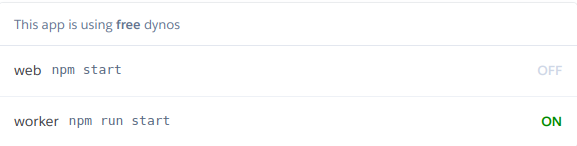
After successful deployment you can invite bot to your server by clicking on this link `https://discord.com/api/oauth2/authorize?client_id={CLIENT_ID}&permissions=34816&scope=applications.commands%20bot`, where `CLIENT_ID` is your bots client id. Link already contains minimal scopes (_bot_, _application.commands_) and minimal bot permissions (_send messages_, _attach files_)
### Method 2: Containerized deployment:
Another even easier method of deployment is deployment via docker container.
1. Verify docker-compose installation
A] Type `docker-compose -v` into terminal. if output looks similar to `docker-compose version 1.29.2, build 5becea4c` then you can continue to the next step.
B] If this command throws an error, you have to follow [docker-compose installation guide](https://docs.docker.com/compose/install/)
2. Set required variables
- Only required variables is `TOKEN`, this can be set as environment variables using `export ENV_NAME=VALUE` on linux based OS or `$env:VARIABLE_NAME=VALUE` on Windows based OS
3. Building Docker containers
- Type `docker-compose -f "docker/deploy/docker-compose.yml" build` into terminal, this will automatically build all required docker images.
4. Start container
- Type `docker-compose -f "docker/deploy/docker-compose.yml" up` into terminal. This will start all services needed. RabbitMQ management console will be accessible [here](http://localhost:15673/) with login credentials being:
- username:
- `guest`
- password:
- `guest`
- MongoDb management console will be accessible [here](https://localhost:8081/) without any login credentials
__This network is not external, so it will not be accessible from outside.__
## Usage
Commands are separated into 2 command groups
- `help` - Help command
- `/ai-art`
- `cog-view-2` - Generates collage of 9 images using CogView2 model
- `dalle-mini` - Generates collage of 9 images using Dall-e mini model
- `wombo-dream` - Generartes one image based on WomboDream model
- `/ai-story`
- `story` - Generates story from given headline (Requires OpenAi API) token
- React with :envelope: to any collage and bot will dm it to you.
Discord offers autocompletion so all you need is to start typing name of the command or group in which command is, discord will then guide you through all the required parameters using its autocompletion.
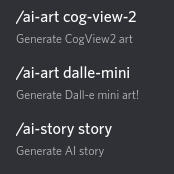
_For more examples, please refer to the [Documentation](https://karafra.github.io/ai-art/additional-documentation/commands.html)_
## Contributing
Contributions are what make the open source community such an amazing place to learn, inspire, and create. Any contributions you make are **greatly appreciated**.
If you have a suggestion that would make this better, please fork the repo and create a pull request. You can also simply open an issue with the tag "enhancement".
Don't forget to give the project a star! Thanks again!
1. Fork the Project
2. Create your Feature Branch (`git checkout -b feature/AmazingFeature`)
3. Commit your Changes (`git commit -m 'Add some AmazingFeature'`)
4. Push to the Branch (`git push origin feature/AmazingFeature`)
5. Open a Pull Request
## License
Distributed under the Apache2.0 License. See [LICENSE](./LICENSE) for more information.
## Contact
Your Name - [@Karafro](https://twitter.com/Karafro) - dariusKralovic@protonmail.com
Project Link: [https://github.com/karafra/ai-art](https://github.com/karafra/ai-art)
## Acknowledgments
- [DALL·E Mini](https://github.com/borisdayma/dalle-mini)
- Image generation model for `/ai-art dalle-mini`
- [CogView2](https://github.com/THUDM/CogView2)
- Image generation model for `/ai-art cog-view-2`
- [Open Ai](https://beta.openai.com/playground)
- Story generation model for `/ai-story story`
- [WomboDream](https://www.wombo.art/)
- Art generation model for `ai-art wombo-art`
[contributors-shield]: https://img.shields.io/github/contributors/karafra/ai-art.svg?style=for-the-badge
[contributors-url]: https://github.com/karafra/ai-art/graphs/contributors
[forks-shield]: https://img.shields.io/github/forks/karafra/ai-art.svg?style=for-the-badge
[forks-url]: https://github.com/karafra/ai-art/network/members
[stars-shield]: https://img.shields.io/github/stars/karafra/ai-art.svg?style=for-the-badge
[stars-url]: https://github.com/karafra/ai-art/stargazers
[issues-shield]: https://img.shields.io/github/issues/karafra/ai-art.svg?style=for-the-badge
[issues-url]: https://github.com/karafra/ai-art/issues
[license-shield]: https://img.shields.io/github/license/karafra/ai-art.svg?style=for-the-badge
[license-url]: https://github.com/karafra/ai-art/blob/master/LICENSE.txt
[linkedin-shield]: https://img.shields.io/badge/-LinkedIn-black.svg?style=for-the-badge&logo=linkedin&colorB=555
[linkedin-url]: https://linkedin.com/in/linkedin_username
[product-screenshot]: https://raw.githubusercontent.com/karafra/ai-art/main/.github/images/showcase.gif
[discord-shield]: https://img.shields.io/discord/984823638333210715?color=purple&label=DEMO%20SERVER&logo=discord&logoColor=white&style=for-the-badge
[discord-invite]:https://discord.gg/VDKhbrc73Z
[top-gg-shield]: https://img.shields.io/static/v1?label=TOP.GG&message=LISTED&color=purple&style=for-the-badge&logo=google-chrome&logoColor=white
[top-gg-link]: https://top.gg/bot/984821826096091206
[codecov-shield]: https://img.shields.io/codecov/c/github/karafra/ai-art?style=for-the-badge&token=zeGtflSZ48
[codecov-url]: https://app.codecov.io/gh/karafra/ai-art
[buy-me-a-coffee-badge]: https://img.shields.io/badge/-buy_me_a%C2%A0coffee-gray?logo=buy-me-a-coffee&style=for-the-badge
[buy-me-a-coffee-url]: https://www.buymeacoffee.com/karafra