https://github.com/karam-ajaj/atlas
Open-source tool for network discovery, visualization, and monitoring. Built with Go, FastAPI, and React, supports Docker host scanning.
https://github.com/karam-ajaj/atlas
container devops devops-tools docker docker-monitoring docker-swarm fastapi golang homelab host-discovery infrastructure-automation network-discovery network-monitoring network-visualization networking open-source react self-hosted
Last synced: about 1 month ago
JSON representation
Open-source tool for network discovery, visualization, and monitoring. Built with Go, FastAPI, and React, supports Docker host scanning.
- Host: GitHub
- URL: https://github.com/karam-ajaj/atlas
- Owner: karam-ajaj
- License: mit
- Created: 2025-05-15T22:18:05.000Z (about 1 year ago)
- Default Branch: main
- Last Pushed: 2025-09-21T22:10:00.000Z (10 months ago)
- Last Synced: 2025-09-21T23:35:45.545Z (10 months ago)
- Topics: container, devops, devops-tools, docker, docker-monitoring, docker-swarm, fastapi, golang, homelab, host-discovery, infrastructure-automation, network-discovery, network-monitoring, network-visualization, networking, open-source, react, self-hosted
- Language: Shell
- Homepage: https://atlasdemo.vnerd.nl
- Size: 34.9 MB
- Stars: 200
- Watchers: 1
- Forks: 6
- Open Issues: 6
-
Metadata Files:
- Readme: README.md
- License: LICENSE
- Code of conduct: CODE_OF_CONDUCT.md
Awesome Lists containing this project
README
# 🌐 Atlas - Network Infrastructure Visualizer (Go-powered)
**Atlas** is a full-stack containerized tool to **scan**, **analyze**, and **visualize** network infrastructure dynamically. Built with Go, FastAPI, NGINX, and a custom React frontend, it provides automated scanning, storage, and rich dashboards for insight into your infrastructure.
---
## 🌍 Live Demo
🔗 **URL:** https://atlasdemo.vnerd.nl/
👤 **Username:** `admin`
🔑 **Password:** `change-me`
---
## 🚀 What It Does
Atlas performs three key functions:
1. **Scans Docker Containers** running on the host to extract:
- IP addresses **(supports multiple IPs per container)**
- MAC addresses **(supports multiple MACs per container)**
- Open ports
- Network names
- OS type (from image metadata)
- **Each network interface is tracked separately**
2. **Scans Local & Neighboring Hosts** on the subnet to:
- Detect reachable devices
- Retrieve OS fingerprints, MACs, and open ports
- Populate a full map of the infrastructure
3. **Visualizes Data in Real-Time**:
- Serves an interactive HTML dashboard via Nginx
- Hosts a FastAPI backend for data access and control
- Uses a React frontend to render dynamic network graphs
---
## 🖼️ Screenshots
### 🖥️ Desktop View

Dashboard - Hierarchical Layout
### 📱 Mobile View
> 💡 **Tip:** Click on any screenshot to view the full-size image
---
## 🚀 Deployment (Docker)
Run Atlas with optional port configuration:
```bash
docker run -d \
--name atlas \
--network=host \
--cap-add=NET_RAW \
--cap-add=NET_ADMIN \
-v /var/run/docker.sock:/var/run/docker.sock \
-e ATLAS_UI_PORT='8884' \
-e ATLAS_API_PORT='8885' \
-e ATLAS_ADMIN_USER='admin' \
-e ATLAS_ADMIN_PASSWORD='change-me' \
-e ATLAS_AUTH_TTL_SECONDS='86400'
-e FASTSCAN_INTERVAL='3600' \
-e DOCKERSCAN_INTERVAL='3600' \
-e DEEPSCAN_INTERVAL='7200' \
-e SCAN_SUBNETS="192.168.1.0/24,10.0.0.0/24" \
keinstien/atlas:{tag}
```
**Environment Variables:**
- `ATLAS_UI_PORT` – Sets the port for the Atlas UI (Nginx). Default: `8888`.
- `ATLAS_API_PORT` – Sets the port for the FastAPI backend. Default: `8889`.
- `ATLAS_ADMIN_USER` – Admin username for login (single user). Default: `admin`.
- `ATLAS_ADMIN_PASSWORD` – Enables UI/API authentication when set (required password for login). Default: `disabled`.
- `ATLAS_AUTH_TTL_SECONDS` – Session lifetime in seconds. Default: `86400` (24h).
- `FASTSCAN_INTERVAL` – Interval in seconds between fast scans. Default: `3600` (1 hour).
- `DOCKERSCAN_INTERVAL` – Interval in seconds between Docker scans. Default: `3600` (1 hour).
- `DEEPSCAN_INTERVAL` – Interval in seconds between deep scans. Default: `7200` (2 hours).
- `SCAN_SUBNETS` – Comma-separated list of subnets to scan (e.g., "192.168.1.0/24,10.0.0.0/24"). If not set, Atlas will auto-detect the local subnet. This allows scanning multiple networks including LAN and remote servers.
If not set, defaults are used (UI: `8888`, API: `8889`, scan intervals as shown above).
Example endpoints:
- UI: `http://localhost:ATLAS_UI_PORT`
- API (from exposed API port): `http://localhost:ATLAS_API_PORT/api/docs`
- API (based on nginx conf): `http://localhost:ATLAS_UI_PORT/api/docs`
### 🔐 Authentication
Atlas authentication is optional and disabled by default.
- **Enable auth:** set `ATLAS_ADMIN_PASSWORD` (and optionally `ATLAS_ADMIN_USER`).
- **UI behavior:** when auth is enabled, the UI shows a login gate before any data is rendered.
- **API behavior:** when auth is enabled, core endpoints (hosts, external, scripts, logs, scheduler, containers) require a token.
Relevant auth endpoints:
- `GET /api/auth/enabled` – returns whether auth is enabled
- `POST /api/auth/login` – returns a bearer token
- `GET /api/auth/me` – validates current token
- `POST /api/auth/logout` – invalidates the current token
**Scan Scheduling:**
Atlas automatically runs scans at the configured intervals. You can:
- Set initial intervals via environment variables (see above)
- Change intervals dynamically through the Scripts Panel in the UI
- Manually trigger scans via the UI or API at any time
The scheduler starts automatically when the container starts and runs scans in the background.
---
## ⚙️ How it Works
### 🔹 Backend Architecture
- **Go CLI (`atlas`)**
- Built using Go 1.22
- Handles:
- `initdb`: Creates SQLite DB with required schema
- `fastscan`: Fast host scan using ARP/Nmap
- `dockerscan`: Gathers Docker container info from `docker inspect`
- `deepscan`: Enriches data with port scans, OS info, etc.
- **FastAPI Backend**
- Runs on `port 8889`
- Serves:
- `/api/hosts` – all discovered hosts (regular + Docker)
- `/api/external` – external IP and metadata
- **NGINX**
- Serves frontend (React static build) on `port 8888`
- Proxies API requests (`/api/`) to FastAPI (`localhost:8889`)
---
## 📂 Project Structure
**Source Code (Host Filesystem)**
```
atlas/
├── config/
│ ├── atlas_go/ # Go source code (main.go, scan, db)
│ ├── bin/ # Compiled Go binary (atlas)
│ ├── db/ # SQLite file created on runtime
│ ├── logs/ # Uvicorn logs
│ ├── nginx/ # default.conf for port 8888
│ └── scripts/ # startup shell scripts
├── data/
│ ├── html/ # Static files served by Nginx
│ └── react-ui/ # Frontend source (React)
├── Dockerfile
├── LICENSE
└── README.md
```
**Inside Container (/config)**
```
/config/
├── bin/atlas # Go binary entrypoint
├── db/atlas.db # Persistent SQLite3 DB
├── logs/ # Logs for FastAPI
├── nginx/default.conf # Nginx config
└── scripts/atlas_check.sh # Entrypoint shell script
```
---
## 🧪 React Frontend (Dev Instructions)
This is a new React-based UI.
### 🛠️ Setup and Build
```bash
cd /swarm/data/atlas/react-ui
npm install
npm run build
```
The built output will be in:
```
/swarm/data/atlas/react-ui/dist/
```
For development CI/CD (for UI and backend and build a new docker version):
```bash
/swarm/github-repos/atlas/deploy.sh
```
## 🚀 CI/CD: Build and Publish a New Atlas Docker Image
To deploy a new version and upload it to Docker Hub, use the provided CI/CD script:
1. Build and publish a new image:
```bash
/swarm/github-repos/atlas/deploy.sh
```
- The script will prompt you for a version tag (e.g. `v3.2`).
- It will build the React frontend, copy to NGINX, build the Docker image, and push **both** `keinstien/atlas:$VERSION` and `keinstien/atlas:latest` to Docker Hub.
2. Why push both tags?
- **Version tag:** Allows you to pin deployments to a specific release (e.g. `keinstien/atlas:v3.2`).
- **Latest tag:** Users can always pull the most recent stable build via `docker pull keinstien/atlas:latest`.
3. The script will also redeploy the running container with the new version.
**Example output:**
```shell
🔄 Tagging Docker image as latest
📤 Pushing Docker image to Docker Hub...
✅ Deployment complete for version: v3.2
```
> **Note:** Make sure you are logged in to Docker Hub (`docker login`) before running the script.
---
## 🌍 URLs
- **Swagger API docs:**
- `🌍 http://localhost:8888/api/docs` (Host Data API endpoint)
- **Frontend UI:**
- `🖥️ UI http://localhost:8888/` (main dashboard)
- `📊 http://localhost:8888/hosts.html` (Hosts Table)
- `🧪 http://localhost:8888/visuals/vis.js_node_legends.html` (legacy test UI)
> Default exposed port is: `8888`
### 📡 Scheduler API Endpoints
New scheduler management endpoints:
- `GET /api/scheduler/intervals` - Get current scan intervals for all scan types
- `PUT /api/scheduler/intervals/{scan_type}` - Update interval for a specific scan type (fastscan, dockerscan, or deepscan)
- `GET /api/scheduler/status` - Get scheduler status and current intervals
Example:
```bash
# Get current intervals
curl http://localhost:8888/api/scheduler/intervals
# Update fastscan interval to 30 minutes (1800 seconds)
curl -X PUT http://localhost:8888/api/scheduler/intervals/fastscan \
-H "Content-Type: application/json" \
-d '{"interval": 1800}'
# Check scheduler status
curl http://localhost:8888/api/scheduler/status
```
---
## ✅ Features
- [x] **Multi-interface scanning** - Automatically detects and scans all physical network interfaces on the host
- [x] Fast network scans (ping/ARP)
- [x] **Multiple subnet scanning** - Scan your LAN, remote servers, and multiple networks simultaneously via SCAN_SUBNETS environment variable
- [x] Docker container inspection with **multi-network support**
- [x] **Multiple IPs and MACs per container** - Containers on multiple networks show all interfaces
- [x] **Interface-aware host tracking** - Same host on multiple interfaces appears separately with interface labels
- [x] External IP discovery
- [x] Deep port scans with OS enrichment
- [x] React-based dynamic frontend
- [x] NGINX + FastAPI routing
- [x] SQLite persistence
- [x] **Scheduled auto scans with configurable intervals** - Configure via environment variables or UI
- [x] **Dynamic interval management** - Change scan intervals without restarting the container
---
## 📌 Dev Tips
To edit Go logic:
- Main binary: `internal/scan/`
- Commands exposed via: `main.go`
To edit API:
- Python FastAPI app: `scripts/app.py`
To edit UI:
- Modify React app under `/react-ui`
- Rebuild and copy static files to `/html`
- _automated deplolyment and publish to dockerhub using the script deploy.sh_
---
## ⚙️ Automation Notes
- Atlas runs automatically on container start.
- All Go scan tasks run sequentially:
- `initdb → fastscan → deepscan → dockerscan`
- Scheduled scans are run every 30 minutes via Go timers.
- No cron dependency required inside the container.
- Scans can also be manually triggered via the UI using API post request.
---
## 👨💻 Author
**Karam Ajaj**
Infrastructure & Automation Engineer
[https://github.com/karam-ajaj](https://github.com/karam-ajaj)
---
## 📝 License
MIT License — free for personal or commercial use.
---
## 📚 Documentation
- [Multi-Interface Support](MULTI_INTERFACE_SUPPORT.md) - Detailed guide on the multi-interface scanning feature
- [Migration Guide](MIGRATION_GUIDE.md) - Guide for migrating from bash scripts to Go implementation
## 🤝 Contributing
Suggestions, bug reports, and pull requests are welcome!
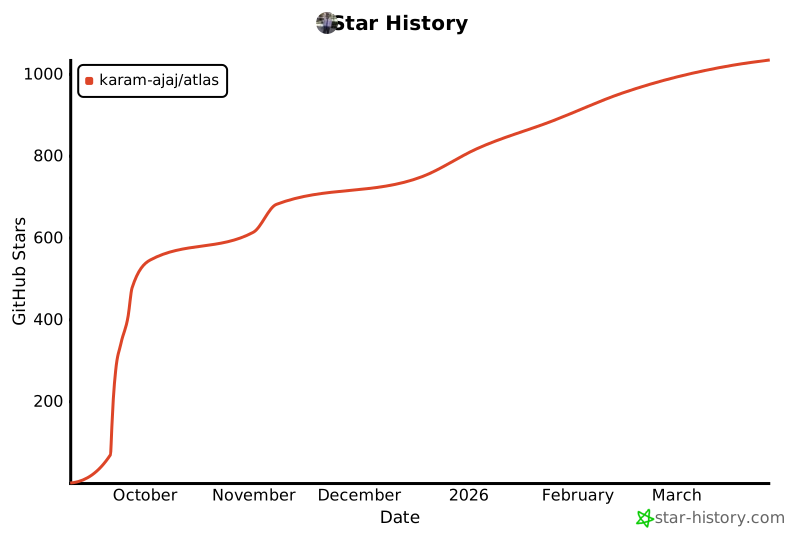
## Star History
[](https://www.star-history.com/#karam-ajaj/atlas&type=date&legend=top-left)


