https://github.com/karanpratapsingh/learn-go
Master the fundamentals and advanced features of the Go programming language
https://github.com/karanpratapsingh/learn-go
course go golang tech tutorial
Last synced: about 1 year ago
JSON representation
Master the fundamentals and advanced features of the Go programming language
- Host: GitHub
- URL: https://github.com/karanpratapsingh/learn-go
- Owner: karanpratapsingh
- License: other
- Created: 2022-06-24T07:21:47.000Z (about 4 years ago)
- Default Branch: main
- Last Pushed: 2022-10-19T18:10:58.000Z (over 3 years ago)
- Last Synced: 2025-04-12T17:49:40.573Z (about 1 year ago)
- Topics: course, go, golang, tech, tutorial
- Language: Go
- Homepage: https://leanpub.com/go
- Size: 438 KB
- Stars: 1,012
- Watchers: 9
- Forks: 129
- Open Issues: 0
-
Metadata Files:
- Readme: README.md
- Contributing: CONTRIBUTING.md
- Funding: .github/funding.yml
- License: LICENSE
- Code of conduct: CODE_OF_CONDUCT.md
Awesome Lists containing this project
README
# Learn Go
Hey, welcome to the course, and thanks for learning Go. I hope this course provides a great learning experience.
_This course is also available on my [website](https://karanpratapsingh.com/courses/go) and as an ebook on [leanpub](https://leanpub.com/go). Please leave a ⭐ as motivation if this was helpful!_
# Table of contents
- **Getting Started**
- [What is Go?](#what-is-go)
- [Why learn Go?](#why-learn-go)
- [Installation and Setup](#installation-and-setup)
- **Chapter I**
- [Hello World](#hello-world)
- [Variables and Data Types](#variables-and-data-types)
- [String Formatting](#string-formatting)
- [Flow Control](#flow-control)
- [Functions](#functions)
- [Modules](#modules)
- [Packages](#packages)
- [Workspaces](#workspaces)
- [Useful Commands](#useful-commands)
- [Build](#build)
- **Chapter II**
- [Pointers](#pointers)
- [Structs](#structs)
- [Methods](#methods)
- [Arrays and Slices](#arrays-and-slices)
- [Maps](#maps)
- **Chapter III**
- [Interfaces](#interfaces)
- [Errors](#errors)
- [Panic and Recover](#panic-and-recover)
- [Testing](#testing)
- [Generics](#generics)
- **Chapter IV**
- [Concurrency](#concurrency)
- [Goroutines](#goroutines)
- [Channels](#channels)
- [Select](#select)
- [Sync Package](#sync-package)
- [Advanced Concurrency Patterns](#advanced-concurrency-patterns)
- [Context](#context)
- **Appendix**
- [Next Steps](#next-steps)
- [References](#references)
# What is Go?
Go (also known as _Golang_) is a programming language developed at Google in 2007 and open-sourced in 2009.
It focuses on simplicity, reliability, and efficiency. It was designed to combine the efficacy, speed, and safety of a statically typed and compiled language with the ease of programming of a dynamic language to make programming more fun again.
In a way, they wanted to combine the best parts of Python and C++ so that they can build reliable systems that can take advantage of multi-core processors.
# Why learn Go?
Before we start this course, let us talk about why we should learn Go.
## 1. Easy to learn
Go is quite easy to learn and has a supportive and active community.
And being a multipurpose language you can use it for things like backend development, cloud computing, and more recently, data science.
## 2. Fast and Reliable
Which makes it highly suitable for distributed systems. Projects such as Kubernetes and Docker are written in Go.
## 3. Simple yet powerful
Go has just 25 keywords which makes it easy to read, write and maintain. The language itself is concise.
But don't be fooled by the simplicity, Go has several powerful features that we will later learn in the course.
## 4. Career opportunities
Go is growing fast and is being adopted by companies of any size. and with that, comes new high-paying job opportunities.
I hope this made you excited about Go. Let's start this course.
# Installation and Setup
In this tutorial, we will install Go and setup our code editor.
## Download
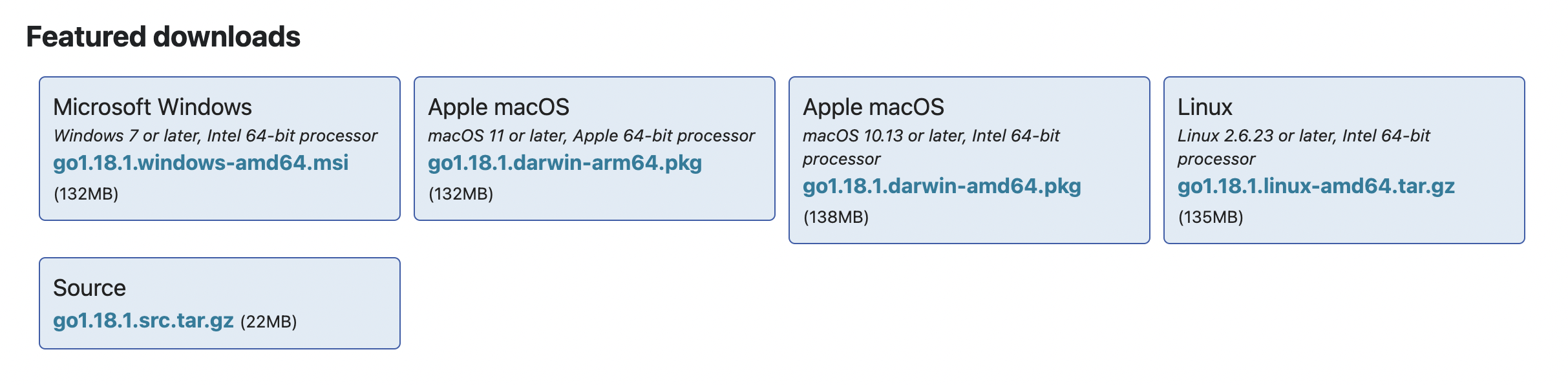
We can install Go from the [downloads](https://go.dev/dl) section.
## Installation
_These instructions are from the [official website](https://go.dev/doc/install)._
### MacOS
1. Open the package file you downloaded and follow the prompts to install Go.
The package installs the Go distribution to `/usr/local/go`. The package should put the `/usr/local/go/bin` directory in your `PATH` environment variable.
You may need to restart any open Terminal sessions for the change to take effect.
2. Verify that you've installed Go by opening a command prompt and typing the following command:
```
$ go version
```
3. Confirm that the command prints the installed version of Go.
### Linux
1. Remove any previous Go installation by deleting the `/usr/local/go` folder (if it exists),
then extract the archive you just downloaded into `/usr/local`, creating a fresh Go tree in `/usr/local/go`:
```
$ rm -rf /usr/local/go && tar -C /usr/local -xzf go1.18.1.linux-amd64.tar.gz
```
_Note: You may need to run the command as root or through sudo._
**Do not untar** the archive into an existing `/usr/local/go` tree. This is known to produce broken Go installations.
2. Add `/usr/local/go/bin` to the PATH environment variable.
You can do this by adding the following line to your `$HOME/.profile` or `/etc/profile` (for a system-wide installation):
```
export PATH=$PATH:/usr/local/go/bin
```
_Note: Changes made to a profile file may not apply until the next time you log into your computer. To apply the changes immediately, just run the shell commands directly or execute them from the profile using a command such as source `$HOME/.profile`._
3. Verify that you've installed Go by opening a command prompt and typing the following command:
```
$ go version
```
4. Confirm that the command prints the installed version of Go.
### Windows
1. Open the MSI file you downloaded and follow the prompts to install Go.
By default, the installer will install Go to Program Files or Program Files (x86).
You can change the location as needed. After installing, you will need to close and reopen any open command prompts so that changes to the environment made by the installer are reflected at the command prompt.
2. Verify that you've installed Go.
1. In Windows, click the Start menu.
2. In the menu's search box, type cmd, then press the Enter key.
3. In the Command Prompt window that appears, type the following command:
```
$ go version
```
3. Confirm that the command prints the installed version of Go.
## VS Code
In this course, I will be using [VS Code](https://code.visualstudio.com) and you can download it from [here](https://code.visualstudio.com/download).
_Feel free to use any other code editor you prefer._
### Extension
Make sure to also install the [Go extension](https://code.visualstudio.com/docs/languages/go) which makes it easier to work with Go in VS Code.

This is it for the installation and setup of Go, let's start the course and write our first hello world!
# Hello World
Let's write our first hello world program, we can start by initializing a module. For that, we can use the `go mod` command.
```bash
$ go mod init example
```
But wait...what's a `module`? Don't worry we will discuss that soon! But for now, assume that the module is basically a collection of Go packages.
Moving ahead, let's now create a `main.go` file and write a program that simply prints hello world.
```go
package main
import "fmt"
func main() {
fmt.Println("Hello World!")
}
```
_If you're wondering, `fmt` is part of the Go standard library which is a set of core packages provided by the language._
## Structure of a Go program
Now, let's quickly break down what we did here, or rather the structure of a Go program.
First, we defined a package such as `main`.
```go
package main
```
Then, we have some imports.
```go
import "fmt"
```
Last but not least, is our `main` function which acts as an entry point for our application, just like in other languages like C, Java, or C#.
```go
func main() {
...
}
```
Remember, the goal here is to keep a mental note, and later in the course, we'll learn about `functions`, `imports`, and other things in detail!
Finally, to run our code, we can simply use `go run` command.
```bash
$ go run main.go
Hello World!
```
Congratulations, you just wrote your first Go program!
# Variables and Data Types
In this tutorial, we will learn about variables. We will also learn about the different data types that Go provides us.
## Variables
Let's start with declaring a variable.
This is also known as declaration without initialization:
```go
var foo string
```
Declaration with initialization:
```go
var foo string = "Go is awesome"
```
Multiple declarations:
```go
var foo, bar string = "Hello", "World"
// OR
var (
foo string = "Hello"
bar string = "World"
)
```
Type is omitted but will be inferred:
```go
var foo = "What's my type?"
```
Shorthand declaration, here we omit `var` keyword and type is always implicit. This is how we will see variables being declared most of the time. We also use the `:=` for declaration plus assignment.
```go
foo := "Shorthand!"
```
_Note: Shorthand only works inside `function` bodies._
## Constants
We can also declare constants with the `const` keyword. Which as the name suggests, are fixed values that cannot be reassigned.
```go
const constant = "This is a constant"
```
It is also important to note that, only constants can be assigned to other constants.
```go
const a = 10
const b = a // ✅ Works
var a = 10
const b = a // ❌ a (variable of type int) is not constant (InvalidConstInit)
```
## Data Types
Perfect! Now let's look at some basic data types available in Go. Starting with string.
### String
In Go, a string is a sequence of bytes. They are declared either using double quotes or backticks which can span multiple lines.
```go
var name string = "My name is Go"
var bio string = `I am statically typed.
I was designed at Google.`
```
### Bool
Next is `bool` which is used to store boolean values. It can have two possible values - `true` or `false`.
```go
var value bool = false
var isItTrue bool = true
```
**Operators**
We can use the following operators on boolean types
| Type | Syntax |
| -------- | --------------- |
| Logical | `&&` `\|\|` `!` |
| Equality | `==` `!=` |
### Numeric types
Now, let's talk about numeric types.
**Signed and Unsigned integers**
Go has several built-in integer types of varying sizes for storing signed and unsigned integers
The size of the generic `int` and `uint` types are platform-dependent. This means it is 32-bits wide on a 32-bit system and 64-bits wide on a 64-bit system.
```go
var i int = 404 // Platform dependent
var i8 int8 = 127 // -128 to 127
var i16 int16 = 32767 // -2^15 to 2^15 - 1
var i32 int32 = -2147483647 // -2^31 to 2^31 - 1
var i64 int64 = 9223372036854775807 // -2^63 to 2^63 - 1
```
Similar to signed integers, we have unsigned integers.
```go
var ui uint = 404 // Platform dependent
var ui8 uint8 = 255 // 0 to 255
var ui16 uint16 = 65535 // 0 to 2^16
var ui32 uint32 = 2147483647 // 0 to 2^32
var ui64 uint64 = 9223372036854775807 // 0 to 2^64
var uiptr uintptr // Integer representation of a memory address
```
If you noticed, there's also an unsigned integer pointer `uintptr` type, which is an integer representation of a memory address. It is not recommended to use this, so we don't have to worry about it.
**So which one should we use?**
It is recommended that whenever we need an integer value, we should just use `int` unless we have a specific reason to use a sized or unsigned integer type.
**Byte and Rune**
Golang has two additional integer types called `byte` and `rune` that are aliases for `uint8` and `int32` data types respectively.
```go
type byte = uint8
type rune = int32
```
_A `rune` represents a unicode code point._
```go
var b byte = 'a'
var r rune = '🍕'
```
**Floating point**
Next, we have floating point types which are used to store numbers with a decimal component.
Go has two floating point types `float32` and `float64`. Both type follows the IEEE-754 standard.
_The default type for floating point values is float64._
```go
var f32 float32 = 1.7812 // IEEE-754 32-bit
var f64 float64 = 3.1415 // IEEE-754 64-bit
```
**Operators**
Go provides several operators for performing operations on numeric types.
| Type | Syntax |
| ------------------- | -------------------------------------------------------- |
| Arithmetic | `+` `-` `*` `/` `%` |
| Comparison | `==` `!=` `<` `>` `<=` `>=` |
| Bitwise | `&` `\|` `^` `<<` `>>` |
| Increment/Decrement | `++` `--` |
| Assignment | `=` `+=` `-=` `*=` `/=` `%=` `<<=` `>>=` `&=` `\|=` `^=` |
**Complex**
There are 2 complex types in Go, `complex128` where both real and imaginary parts are `float64` and `complex64` where real and imaginary parts are `float32`.
We can define complex numbers either using the built-in complex function or as literals.
```go
var c1 complex128 = complex(10, 1)
var c2 complex64 = 12 + 4i
```
## Zero Values
Now let's discuss zero values. So in Go, any variable declared without an explicit initial value is given its _zero value_. For example, let's declare some variables and see:
```go
var i int
var f float64
var b bool
var s string
fmt.Printf("%v %v %v %q\n", i, f, b, s)
```
```bash
$ go run main.go
0 0 false ""
```
So, as we can see `int` and `float` are assigned as 0, `bool` as false, and `string` as an empty string. This is quite different from how other languages do it. For example, most languages initialize unassigned variables as null or undefined.
This is great, but what are those percent symbols in our `Printf` function? As you've already guessed, they are used for formatting and we will learn about them later.
## Type Conversion
Moving on, now that we have seen how data types work, let's see how to do type conversion.
```go
i := 42
f := float64(i)
u := uint(f)
fmt.Printf("%T %T", f, u)
```
```bash
$ go run main.go
float64 uint
```
And as we can see, it prints the type as `float64` and `uint`.
_Note that this is different from parsing._
## Alias types
Alias types were introduced in Go 1.9. They allow developers to provide an alternate name for an existing type and use it interchangeably with the underlying type.
```go
package main
import "fmt"
type MyAlias = string
func main() {
var str MyAlias = "I am an alias"
fmt.Printf("%T - %s", str, str) // Output: string - I am an alias
}
```
## Defined types
Lastly, we have defined types that unlike alias types do not use an equals sign.
```go
package main
import "fmt"
type MyDefined string
func main() {
var str MyDefined = "I am defined"
fmt.Printf("%T - %s", str, str) // Output: main.MyDefined - I am defined
}
```
**But wait...what's the difference?**
So, defined types do more than just give a name to a type.
It first defines a new named type with an underlying type. However, this defined type is different from any other type, including its underline type.
Hence, it cannot be used interchangeably with the underlying type like alias types.
It's a bit confusing at first, hopefully, this example will make things clear.
```go
package main
import "fmt"
type MyAlias = string
type MyDefined string
func main() {
var alias MyAlias
var def MyDefined
// ✅ Works
var copy1 string = alias
// ❌ Cannot use def (variable of type MyDefined) as string value in variable
var copy2 string = def
fmt.Println(copy1, copy2)
}
```
As we can see, we cannot use the defined type interchangeably with the underlying type, unlike _alias types_.
# String Formatting
In this tutorial, we will learn about string formatting or sometimes also known as templating.
`fmt` package contains lots of functions. So to save time, we will discuss the most frequently used functions. Let's start with `fmt.Print` inside our main function.
```go
...
fmt.Print("What", "is", "your", "name?")
fmt.Print("My", "name", "is", "golang")
...
```
```bash
$ go run main.go
Whatisyourname?Mynameisgolang
```
As we can see, `Print` does not format anything, it simply takes a string and prints it.
Next, we have `Println` which is the same as `Print` but it adds a new line at the end and also inserts space between the arguments.
```go
...
fmt.Println("What", "is", "your", "name?")
fmt.Println("My", "name", "is", "golang")
...
```
```bash
$ go run main.go
What is your name?
My name is golang
```
That's much better!
Next, we have `Printf` also known as _"Print Formatter"_, which allows us to format numbers, strings, booleans, and much more.
Let's look at an example.
```go
...
name := "golang"
fmt.Println("What is your name?")
fmt.Printf("My name is %s", name)
...
```
```bash
$ go run main.go
What is your name?
My name is golang
```
As we can see that `%s` was substituted with our `name` variable.
But the question is what is `%s` and what does it mean?
So, these are called _annotation verbs_ and they tell the function how to format the arguments. We can control things like width, types, and precision with these and there are lots of them. Here's a [cheatsheet](https://pkg.go.dev/fmt).
Now, let's quickly look at some more examples. Here we will try to calculate a percentage and print it to the console.
```go
...
percent := (7.0 / 9) * 100
fmt.Printf("%f", percent)
...
```
```bash
$ go run main.go
77.777778
```
Let's say we want just `77.78` which is 2 points precision, we can do that as well by using `.2f`.
Also, to add an actual percent sign, we will need to _escape it_.
```go
...
percent := (7.0 / 9) * 100
fmt.Printf("%.2f %%", percent)
...
```
```bash
$ go run main.go
77.78 %
```
This brings us to `Sprint`, `Sprintln`, and `Sprintf`. These are basically the same as the print functions, the only difference being they return the string instead of printing it.
Let's take a look at an example.
```go
...
s := fmt.Sprintf("hex:%x bin:%b", 10 ,10)
fmt.Println(s)
...
```
```bash
$ go run main.go
hex:a bin:1010
```
So, as we can see `Sprintf` formats our integer as hex or binary and returns it as a string.
Lastly, we have multiline string literals, which can be used like this.
```go
...
msg := `
Hello from
multiline
`
fmt.Println(msg)
...
```
Great! But this is just the tip of the iceberg...so make sure to check out the go doc for `fmt` package.
For those who are coming from C/C++ background, this should feel natural, but if you're coming from, let's say Python or JavaScript, this might be a little strange at first. But it is very powerful and you'll see this functionality used quite extensively.
# Flow Control
Let's talk about flow control, starting with if/else.
## If/Else
This works pretty much the same as you expect but the expression doesn't need to be surrounded by parentheses `()`.
```go
func main() {
x := 10
if x > 5 {
fmt.Println("x is gt 5")
} else if x > 10 {
fmt.Println("x is gt 10")
} else {
fmt.Println("else case")
}
}
```
```bash
$ go run main.go
x is gt 5
```
### Compact if
We can also compact our if statements.
```go
func main() {
if x := 10; x > 5 {
fmt.Println("x is gt 5")
}
}
```
_Note: This pattern is quite common._
## Switch
Next, we have `switch` statement, which is often a shorter way to write conditional logic.
In Go, the switch case only runs the first case whose value is equal to the condition expression and not all the cases that follow. Hence, unlike other languages, `break` statement is automatically added at the end of each case.
This means that it evaluates cases from top to bottom, stopping when a case succeeds.
Let's take a look at an example:
```go
func main() {
day := "monday"
switch day {
case "monday":
fmt.Println("time to work!")
case "friday":
fmt.Println("let's party")
default:
fmt.Println("browse memes")
}
}
```
```bash
$ go run main.go
time to work!
```
Switch also supports shorthand declaration like this.
```go
switch day := "monday"; day {
case "monday":
fmt.Println("time to work!")
case "friday":
fmt.Println("let's party")
default:
fmt.Println("browse memes")
}
```
We can also use the `fallthrough` keyword to transfer control to the next case even though the current case might have matched.
```go
switch day := "monday"; day {
case "monday":
fmt.Println("time to work!")
fallthrough
case "friday":
fmt.Println("let's party")
default:
fmt.Println("browse memes")
}
```
And if we run this, we'll see that after the first case matches the switch statement continues to the next case because of the `fallthrough` keyword.
```bash
$ go run main.go
time to work!
let's party
```
We can also use it without any condition, which is the same as `switch true`.
```go
x := 10
switch {
case x > 5:
fmt.Println("x is greater")
default:
fmt.Println("x is not greater")
}
```
## Loops
Now, let's turn our attention toward loops.
So in Go, we only have one type of loop which is the `for` loop.
But it's incredibly versatile. Same as if statement, for loop, doesn't need any parenthesis `()` unlike other languages.
### For loop
Let's start with the basic `for` loop.
```go
func main() {
for i := 0; i < 10; i++ {
fmt.Println(i)
}
}
```
The basic `for` loop has three components separated by semicolons:
- **init statement**: which is executed before the first iteration.
- **condition expression**: which is evaluated before every iteration.
- **post statement**: which is executed at the end of every iteration.
**Break and continue**
As expected, Go also supports both `break` and `continue` statements for loop control. Let's try a quick example:
```go
func main() {
for i := 0; i < 10; i++ {
if i < 2 {
continue
}
fmt.Println(i)
if i > 5 {
break
}
}
fmt.Println("We broke out!")
}
```
So, the `continue` statement is used when we want to skip the remaining portion of the loop, and `break` statement is used when we want to break out of the loop.
Also, Init and post statements are optional, hence we can make our `for` loop behave like a while loop as well.
```go
func main() {
i := 0
for ;i < 10; {
i += 1
}
}
```
_Note: we can also remove the additional semi-colons to make it a little cleaner._
### Forever loop
Lastly, If we omit the loop condition, it loops forever, so an infinite loop can be compactly expressed. This is also known as the forever loop.
```go
func main() {
for {
// do stuff here
}
}
```
# Functions
In this tutorial, we will discuss how we work with functions in Go. So, let's start with a simple function declaration.
## Simple declaration
```go
func myFunction() {}
```
And we can _call or execute_ it as follows.
```go
...
myFunction()
...
```
Let's pass some parameters to it.
```go
func main() {
myFunction("Hello")
}
func myFunction(p1 string) {
fmt.Println(p1)
}
```
```bash
$ go run main.go
```
As we can see it prints our message. We can also do a shorthand declaration if the consecutive parameters have the same type. For example:
```go
func myNextFunction(p1, p2 string) {}
```
## Returning the value
Now let's also return a value.
```go
func main() {
s := myFunction("Hello")
fmt.Println(s)
}
func myFunction(p1 string) string {
msg := fmt.Sprintf("%s function", p1)
return msg
}
```
### Multiple returns
Why return one value at a time, when we can do more? Go also supports multiple returns!
```go
func main() {
s, i := myFunction("Hello")
fmt.Println(s, i)
}
func myFunction(p1 string) (string, int) {
msg := fmt.Sprintf("%s function", p1)
return msg, 10
}
```
### Named returns
Another cool feature is [named returns](https://go.dev/tour/basics/7), where return values can be named and treated as their own variables.
```go
func myFunction(p1 string) (s string, i int) {
s = fmt.Sprintf("%s function", p1)
i = 10
return
}
```
Notice how we added a `return` statement without any arguments, this is also known as _naked return_.
I will say that, although this feature is interesting, please use it with care as this might reduce readability for larger functions.
## Functions as values
Next, let's talk about functions as values, in Go functions are first class and we can use them as values. So, let's clean up our function and try it out!
```go
func myFunction() {
fn := func() {
fmt.Println("inside fn")
}
fn()
}
```
We can also simplify this by making `fn` an _anonymous function_.
```go
func myFunction() {
func() {
fmt.Println("inside fn")
}()
}
```
_Notice how we execute it using the parenthesis at the end._
## Closures
Why stop there? let's also return a function and hence create something called a closure. A simple definition can be that a closure is a function value that references variables from outside its body.
Closures are lexically scoped, which means functions can access the values in scope when defining the function.
```go
func myFunction() func(int) int {
sum := 0
return func(v int) int {
sum += v
return sum
}
}
```
```go
...
add := myFunction()
add(5)
fmt.Println(add(10))
...
```
As we can see, we get a result of 15 as `sum` variable is _bound_ to the function. This is a very powerful concept and definitely, a must know.
## Variadic Functions
Now let's look at variadic functions, which are functions that can take zero or multiple arguments using the `...` ellipses operator.
An example here would be a function that can add a bunch of values.
```go
func main() {
sum := add(1, 2, 3, 5)
fmt.Println(sum)
}
func add(values ...int) int {
sum := 0
for _, v := range values {
sum += v
}
return sum
}
```
Pretty cool huh? Also, don't worry about the `range` keyword, we will discuss it later in the course.
_**Fun fact**: `fmt.Println` is a variadic function, that's how we were able to pass multiple values to it._
## Init
In Go, `init` is a special lifecycle function that is executed before the `main` function.
Similar to `main`, the `init` function does not take any arguments nor returns any value. Let's see how it works with an example.
```go
package main
import "fmt"
func init() {
fmt.Println("Before main!")
}
func main() {
fmt.Println("Running main")
}
```
As expected, the `init` function was executed before the `main` function.
```bash
$ go run main.go
Before main!
Running main
```
Unlike `main`, there can be more than one `init` function in single or multiple files.
For multiple `init` in a single file, their processing is done in the order of their declaration, while `init` functions declared in multiple files are processed according to the lexicographic filename order.
```go
package main
import "fmt"
func init() {
fmt.Println("Before main!")
}
func init() {
fmt.Println("Hello again?")
}
func main() {
fmt.Println("Running main")
}
```
And if we run this, we'll see the `init` functions were executed in the order they were declared.
```bash
$ go run main.go
Before main!
Hello again?
Running main
```
The `init` function is optional and is particularly used for any global setup which might be essential for our program, such as establishing a database connection, fetching configuration files, setting up environment variables, etc.
## Defer
Lastly, let's discuss the `defer` keyword, which lets us postpones the execution of a function until the surrounding function returns.
```go
func main() {
defer fmt.Println("I am finished")
fmt.Println("Doing some work...")
}
```
Can we use multiple defer functions? Absolutely, this brings us to what is known as _defer stack_. Let's take a look at an example:
```go
func main() {
defer fmt.Println("I am finished")
defer fmt.Println("Are you?")
fmt.Println("Doing some work...")
}
```
```bash
$ go run main.go
Doing some work...
Are you?
I am finished
```
As we can see, defer statements are stacked and executed in a _last in first out_ manner.
So, Defer is incredibly useful and is commonly used for doing cleanup or error handling.
Functions can also be used with generics but we will discuss them later in the course.
# Modules
In this tutorial, we will learn about modules.
## What are modules?
Simply defined, A module is a collection of [Go packages](https://go.dev/ref/spec#Packages) stored in a file tree with a `go.mod` file at its root, provided the directory is _outside_ `$GOPATH/src`.
Go modules were introduced in Go 1.11, which brings native support for versions and modules. Earlier, we needed the `GO111MODULE=on` flag to turn on the modules functionality when it was experimental. But now after Go 1.13 modules mode is the default for all development.
**But wait, what is `GOPATH`?**
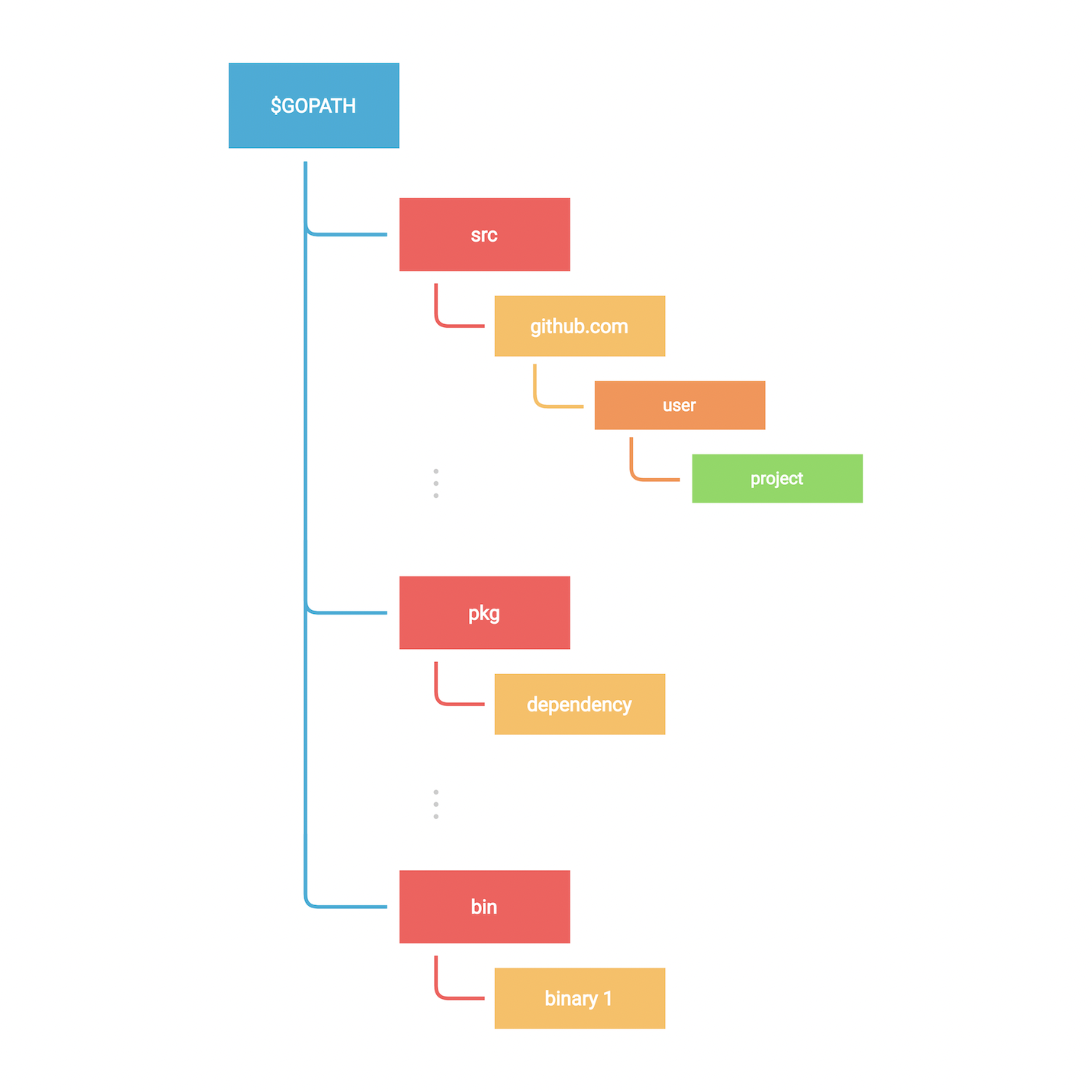
Well, `GOPATH` is a variable that defines the root of your workspace and it contains the following folders:
- **src**: contains Go source code organized in a hierarchy.
- **pkg**: contains compiled package code.
- **bin**: contains compiled binaries and executables.
Like earlier, let's create a new module using `go mod init` command which creates a new module and initializes the `go.mod` file that describes it.
```bash
$ go mod init example
```
The important thing to note here is that a Go module can correspond to a Github repository as well if you plan to publish this module. For example:
```bash
$ go mod init example
```
Now, let's explore `go.mod` which is the file that defines the module's _module path_ and also the import path used for the root directory, and its _dependency requirements_.
```go
module
go
require (
...
)
```
And if we want to add a new dependency, we will use `go install` command:
```bash
$ go install github.com/rs/zerolog
```
As we can see a `go.sum` file was also created. This file contains the expected [hashes](https://go.dev/cmd/go/#hdr-Module_downloading_and_verification) of the content of the new modules.
We can list all the dependencies using `go list` command as follows:
```bash
$ go list -m all
```
If the dependency is not used, we can simply remove it using `go mod tidy` command:
```bash
$ go mod tidy
```
Finishing up our discussion on modules, let's also discuss vendoring.
Vendoring is the act of making your own copy of the 3rd party packages your project is using. Those copies are traditionally placed inside each project and then saved in the project repository.
This can be done through `go mod vendor` command.
So, let's reinstall the removed module using `go mod tidy`.
```go
package main
import "github.com/rs/zerolog/log"
func main() {
log.Info().Msg("Hello")
}
```
```bash
$ go mod tidy
go: finding module for package github.com/rs/zerolog/log
go: found github.com/rs/zerolog/log in github.com/rs/zerolog v1.26.1
```
```bash
$ go mod vendor
```
After the `go mod vendor` command is executed, a `vendor` directory will be created.
```
├── go.mod
├── go.sum
├── go.work
├── main.go
└── vendor
├── github.com
│ └── rs
│ └── zerolog
│ └── ...
└── modules.txt
```
# Packages
In this tutorial, we will talk about packages.
## What are packages?
A package is nothing but a directory containing one or more Go source files, or other Go packages.
This means every Go source file must belong to a package and package declaration is done at top of every source file as follows.
```go
package
```
So far, we've done everything inside of `package main`. By convention, executable programs (by that I mean the ones with the `main` package) are called _Commands_, others are simply called _Packages_.
The `main` package should also contain a `main()` function which is a special function that acts as the entry point of an executable program.
Let's take a look at an example by creating our own package `custom` and adding some source files to it such as `code.go`.
```go
package custom
```
Before we proceed any further, we should talk about imports and exports. Just like other languages, go also has a concept of imports and exports but it's very elegant.
Basically, any value (like a variable or function) can be exported and visible from other packages if they have been defined with an upper case identifier.
Let's try an example in our `custom` package.
```go
package custom
var value int = 10 // Will not be exported
var Value int = 20 // Will be exported
```
As we can see lower case identifiers will not be exported and will be private to the package it's defined in. In our case the `custom` package.
That's great but how do we import or access it? Well, same as we've been doing so far unknowingly. Let's go to our `main.go` file and import our `custom` package.
Here we can refer to it using the `module` we had initialized in our `go.mod` file earlier.
```go
---go.mod---
module example
go 1.18
---main.go--
package main
import "example/custom"
func main() {
custom.Value
}
```
_Notice how the package name is the last name of the import path._
We can import multiple packages as well like this.
```go
package main
import (
"fmt"
"example/custom"
)
func main() {
fmt.Println(custom.Value)
}
```
We can also alias our imports to avoid collisions like this.
```go
package main
import (
"fmt"
abcd "example/custom"
)
func main() {
fmt.Println(abcd.Value)
}
```
## External Dependencies
In Go, we are not only limited to working with local packages, we can also install external packages using `go install` command as we saw earlier.
So let's download a simple logging package `github.com/rs/zerolog/log`.
```bash
$ go install github.com/rs/zerolog
```
```go
package main
import (
"github.com/rs/zerolog/log"
abcd "example/custom"
)
func main() {
log.Print(abcd.Value)
}
```
Also, make sure to check out the go doc of packages you install, which is usually located in the project's readme file. go doc parses the source code and generates documentation in HTML format. Reference to It is usually located in readme files.
Lastly, I will add that, Go doesn't have a particular _"folder structure"_ convention, always try to organize your packages in a simple and intuitive way.
# Workspaces
In this tutorial, we will learn about multi-module workspaces that were introduced in Go 1.18.
Workspaces allow us to work with multiple modules simultaneously without having to edit `go.mod` files for each module. Each module within a workspace is treated as a root module when resolving dependencies.
To understand this better, let's start by creating a `hello` module.
```bash
$ mkdir workspaces && cd workspaces
$ mkdir hello && cd hello
$ go mod init hello
```
For demonstration purposes, I will add a simple `main.go` and install an example package.
```go
package main
import (
"fmt"
"golang.org/x/example/stringutil"
)
func main() {
result := stringutil.Reverse("Hello Workspace")
fmt.Println(result)
}
```
```bash
$ go get golang.org/x/example
go: downloading golang.org/x/example v0.0.0-20220412213650-2e68773dfca0
go: added golang.org/x/example v0.0.0-20220412213650-2e68773dfca0
```
And if we run this, we should see our output in reverse.
```bash
$ go run main.go
ecapskroW olleH
```
This is great, but what if we want to modify the `stringutil` module that our code depends on?
Until now, we had to do it using the `replace` directive in the `go.mod` file, but now let's see how we can use workspaces here.
So, let's create our workspace in the `workspaces` directory.
```bash
$ go work init
```
This will create a `go.work` file.
```bash
$ cat go.work
go 1.18
```
We will also add our `hello` module to the workspace.
```bash
$ go work use ./hello
```
This should update the `go.work` file with a reference to our `hello` module.
```go
go 1.18
use ./hello
```
Now, let's download and modify the `stringutil` package and update the `Reverse` function implementation.
```bash
$ git clone https://go.googlesource.com/example
Cloning into 'example'...
remote: Total 204 (delta 39), reused 204 (delta 39)
Receiving objects: 100% (204/204), 467.53 KiB | 363.00 KiB/s, done.
Resolving deltas: 100% (39/39), done.
```
`example/stringutil/reverse.go`
```go
func Reverse(s string) string {
return fmt.Sprintf("I can do whatever!! %s", s)
}
```
Finally, let's add `example` package to our workspace.
```bash
$ go work use ./example
$ cat go.work
go 1.18
use (
./example
./hello
)
```
Perfect, now if we run our `hello` module we will notice that the `Reverse` function has been modified.
```bash
$ go run hello
I can do whatever!! Hello Workspace
```
_This is a very underrated feature from Go 1.18 but it is quite useful in certain circumstances._
# Useful Commands
During our module discussion, we discussed some go commands related to go modules, let's now discuss some other important commands.
Starting with `go fmt`, which formats the source code and it's enforced by that language so that we can focus on how our code should work rather than how our code should look.
```bash
$ go fmt
```
This might seem a little weird at first especially if you're coming from a javascript or python background like me but frankly, it's quite nice not to worry about linting rules.
Next, we have `go vet` which reports likely mistakes in our packages.
So, if I go ahead and make a mistake in the syntax, and then run `go vet`.
It should notify me of the errors.
```bash
$ go vet
```
Next, we have `go env` which simply prints all the go environment information, we'll learn about some of these build-time variables later.
Lastly, we have `go doc` which shows documentation for a package or symbol, here's an example of the `fmt` package.
```bash
$ go doc -src fmt Printf
```
Let's use `go help` command to see what other commands are available.
```bash
$ go help
```
As we can see, we have:
`go fix` finds Go programs that use old APIs and rewrites them to use newer ones.
`go generate` is usually used for code generation.
`go install` compiles and installs packages and dependencies.
`go clean` is used for cleaning files that are generated by compilers.
Some other very important commands are `go build` and `go test` but we will learn about them in detail later in the course.
# Build
Building static binaries is one of the best features of Go which enables us to ship our code efficiently.
We can do this very easily using the `go build` command.
```go
package main
import "fmt"
func main() {
fmt.Println("I am a binary!")
}
```
```bash
$ go build
```
This should produce a binary with the name of our module. For example, here we have `example`.
We can also specify the output.
```bash
$ go build -o app
```
Now to run this, we simply need to execute it.
```bash
$ ./app
I am a binary!
```
_Yes, it's as simple as that!_
Now, let's talk about some important build time variables, starting with:
- `GOOS` and `GOARCH`
These environment variables help us build go programs for different [operating systems](https://en.wikipedia.org/wiki/Operating_system)
and underlying processor [architectures](https://en.wikipedia.org/wiki/Microarchitecture).
We can list all the supported architecture using `go tool` command.
```bash
$ go tool dist list
android/amd64
ios/amd64
js/wasm
linux/amd64
windows/arm64
.
.
.
```
Here's an example for building a windows executable from macOS!
```bash
$ GOOS=windows GOARCH=amd64 go build -o app.exe
```
- `CGO_ENABLED`
This variable allows us to configure [CGO](https://go.dev/blog/cgo), which is a way in Go to call C code.
This helps us to produce a [statically linked binary](https://en.wikipedia.org/wiki/Static_build) that works without any external dependencies.
This is quite helpful for, let's say when we want to run our go binaries in a docker container with minimum external dependencies.
Here's an example of how to use it:
```bash
$ CGO_ENABLED=0 go build -o app
```
# Pointers
In this tutorial, we will discuss pointers. So what are Pointers?
Simply defined, a Pointer is a variable that is used to store the memory address of another variable.
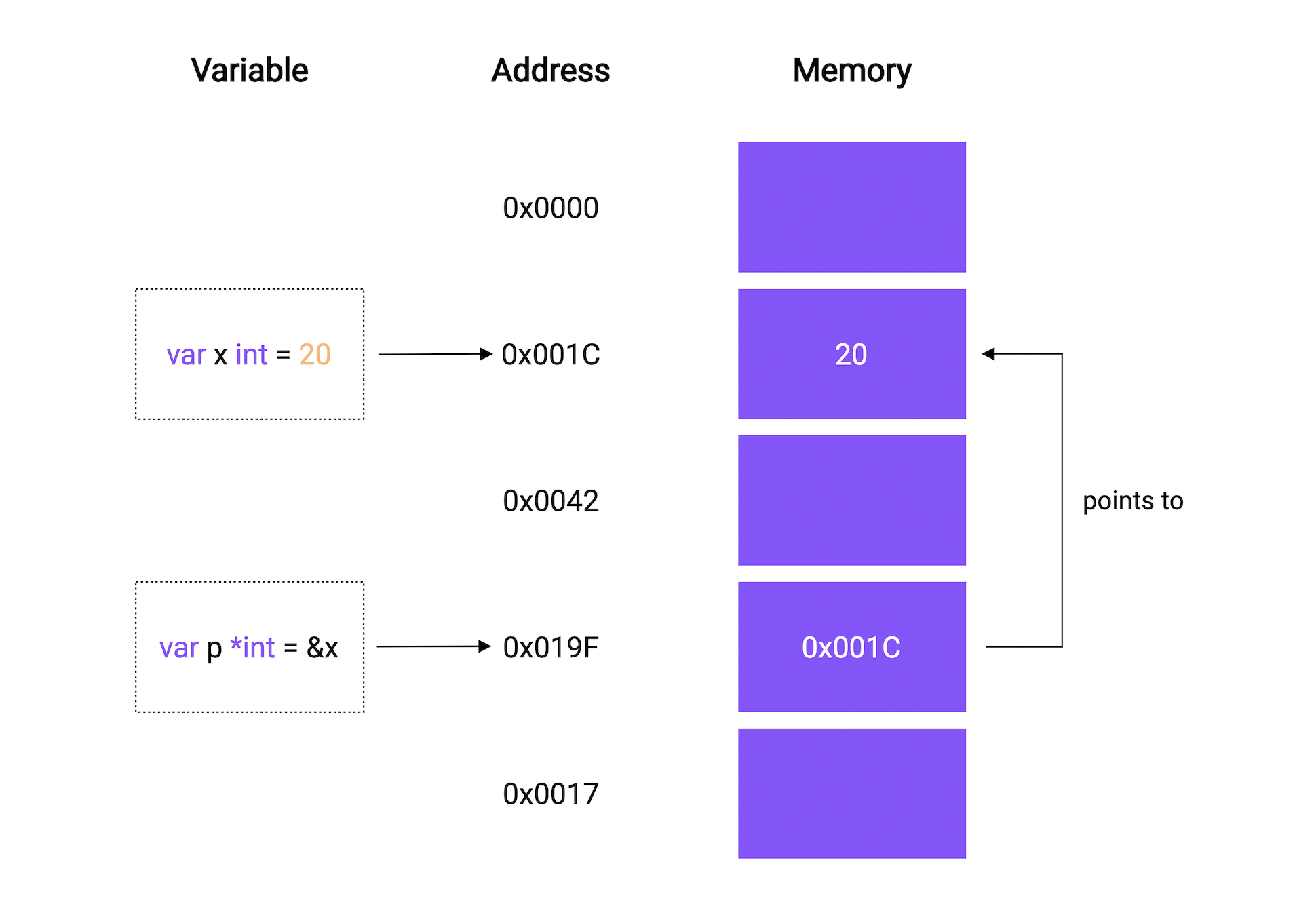
It can be used like this:
```go
var x *T
```
Where `T` is the type such as `int`, `string`, `float`, and so on.
Let's try a simple example and see it in action.
```go
package main
import "fmt"
func main() {
var p *int
fmt.Println(p)
}
```
```bash
$ go run main.go
nil
```
Hmm, this prints `nil`, but what is `nil`?
So nil is a predeclared identifier in Go that represents zero value for pointers, interfaces, channels, maps, and slices.
This is just like what we learned in the variables and datatypes section, where we saw that uninitialized `int` has a zero value of 0, a `bool` has false, and so on.
Okay, now let's assign a value to the pointer.
```go
package main
import "fmt"
func main() {
a := 10
var p *int = &a
fmt.Println("address:", p)
}
```
We use the `&` ampersand operator to refer to a variable's memory address.
```bash
$ go run main.go
0xc0000b8000
```
This must be the value of the memory address of the variable `a`.
## Dereferencing
We can also use the `*` asterisk operator to retrieve the value stored in the variable that the pointer points to. This is also called **dereferencing**.
For example, we can access the value of the variable `a` through the pointer `p` using that `*` asterisk operator.
```go
package main
import "fmt"
func main() {
a := 10
var p *int = &a
fmt.Println("address:", p)
fmt.Println("value:", *p)
}
```
```bash
$ go run main.go
address: 0xc000018030
value: 10
```
We can not only access it but change it as well through the pointer.
```go
package main
import "fmt"
func main() {
a := 10
var p *int = &a
fmt.Println("before", a)
fmt.Println("address:", p)
*p = 20
fmt.Println("after:", a)
}
```
```bash
$ go run main.go
before 10
address: 0xc000192000
after: 20
```
I think this is pretty neat!
## Pointers as function args
Pointers can also be used as arguments for a function when we need to pass some data by reference.
Here's an example:
```go
myFunction(&a)
...
func myFunction(ptr *int) {}
```
## New function
There's also another way to initialize a pointer. We can use the `new` function which takes a type as an argument, allocates enough memory to accommodate a value of that type, and returns a pointer to it.
Here's an example:
```go
package main
import "fmt"
func main() {
p := new(int)
*p = 100
fmt.Println("value", *p)
fmt.Println("address", p)
}
```
```bash
$ go run main.go
value 100
address 0xc000018030
```
## Pointer to a Pointer
Here's an interesting idea...can we create a pointer to a pointer? The answer is yes! Yes, we can.
```go
package main
import "fmt"
func main() {
p := new(int)
*p = 100
p1 := &p
fmt.Println("P value", *p, " address", p)
fmt.Println("P1 value", *p1, " address", p)
fmt.Println("Dereferenced value", **p1)
}
```
```bash
$ go run main.go
P value 100 address 0xc0000be000
P1 value 0xc0000be000 address 0xc0000be000
Dereferenced value 100
```
_Notice how the value of `p1` matches the address of `p`._
Also, it is important to know that pointers in Go do not support pointer arithmetic like in C or C++.
```go
p1 := p * 2 // Compiler Error: invalid operation
```
However, we can compare two pointers of the same type for equality using a `==` operator.
```go
p := &a
p1 := &a
fmt.Println(p == p1)
```
## But Why?
This brings us to the million-dollar question, why do we need pointers?
Well, there's no definite answer for that, and pointers are just another useful feature that helps us mutate our data efficiently without copying a large amount of data.
Lastly, I will add that if you are coming from a language with no notion of pointers, don't panic and try to form a mental model of how pointers work.
# Structs
In this tutorial, we will learn about structs.
So, a `struct` is a user-defined type that contains a collection of named fields. Basically, it is used to group related data together to form a single unit.
If you're coming from an objected-oriented background, think of structs as lightweight classes which that support composition but not inheritance.
## Defining
We can define a `struct` like this:
```go
type Person struct {}
```
We use the `type` keyword to introduce a new type, followed by the name and then the `struct` keyword to indicate that we're defining a struct.
Now, let's give it some fields:
```go
type Person struct {
FirstName string
LastName string
Age int
}
```
And, if the fields have the same type, we can collapse them as well.
```go
type Person struct {
FirstName, LastName string
Age int
}
```
## Declaring and initializing
Now that we have our struct, we can declare it the same as other datatypes.
```go
func main() {
var p1 Person
fmt.Println("Person 1:", p1)
}
```
```bash
$ go run main.go
Person 1: { 0}
```
As we can see, all the struct fields are initialized with their zero values. So the `FirstName` and `LastName` are set to `""` empty string and `Age` is set to 0.
We can also initialize it as _"struct literal"_.
```go
func main() {
var p1 Person
fmt.Println("Person 1:", p1)
var p2 = Person{FirstName: "Karan", LastName: "Pratap Singh", Age: 22}
fmt.Println("Person 2:", p2)
}
```
For readability, we can separate by new line but this will also require a trailing comma.
```go
var p2 = Person{
FirstName: "Karan",
LastName: "Pratap Singh",
Age: 22,
}
```
```bash
$ go run main.go
Person 1: { 0}
Person 2: {Karan Pratap Singh 22}
```
We can also initialize only a subset of fields.
```go
func main() {
var p1 Person
fmt.Println("Person 1:", p1)
var p2 = Person{
FirstName: "Karan",
LastName: "Pratap Singh",
Age: 22,
}
fmt.Println("Person 2:", p2)
var p3 = Person{
FirstName: "Tony",
LastName: "Stark",
}
fmt.Println("Person 3:", p3)
}
```
```bash
$ go run main.go
Person 1: { 0}
Person 2: {Karan Pratap Singh 22}
Person 3: {Tony Stark 0}
```
As we can see, the age field of person 3 has defaulted to the zero value.
## Without field name
Go structs also supports initialization without field names.
```go
func main() {
var p1 Person
fmt.Println("Person 1:", p1)
var p2 = Person{
FirstName: "Karan",
LastName: "Pratap Singh",
Age: 22,
}
fmt.Println("Person 2:", p2)
var p3 = Person{
FirstName: "Tony",
LastName: "Stark",
}
fmt.Println("Person 3:", p3)
var p4 = Person{"Bruce", "Wayne"}
fmt.Println("Person 4:", p4)
}
```
But here's the catch, we will need to provide all the values during the initialization or it will fail.
```bash
$ go run main.go
# command-line-arguments
./main.go:30:27: too few values in Person{...}
```
```go
var p4 = Person{"Bruce", "Wayne", 40}
fmt.Println("Person 4:", p4)
```
We can also declare an anonymous struct.
```go
func main() {
var p1 Person
fmt.Println("Person 1:", p1)
var p2 = Person{
FirstName: "Karan",
LastName: "Pratap Singh",
Age: 22,
}
fmt.Println("Person 2:", p2)
var p3 = Person{
FirstName: "Tony",
LastName: "Stark",
}
fmt.Println("Person 3:", p3)
var p4 = Person{"Bruce", "Wayne", 40}
fmt.Println("Person 4:", p4)
var a = struct {
Name string
}{"Golang"}
fmt.Println("Anonymous:", a)
}
```
## Accessing fields
Let's clean up our example a bit and see how we can access individual fields.
```go
func main() {
var p = Person{
FirstName: "Karan",
LastName: "Pratap Singh",
Age: 22,
}
fmt.Println("FirstName", p.FirstName)
}
```
We can also create a pointer to structs as well.
```go
func main() {
var p = Person{
FirstName: "Karan",
LastName: "Pratap Singh",
Age: 22,
}
ptr := &p
fmt.Println((*ptr).FirstName)
fmt.Println(ptr.FirstName)
}
```
Both statements are equal as in Go we don't need to explicitly dereference the pointer. We can also use the built-in `new` function.
```go
func main() {
p := new(Person)
p.FirstName = "Karan"
p.LastName = "Pratap Singh"
p.Age = 22
fmt.Println("Person", p)
}
```
```bash
$ go run main.go
Person &{Karan Pratap Singh 22}
```
As a side note, two structs are equal if all their corresponding fields are equal as well.
```go
func main() {
var p1 = Person{"a", "b", 20}
var p2 = Person{"a", "b", 20}
fmt.Println(p1 == p2)
}
```
```bash
$ go run main.go
true
```
## Exported fields
Now let's learn what is exported and unexported fields in a struct. Same as the rules for variables and functions, if a struct field is declared with a lower case identifier, it will not be exported and only be visible to the package it is defined in.
```go
type Person struct {
FirstName, LastName string
Age int
zipCode string
}
```
So, the `zipCode` field won't be exported. Also, the same goes for the `Person` struct, if we rename it as `person`, it won't be exported as well.
```go
type person struct {
FirstName, LastName string
Age int
zipCode string
}
```
## Embedding and composition
As we discussed earlier, Go doesn't necessarily support inheritance, but we can do something similar with embedding.
```go
type Person struct {
FirstName, LastName string
Age int
}
type SuperHero struct {
Person
Alias string
}
```
So, our new struct will have all the properties of the original struct. And it should behave the same as our normal struct.
```go
func main() {
s := SuperHero{}
s.FirstName = "Bruce"
s.LastName = "Wayne"
s.Age = 40
s.Alias = "batman"
fmt.Println(s)
}
```
```bash
$ go run main.go
{{Bruce Wayne 40} batman}
```
However, this is usually not recommended and in most cases, composition is preferred. So rather than embedding, we will just define it as a normal field.
```go
type Person struct {
FirstName, LastName string
Age int
}
type SuperHero struct {
Person Person
Alias string
}
```
Hence, we can rewrite our example with composition as well.
```go
func main() {
p := Person{"Bruce", "Wayne", 40}
s := SuperHero{p, "batman"}
fmt.Println(s)
}
```
```bash
$ go run main.go
{{Bruce Wayne 40} batman}
```
Again, there is no right or wrong here, but nonetheless, embedding comes in handy sometimes.
## Struct tags
A struct tag is just a tag that allows us to attach metadata information to the field which can be used for custom behavior using the `reflect` package.
Let's learn how we can define struct tags.
```go
type Animal struct {
Name string `key:"value1"`
Age int `key:"value2"`
}
```
You will often find tags in encoding packages, such as XML, JSON, YAML, ORMs, and Configuration management.
Here's a tags example for the JSON encoder.
```go
type Animal struct {
Name string `json:"name"`
Age int `json:"age"`
}
```
## Properties
Finally, let's discuss the properties of structs.
Structs are value types. When we assign one `struct` variable to another, a new copy of the `struct` is created and assigned.
Similarly, when we pass a `struct` to another function, the function gets its own copy of the `struct`.
```go
package main
import "fmt"
type Point struct {
X, Y float64
}
func main() {
p1 := Point{1, 2}
p2 := p1 // Copy of p1 is assigned to p2
p2.X = 2
fmt.Println(p1) // Output: {1 2}
fmt.Println(p2) // Output: {2 2}
}
```
Empty struct occupies zero bytes of storage.
```go
package main
import (
"fmt"
"unsafe"
)
func main() {
var s struct{}
fmt.Println(unsafe.Sizeof(s)) // Output: 0
}
```
# Methods
Let's talk about methods, sometimes also known as function receivers.
Technically, Go is not an object-oriented programming language. It doesn't have classes, objects, and inheritance.
However, Go has types. And, you can define **methods** on types.
A method is nothing but a function with a special _receiver_ argument. Let's see how we can declare methods.
```go
func (variable T) Name(params) (returnTypes) {}
```
The _receiver_ argument has a name and a type. It appears between the `func` keyword and the method name.
For example, let's define a `Car` struct.
```go
type Car struct {
Name string
Year int
}
```
Now, let us define a method like `IsLatest` which will tell us if a car was manufactured within the last 5 years.
```go
func (c Car) IsLatest() bool {
return c.Year >= 2017
}
```
As you can see, we can access the instance of `Car` using the receiver variable `c`. I like to think of it as `this` keyword from the object-oriented world.
Now we should be able to call this method after we initialize our struct, just like we do with classes in other languages.
```go
func main() {
c := Car{"Tesla", 2021}
fmt.Println("IsLatest", c.IsLatest())
}
```
## Methods with Pointer receivers
All the examples that we saw previously had a value receiver.
With a value receiver, the method operates on a copy of the value passed to it. Therefore, any modifications done to the receiver inside the methods are not visible to the caller.
For example, let's make another method called `UpdateName` which will update the name of the `Car`.
```go
func (c Car) UpdateName(name string) {
c.Name = name
}
```
Now, let's run this.
```go
func main() {
c := Car{"Tesla", 2021}
c.UpdateName("Toyota")
fmt.Println("Car:", c)
}
```
```bash
$ go run main.go
Car: {Tesla 2021}
```
Seems like the name wasn't updated, so now let's switch our receiver to pointer type and try again.
```go
func (c *Car) UpdateName(name string) {
c.Name = name
}
```
```bash
$ go run main.go
Car: {Toyota 2021}
```
As expected, methods with pointer receivers can modify the value to which the receiver points. Such modifications are visible to the caller of the method as well.
## Properties
Let's also see some properties of the methods!
- Go is smart enough to interpret our function call correctly, and hence, pointer receiver method calls are just syntactic sugar provided by Go for convenience.
```go
(&c).UpdateName(...)
```
- We can omit the variable part of the receiver as well if we're not using it.
```go
func (Car) UpdateName(...) {}
```
- Methods are not limited to structs but can also be used with non-struct types as well.
```go
package main
import "fmt"
type MyInt int
func (i MyInt) isGreater(value int) bool {
return i > MyInt(value)
}
func main() {
i := MyInt(10)
fmt.Println(i.isGreater(5))
}
```
## Why methods instead of functions?
So the question is, why use methods instead of functions?
As always, there's no particular answer for this, and in no way one is better than the other. Instead, they should be used appropriately when the situation arrives.
One thing I can think of right now is that methods can help us avoid naming conflicts.
Since a method is tied to a particular type, we can have the same method names for multiple receivers.
But in the end, it might just come down to preference, such as _"method calls are much easier to read and understand than function calls"_ or the other way around.
# Arrays and Slices
In this tutorial, we will learn about arrays and slices in Go.
## Arrays
### What is an array?
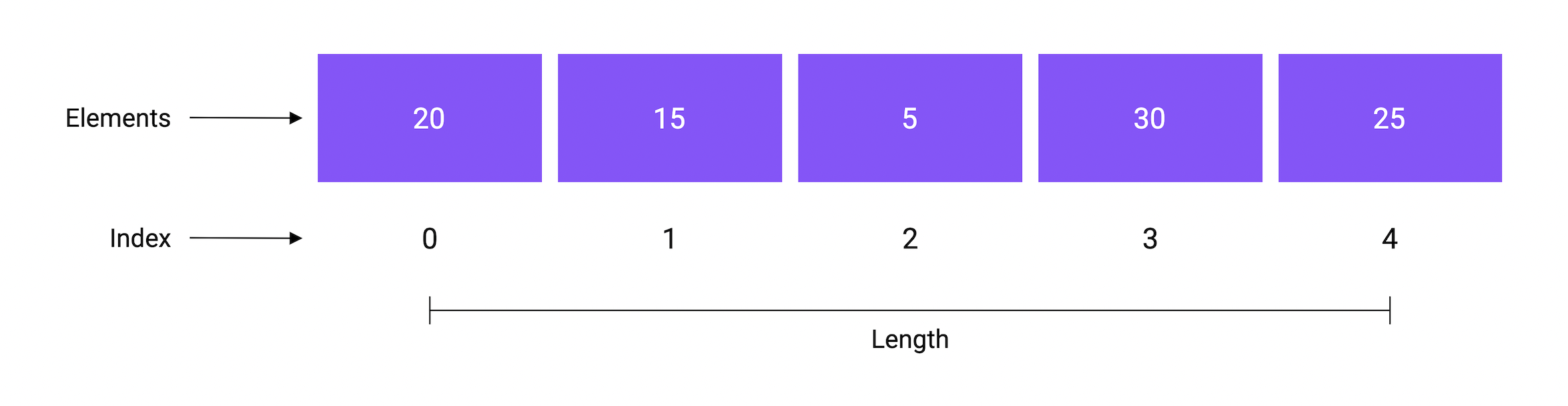
An array is a fixed-size collection of elements of the same type. The elements of the array are stored sequentially and can be accessed using their `index`.
### Declaration
We can declare an array as follows:
```go
var a [n]T
```
Here, `n` is the length and `T` can be any type like integer, string, or user-defined structs.
Now, let's declare an array of integers with length 4 and print it.
```go
func main() {
var arr [4]int
fmt.Println(arr)
}
```
```bash
$ go run main.go
[0 0 0 0]
```
By default, all the array elements are initialized with the zero value of the corresponding array type.
### Initialization
We can also initialize an array using an array literal.
```go
var a [n]T = [n]T{V1, V2, ... Vn}
```
```go
func main() {
var arr = [4]int{1, 2, 3, 4}
fmt.Println(arr)
}
```
```bash
$ go run main.go
[1 2 3 4]
```
We can even do a shorthand declaration.
```go
...
arr := [4]int{1, 2, 3, 4}
```
### Access
And similar to other languages, we can access the elements using the `index` as they're stored sequentially.
```go
func main() {
arr := [4]int{1, 2, 3, 4}
fmt.Println(arr[0])
}
```
```bash
$ go run main.go
1
```
### Iteration
Now, let's talk about iteration.
So, there are multiple ways to iterate over arrays.
The first one is using the for loop with the `len` function which gives us the length of the array.
```go
func main() {
arr := [4]int{1, 2, 3, 4}
for i := 0; i < len(arr); i++ {
fmt.Printf("Index: %d, Element: %d\n", i, arr[i])
}
}
```
```bash
$ go run main.go
Index: 0, Element: 1
Index: 1, Element: 2
Index: 2, Element: 3
Index: 3, Element: 4
```
Another way is to use the `range` keyword with the `for` loop.
```go
func main() {
arr := [4]int{1, 2, 3, 4}
for i, e := range arr {
fmt.Printf("Index: %d, Element: %d\n", i, e)
}
}
```
```bash
$ go run main.go
Index: 0, Element: 1
Index: 1, Element: 2
Index: 2, Element: 3
Index: 3, Element: 4
```
As we can see, our example works the same as before.
But the range keyword is quite versatile and can be used in multiple ways.
```go
for i, e := range arr {} // Normal usage of range
for _, e := range arr {} // Omit index with _ and use element
for i := range arr {} // Use index only
for range arr {} // Simply loop over the array
```
### Multi dimensional
All the arrays that we created so far are one-dimensional. We can also create multi-dimensional arrays in Go.
Let's take a look at an example:
```go
func main() {
arr := [2][4]int{
{1, 2, 3, 4},
{5, 6, 7, 8},
}
for i, e := range arr {
fmt.Printf("Index: %d, Element: %d\n", i, e)
}
}
```
```bash
$ go run main.go
Index: 0, Element: [1 2 3 4]
Index: 1, Element: [5 6 7 8]
```
We can also let the compiler infer the length of the array by using `...` ellipses instead of the length.
```go
func main() {
arr := [...][4]int{
{1, 2, 3, 4},
{5, 6, 7, 8},
}
for i, e := range arr {
fmt.Printf("Index: %d, Element: %d\n", i, e)
}
}
```
```bash
$ go run main.go
Index: 0, Element: [1 2 3 4]
Index: 1, Element: [5 6 7 8]
```
### Properties
Now let's talk about some properties of arrays.
The array's length is part of its type. So, the array `a` and `b` are completely distinct types, and we cannot assign one to the other.
This also means that we cannot resize an array, because resizing an array would mean changing its type.
```go
package main
func main() {
var a = [4]int{1, 2, 3, 4}
var b [2]int = a // Error, cannot use a (type [4]int) as type [2]int in assignment
}
```
Arrays in Go are value types unlike other languages like C, C++, and Java where arrays are reference types.
This means that when we assign an array to a new variable or pass an array to a function, the entire array is copied.
So, if we make any changes to this copied array, the original array won't be affected and will remain unchanged.
```go
package main
import "fmt"
func main() {
var a = [7]string{"Mon", "Tue", "Wed", "Thu", "Fri", "Sat", "Sun"}
var b = a // Copy of a is assigned to b
b[0] = "Monday"
fmt.Println(a) // Output: [Mon Tue Wed Thu Fri Sat Sun]
fmt.Println(b) // Output: [Monday Tue Wed Thu Fri Sat Sun]
}
```
## Slices
I know what you're thinking, arrays are useful but a bit inflexible due to the limitation caused by their fixed size.
This brings us to Slice, so what is a slice?
A Slice is a segment of an array. Slices build on arrays and provide more power, flexibility, and convenience.
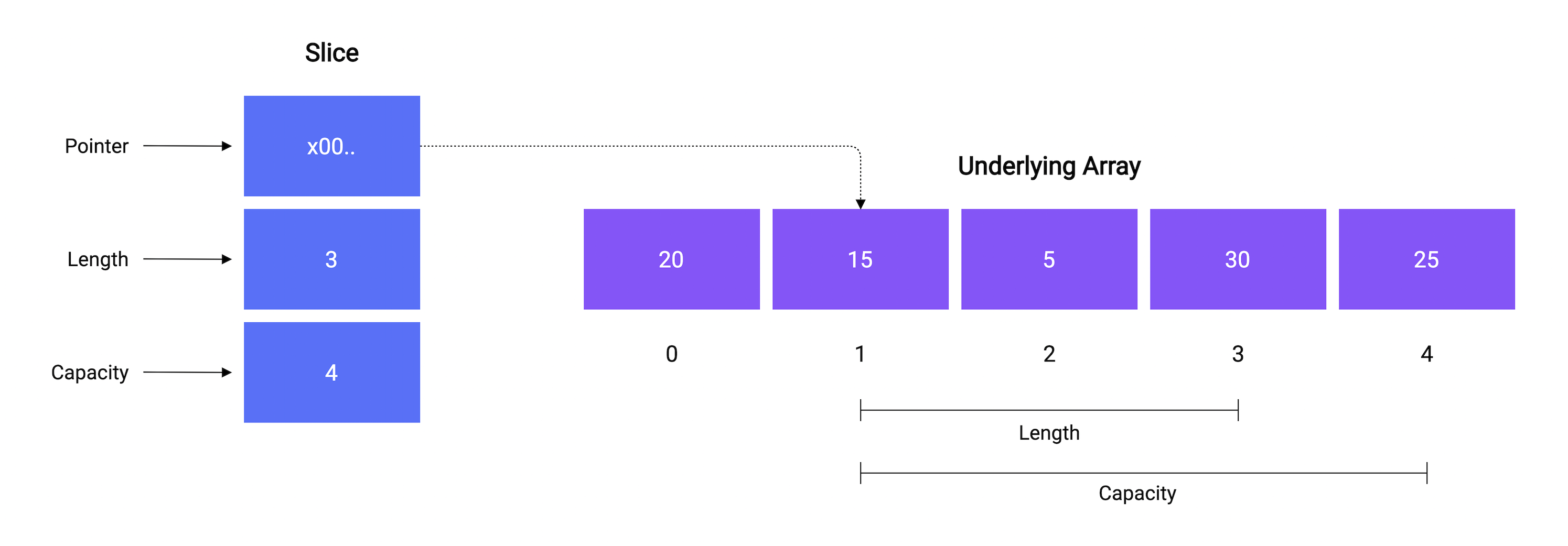
A slice consists of three things:
- A pointer reference to an underlying array.
- The length of the segment of the array that the slice contains.
- And, the capacity, which is the maximum size up to which the segment can grow.
Just like `len` function, we can determine the capacity of a slice using the built-in `cap` function. Here's an example:
```go
package main
import "fmt"
func main() {
a := [5]int{20, 15, 5, 30, 25}
s := a[1:4]
// Output: Array: [20 15 5 30 25], Length: 5, Capacity: 5
fmt.Printf("Array: %v, Length: %d, Capacity: %d\n", a, len(a), cap(a))
// Output: Slice [15 5 30], Length: 3, Capacity: 4
fmt.Printf("Slice: %v, Length: %d, Capacity: %d", s, len(s), cap(s))
}
```
Don't worry, we are going to discuss everything shown here in detail.
### Declaration
Let's see how we can declare a slice.
```go
var s []T
```
As we can see, we don't need to specify any length. Let's declare a slice of integers and see how it works.
```go
func main() {
var s []string
fmt.Println(s)
fmt.Println(s == nil)
}
```
```bash
$ go run main.go
[]
true
```
So, unlike arrays, the zero value of a slice is `nil`.
### Initialization
There are multiple ways to initialize our slice. One way is to use the built-in `make` function.
```go
make([]T, len, cap) []T
```
```go
func main() {
var s = make([]string, 0, 0)
fmt.Println(s)
}
```
```bash
$ go run main.go
[]
```
Similar to arrays, we can use the slice literal to initialize our slice.
```go
func main() {
var s = []string{"Go", "TypeScript"}
fmt.Println(s)
}
```
```bash
$ go run main.go
[Go TypeScript]
```
Another way is to create a slice from an array. Since a slice is a segment of an array, we can create a slice from index `low` to `high` as follows.
```go
a[low:high]
```
```go
func main() {
var a = [4]string{
"C++",
"Go",
"Java",
"TypeScript",
}
s1 := a[0:2] // Select from 0 to 2
s2 := a[:3] // Select first 3
s3 := a[2:] // Select last 2
fmt.Println("Array:", a)
fmt.Println("Slice 1:", s1)
fmt.Println("Slice 2:", s2)
fmt.Println("Slice 3:", s3)
}
```
```bash
$ go run main.go
Array: [C++ Go Java TypeScript]
Slice 1: [C++ Go]
Slice 2: [C++ Go Java]
Slice 3: [Java TypeScript]
```
_Missing low index implies 0 and missing high index implies the length of the underlying array (`len(a)`)._
The thing to note here is we can create a slice from other slices too and not just arrays.
```go
var a = []string{
"C++",
"Go",
"Java",
"TypeScript",
}
```
### Iteration
We can iterate over a slice in the same way you iterate over an array, by using the for loop with either `len` function or `range` keyword.
### Functions
So now, let's talk about built-in slice functions provided in Go.
**copy**
The `copy()` function copies elements from one slice to another. It takes 2 slices, a destination, and a source. It also returns the number of elements copied.
```go
func copy(dst, src []T) int
```
Let's see how we can use it.
```go
func main() {
s1 := []string{"a", "b", "c", "d"}
s2 := make([]string, len(s1))
e := copy(s2, s1)
fmt.Println("Src:", s1)
fmt.Println("Dst:", s2)
fmt.Println("Elements:", e)
}
```
```bash
$ go run main.go
Src: [a b c d]
Dst: [a b c d]
Elements: 4
```
As expected, our 4 elements from the source slice were copied to the destination slice.
**append**
Now, let's look at how we can append data to our slice using the built-in `append` function which appends new elements at the end of a given slice.
It takes a slice and a variable number of arguments. It then returns a new slice containing all the elements.
```go
append(slice []T, elems ...T) []T
```
Let's try it in an example by appending elements to our slice.
```go
func main() {
s1 := []string{"a", "b", "c", "d"}
s2 := append(s1, "e", "f")
fmt.Println("s1:", s1)
fmt.Println("s2:", s2)
}
```
```bash
$ go run main.go
s1: [a b c d]
s2: [a b c d e f]
```
As we can see, the new elements were appended and a new slice was returned.
But if the given slice doesn't have sufficient capacity for the new elements then a new underlying array is allocated with a bigger capacity.
All the elements from the underlying array of the existing slice are copied to this new array, and then the new elements are appended.
### Properties
Finally, let's discuss some properties of slices.
Slices are reference types, unlike arrays.
This means modifying the elements of a slice will modify the corresponding elements in the referenced array.
```go
package main
import "fmt"
func main() {
a := [7]string{"Mon", "Tue", "Wed", "Thu", "Fri", "Sat", "Sun"}
s := a[0:2]
s[0] = "Sun"
fmt.Println(a) // Output: [Sun Tue Wed Thu Fri Sat Sun]
fmt.Println(s) // Output: [Sun Tue]
}
```
Slices can be used with variadic types as well.
```go
package main
import "fmt"
func main() {
values := []int{1, 2, 3}
sum := add(values...)
fmt.Println(sum)
}
func add(values ...int) int {
sum := 0
for _, v := range values {
sum += v
}
return sum
}
```
# Maps
So, Go provides a built-in map type, and we'll learn how to use it.
But, the question is what are maps? And why do we need them?
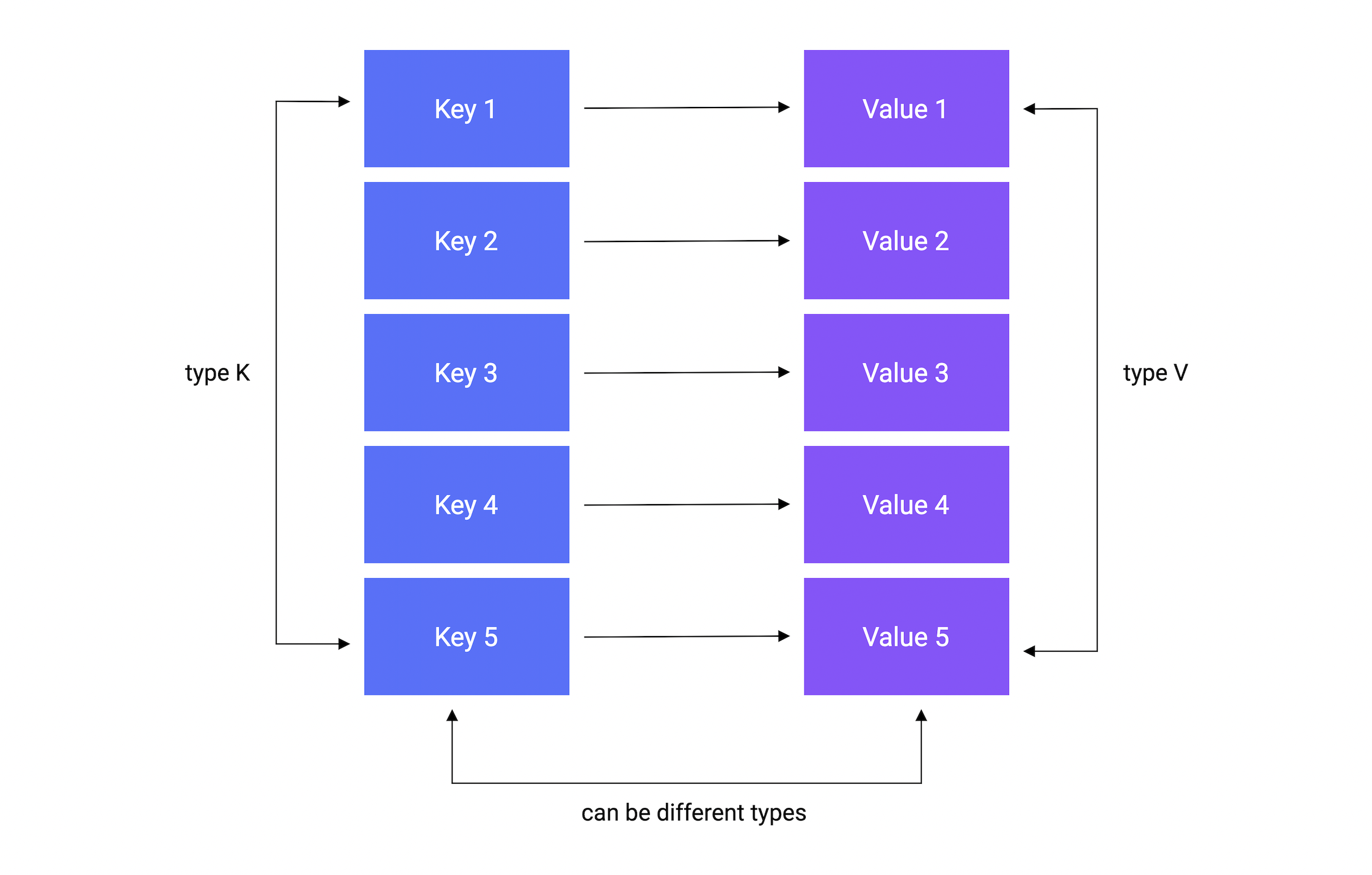
Well, A map is an unordered collection of key-value pairs. It maps keys to values. The keys are unique within a map while the values may not be.
It is used for fast lookups, retrieval, and deletion of data based on keys. It is one of the most used data structures.
## Declaration
Let's start with the declaration.
A map is declared using the following syntax:
```go
var m map[K]V
```
Where `K` is the key type and `V` is the value type.
For example, here's how we can declare a map of `string` keys to `int` values.
```go
func main() {
var m map[string]int
fmt.Println(m)
}
```
```bash
$ go run main.go
nil
```
As we can see, the zero value of a map is `nil`.
A `nil` map has no keys. Moreover, any attempt to add keys to a `nil` map will result in a runtime error.
## Initialization
There are multiple ways to initialize a map.
**make function**
We can use the built-in `make` function, which allocates memory for referenced data types and initializes their underlying data structures.
```go
func main() {
var m = make(map[string]int)
fmt.Println(m)
}
```
```bash
$ go run main.go
map[]
```
**map literal**
Another way is using a map literal.
```go
func main() {
var m = map[string]int{
"a": 0,
"b": 1,
}
fmt.Println(m)
}
```
_Note that the trailing comma is required._
```bash
$ go run main.go
map[a:0 b:1]
```
As always, we can use our custom types as well.
```go
type User struct {
Name string
}
func main() {
var m = map[string]User{
"a": User{"Peter"},
"b": User{"Seth"},
}
fmt.Println(m)
}
```
We can even remove the value type and Go will figure it out!
```go
var m = map[string]User{
"a": {"Peter"},
"b": {"Seth"},
}
```
```bash
$ go run main.go
map[a:{Peter} b:{Seth}]
```
## Add
Now, let's see how we can add a value to our map.
```go
func main() {
var m = map[string]User{
"a": {"Peter"},
"b": {"Seth"},
}
m["c"] = User{"Steve"}
fmt.Println(m)
}
```
```bash
$ go run main.go
map[a:{Peter} b:{Seth} c:{Steve}]
```
## Retrieve
We can also retrieve our values from the map using the key.
```go
...
c := m["c"]
fmt.Println("Key c:", c)
```
```bash
$ go run main.go
key c: {Steve}
```
**What if we use a key that is not present in the map?**
```go
...
d := m["d"]
fmt.Println("Key d:", d)
```
Yes, you guessed it! we will get the zero value of the map's value type.
```bash
$ go run main.go
Key c: {Steve}
Key d: {}
```
## Exists
When you retrieve the value assigned to a given key, it returns an additional boolean value as well. The boolean variable will be `true` if the key exists, and `false` otherwise.
Let's try this in an example:
```go
...
c, ok := m["c"]
fmt.Println("Key c:", c, ok)
d, ok := m["d"]
fmt.Println("Key d:", d, ok)
```
```bash
$ go run main.go
Key c: {Steve} Present: true
Key d: {} Present: false
```
## Update
We can also update the value for a key by simply re-assigning a key.
```go
...
m["a"] = "Roger"
```
```bash
$ go run main.go
map[a:{Roger} b:{Seth} c:{Steve}]
```
## Delete
Or, we can delete the key using the built-in `delete` function.
Here's how the syntax looks:
```go
...
delete(m, "a")
```
The first argument is the map, and the second is the key we want to delete.
The `delete()` function doesn't return any value. Also, it doesn't do anything if the key doesn't exist in the map.
```bash
$ go run main.go
map[a:{Roger} c:{Steve}]
```
## Iteration
Similar to arrays or slices, we can iterate over maps with the `range` keyword.
```go
package main
import "fmt"
func main() {
var m = map[string]User{
"a": {"Peter"},
"b": {"Seth"},
}
m["c"] = User{"Steve"}
for key, value := range m {
fmt.Println("Key: %s, Value: %v", key, value)
}
}
```
```bash
$ go run main.go
Key: c, Value: {Steve}
Key: a, Value: {Peter}
Key: b, Value: {Seth}
```
Note that a map is an unordered collection, and therefore the iteration order of a map is not guaranteed to be the same every time we iterate over it.
## Properties
Lastly, let's talk about map properties.
Maps are reference types, which means when we assign a map to a new variable, they both refer to the same underlying data structure.
Therefore, changes done by one variable will be visible to the other.
```go
package main
import "fmt"
type User struct {
Name string
}
func main() {
var m1 = map[string]User{
"a": {"Peter"},
"b": {"Seth"},
}
m2 := m1
m2["c"] = User{"Steve"}
fmt.Println(m1) // Output: map[a:{Peter} b:{Seth} c:{Steve}]
fmt.Println(m2) // Output: map[a:{Peter} b:{Seth} c:{Steve}]
}
```
# Interfaces
In this section, let's talk about the interfaces.
## What is an interface?
So, an interface in Go is an **abstract type** that is defined using a set of method signatures. The interface defines the **behavior** for similar types of objects.
_Here, **behavior** is a key term that we will discuss shortly._
Let's take a look at an example to understand this better.
One of the best real-world examples of interfaces is the power socket. Imagine that we need to connect different devices to the power socket.
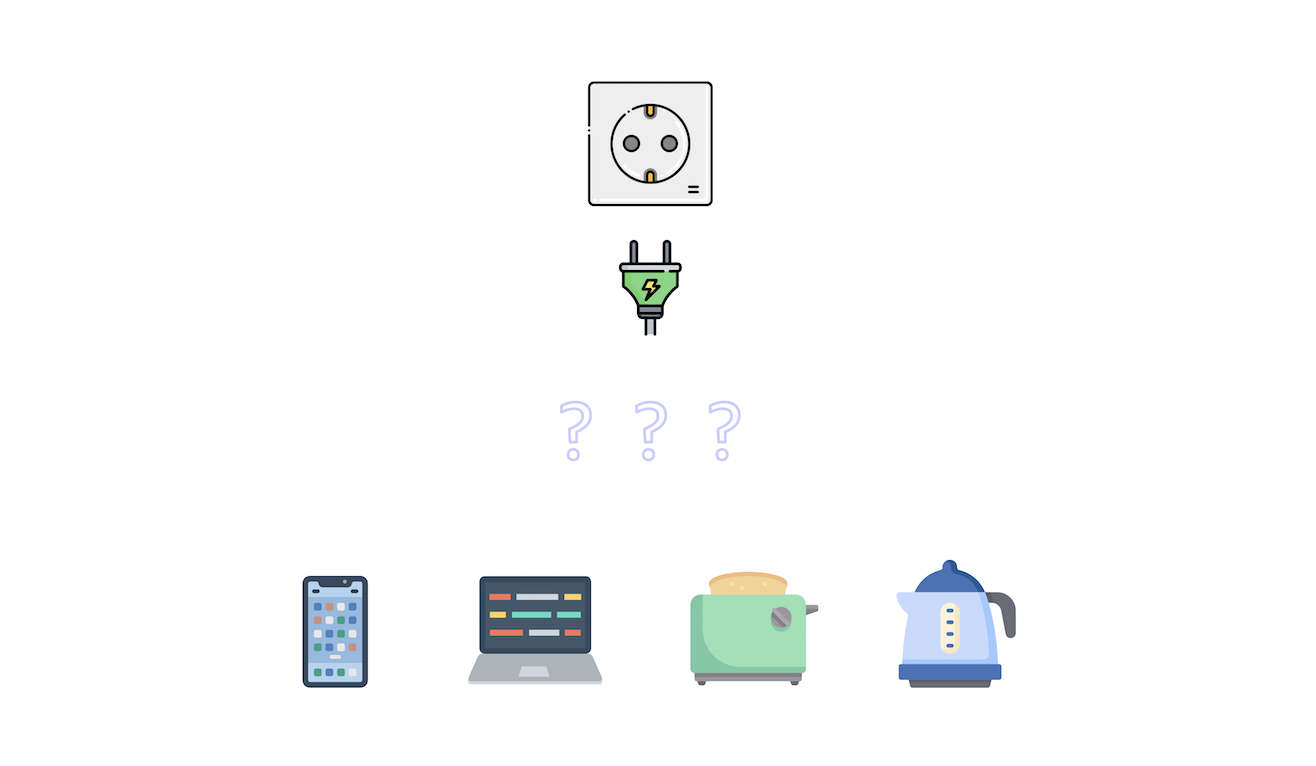
Let's try to implement this. Here are the device types we will be using.
```go
type mobile struct {
brand string
}
type laptop struct {
cpu string
}
type toaster struct {
amount int
}
type kettle struct {
quantity string
}
type socket struct{}
```
Now, let's define a `Draw` method on a type, let's say `mobile`. Here we will simply print the properties of the type.
```go
func (m mobile) Draw(power int) {
fmt.Printf("%T -> brand: %s, power: %d", m, m.brand, power)
}
```
Great, now we will define the `Plug` method on the `socket` type which accepts our `mobile` type as an argument.
```go
func (socket) Plug(device mobile, power int) {
device.Draw(power)
}
```
Let's try to _"connect"_ or _"plug in"_ the `mobile` type to our `socket` type in the `main` function.
```go
package main
import "fmt"
func main() {
m := mobile{"Apple"}
s := socket{}
s.Plug(m, 10)
}
```
And if we run this we'll see the following.
```bash
$ go run main.go
main.mobile -> brand: Apple, power: 10
```
This is interesting, but let's say now we want to connect our `laptop` type.
```go
package main
import "fmt"
func main() {
m := mobile{"Apple"}
l := laptop{"Intel i9"}
s := socket{}
s.Plug(m, 10)
s.Plug(l, 50) // Error: cannot use l as mobile value in argument
}
```
As we can see, this will throw an error.
**What should we do now? Define another method? Such as `PlugLaptop`?**
Sure, but then every time we add a new device type we will need to add a new method to the socket type as well and that's not ideal.
This is where the `interface` comes in. Essentially, we want to define a **contract** that, in the future, must be implemented.
We can simply define an interface such as `PowerDrawer` and use it in our `Plug` function to allow any device that satisfies the criteria, which is that the type must have a `Draw` method matching the signature that the interface requires.
And anyways, the socket doesn't need to know anything about our device and can simply call the `Draw` method.
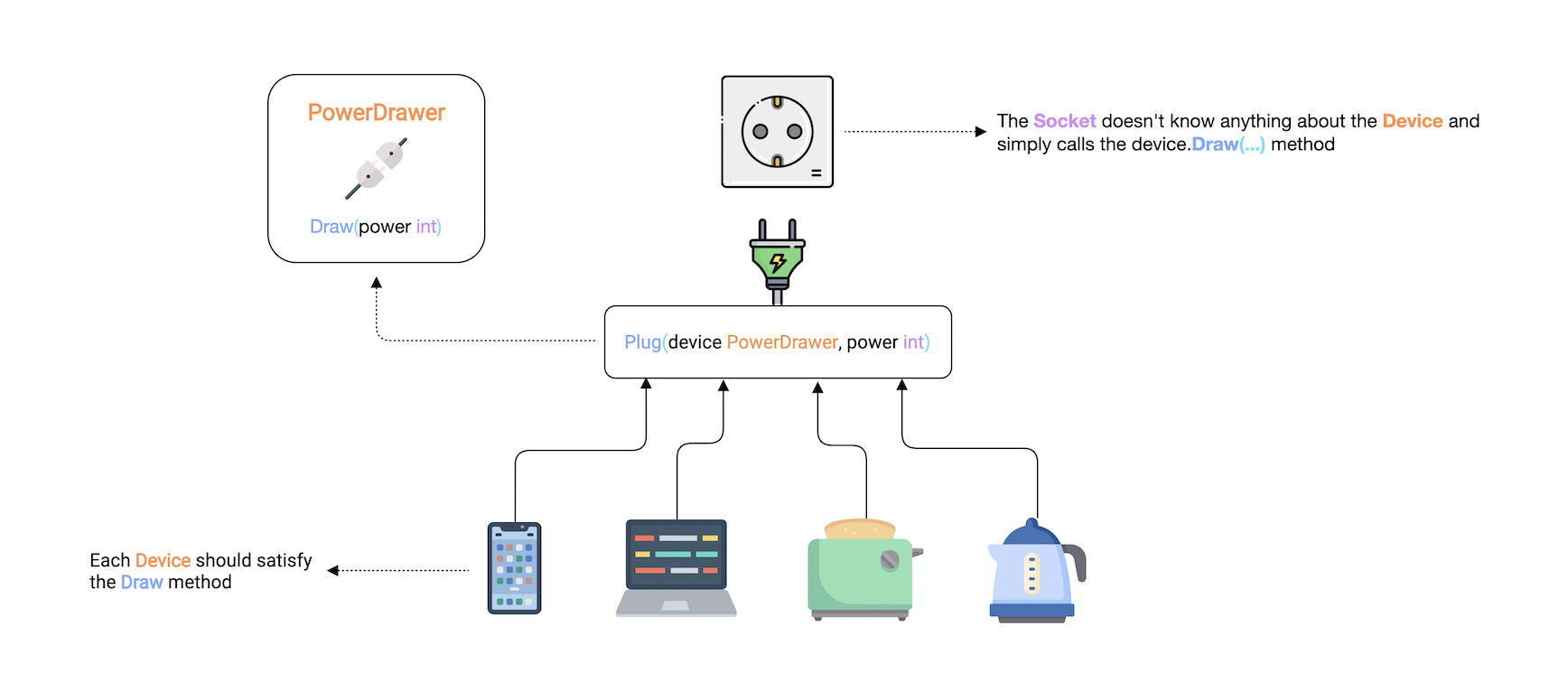
Now let's try to implement our `PowerDrawer` interface. Here's how it will look.
The convention is to use **"-er"** as a suffix in the name. And as we discussed earlier, an interface should only describe the **expected behavior**. Which in our case is the `Draw` method.
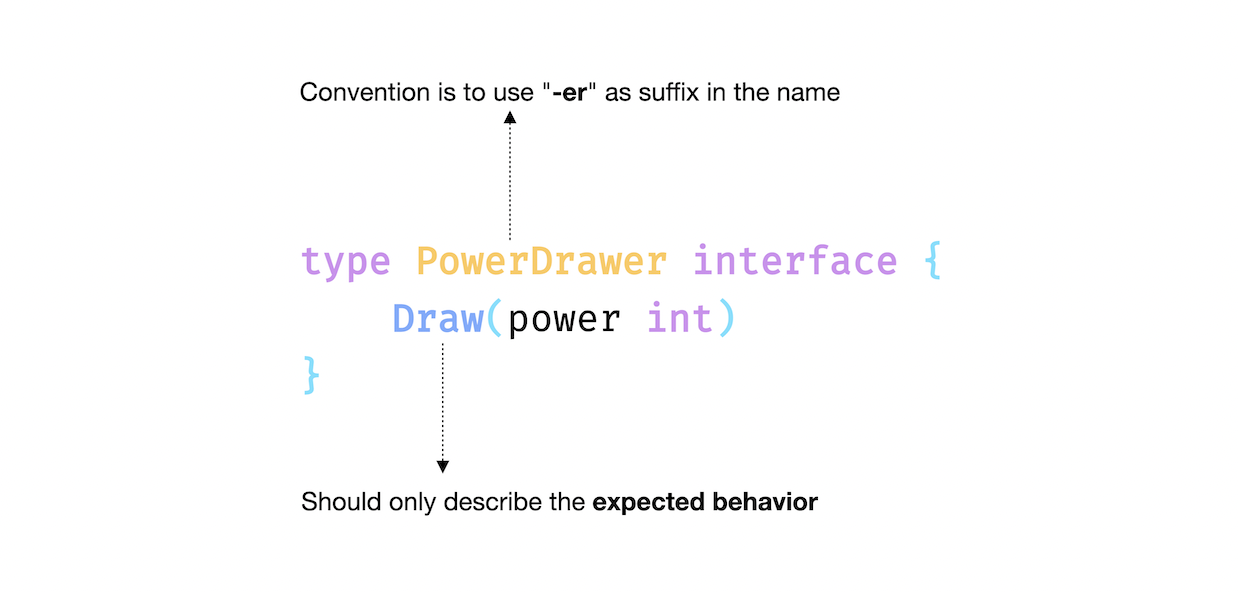
```go
type PowerDrawer interface {
Draw(power int)
}
```
Now, we need to update our `Plug` method to accept a device that implements the `PowerDrawer` interface as an argument.
```go
func (socket) Plug(device PowerDrawer, power int) {
device.Draw(power)
}
```
And to satisfy the interface, we can simply add `Draw` methods to all the device types.
```go
type mobile struct {
brand string
}
func (m mobile) Draw(power int) {
fmt.Printf("%T -> brand: %s, power: %d\n", m, m.brand, power)
}
type laptop struct {
cpu string
}
func (l laptop) Draw(power int) {
fmt.Printf("%T -> cpu: %s, power: %d\n", l, l.cpu, power)
}
type toaster struct {
amount int
}
func (t toaster) Draw(power int) {
fmt.Printf("%T -> amount: %d, power: %d\n", t, t.amount, power)
}
type kettle struct {
quantity string
}
func (k kettle) Draw(power int) {
fmt.Printf("%T -> quantity: %s, power: %d\n", k, k.quantity, power)
}
```
Now, we can connect all our devices to the socket with the help of our interface!
```go
func main() {
m := mobile{"Apple"}
l := laptop{"Intel i9"}
t := toaster{4}
k := kettle{"50%"}
s := socket{}
s.Plug(m, 10)
s.Plug(l, 50)
s.Plug(t, 30)
s.Plug(k, 25)
}
```
And it works just as we expected.
```bash
$ go run main.go
main.mobile -> brand: Apple, power: 10
main.laptop -> cpu: Intel i9, power: 50
main.toaster -> amount: 4, power: 30
main.kettle -> quantity: Half Empty, power: 25
```
**But why is this considered such a powerful concept?**
Well, an interface can help us decouple our types. For example, because we have the interface, we don't need to update our `socket` implementation. We can just define a new device type with a `Draw` method.
Unlike other languages, Go Interfaces are implemented **implicitly**, so we don't need something like an `implements` keyword. This means that a type satisfies an interface automatically when it has _"all the methods"_ of the interface.
## Empty Interface
Next, let's talk about the empty interface. An empty interface can take on a value of any type.
Here's how we declare it.
```go
var x interface{}
```
**But why do we need it?**
Empty interfaces can be used to handle values of unknown types.
Some examples are:
- Reading heterogeneous data from an API.
- Variables of an unknown type, like in the `fmt.Println` function.
To use a value of type empty `interface{}`, we can use _type assertion_ or a _type switch_ to determine the type of the value.
## Type Assertion
A _type assertion_ provides access to an interface value's underlying concrete value.
For example:
```go
func main() {
var i interface{} = "hello"
s := i.(string)
fmt.Println(s)
}
```
This statement asserts that the interface value holds a concrete type and assigns the underlying type value to the variable.
We can also test whether an interface value holds a specific type.
A type assertion can return two values:
- The first one is the underlying value.
- The second is a boolean value that reports whether the assertion succeeded.
```go
s, ok := i.(string)
fmt.Println(s, ok)
```
This can help us test whether an interface value holds a specific type or not.
In a way, this is similar to how we read values from a map.
And If this is not the case then, `ok` will be false and the value will be the zero value of the type, and no panic will occur.
```go
f, ok := i.(float64)
fmt.Println(f, ok)
```
But if the interface does not hold the type, the statement will trigger a panic.
```go
f = i.(float64)
fmt.Println(f) // Panic!
```
```bash
$ go run main.go
hello
hello true
0 false
panic: interface conversion: interface {} is string, not float64
```
## Type Switch
Here, a `switch` statement can be used to determine the type of a variable of type empty `interface{}`.
```go
var t interface{}
t = "hello"
switch t := t.(type) {
case string:
fmt.Printf("string: %s\n", t)
case bool:
fmt.Printf("boolean: %v\n", t)
case int:
fmt.Printf("integer: %d\n", t)
default:
fmt.Printf("unexpected: %T\n", t)
}
```
And if we run this, we can verify that we have a `string` type.
```bash
$ go run main.go
string: hello
```
## Properties
Let's discuss some properties of interfaces.
### Zero value
The zero value of an interface is `nil`.
```go
package main
import "fmt"
type MyInterface interface {
Method()
}
func main() {
var i MyInterface
fmt.Println(i) // Output:
}
```
### Embedding
We can embed interfaces like structs. For example:
```go
type interface1 interface {
Method1()
}
type interface2 interface {
Method2()
}
type interface3 interface {
interface1
interface2
}
```
### Values
Interface values are comparable.
```go
package main
import "fmt"
type MyInterface interface {
Method()
}
type MyType struct{}
func (MyType) Method() {}
func main() {
t := MyType{}
var i MyInterface = MyType{}
fmt.Println(t == i)
}
```
### Interface Values
Under the hood, an interface value can be thought of as a tuple consisting of a value and a concrete type.
```go
package main
import "fmt"
type MyInterface interface {
Method()
}
type MyType struct {
property int
}
func (MyType) Method() {}
func main() {
var i MyInterface
i = MyType{10}
fmt.Printf("(%v, %T)\n", i, i) // Output: ({10}, main.MyType)
}
```
With that, we covered interfaces in Go.
It's a really powerful feature, but remember, _"Bigger the interface, the weaker the abstraction"_ - Rob Pike.
# Errors
In this tutorial, let's talk about error handling.
Notice how I said errors and not exceptions as there is no exception handling in Go.
Instead, we can just return a built-in `error` type which is an interface type.
```go
type error interface {
Error() string
}
```
We will circle back to this shortly. First, let's try to understand the basics.
So, let's declare a simple `Divide` function which, as the name suggests, will divide integer `a` by `b`.
```go
func Divide(a, b int) int {
return a/b
}
```
Great. Now, we want to return an error, let's say, to prevent the division by zero. This brings us to error construction.
## Constructing Errors
There are multiple ways to do this, but we will look at the two most common ones.
### `errors` package
The first is by using the `New` function provided by the `errors` package.
```go
package main
import "errors"
func main() {}
func Divide(a, b int) (int, error) {
if b == 0 {
return 0, errors.New("cannot divide by zero")
}
return a/b, nil
}
```
Notice, how we return an `error` with the result. And if there is no error we simply return `nil` as it is the zero value of an error because after all, it's an interface.
But how do we handle it? So, for that, let's call the `Divide` function in our `main` function.
```go
package main
import (
"errors"
"fmt"
)
func main() {
result, err := Divide(4, 0)
if err != nil {
fmt.Println(err)
// Do something with the error
return
}
fmt.Println(result)
// Use the result
}
func Divide(a, b int) (int, error) {...}
```
```bash
$ go run main.go
cannot divide by zero
```
As you can see, we simply check if the error is `nil` and build our logic accordingly. This is considered quite idiomatic in Go and you will see this being used a lot.
Another way to construct our errors is by using the `fmt.Errorf` function.
This function is similar to `fmt.Sprintf` and it lets us format our error. But instead of returning a string, it returns an error.
It is often used to add some context or detail to our errors.
```go
...
func Divide(a, b int) (int, error) {
if b == 0 {
return 0, fmt.Errorf("cannot divide %d by zero", a)
}
return a/b, nil
}
```
And it should work similarly.
```bash
$ go run main.go
cannot divide 4 by zero
```
### Sentinel Errors
Another important technique in Go is defining expected Errors so they can be checked explicitly in other parts of the code. These are sometimes referred to as sentinel errors.
```go
package main
import (
"errors"
"fmt"
)
var ErrDivideByZero = errors.New("cannot divide by zero")
func main() {...}
func Divide(a, b int) (int, error) {
if b == 0 {
return 0, ErrDivideByZero
}
return a/b, nil
}
```
In Go, it is considered conventional to prefix the variable with `Err`. For example, `ErrNotFound`.
**But what's the point?**
So, this becomes useful when we need to execute a different branch of code if a certain kind of error is encountered.
For example, now we can check explicitly which error occurred using the `errors.Is` function.
```go
package main
import (
"errors"
"fmt"
)
func main() {
result, err := Divide(4, 0)
if err != nil {
switch {
case errors.Is(err, ErrDivideByZero):
fmt.Println(err)
// Do something with the error
default:
fmt.Println("no idea!")
}
return
}
fmt.Println(result)
// Use the result
}
func Divide(a, b int) (int, error) {...}
```
```bash
$ go run main.go
cannot divide by zero
```
## Custom Errors
This strategy covers most of the error handling use cases. But sometimes we need additional functionalities such as dynamic values inside of our errors.
Earlier, we saw that `error` is just an interface. So basically, anything can be an `error` as long as it implements the `Error()` method which returns an error message as a string.
So, let's define our custom `DivisionError` struct which will contain an error code and a message.
```go
package main
import (
"errors"
"fmt"
)
type DivisionError struct {
Code int
Msg string
}
func (d DivisionError) Error() string {
return fmt.Sprintf("code %d: %s", d.Code, d.Msg)
}
func main() {...}
func Divide(a, b int) (int, error) {
if b == 0 {
return 0, DivisionError{
Code: 2000,
Msg: "cannot divide by zero",
}
}
return a/b, nil
}
```
Here, we will use `errors.As` instead of `errors.Is` function to convert the error to the correct type.
```go
func main() {
result, err := Divide(4, 0)
if err != nil {
var divErr DivisionError
switch {
case errors.As(err, &divErr):
fmt.Println(divErr)
// Do something with the error
default:
fmt.Println("no idea!")
}
return
}
fmt.Println(result)
// Use the result
}
func Divide(a, b int) (int, error) {...}
```
```bash
$ go run main.go
code 2000: cannot divide by zero
```
**But what's the difference between `errors.Is` and `errors.As`?**
The difference is that this function checks whether the error has a specific type, unlike the [`Is`](https://pkg.go.dev/errors#Is) function, which examines if it is a particular error object.
We can also use type assertions but it's not preferred.
```go
func main() {
result, err := Divide(4, 0)
if e, ok := err.(DivisionError); ok {
fmt.Println(e.Code, e.Msg) // Output: 2000 cannot divide by zero
return
}
fmt.Println(result)
}
```
Lastly, I will say that error handling in Go is quite different compared to the traditional `try/catch` idiom in other languages. But it is very powerful as it encourages the developer to actually handle the error in an explicit way, which improves readability as well.
# Panic and Recover
So earlier, we learned that the idiomatic way of handling abnormal conditions in a Go program is using errors. While errors are sufficient for most cases, there are some situations where the program cannot continue.
In those cases, we can use the built-in `panic` function.
## Panic
```go
func panic(interface{})
```
The panic is a built-in function that stops the normal execution of the current `goroutine`. When a function calls `panic`, the normal execution of the function stops immediately and the control is returned to the caller. This is repeated until the program exits with the panic message and stack trace.
_Note: We will discuss `goroutines` later in the course._
So, let's see how we can use the `panic` function.
```go
package main
func main() {
WillPanic()
}
func WillPanic() {
panic("Woah")
}
```
And if we run this, we can see `panic` in action.
```bash
$ go run main.go
panic: Woah
goroutine 1 [running]:
main.WillPanic(...)
.../main.go:8
main.main()
.../main.go:4 +0x38
exit status 2
```
As expected, our program printed the panic message, followed by the stack trace, and then it was terminated.
So, the question is, what to do when an unexpected panic happens?
## Recover
Well, it is possible to regain control of a panicking program using the built-in `recover` function, along with the `defer` keyword.
```go
func recover() interface{}
```
Let's try an example by creating a `handlePanic` function. And then, we can call it using `defer`.
```go
package main
import "fmt"
func main() {
WillPanic()
}
func handlePanic() {
data := recover()
fmt.Println("Recovered:", data)
}
func WillPanic() {
defer handlePanic()
panic("Woah")
}
```
```bash
$ go run main.go
Recovered: Woah
```
As we can see, our panic was recovered and now our program can continue execution.
Lastly, I will mention that `panic` and `recover` can be considered similar to the `try/catch` idiom in other languages. But one important factor is that we should avoid panic and recover and use [errors](https://karanpratapsingh.com/courses/go/errors) when possible.
If so, then this brings us to the question, when should we use `panic`?
## Use Cases
There are two valid use cases for `panic`:
- **An unrecoverable error**
Which can be a situation where the program cannot simply continue its execution.
For example, reading a configuration file which is important to start the program, as there is nothing else to do if the file read itself fails.
- **Developer error**
This is the most common situation. For example, dereferencing a pointer when the value is `nil` will cause a panic.
# Testing
In this tutorial, we will talk about testing in Go. So, let's start using a simple example.
We have created a `math` package that contains an `Add` function Which as the name suggests, adds two integers.
```go
package math
func Add(a, b int) int {
return a + b
}
```
It's being used in our `main` package like this.
```go
package main
import (
"example/math"
"fmt"
)
func main() {
result := math.Add(2, 2)
fmt.Println(result)
}
```
And, if we run this, we should see the result.
```bash
$ go run main.go
4
```
Now, we want to test our `Add` function. So, in Go, we declare test files with `_test` suffix in the file name. So for our `add.go`, we will create a test as `add_test.go`. Our project structure should look like this.
```bash
.
├── go.mod
├── main.go
└── math
├── add.go
└── add_test.go
```
We will start by using a `math_test` package, and importing the `testing` package from the standard library. That's right! Testing is built into Go, unlike many other languages.
But wait...why do we need to use `math_test` as our package, can't we just use the same `math` package?
Well yes, we can write our test in the same package if we wanted, but I personally think doing this in a separate package helps us write tests in a more decoupled way.
Now, we can create our `TestAdd` function. It will take an argument of type `testing.T` which will provide us with helpful methods.
```go
package math_test
import "testing"
func TestAdd(t *testing.T) {}
```
Before we add any testing logic, let's try to run it. But this time, we cannot use `go run` command, instead, we will use the `go test` command.
```bash
$ go test ./math
ok example/math 0.429s
```
Here, we will have our package name which is `math`, but we can also use the relative path `./...` to test all packages.
```bash
$ go test ./...
? example [no test files]
ok example/math 0.348s
```
And if Go doesn't find any test in a package, it will let us know.
Perfect, let's write some test code. To do this, we will check our result with an expected value and if they do not match, we can use the `t.Fail` method to fail the test.
```go
package math_test
import "testing"
func TestAdd(t *testing.T) {
got := math.Add(1, 1)
expected := 2
if got != expected {
t.Fail()
}
}
```
Great! Our test seems to have passed.
```bash
$ go test math
ok example/math 0.412s
```
Let's also see what happens if we fail the test, for that, we can simply change our expected result.
```go
package math_test
import "testing"
func TestAdd(t *testing.T) {
got := math.Add(1, 1)
expected := 3
if got != expected {
t.Fail()
}
}
```
```bash
$ go test ./math
ok example/math (cached)
```
If you see this, don't worry. For optimization, our tests are cached. We can use the `go clean` command to clear our cache and then re-run the test.
```bash
$ go clean -testcache
$ go test ./math
--- FAIL: TestAdd (0.00s)
FAIL
FAIL example/math 0.354s
FAIL
```
So, this is what a test failure will look like.
## Table driven tests
This brings us to table-driven tests. But what exactly are they?
So earlier, we had function arguments and expected variables which we compared to determine if our tests passed or fail. But what if we defined all that in a slice and iterate over that? This will make our tests a little bit more flexible and help us run multiple cases easily.
Don't worry, we will learn this by example. So we will start by defining our `addTestCase` struct.
```go
package math_test
import (
"example/math"
"testing"
)
type addTestCase struct {
a, b, expected int
}
var testCases = []addTestCase{
{1, 1, 3},
{25, 25, 50},
{2, 1, 3},
{1, 10, 11},
}
func TestAdd(t *testing.T) {
for _, tc := range testCases {
got := math.Add(tc.a, tc.b)
if got != tc.expected {
t.Errorf("Expected %d but got %d", tc.expected, got)
}
}
}
```
Notice, how we declared `addTestCase` with a lower case. That's right we don't want to export it as it's not useful outside our testing logic. Let's run our test.
```bash
$ go run main.go
--- FAIL: TestAdd (0.00s)
add_test.go:25: Expected 3 but got 2
FAIL
FAIL example/math 0.334s
FAIL
```
Seems like our tests broke, let's fix them by updating our test cases.
```go
var testCases = []addTestCase{
{1, 1, 2},
{25, 25, 50},
{2, 1, 3},
{1, 10, 11},
}
```
Perfect, it's working!
```bash
$ go run main.go
ok example/math 0.589s
```
## Code coverage
Finally, let's talk about code coverage. When writing tests, it is often important to know how much of your actual code the tests cover. This is generally referred to as code coverage.
To calculate and export the coverage for our test, we can simply use the `-coverprofile` argument with the `go test` command.
```bash
$ go test ./math -coverprofile=coverage.out
ok example/math 0.385s coverage: 100.0% of statements
```
Seems like we have great coverage. Let's also check the report using the `go tool cover` command which gives us a detailed report.
```bash
$ go tool cover -html=coverage.out
```
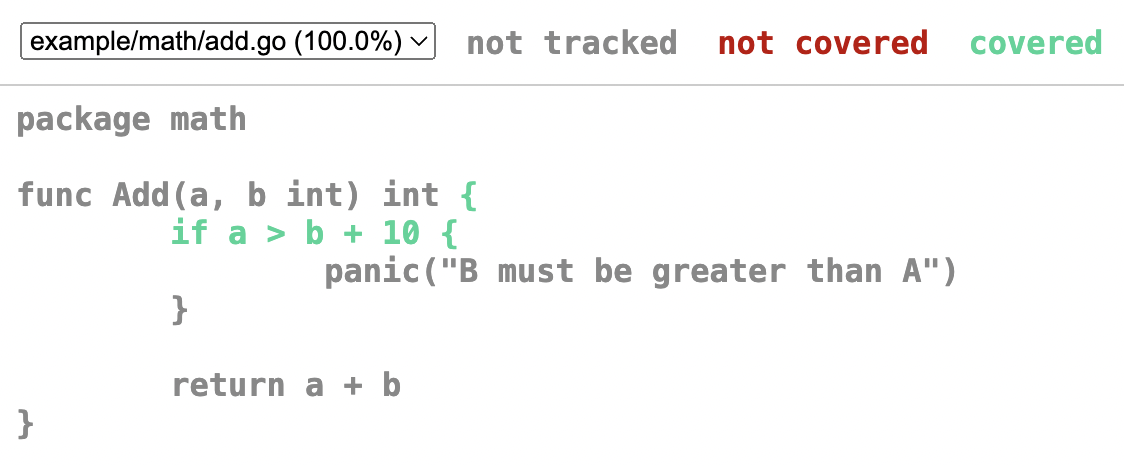
As we can see, this is a much more readable format. And best of all, it is built right into standard tooling.
## Fuzz testing
Lastly, let's look at fuzz testing which was introduced in Go version 1.18.
Fuzzing is a type of automated testing that continuously manipulates inputs to a program to find bugs.
Go fuzzing uses coverage guidance to intelligently walk through the code being fuzzed to find and report failures to the user.
Since it can reach edge cases that humans often miss, fuzz testing can be particularly valuable for finding bugs and security exploits.
Let's try an example:
```go
func FuzzTestAdd(f *testing.F) {
f.Fuzz(func(t *testing.T, a, b int) {
math.Add(a , b)
})
}
```
If we run this, we'll see that it'll automatically create test cases. Because our `Add` function is quite simple, tests will pass.
```bash
$ go test -fuzz FuzzTestAdd example/math
fuzz: elapsed: 0s, gathering baseline coverage: 0/192 completed
fuzz: elapsed: 0s, gathering baseline coverage: 192/192 completed, now fuzzing with 8 workers
fuzz: elapsed: 3s, execs: 325017 (108336/sec), new interesting: 11 (total: 202)
fuzz: elapsed: 6s, execs: 680218 (118402/sec), new interesting: 12 (total: 203)
fuzz: elapsed: 9s, execs: 1039901 (119895/sec), new interesting: 19 (total: 210)
fuzz: elapsed: 12s, execs: 1386684 (115594/sec), new interesting: 21 (total: 212)
PASS
ok foo 12.692s
```
But if we update our `Add` function with a random edge case such that the program will panic if `b + 10` is greater than `a`.
```go
func Add(a, b int) int {
if a > b + 10 {
panic("B must be greater than A")
}
return a + b
}
```
And if we re-run the test, this edge case will be caught by fuzz testing.
```bash
$ go test -fuzz FuzzTestAdd example/math
warning: starting with empty corpus
fuzz: elapsed: 0s, execs: 0 (0/sec), new interesting: 0 (total: 0)
fuzz: elapsed: 0s, execs: 1 (25/sec), new interesting: 0 (total: 0)
--- FAIL: FuzzTestAdd (0.04s)
--- FAIL: FuzzTestAdd (0.00s)
testing.go:1349: panic: B is greater than A
```
I think this is a really cool feature of Go 1.18. You can learn more about fuzz testing from the [official Go blog](https://go.dev/doc/fuzz).
# Generics
In this section, we will learn about Generics which is a much awaited feature that was released with Go version 1.18.
## What are Generics?
Generics means parameterized types. Put simply, generics allow programmers to write code where the type can be specified later because the type isn't immediately relevant.
Let's take a look at an example to understand this better.
For our example, we have simple sum functions for different types such as `int`, `float64`, and `string`. Since method overriding is not allowed in Go we usually have to create new functions.
```go
package main
import "fmt"
func sumInt(a, b int) int {
return a + b
}
func sumFloat(a, b float64) float64 {
return a + b
}
func sumString(a, b string) string {
return a + b
}
func main() {
fmt.Println(sumInt(1, 2))
fmt.Println(sumFloat(4.0, 2.0))
fmt.Println(sumString("a", "b"))
}
```
As we can see, apart from the types, these functions are pretty similar.
Let's see how we can define a generic function.
```go
func fnName[T constraint]() {
...
}
```
Here, `T` is our type parameter and `constraint` will be the interface that allows any type implementing the interface.
I know, I know, this is confusing. So, let's start building our generic `sum` function.
Here, we will use `T` as our type parameter with an empty `interface{}` as our constraint.
```go
func sum[T interface{}](a, b T) T {
fmt.Println(a, b)
}
```
Also, starting with Go 1.18 we can use `any`, which is pretty much equivalent to the empty interface.
```go
func sum[T any](a, b T) T {
fmt.Println(a, b)
}
```
With type parameters, comes the need to pass type arguments, which can make our code verbose.
```go
sum[int](1, 2) // explicit type argument
sum[float64](4.0, 2.0)
sum[string]("a", "b")
```
Luckily, Go 1.18 comes with **type inference** which helps us to write code that calls generic functions without explicit types.
```go
sum(1, 2)
sum(4.0, 2.0)
sum("a", "b")
```
Let's run this and see if it works.
```bash
$ go run main.go
1 2
4 2
a b
```
Now, let's update the `sum` function to add our variables.
```go
func sum[T any](a, b T) T {
return a + b
}
```
```go
fmt.Println(sum(1, 2))
fmt.Println(sum(4.0, 2.0))
fmt.Println(sum("a", "b"))
```
But now if we run this, we will get an error that operator `+` is not defined in the constraint.
```bash
$ go run main.go
./main.go:6:9: invalid operation: operator + not defined on a (variable of type T constrained by any)
```
While constraint of type `any` generally works it does not support operators.
So let's define our own custom constraint using an interface. Our interface should define a type set containing `int`, `float`, and `string`.
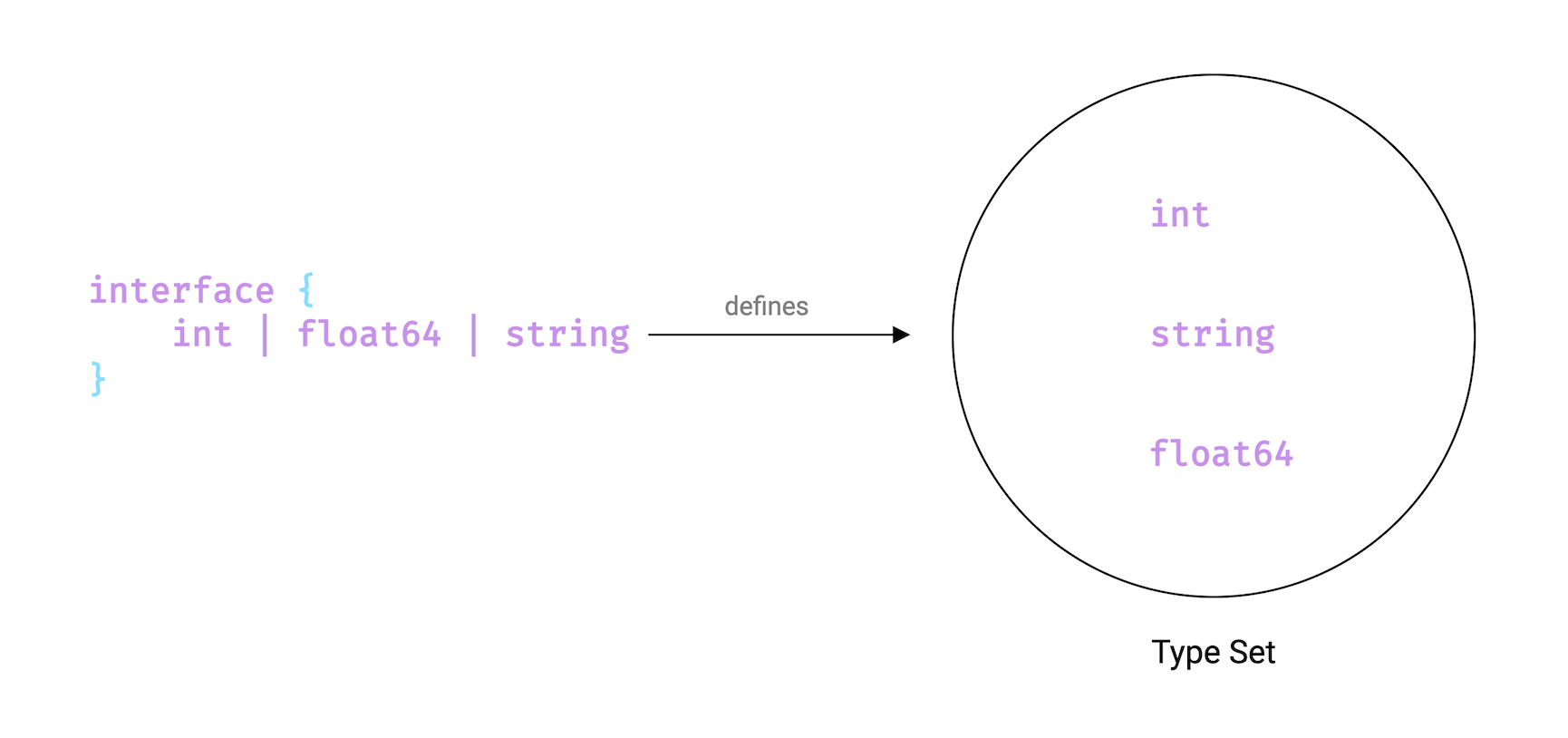
Here's how our `SumConstraint` interface looks.
```go
type SumConstraint interface {
int | float64 | string
}
func sum[T SumConstraint](a, b T) T {
return a + b
}
func main() {
fmt.Println(sum(1, 2))
fmt.Println(sum(4.0, 2.0))
fmt.Println(sum("a", "b"))
}
```
And this should work as expected.
```bash
$ go run main.go
3
6
ab
```
We can also use the `constraints` package which defines a set of useful constraints to be used with type parameters.
```go
type Signed interface {
~int | ~int8 | ~int16 | ~int32 | ~int64
}
type Unsigned interface {
~uint | ~uint8 | ~uint16 | ~uint32 | ~uint64 | ~uintptr
}
type Integer interface {
Signed | Unsigned
}
type Float interface {
~float32 | ~float64
}
type Complex interface {
~complex64 | ~complex128
}
type Ordered interface {
Integer | Float | ~string
}
```
For that, we will need to install the `constraints` package.
```bash
$ go get golang.org/x/exp/constraints
go: added golang.org/x/exp v0.0.0-20220414153411-bcd21879b8fd
```
```go
import (
"fmt"
"golang.org/x/exp/constraints"
)
func sum[T constraints.Ordered](a, b T) T {
return a + b
}
func main() {
fmt.Println(sum(1, 2))
fmt.Println(sum(4.0, 2.0))
fmt.Println(sum("a", "b"))
}
```
Here we are using the `Ordered` constraint.
```go
type Ordered interface {
Integer | Float | ~string
}
```
`~` is a new token added to Go and the expression `~string` means the set of all types whose underlying type is `string`.
And it still works as expected.
```bash
$ go run main.go
3
6
ab
```
Generics is an amazing feature because it permits writing abstract functions that can drastically reduce code duplication in certain cases.
## When to use generics
So, when to use generics? We can take the following use cases as an example:
- Functions that operate on arrays, slices, maps, and channels.
- General purpose data structures like stack or linked list.
- To reduce code duplication.
Lastly, I will add that while generics are a great addition to the language, they should be used sparingly.
And, it is advised to start simple and only write generic code once we have written very similar code at least 2 or 3 times.
# Concurrency
In this lesson, we will learn about concurrency which is one of the most powerful features of Go.
So, let's start by asking What is _"concurrency"_?
## What is Concurrency
Concurrency, by definition, is the ability to break down a computer program or algorithm into individual parts, which can be executed independently.
The final outcome of a concurrent program is the same as that of a program that has been executed sequentially.
Using concurrency, we can achieve the same results in lesser time, thus increasing the overall performance and efficiency of our programs.
## Concurrency vs Parallelism
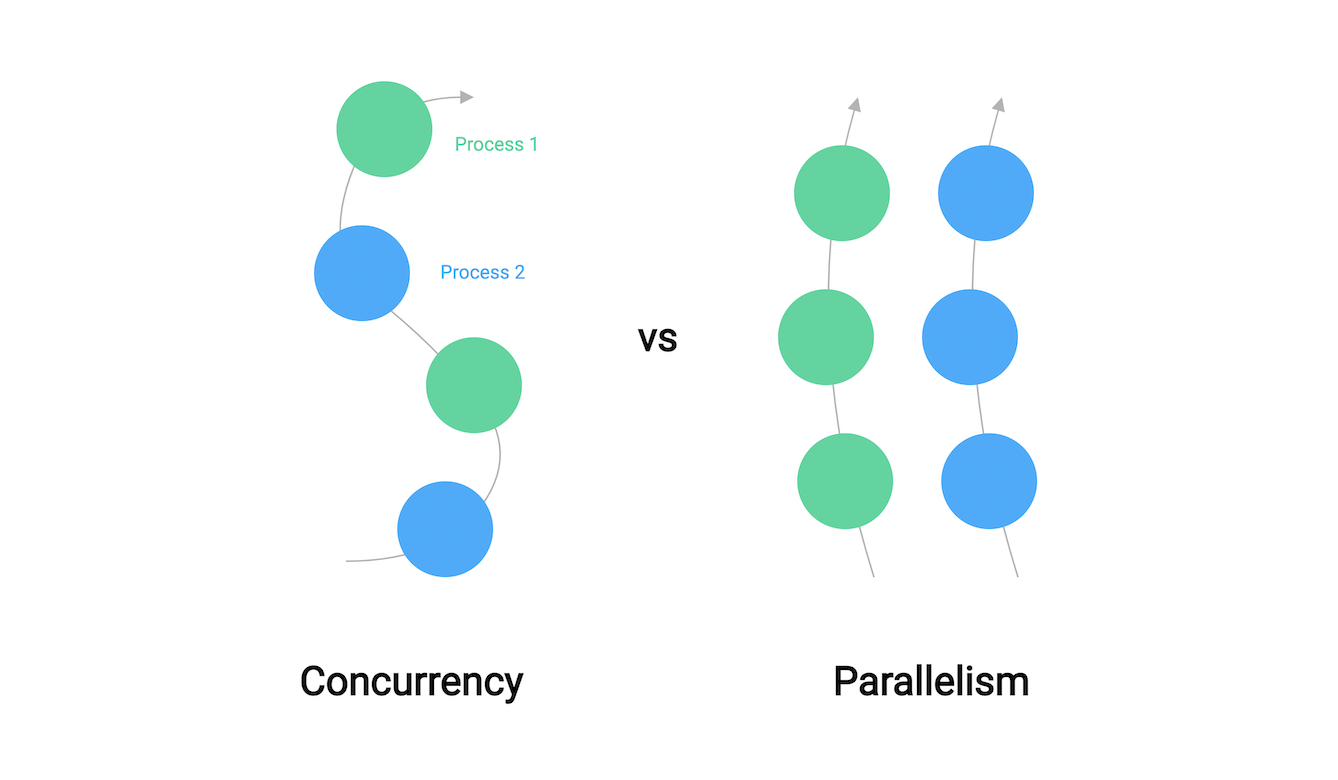
A lot of people confuse concurrency with parallelism because they both somewhat imply executing code