https://github.com/karashiiro/soundsetter
A Dalamud plugin that allows volume control from anywhere, including gpose and cutscenes.
https://github.com/karashiiro/soundsetter
cutscenes dalamud dalamud-plugin ffxiv volume-control
Last synced: over 1 year ago
JSON representation
A Dalamud plugin that allows volume control from anywhere, including gpose and cutscenes.
- Host: GitHub
- URL: https://github.com/karashiiro/soundsetter
- Owner: karashiiro
- License: mit
- Created: 2020-08-16T07:31:32.000Z (almost 6 years ago)
- Default Branch: master
- Last Pushed: 2024-07-12T16:04:09.000Z (almost 2 years ago)
- Last Synced: 2024-10-13T11:12:24.237Z (over 1 year ago)
- Topics: cutscenes, dalamud, dalamud-plugin, ffxiv, volume-control
- Language: C#
- Homepage:
- Size: 12.7 MB
- Stars: 13
- Watchers: 3
- Forks: 7
- Open Issues: 8
-
Metadata Files:
- Readme: README.md
- License: LICENSE
Awesome Lists containing this project
README
[](https://github.com/karashiiro/SoundSetter)
# SoundSetter
A [Dalamud](https://github.com/goatcorp/Dalamud) plugin that allows volume control from anywhere, including gpose and cutscenes.
## Usage
`/soundsetterconfig` - Opens/closes the plugin configuration.
`/ssconfig` - Alias for `/soundsetterconfig`
`/ssmv +/-amount`: Adjust the game's master volume by the specified quantity.
`/ssbgm +/-amount`: Adjust the game's BGM volume by the specified quantity.
`/sssfx +/-amount`: Adjust the game's SFX volume by the specified quantity.
`/ssv +/-amount`: Adjust the game's voice volume by the specified quantity.
`/sssys +/-amount`: Adjust the game's system sound volume by the specified quantity.
`/ssas +/-amount`: Adjust the game's ambient sound volume by the specified quantity.
`/ssp +/-amount`: Adjust the game's performance volume by the specified quantity.
`Ctrl+K` - Default keybind for opening the plugin configuration. This can be changed in the plugin configuration.
## Screenshots

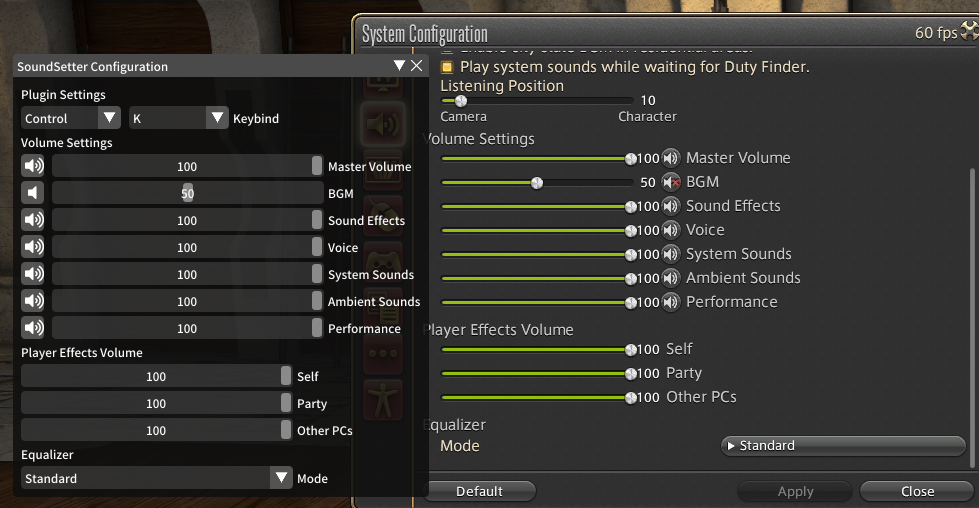
## Remarks
It's disabled on the title screen due to laziness. The function I use to hook the configuration options takes a pointer to the base of the object
as its first argument, and I don't know how to get that pointer without waiting for the function to be called. Luckily, it's called automatically
when the player logs in, for one reason or another. So, I just take the address down once it's called on login, and disable it on the title screen.